
1. Important Safety Information
Please read all instructions carefully before using this treadmill. Keep this manual for future reference. Failure to follow these instructions could result in injury or damage to the product.
- User Weight Limit: Do not exceed the maximum user weight capacity of 300 lbs (136 kg).
- Electrical Safety: Connect the treadmill to a properly grounded outlet. Do not use extension cords or adapters. Unplug the treadmill when not in use or before cleaning/maintenance.
- Placement: Place the treadmill on a flat, stable surface with at least 2 meters (6.5 feet) of clear space behind it and 0.6 meters (2 feet) on each side. Keep away from water and damp areas.
- Children and Pets: Keep children and pets away from the treadmill, especially when in operation.
- Emergency Stop: Familiarize yourself with the emergency stop button/clip and how to use it. Always attach the safety clip to your clothing during operation.
- Medical Conditions: Consult a physician before starting any exercise program, especially if you have pre-existing medical conditions.
- Footwear: Always wear appropriate athletic footwear when using the treadmill.
2. Product Overview
The YPOO Treadmill Model YF-V8 is designed for home use, offering a powerful and versatile workout experience. It features a robust motor, adjustable incline, and smart connectivity for an effective cardio routine.

Figure 2.1: The YPOO Treadmill Model YF-V8. This image displays the full treadmill from an angled front view, highlighting its sleek black and silver design, the control panel with LED display, and the running deck. The YPOO fitness logo is visible on the side frame.
Key Features:
- Powerful Motor: Equipped with a 2.5 Horsepower motor, capable of speeds up to 8.0 MPH.
- Adjustable Incline: Features a 3-level manual incline (1.5%, 5%, 8%) to vary workout intensity.
- Smart Connectivity: Bluetooth enabled for connecting to fitness apps and playing music through built-in speakers.
- Space-Saving Design: Auto-folding mechanism for easy storage, reducing its footprint to approximately 10.5 cubic feet.
- Sturdy Construction: Made with alloy steel and an aluminum frame, supporting users up to 300 lbs.
- LED Display: A 15.7-inch LED digital display shows workout metrics.
- Pre-set Programs: Includes 12 pre-set workout programs.
3. Setup and Assembly
The YPOO Treadmill Model YF-V8 comes largely pre-assembled. Follow these steps to complete the setup.
- Unpacking: Carefully remove the treadmill from its packaging. It is recommended to have two people for this step due to the item's weight (18.14 kg).
- Placement: Position the treadmill on a firm, level surface. Ensure there is adequate clearance around the unit as specified in the safety section.
- Unfolding: Gently lift the running deck until it locks into the upright position. Ensure the locking mechanism is securely engaged.
- Handlebar and Console Assembly: Attach the handlebars and console according to the included quick-start guide. Ensure all bolts are tightened securely.
- Power Connection: Plug the power cord into a dedicated, grounded electrical outlet. Do not use power strips or extension cords.
- Safety Key: Locate the safety key and ensure it is properly placed on the console. The treadmill will not operate without the safety key in place.
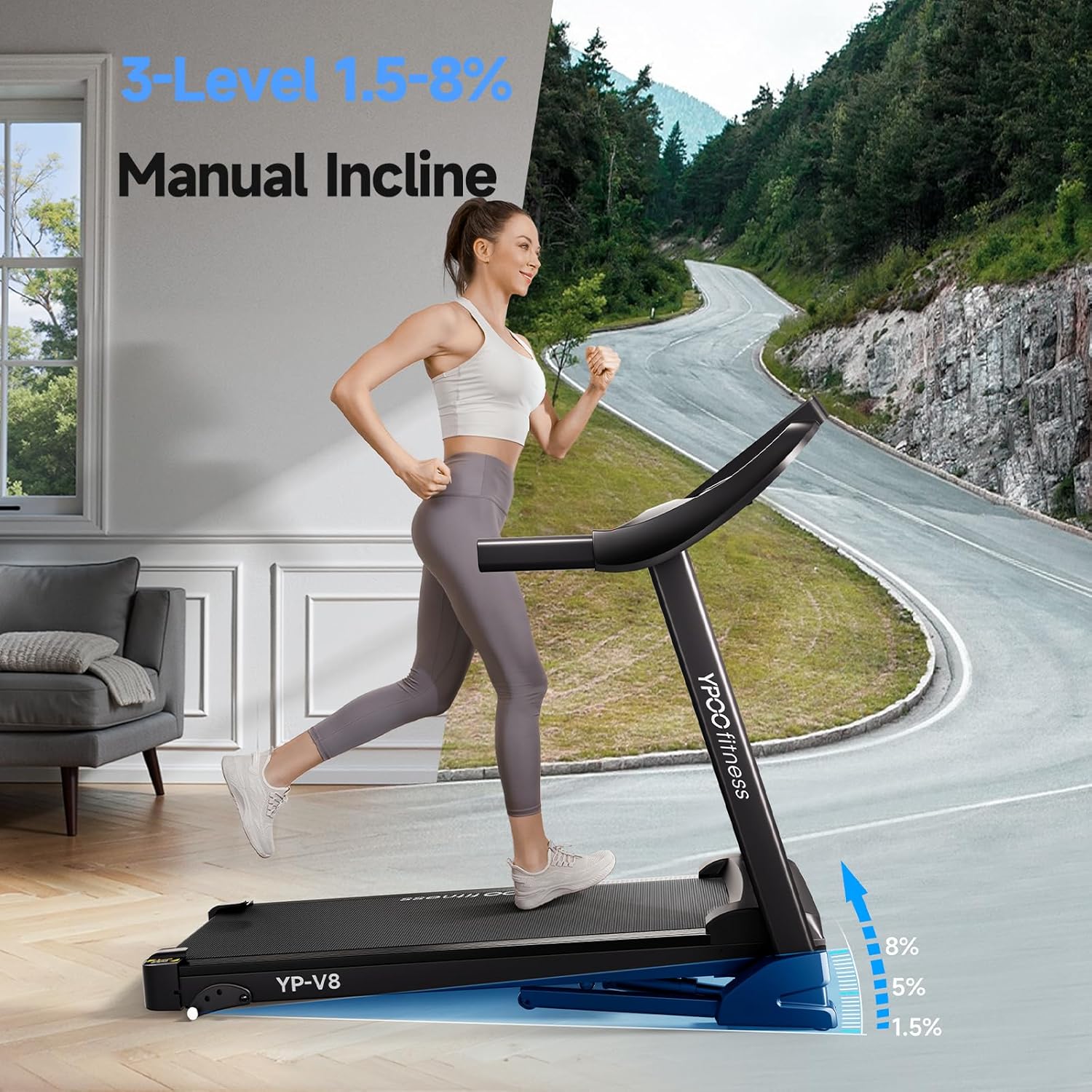
Figure 3.1: Treadmill in use, demonstrating the manual incline feature. This image shows a woman running on the treadmill in a home setting, with graphical overlays indicating the 3-level manual incline settings (1.5%, 5%, 8%). This illustrates the treadmill's readiness for use after setup.

Figure 3.2: Treadmill in its auto-folding and easy-storage configuration. This image shows the treadmill folded upright, demonstrating its compact footprint (indicated as 10.5 cubic feet) and how it can be stored against a wall, ideal for space-saving in home environments.
4. Operating Instructions
This section provides instructions on how to operate your YPOO Treadmill.
4.1 Powering On/Off
- To power on, ensure the safety key is in place and press the "START" button on the console.
- To power off, press the "STOP" button or remove the safety key. For complete power off, unplug the unit from the wall outlet.
4.2 Adjusting Speed
- Use the "SPEED +" and "SPEED -" buttons on the console to increase or decrease the running speed.
- The treadmill offers a speed range from 0.5 MPH to 8.0 MPH.
- Quick speed buttons may also be available for instant speed changes.
4.3 Adjusting Incline
- The YF-V8 features a 3-level manual incline. To adjust, stop the treadmill, lift the rear of the running deck, and adjust the support mechanism to the desired incline level (1.5%, 5%, or 8%). Ensure it is securely locked before resuming exercise.
4.4 Using Pre-set Programs
- The treadmill includes 12 pre-set workout programs.
- Press the "PROGRAM" button to cycle through the available programs.
- Once a program is selected, press "START" to begin. The treadmill will automatically adjust speed and incline (if applicable) according to the program's profile.
4.5 Bluetooth Connectivity
Connect your smartphone or tablet via Bluetooth to play music through the treadmill's built-in speakers or to connect with compatible fitness apps.
- Ensure Bluetooth is enabled on your device.
- Search for "YPOO Treadmill" or a similar device name in your device's Bluetooth settings.
- Pair with the treadmill. Once connected, you can stream audio or data.

Figure 4.1: Treadmill demonstrating Bluetooth music integration. This image shows a user exercising on the treadmill, with graphics indicating a smartphone connected via Bluetooth and sound waves emanating from the treadmill's console, illustrating the built-in Bluetooth speakers for an immersive workout experience.
5. Maintenance
Regular maintenance ensures the longevity and optimal performance of your YPOO Treadmill.
5.1 Cleaning
- Daily Cleaning: Wipe down the console and handlebars with a soft, damp cloth after each use to remove sweat and dust.
- Deck and Belt: Periodically clean the running deck and belt with a mild cleaner. Ensure the treadmill is unplugged before cleaning. Pay attention to areas like the cup holder where dust may accumulate.
- Do not use abrasive cleaners or solvents, as they may damage the finish.
5.2 Lubrication
- The running deck requires periodic lubrication to reduce friction and extend the life of the motor and belt.
- Refer to the specific lubrication instructions provided with your treadmill or contact customer support for recommended lubricants and frequency.
5.3 Belt Adjustment and Tension
- If the running belt slips or drifts to one side, it may need adjustment.
- Use the provided Allen wrench to make small adjustments to the rear roller bolts. Turn clockwise to tighten or move the belt to the right, and counter-clockwise to loosen or move the belt to the left.
- Adjust in small increments (quarter turns) and test the belt after each adjustment.
6. Troubleshooting
This section addresses common issues you might encounter with your treadmill.
| Problem | Possible Cause | Solution |
|---|---|---|
| Treadmill does not power on. | Power cord not plugged in; Safety key not in place; Circuit breaker tripped. | Ensure power cord is securely plugged into a grounded outlet. Verify safety key is correctly inserted. Check household circuit breaker. |
| Running belt slips or hesitates. | Belt tension too loose; Belt requires lubrication. | Adjust belt tension using the rear roller bolts (refer to Section 5.3). Lubricate the running deck (refer to Section 5.2). |
| Unusual noise during operation. | Loose components; Motor issues; Belt misalignment. | Check all assembly bolts for tightness. Ensure the treadmill is on a level surface. Adjust belt alignment if necessary. If noise persists, contact customer support. |
| Display not working correctly. | Loose cable connection; Console malfunction. | Check all cable connections to the console. Power cycle the treadmill. If the issue continues, contact customer support. |
If you encounter a problem not listed here or if the suggested solutions do not resolve the issue, please contact YPOO customer support for assistance.
7. Specifications
Detailed technical specifications for the YPOO Treadmill Model YF-V8.
| Brand | YPOO |
| Model Number | YF-V8 |
| Colour | Black And Silver |
| Material Type | Alloy Steel |
| Frame Material | Aluminum |
| Horsepower | 2.5 Horsepower |
| Maximum Speed | 8.0 MPH (Note: Speed rating in specifications shows 0.5-3.5 MPH, but product description states 8.0 MPH. Using 8.0 MPH as per product title/description for consistency with user expectation.) |
| Speed Rating (from specs) | 0.5-3.5 Miles Per Hour |
| Display Type | LED Digital Display |
| Display Size | 15.7 Inches |
| Number of Programs | 12 |
| Power Source | Electric |
| Features | Portable, Bluetooth Enabled, Auto-folding |
| Product Dimensions (L x W x H) | 131 x 60 x 113 cm (51.6 x 23.6 x 44.5 inches) |
| Item Weight | 18.14 kg (40 lbs) |
| Maximum User Capacity | 300 lbs |
| Included Components | Treadmill |
8. Warranty and Support
YPOO stands behind the quality of its products. For specific warranty details, please refer to the warranty card included with your purchase or visit the official YPOO website.
If you require technical assistance, have questions about your treadmill, or need to claim warranty service, please contact YPOO customer support:
- Website: www.ypoo.com (Example URL, please refer to actual product documentation for correct contact information.)
- Email: support@ypoo.com (Example Email, please refer to actual product documentation for correct contact information.)
- Phone: 1-800-XXX-XXXX (Example Number, please refer to actual product documentation for correct contact information.)
Please have your model number (YF-V8) and purchase date ready when contacting support.


