
XINFUTE YKR-T/111E
XINFUTE YKR-T/111E Remote Control User Manual
For Panasonic AUX LCD Air Conditioners
Introduction
This user manual provides comprehensive instructions for the XINFUTE YKR-T/111E remote control, designed as a replacement or spare for Panasonic AUX LCD Air Conditioners. Please read this manual carefully before using the remote control to ensure proper operation and longevity.
The XINFUTE YKR-T/111E remote control offers a straightforward, plug-and-play solution, requiring no complex pairing or programming. Its design focuses on ease of use and compatibility with specified air conditioner models.
Product Overview
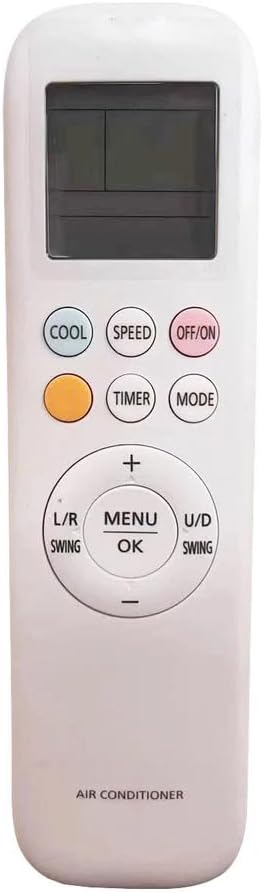
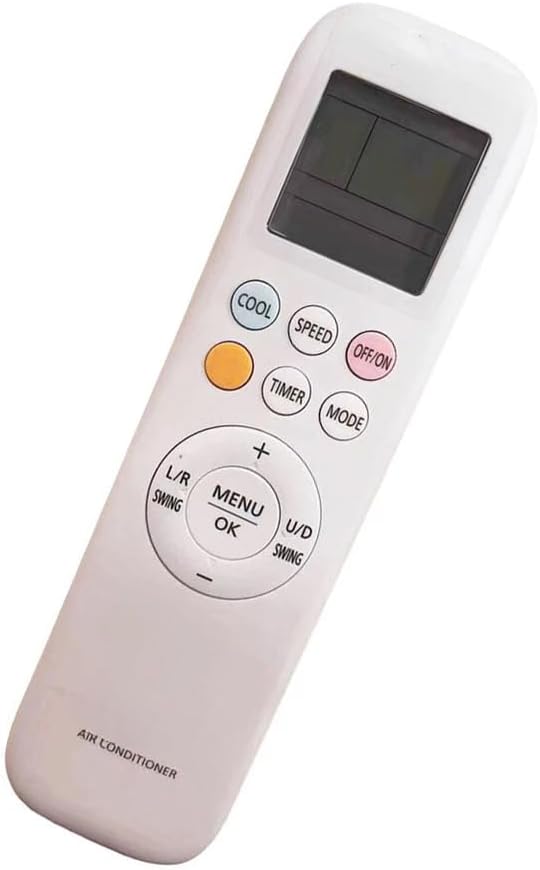

Setup
1. Battery Installation
The XINFUTE YKR-T/111E remote control requires two (2) AAA batteries (not included) for operation.
- Locate the battery compartment on the back of the remote control.
- Slide the battery compartment cover downwards to open it.
- Insert two new AAA batteries, ensuring the positive (+) and negative (-) terminals align correctly with the markings inside the compartment.
- Slide the battery compartment cover back into place until it clicks securely.
Note: Always use new batteries and replace both batteries at the same time. Do not mix old and new batteries or different types of batteries.
2. Initial Use
This remote control is designed for immediate use with compatible Panasonic AUX LCD Air Conditioners. No pairing or programming is required. Once batteries are installed, point the remote control towards your air conditioner and begin operation.
Operating Instructions
Familiarize yourself with the buttons and their functions:
| Button | Function |
|---|---|
| OFF/ON | Powers the air conditioner on or off. |
| COOL | Activates the cooling mode. |
| SPEED | Adjusts the fan speed (e.g., Low, Medium, High, Auto). Press repeatedly to cycle through options. |
| TIMER | Sets or cancels the timer function for scheduled operation. Refer to your air conditioner's manual for specific timer settings. |
| MODE | Cycles through various operating modes (e.g., Cool, Dry, Fan, Heat - if supported by AC unit). |
| +/- (Temperature) | Increases or decreases the desired temperature setting. |
| MENU/OK | Confirms selections or accesses menu options. |
| L/R SWING | Controls the horizontal swing of the air conditioner's louvers. |
| U/D SWING | Controls the vertical swing of the air conditioner's louvers. |
For detailed instructions on specific air conditioner functions, please refer to the user manual provided with your Panasonic AUX LCD Air Conditioner.
Maintenance
Cleaning the Remote Control
- Wipe the remote control with a soft, dry cloth.
- For stubborn dirt, lightly dampen the cloth with water and a mild detergent, then wipe dry immediately.
- Do not use abrasive cleaners, alcohol, or chemical solvents, as these can damage the surface or internal components.
Battery Replacement
Replace batteries when the remote control's response becomes sluggish or the display dims. Always replace both batteries simultaneously with new AAA batteries.
Storage
If the remote control will not be used for an extended period, remove the batteries to prevent leakage and potential damage to the device.
Troubleshooting
| Problem | Possible Cause | Solution |
|---|---|---|
| Remote control not responding. | Dead or incorrectly installed batteries. Obstruction between remote and AC unit. Remote control out of range. | Replace batteries, ensuring correct polarity. Remove any obstructions. Move closer to the air conditioner. |
| Air conditioner not responding to specific commands. | Air conditioner not powered on. Function not supported by AC model. | Ensure AC unit is powered on. Verify if the function is available on your specific air conditioner model by checking its manual. |
| LCD display is dim or blank. | Low battery power. | Replace batteries. |
Specifications
- Model: YKR-T/111E
- Brand: XINFUTE
- Compatibility: Panasonic AUX LCD Air Conditioners (check specific model compatibility)
- Power Source: 2 x AAA Batteries (not included)
- Material: ABS Material
- Dimensions: Approximately 10.16 x 7.62 x 2.54 cm (4 x 3 x 1 inches)
- Weight: Approximately 68.04 g (0.15 lbs) (without batteries)
Warranty and Support
Warranty Description: Enjoy a one-year warranty on all purchases of the XINFUTE YKR-T/111E remote control.
Customer Support: All goods are inspected before shipment. If you are not satisfied with your purchase, please contact us within 24 hours of receipt. For further assistance or inquiries, please refer to the contact information provided by your retailer or the XINFUTE official support channels.
Ask a question about this manual
Ask about setup, troubleshooting, compatibility, parts, safety, or missing instructions. Manuals+ will review the question and use this page’s manual context to help answer it.