
DermRays RM
DermRays Revive Skincare Device
Instruction Manual
Product Overview
The DermRays Revive Skincare Device is a multifunctional beauty device designed for at-home facial care, targeting anti-aging concerns and improving skin texture. It utilizes a 1064nm super pulsed laser technology, similar to professional beauty salon treatments, to help reduce wrinkles, improve elasticity, and enhance overall skin vitality.
Key features include:
- 1064nm Super Pulsed Laser for effective skincare.
- Integrated cooling system for comfortable and painless use.
- Three adjustable intensity levels to suit individual skin needs.
- Compact and easy-to-use design for convenient home application.

The DermRays Revive Skincare Device with its packaging.
Safety Information
This device is intended for adult use only. Always follow the instructions carefully to ensure safe operation.
- Do not look directly into the laser aperture. The device emits an invisible near-infrared laser.
- Ensure the device has full contact with the skin before activation to prevent accidental laser exposure.
- If you experience excessive redness, discomfort, or any adverse reactions, discontinue use immediately and consult a healthcare professional.
- Keep out of reach of children.
Kit Contents
- 1 x facial laser device
- 1 x adapter
- 1 x instruction manual
Setup
Before using the DermRays Revive device, ensure your skin is clean and dry. Do not apply any toners or other skincare products before treatment.
- Prepare Your Skin: Cleanse your face thoroughly and pat it dry. Ensure no makeup or skincare products are on the treatment area.

Cleanse and dry your skin.
- Connect Power: Plug the adapter into a wall outlet and connect the cable to the device.
Plug the device into the power source.
- Power On: Press and hold the Power button for 2 seconds until the device beeps and the indicator light turns on.

Press the Power button for 2 seconds.
- Select a Level: Press the Power button again to cycle through the three intensity levels (1, 2, or 3). Level 1 is the least intense, and Level 3 is the most intense. For first-time users, it is recommended to start with Level 1.

Select your desired intensity level.
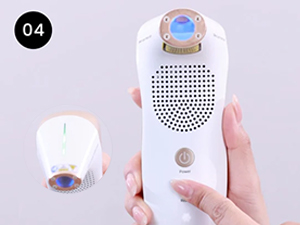
- Unlock Device: Press the Ready button. The indicator light will turn green, signifying the device is ready for use.

Press the Ready button; indicator light flashes green.
Operating Instructions
The DermRays Revive device is designed for easy and effective use. Divide your face into four main zones: forehead, left cheek, right cheek, and chin/neck area. Apply the device to one zone at a time.
- Ensure the device head makes full contact with your skin. The device will not activate the laser unless proper skin contact is detected.
- Move the device in a right-to-left motion across the treatment area.
- The device can be used in either a 'stamping' motion (pressing and lifting) or a 'sliding' motion (gliding across the skin) depending on your preference and the area being treated.

Stamping and Sliding application methods.
Recommended Treatment Duration per Zone:
- Level 1: 120 seconds per zone.
- Level 2: 60 seconds per zone.
- Level 3: 30 seconds per zone.
The device features a cooling system to ensure comfort during use. You may feel a slight warmth, which is normal, but the cooling feature helps to minimize discomfort.
Official product video demonstrating before and after comparison of skin improvements.
Usage Frequency
- Initial Phase (First 2 weeks): Use 3 days a week.
- Ongoing Phase: After the initial 2 weeks, use 2 times a week.
- Maintenance Phase (After 5 weeks): Use once a month to maintain results.
Many users report noticing visible results within 2 to 8 weeks of consistent use.
Maintenance
To ensure the longevity and optimal performance of your DermRays Revive device:
- After each use, gently wipe the device head with a soft, dry cloth.
- Do not use abrasive cleaners or immerse the device in water.
- Store the device in a cool, dry place, away from direct sunlight and extreme temperatures.
Troubleshooting
If you encounter any issues with your device, please refer to the following common solutions:
- Device not turning on: Ensure the power adapter is securely plugged into both the device and a working electrical outlet.
- Laser not activating: Verify that the device head is making full and firm contact with your skin. The safety mechanism prevents activation without proper contact.
- Device enters standby mode: If the device does not sense skin contact for approximately 10 seconds, it will automatically enter standby mode. Press the Ready button again to resume operation.
- Excessive warmth or discomfort: While some warmth is normal, if it becomes uncomfortable, reduce the intensity level or take a short break. Ensure the cooling system is functioning (a slight humming sound indicates it's active).
For persistent issues not covered here, please contact DermRays customer support.
Specifications
| Attribute | Value |
|---|---|
| Brand | DermRays |
| Model Name | RM |
| Color | White |
| Skin Type | All |
| Item Weight | 1.43 Kilograms (3.15 Pounds) |
| Package Dimensions | 9.06 x 7.91 x 4.02 inches |
| Manufacturer | Wuhan Lotuxs Technology Co., Ltd |
| Country of Origin | China |
| First Available Date | April 29, 2025 |
Warranty and Support
The DermRays Revive Skincare Device is FDA certified, ensuring it meets rigorous safety and effectiveness standards for home use.
For any product inquiries, technical support, or warranty claims, please contact DermRays customer service through the official website or your point of purchase. Please retain your proof of purchase for warranty validation.
Ask a question about this manual
Ask about setup, troubleshooting, compatibility, parts, safety, or missing instructions. Manuals+ will review the question and use this page’s manual context to help answer it.