
1. Introduction
Thank you for choosing the ALERVITES AT-888S Two-Way Radio. This manual provides essential information for the safe and efficient operation of your device. Please read it thoroughly before use and retain it for future reference.
Package Contents
- 2 × ALERVITES AT-888S Radios
- 2 × Rechargeable Batteries
- 2 × Antennas
- 2 × Back Clips
- 2 × Hanging Ropes
- 2 × Type-C Charging Cables
- 2 × Earpieces
2. Product Overview
The ALERVITES AT-888S is a portable two-way radio designed for reliable long-range communication. It features a compact design, multiple functions, and convenient USB-C charging.

Figure 1: ALERVITES AT-888S Two-Way Radio with key components labeled, including Antenna, Power Switch/Volume Control, Channel Switch, LED Indicator, PTT Button, MONI Button, Flashlight Button, and SP/MIC Jacks.
Key Features
- Portable Design: Lightweight at 160g for easy carrying.
- 16 Channels: Provides multiple communication options.
- VOX Function: Voice-activated transmission for hands-free operation.
- Scanning Function: Automatically scans for active channels.
- Wireless Frequency Replication: Easily copy frequencies from other compatible radios.
- Built-in Flashlight: Provides illumination in dark environments.
- USB-C Charging: Convenient charging via car, power bank, laptop, or any USB-enabled device.
- 1500mAh Battery: Offers 8-48 hours of normal use or 8-12 hours of continuous use.
- Long Communication Range: Up to 3-5 miles in open areas, 0.6-1.2 miles in urban environments.
3. Setup
3.1 Battery Installation and Charging
- Ensure the radio is powered off.
- Align the battery with the back of the radio and slide it into place until it clicks securely.
- To charge, connect the provided Type-C charging cable to the charging port on the radio and to a compatible USB power source (e.g., wall adapter, car charger, power bank, computer).
- The LED indicator will show charging status (e.g., red for charging, green for fully charged). A full charge typically takes 3-4 hours.

Figure 2: The ALERVITES AT-888S radio connected to a USB-C charging cable, demonstrating convenient charging options.
3.2 Attaching Accessories
- Antenna: Screw the antenna clockwise into the connector on top of the radio until it is finger-tight.
- Back Clip: Attach the back clip to the designated slot on the rear of the radio for easy carrying on a belt or pocket.
- Earpiece: Insert the earpiece plug into the SP/MIC jacks on the side of the radio.
4. Operating Instructions
4.1 Power On/Off and Volume Control
- To power on, rotate the Power Switch/Volume Control knob clockwise. You will hear a "beep" sound and the radio will announce the current channel.
- To adjust the volume, continue rotating the knob clockwise to increase volume or counter-clockwise to decrease it.
- To power off, rotate the knob counter-clockwise until it clicks.
4.2 Channel Selection
Rotate the Channel Switch knob on top of the radio to select one of the 16 available channels. The radio will announce the selected channel number.
4.3 Transmitting and Receiving (PTT)
- To transmit, press and hold the PTT (Push-To-Talk) button on the side of the radio. Speak clearly into the microphone.
- Release the PTT button to stop transmitting and return to receive mode.
- When receiving a signal, the LED indicator will typically glow green.
4.4 VOX Function (Voice-Activated Transmission)
The VOX function allows for hands-free transmission. When activated, the radio will automatically transmit when it detects your voice.
- Turn off the radio.
- Press and hold both the MONI button and the PTT button simultaneously.
- While holding these buttons, turn on the radio.
- The radio will announce "VOX ON" or "VOX OFF" to confirm the status.
- To adjust VOX sensitivity, refer to the advanced programming software (Chirp, compatible with BF-V8A).

Figure 3: A user demonstrating the VOX hands-free function of the ALERVITES AT-888S radio.
Video 1: This video demonstrates the VOX function setup and usage on the ALERVITES AT-888S two-way radio, showing how to activate hands-free communication.
4.5 Flashlight Function
To activate the built-in flashlight, press the dedicated Flashlight Button on the side of the radio. Press it again to turn off the flashlight.
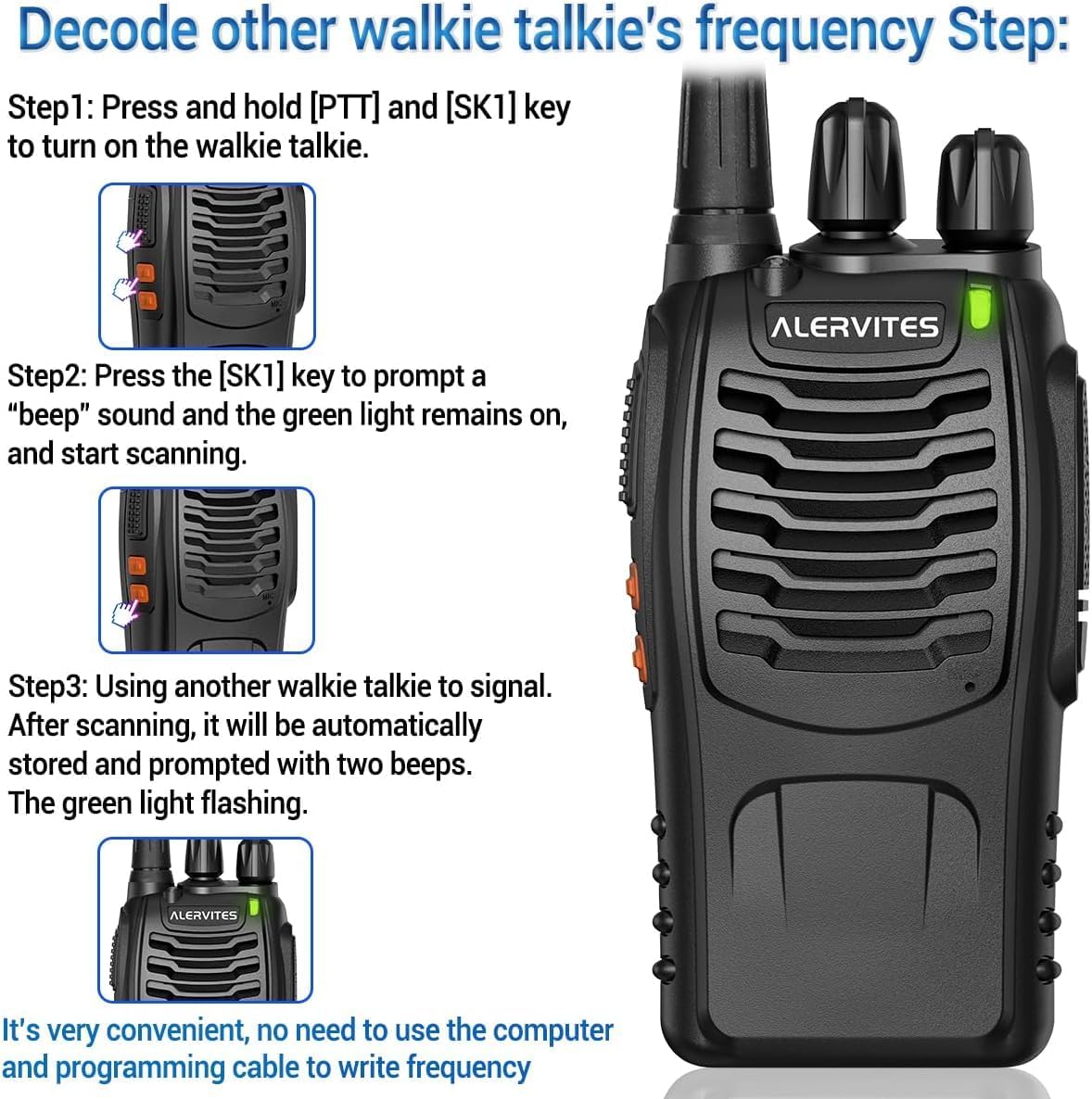
Figure 4: The ALERVITES AT-888S radio with its bright flashlight illuminated, useful in dark environments.
4.6 Wireless Frequency Replication
The AT-888S supports wireless frequency replication, allowing you to quickly copy frequencies from another compatible walkie-talkie without complex programming.
- Step 1: On the AT-888S, press and hold the PTT button and the SK1 button (the upper orange button) simultaneously. Then, turn on the radio. The green LED will flash, indicating it's in frequency scanning mode.
- Step 2: Place the AT-888S near the transmitting radio (e.g., another walkie-talkie you wish to copy from).
- Step 3: On the transmitting radio, send a signal (e.g., press PTT and speak). The AT-888S will scan and automatically store the frequency. A "beep" sound will confirm successful replication, and the green light will continue flashing.
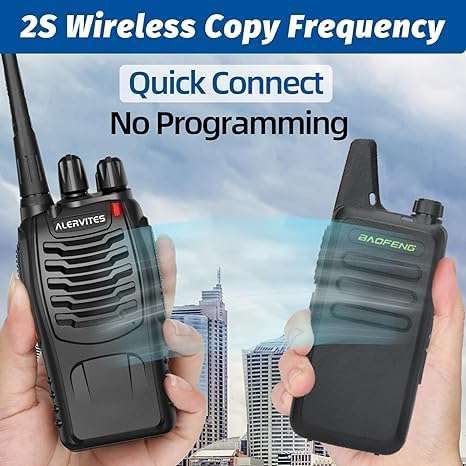
Figure 5: Two ALERVITES AT-888S radios engaged in wireless frequency replication, showing the process of copying frequencies between devices.
Video 2: This tutorial demonstrates the wireless frequency copy function of the ALERVITES AT-888S, guiding users through the steps to synchronize frequencies with another walkie-talkie.
5. Maintenance
- Cleaning: Use a soft, damp cloth to clean the radio's exterior. Do not use harsh chemicals or abrasive cleaners.
- Storage: Store the radio in a cool, dry place away from direct sunlight and extreme temperatures.
- Battery Care: To prolong battery life, avoid fully discharging the battery frequently. Charge the battery regularly, even if the radio is not in use for extended periods.
- Water Resistance: This device is Not Water Resistant. Avoid exposure to water or high humidity.
6. Troubleshooting
| Problem | Possible Cause | Solution |
|---|---|---|
| No power | Battery is low or not installed correctly. | Charge the battery. Ensure the battery is securely installed. |
| Cannot transmit or receive | Incorrect channel selected, out of range, or antenna not attached. | Verify both radios are on the same channel. Move closer to the other radio. Ensure antenna is securely attached. |
| Poor audio quality / Static | Weak signal, interference, or low battery. | Move to an open area. Avoid sources of interference. Charge the battery. |
| VOX not working | VOX function is off or sensitivity is too low. | Activate VOX as per instructions in Section 4.4. Adjust VOX sensitivity if possible via programming software. |
7. Specifications
| Feature | Detail |
|---|---|
| Brand | ALERVITES |
| Model Number | AT-888S |
| Item Weight | 160g (approx. 0.35 lbs) |
| Package Dimensions | 7.99 x 7.64 x 2.32 inches |
| Number of Channels | 16 |
| Frequency Range | 400-470MHz |
| Talking Range Maximum | 5 Miles (open areas), 0.6-1.2 Miles (urban) |
| Battery Capacity | 1500mAh Lithium-Ion |
| Battery Life | 8-48 hours (normal use), 8-12 hours (continuous use) |
| Charging Time | 3-4 hours |
| Charging Port | USB-C |
| Voltage | 3.7 Volts |
| Water Resistance Level | Not Water Resistant |
8. Warranty & Support
This product comes with NO Warranty as per manufacturer specifications. For any product inquiries or support, please contact the seller directly through your purchase platform.


