1. Introduction
This manual provides essential information for setting up, operating, maintaining, and troubleshooting your BEASTCOM Q5 Pro Gaming PC. This system is designed for high-performance gaming and demanding computing tasks, featuring an AMD Ryzen 7 8700F processor, NVIDIA GeForce RTX 5060 graphics, 32GB DDR5 RAM, and a 1TB NVMe SSD. Please read this manual thoroughly to ensure optimal performance and longevity of your device.
2. Setup
2.1 Package Contents
Verify that all items are present in the package:
- BEASTCOM Q5 Pro Gaming PC
- Power Cable
- Gaming Keyboard
- Gaming Mouse
- Documentation (including this manual)
2.2 Connecting Peripherals
Before powering on your PC, connect all necessary peripherals.
- Monitor: Connect your monitor to the graphics card's video output ports (HDMI or DisplayPort) located at the rear of the PC. Ensure the cable is securely fastened.
- Keyboard and Mouse: Plug your gaming keyboard and mouse into any available USB ports. The PC features multiple USB 2.0 and USB 3.0 ports.
- Network: For a wired internet connection, connect an Ethernet cable to the Gigabit LAN port. For wireless connectivity, ensure the Wi-Fi antennas are securely attached to the designated ports at the rear of the PC.
- Power: Connect the power cable to the PC's power supply unit (PSU) input and then to a wall outlet.
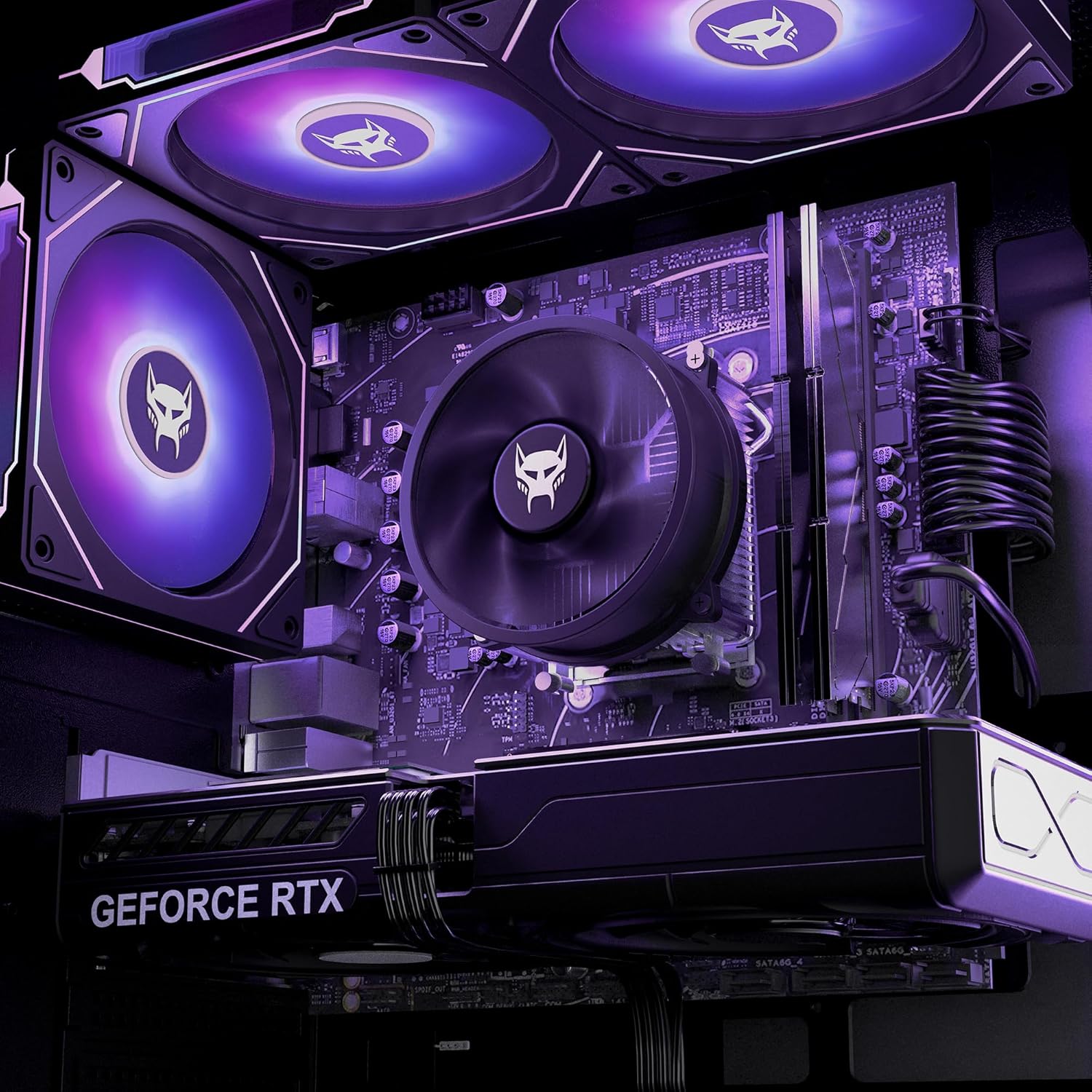
Figure 2.2.1: Rear I/O ports for connecting peripherals.

Figure 2.2.2: Front panel USB and audio ports.

Figure 2.2.3: Wi-Fi antenna connection points.
2.3 Powering On
After connecting all peripherals, press the power button located on the top front of the PC case. The system will boot into Windows 11 Pro, which is pre-installed and ready for use.
3. Operating Your PC
3.1 Windows 11 Pro
Your BEASTCOM Q5 Pro Gaming PC comes with Windows 11 Pro pre-installed. Follow the on-screen instructions for initial setup, including creating a user account and connecting to your network.
3.2 RGB Lighting Control
The PC features built-in RGB lighting with multiple fans. Use the provided remote control to customize the lighting effects and colors.
- Use the M+ / M- buttons on the remote to select a color scheme or a specific color.
- Press the 'On' button to save the selected color or effect.

Figure 3.2.1: RGB lighting remote control.
3.3 Performance Features
The BEASTCOM Q5 Pro is equipped with components optimized for performance:
- Processor: The AMD Ryzen 7 8700F delivers 8-core speed for gaming, streaming, and multitasking.
- Graphics: The NVIDIA GeForce RTX 5060 8GB GDDR6 provides clear visuals and smooth frame rates for an enhanced gaming experience.
- Memory: 32GB of DDR5 RAM ensures efficient multitasking and responsiveness.
- Storage: A 1TB NVMe SSD offers fast load times and quick system responsiveness.
- Connectivity: Features include WiFi 5, Gigabit LAN, multiple USB 2.0 and 3.0 ports, and PCIe 4.0 connectivity for high-bandwidth data transfer.

Figure 3.3.1: Internal components of the BEASTCOM Q5 Pro Gaming PC.

Figure 3.3.2: PCIe 4.0 connectivity on the motherboard.
4. Maintenance
4.1 General Cleaning
Regular cleaning helps maintain optimal performance and extends the lifespan of your PC.
- Exterior: Use a soft, damp cloth to wipe down the exterior surfaces. Avoid abrasive cleaners.
- Dust: Periodically use compressed air to clear dust from ventilation grilles and internal components. Ensure the PC is powered off and unplugged before cleaning.
- Airflow: Ensure the PC is placed in a location with adequate airflow to prevent overheating.
4.2 Software Updates
Keep your operating system and drivers updated to ensure system stability, security, and optimal performance.
- Windows Updates: Regularly check for and install Windows updates through the Settings menu.
- Driver Updates: Download the latest graphics card drivers from the NVIDIA website and other component drivers from the respective manufacturer websites.
5. Troubleshooting
5.1 No Display Output
If your monitor shows no signal after powering on the PC:
- Ensure the monitor cable is connected to the graphics card's output ports, not the motherboard's integrated video ports.
- Verify that the monitor is powered on and set to the correct input source.
- If the issue persists, power off the PC, unplug it, and carefully open the side panel. Gently press down on the graphics card to ensure it is fully seated in its PCIe slot. Re-secure the side panel and test again.
5.2 Windows Activation Issues
If you encounter issues with Windows 11 Pro activation:
- Ensure your PC is connected to the internet.
- If the problem persists, contact BEASTCOM customer support for assistance.
5.3 General Performance Issues
For unexpected performance drops:
- Check for background applications consuming system resources.
- Ensure all drivers, especially graphics drivers, are up to date.
- Monitor system temperatures to rule out thermal throttling.
6. Specifications
Detailed technical specifications for the BEASTCOM Q5 Pro Gaming PC (Model: Q5-217Z1):
| Component | Specification |
|---|---|
| Brand | BEASTCOM |
| Model Number | Q5-217Z1 |
| Processor | AMD Ryzen 7 8700F (5 GHz, 8 Cores) |
| RAM | 32 GB DDR5 SDRAM |
| Hard Drive | 1 TB NVMe SSD |
| Graphics Coprocessor | NVIDIA GeForce RTX 5060 |
| Graphics Card RAM Size | 8 GB GDDR6 |
| Operating System | Windows 11 Pro |
| Wireless Type | 802.11ac (WiFi 5) |
| USB 2.0 Ports | 6 |
| USB 3.0 Ports | 3 |
| Max Screen Resolution | 3840x2160 (4K) |
| Item Weight | 24.4 pounds |
| Package Dimensions | 21.37 x 18.78 x 11.97 inches |
7. Warranty and Support
7.1 Manufacturer Warranty
The BEASTCOM Q5 Pro Gaming PC comes with a standard manufacturer's warranty. For specific details regarding your warranty coverage, please refer to the documentation included with your purchase or contact BEASTCOM customer support.
7.2 Technical Support
Technical support is available for assistance with setup, troubleshooting, and general inquiries. Contact information can typically be found on the manufacturer's website or in the included documentation.
- Return Policy: This product is eligible for a refund/replacement for up to 2026 days from the date of purchase.
- Protection Plans: Optional 3-Year Protection Plan and Complete Protect monthly plan are available for extended coverage.