
1. Introduction
This manual provides instructions for the installation, operation, and maintenance of your EMOS Wireless Door Chime Kit, Model P5760N. This kit includes a battery-powered, waterproof (IP44) doorbell button (transmitter) with a nameplate and a mains-powered door chime (receiver) with an auto-learning function. The system operates on a 433 MHz frequency, ensuring automatic pairing between components. It features a repeater function for extended range, an integrated 20W USB-C Power Delivery output, 16 selectable melodies, 5 volume levels up to 85 dB, and 3 operating modes (ring + visual, ring only, visual only). A memory function retains settings even after power outages.
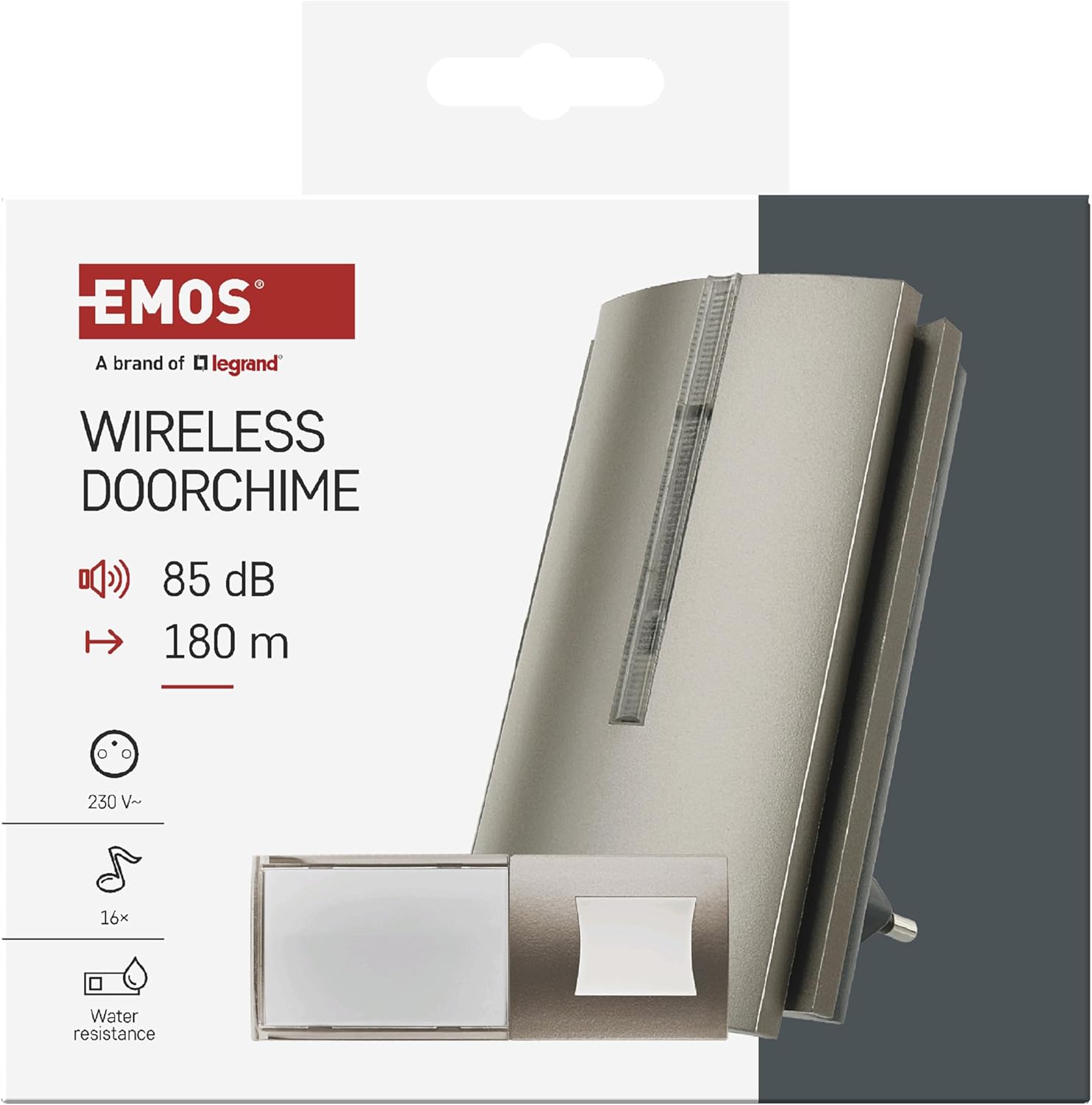
Figure 1: EMOS Wireless Door Chime Kit (Model P5760N) packaging, highlighting key features.
2. Safety Instructions
- Read all instructions carefully before use.
- Do not expose the receiver to moisture or extreme temperatures.
- Ensure the power outlet for the receiver is easily accessible.
- Only use the specified battery type (CR2032) for the transmitter. Insert batteries with correct polarity.
- Keep batteries out of reach of children. Do not ingest batteries.
- Do not attempt to repair or modify the device. Contact qualified service personnel for repairs.
- Dispose of old batteries and the device according to local regulations.
3. Package Contents
Verify that all components are present in the package:
- 1x Wireless Door Chime Receiver (230V plug-in)
- 1x Wireless Doorbell Button Transmitter (IP44, battery-powered)
- 1x CR2032 Button Cell Battery (pre-installed or included separately for transmitter)

Figure 2: Package contents and compatible accessories for the EMOS P5760N.
4. Setup
4.1. Transmitter (Doorbell Button) Installation
- Battery Insertion: If not already installed, open the transmitter casing and insert the CR2032 button cell battery, observing the correct polarity (+/-).
- Mounting Location: Choose a suitable location near your door. The transmitter is IP44 waterproof, making it suitable for outdoor use. Avoid direct exposure to heavy rain or prolonged submersion.
- Mounting: Use the provided screws or adhesive pad to securely attach the transmitter to a flat surface. Ensure the nameplate is visible and accessible.

Figure 3: Installation example of the wireless doorbell button.
4.2. Receiver (Door Chime) Installation
- Placement: Plug the receiver into a standard 230V AC wall outlet in a central location within your home, ensuring it is within the 180-meter range of the transmitter. For larger homes or gardens, additional compatible EMOS receivers (P5763RN or P5763N) can be paired to extend the signal range.
- Power On: Once plugged in, the receiver will power on.
4.3. Pairing (Auto-Learning Function)
The EMOS P5760N features an auto-learning function, meaning the doorbell button and chime are typically pre-paired at the factory. If re-pairing is needed or if you are adding additional transmitters/receivers:
- Put the receiver into pairing mode (refer to the receiver's specific button sequence, usually a long press on a pairing button).
- Press the doorbell button (transmitter) once. The receiver should chime or indicate successful pairing.
- Test the connection by pressing the doorbell button.
5. Operating Instructions
5.1. Melody Selection
The receiver offers 16 different melodies. To change the melody:
- Locate the melody selection button on the receiver (often marked with a music note symbol).
- Press the button repeatedly to cycle through the available melodies. The receiver will play each melody as you select it.
- Stop pressing when you hear your desired melody. The selected melody will be saved automatically.
- Note: A different melody can be set for each paired transmitter.
5.2. Volume Adjustment
The receiver has 5 adjustable volume levels, up to a maximum of 85 dB. To adjust the volume:
- Locate the volume control button on the receiver (often marked with a speaker symbol).
- Press the button repeatedly to cycle through the volume levels.
- The receiver will play a short sound at each volume level.
5.3. Operating Modes (Ring + Visual, Ring Only, Visual Only)
The receiver offers three operating modes:
- Ring + Visual: The receiver will play the selected melody and illuminate its LED display.
- Ring Only: The receiver will only play the selected melody.
- Visual Only (Silent Mode): The receiver will only illuminate its LED display, providing a silent notification. This mode is useful for sleeping children or quiet environments.
To switch between modes, locate the mode selection button (if available, otherwise it might be integrated with volume/melody buttons) and press it until the desired mode is active.
5.4. Memory Function
The EMOS P5760N is equipped with a memory function. All your selected settings, including melody and volume, are automatically saved and will be restored even after a power outage.
5.5. USB-C Charging Port
The receiver features an integrated 20W USB-C Power Delivery (PD) output. This allows you to charge compatible devices such as mobile phones, tablets, or smartwatches directly from the receiver, utilizing the wall outlet it occupies.

Figure 4: Receiver with active USB-C charging port.
5.6. Emergency Call System Functionality
The doorbell button can also serve as an emergency call system. This feature is beneficial for elderly individuals, pregnant women, patients, or children who may need to alert someone quickly. By pressing the button, the receiver will activate, signaling for attention.
6. Maintenance
- Cleaning: Wipe the surfaces of both the transmitter and receiver with a soft, dry cloth. Do not use abrasive cleaners or solvents.
- Transmitter Battery Replacement: When the doorbell button's signal weakens or stops working, it's time to replace the CR2032 battery. Carefully open the casing, remove the old battery, and insert a new one with the correct polarity.
- Environmental Protection: Ensure the outdoor transmitter remains protected from extreme weather conditions to prolong its lifespan.
7. Troubleshooting
| Problem | Possible Cause | Solution |
|---|---|---|
| No sound from receiver. | Receiver unplugged; volume too low; transmitter battery dead; not paired. | Ensure receiver is plugged in and powered. Increase volume. Replace transmitter battery. Re-pair transmitter and receiver. |
| Poor signal range. | Obstructions (thick walls, metal); too far apart; interference. | Relocate receiver or transmitter to minimize obstructions. Consider adding another compatible EMOS receiver to extend range. |
| Transmitter not working. | Dead battery; water damage; faulty unit. | Replace battery. Ensure proper installation and protection from elements. If issues persist, contact support. |
| USB-C port not charging. | Device not compatible with PD; faulty cable; receiver unplugged. | Ensure your device supports USB-C Power Delivery. Try a different USB-C cable. Verify receiver is powered. |
8. Specifications
- Model Number: P5760N
- Brand: EMOS
- Receiver Power: 230V AC
- Transmitter Power: 1x CR2032 button cell battery (included)
- Wireless Communication Standard: Radio Frequency (RF)
- Frequency Band: 433 MHz
- Operating Range: Up to 180 meters (open area)
- Volume Levels: 5 levels, up to 85 dB
- Melodies: 16 selectable melodies
- Operating Modes: Ring + Visual, Ring Only, Visual Only
- Special Features: Repeater function, Memory function, 20W USB-C Power Delivery output
- Transmitter IP Rating: IP44 (water-resistant)
- Product Dimensions (Receiver): 6.3 x 6.6 x 11 cm
- Product Dimensions (Transmitter): 10.1 x 3.9 x 1.6 cm
- Weight: 240 grams (total package)
- Country of Origin: China
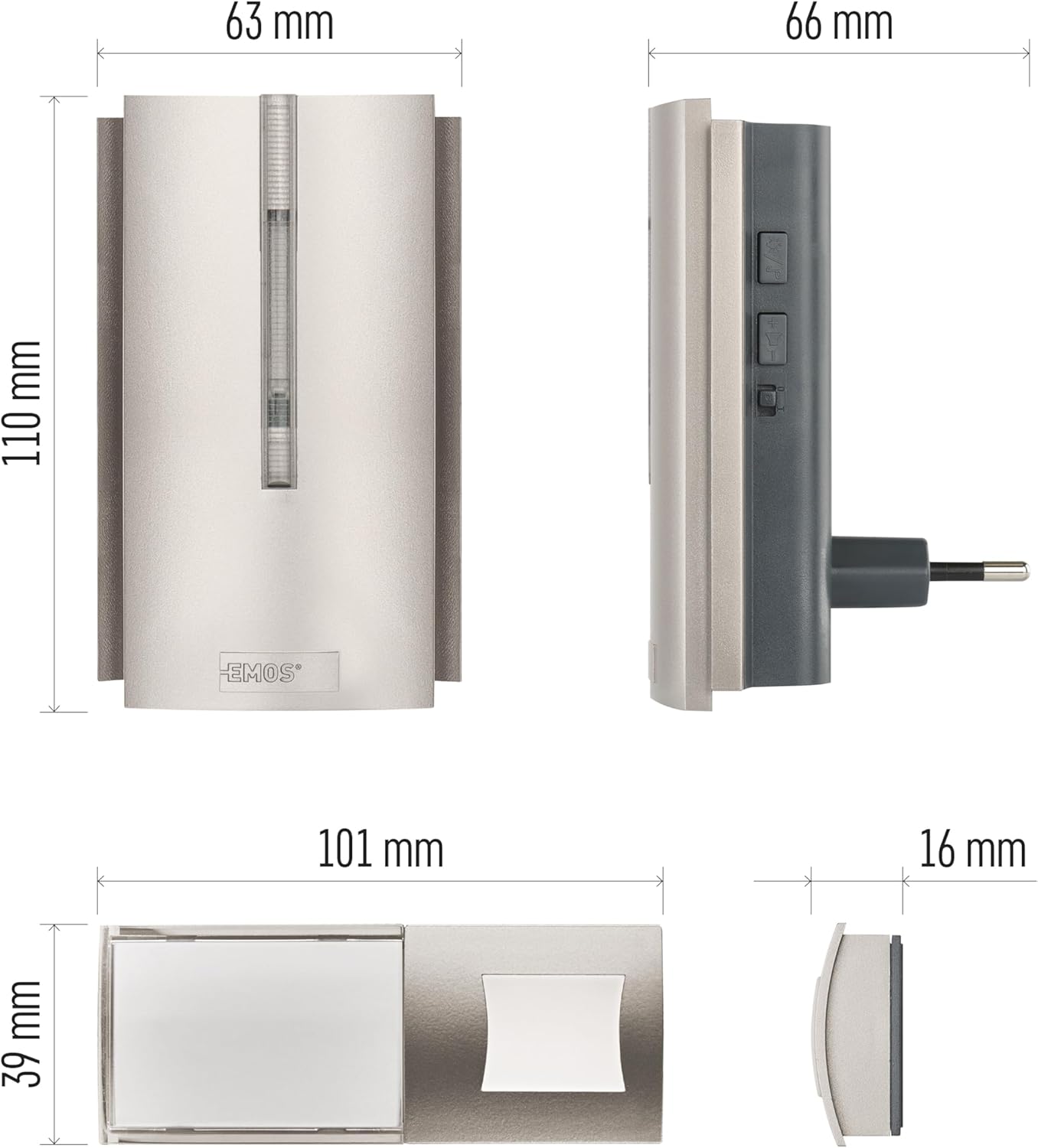
Figure 5: Dimensions of the EMOS P5760N receiver and transmitter.
9. Warranty and Support
EMOS, a brand of Legrand, is committed to providing high-quality electrical products. For any questions, technical support, or warranty claims, please refer to your purchase documentation or contact your local EMOS distributor. Keep your proof of purchase for warranty purposes.
For more information, visit the official EMOS website: www.emos.eu


