
BUBLUE Bubot 700
BUBLUE Bubot 700 C10 Robotic Pool Cleaner User Manual
1. Introduction
This manual provides essential instructions for the safe and efficient operation, maintenance, and troubleshooting of your BUBLUE Bubot 700 C10 Robotic Pool Cleaner. Please read this manual thoroughly before using the product and retain it for future reference.
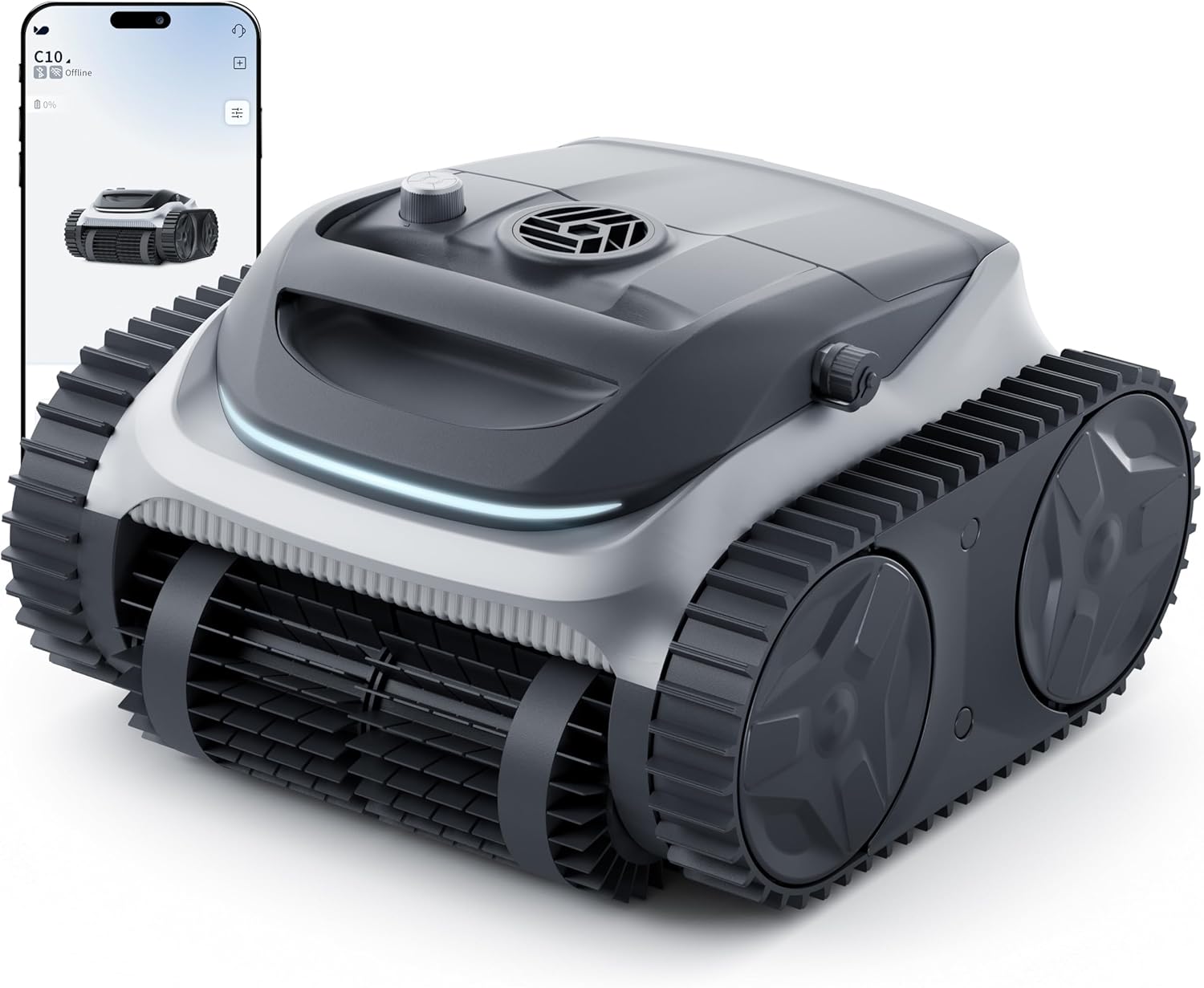
2. Package Contents
Verify that all items listed below are included in your package. If any items are missing or damaged, please contact customer support.
- 1 x Robotic Pool Cleaner (Bubot 700 C10)
- 1 x Charger
- 1 x Hook
- 1 x User Manual

3. Product Features
3.1 Superior Suction with Bluehole Technology
The Bubot 700 C10 features Bluehole Technology and a triple motor system, providing powerful suction for effective debris removal. Its ultra-fine filtration system captures sand, leaves, and other fine particles.

3.2 4-in-1 Cleaning Modes & Wall Climbing
The robot offers three distinct cleaning modes: Floor Only, Wall Only, and Auto Mode. Its dual-drive system, roller scrubbing brushes, and tank-like tracks enable smooth wall climbing, precise waterline scrubbing, and effective navigation over obstacles and steps.

3.3 Smart APP Control
Control your Bubot 700 C10 via the dedicated BUBLUE APP. Connect using Bluetooth or Wi-Fi to monitor real-time status, select cleaning modes, adjust duration, and customize path width. The app also supports OTA updates for continuous improvement.

3.4 AI-Powered Navigation & Self-Parking
Equipped with Bluesonic Path Technology, the robot intelligently maps your pool for maximum coverage, utilizing an N-shape path for walls and an S-shape path for floors. When the battery level is low, it automatically parks itself at the pool's edge for easy retrieval.

3.5 Extended Battery Life & Pool Compatibility
The Bubot 700 C10 provides up to 140 minutes of continuous cleaning on a single charge. It is designed to work with various pool materials and shapes, covering areas up to 861 sq. ft. The unit is constructed with UV-resistant materials for enhanced durability.

3.6 Built for Durability
Each Bubot 700 C10 unit undergoes rigorous testing for sealing and mobility. Its UV-resistant shell material ensures long-lasting performance, preventing aging and degradation. It is designed to operate at depths of up to 3 meters (9.8 ft) without water leakage.

3.7 Ideal for All Pool Shapes and Materials
The Bubot 700 C10 is versatile and compatible with various pool shapes, including rectangular, round, random, and multi-region pools. It is also suitable for different pool materials such as concrete, vinyl, fiberglass, and ceramic tiles.


4. Setup
4.1 Charging the Robot
- Ensure the robot is dry before charging.
- Connect the charger to the robot's charging port and then to a power outlet.
- The LED indicator will show green during charging. A full charge takes approximately 3.4 hours.
4.2 Initial Placement
- Once fully charged, carefully place the robot into the pool. Ensure it is fully submerged before operation.
- Avoid placing the robot in shallow areas where it might get stuck or vent water prematurely.
4.3 App Connection
- Download the BUBLUE APP from your device's app store.
- Enable Bluetooth and Wi-Fi (2.4G Wi-Fi only) on your smartphone.
- Open the app and follow the on-screen instructions to connect to your Bubot 700 C10.
- Once connected, you can monitor the robot's status and control its functions.
5. Operating Instructions
5.1 Understanding Cleaning Modes
The Bubot 700 C10 offers three cleaning modes, selectable via the physical dial on the unit or through the BUBLUE app:
- Auto Mode: The robot intelligently cleans both the pool floor and walls, adapting its path for optimal coverage.
- Floor Mode: The robot focuses solely on cleaning the pool floor.
- Wall Mode: The robot primarily cleans the pool walls and waterline.

5.2 Using the App for Control
The BUBLUE app provides advanced control options:
- Mode Selection: Choose between Auto, Floor, or Wall cleaning modes.
- Cleaning Duration: Set the desired cleaning cycle length.
- Path Width: Customize the cleaning path width for specific pool needs.
- Real-time Status: Monitor battery level and current cleaning activity.
5.3 LED Indicator Meanings
The 5-color LED indicator on the robot provides status information:
- Blue: Normal Operation (40%-100% battery)
- Orange: Normal Operation (20%-40% battery)
- Yellow: Low Power (<20% battery)
- Green: Charging
- Red: Fault/Error

6. Maintenance
6.1 Cleaning the Filter Basket
Regular cleaning of the filter basket is crucial for maintaining optimal cleaning performance.
- After each cleaning cycle, retrieve the robot from the pool.
- Open the robot's cover and remove the filter basket.
- Rinse the filter mesh thoroughly with a hose to remove all collected debris, including fine sand and leaves.
- Ensure the filter basket is clean and dry before reinserting it into the robot.

6.2 General Care
- Store the robot in a cool, dry place when not in use.
- Avoid exposing the robot to direct sunlight for extended periods when out of the water.
- Periodically inspect the scrubbing brushes and tracks for wear and tear.
7. Troubleshooting
If you encounter issues with your Bubot 700 C10, refer to the following common problems and solutions:
| Problem | Possible Cause | Solution |
|---|---|---|
| Robot does not start or stops unexpectedly. | Low battery; Stuck on an obstacle; Placed in shallow water. | Charge the robot fully. Remove any obstructions. Ensure robot is fully submerged in deeper water before starting. |
| App fails to connect to the robot. | Bluetooth/Wi-Fi off; Incorrect Wi-Fi band; Robot out of range. | Ensure Bluetooth and 2.4G Wi-Fi are enabled. Bring your device closer to the robot. Restart the app and robot. |
| Poor cleaning performance. | Clogged filter basket; Worn brushes; Incorrect cleaning mode. | Clean the filter basket thoroughly. Inspect and replace brushes if necessary. Select the appropriate cleaning mode for your pool's needs. |
| Robot gets stuck frequently. | Obstacles in the pool; Complex pool shape (stairs, sharp corners). | Remove large debris from the pool. For complex areas, manual brushing may be required for spots the robot cannot reach. |
| Robot does not park at the edge when battery is low. | Navigation sensor obstruction; Software glitch. | Ensure sensors are clean. Try restarting the robot. If the issue persists, contact customer support. |
8. Specifications
| Feature | Specification |
|---|---|
| Model Name | Bubot 700 |
| Power Source | Battery Powered |
| Control Method | App (Bluetooth/2.4G Wi-Fi) |
| Battery Type | Lithium-Ion (1 included) |
| Battery Voltage | 18.25 Volts |
| Battery Energy Content | 94.9 Watt Hours |
| Battery Weight | 514 Grams |
| Charging Time | 3.4 Hours |
| Runtime | Up to 140 minutes |
| Max Pool Area | 861 Sq.Ft |
| Product Dimensions (L x W x H) | 18.11 x 17.32 x 12.99 inches |
| Item Weight | 25.4 pounds |
| Material | Plastic (UV-resistant) |
| Color | Silver |
| Manufacturer | BUBLUE |
9. Warranty and Support
The BUBLUE Bubot 700 C10 Robotic Pool Cleaner comes with a 2-year warranty. For any product inquiries, technical support, or warranty claims, please contact BUBLUE customer service. Refer to the product packaging or the official BUBLUE website for specific contact details.
Related documentsBubot 700


Ask a question about this manual
Ask about setup, troubleshooting, compatibility, parts, safety, or missing instructions. Manuals+ will review the question and use this page’s manual context to help answer it.