
Introduction
The VR SHINECON AI Smart Glasses integrate advanced technology into a wearable form factor, offering features such as dual touch control, Bluetooth 5.3 audio, real-time language translation, voice memo recording, photo translation, and a sleep aid mode. This manual provides instructions for setting up, operating, and maintaining your smart glasses.

Image: VR SHINECON AI Smart Glasses, showcasing the sleek design.
Setup
1. Unboxing
Upon opening the package, you will find the following items:
- 1 × Smart Glasses
- Protective Carry Case
- Cleaning Cloth
- User Manual
2. Charging the Glasses
The smart glasses are equipped with a magnetic charging port. Use the provided USB charging cable to connect the glasses to a power source. Ensure both sides of the glasses are properly connected to the magnetic charger. A full charge provides extended battery life for daily use.
3. App Download and Installation
To utilize the full range of AI features, download the "EarDance" application on your smartphone.
- Scan the QR code provided in the instruction manual or on the packaging to download the "EarDance" app.
- Alternatively, search for "EarDance" on major app stores (Google Play Store for Android, Apple App Store for iOS) and download/install the application.

Image: Instructions for downloading the EarDance app via QR code or app stores.
4. Pairing with the App
- Open the Bluetooth settings on your mobile phone and select "G06" to complete the initial connection.
- Within the "EarDance" app, navigate to the binding section.
- Scan the authorization QR code (or manually enter the code number) provided with your glasses to link them with the application.
Operating Instructions
1. Smart Wear Detection
The glasses feature smart wear detection. Wearing the glasses automatically triggers playback of audio, and removing them pauses it. Manual power off is not required.
2. Dual Touch Control
Control various functions using the dual touch sensors located on both temples of the glasses:
- Tap: Play/pause music, answer calls.
- Double-tap: Skip tracks (specific function may vary by app settings).
- Long-press: Activate voice assistant, reject calls.
- Slide (on temples): Adjust volume by swiping your fingertips back and forth.
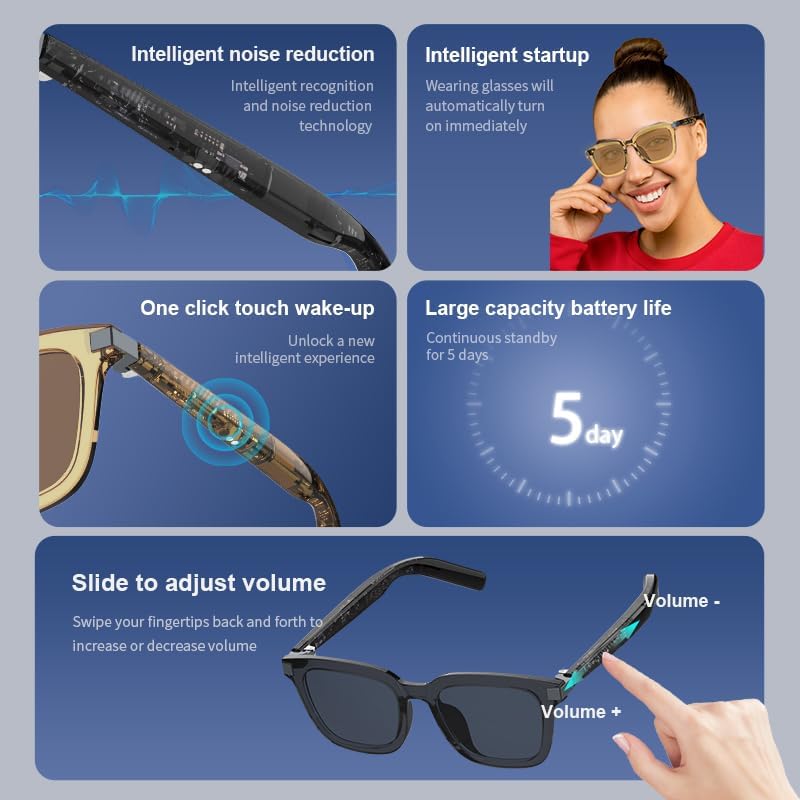
Image: Visual guide to smart features including intelligent startup, touch wake-up, and volume adjustment.
3. AI Real-Time Translator (164 Languages)
The EarDance app enables real-time translation for speech, text, and images:
- Speech Translation: Facilitates face-to-face conversations in different languages. Speak into the app, and the translation is delivered through the glasses.
- Photo Translation: Capture images of menus, signs, or text for instant translation.
- Video Call Translation: Use with video calls to auto-subtitle in both directions.

Image: Demonstrates photo translation, free talk mode, and voice-to-text transcription features.

Image: Smart glasses facilitating real-time language translation in a conversational setting.
4. Voice Memo & Live Transcription
Record voice notes hands-free. The app converts speech to editable notes in real-time, useful for meetings, lectures, or daily reminders. Notes can be edited, saved, and managed within the app.
5. Sleep Aid Music Mode
Activate sleep aid mode to play soothing music and white noise. A timer function is available to help you relax and fall asleep.
Media Integration
1. Stereo Surround High-Quality Sound
The smart glasses deliver 360° stereo surround high-quality sound, providing an immersive audio experience. This allows for clear music streaming and calls while maintaining awareness of your surroundings.

Image: Illustration of stereo surround high-quality sound emanating from the smart glasses.
2. Official Product Video
Video: Demonstration of blue light translation smart glasses features, including app interface and translation capabilities.
Specifications
| Brand | VR SHINECON |
| Model Number | 7e4aaf34-bbb3-421a-a32e-07cb0199a3d9 |
| Connectivity Technology | Bluetooth 5.3 |
| Special Feature | Voice Control, Real-time Translation, Wear Detection, Sleep Aid |
| Item Weight | 166 Grams (5.9 ounces) |
| Battery Type | 2 Nonstandard Battery (Lithium Ion) |
| Compatible Devices | Smartphone |
Maintenance
- Cleaning: Use the provided cleaning cloth to gently wipe the lenses and frame. Avoid harsh chemicals or abrasive materials.
- Storage: Store the smart glasses in the protective carry case when not in use to prevent scratches and damage.
- Battery Care: Avoid fully discharging the battery frequently. Charge regularly to prolong battery life.
Troubleshooting
- Connectivity Issues: If the glasses fail to pair, ensure Bluetooth is enabled on your device and the glasses are charged. Try restarting both the glasses and your phone.
- App Functionality: If the "EarDance" app is not working correctly, ensure it is updated to the latest version. Restarting the app or reinstalling it may resolve issues.
- Sound Quality: Ensure the glasses are positioned correctly on your ears. Check the volume settings on both the glasses and your connected device.
- Translation Accuracy: For optimal translation, speak clearly and at a moderate pace. Ensure the correct source and target languages are selected in the app.
Warranty and Support
For warranty information or technical support, please refer to the official VR SHINECON website or contact customer service through the "EarDance" application. Keep your purchase receipt for warranty claims.