
1. Introduction
The Shanling EC Zero T is a portable HiFi CD player designed for audiophiles, combining advanced R2R DAC architecture with dual JAN6418 vacuum tubes for a warm, natural analog sound. This device supports CD playback, USB DAC input, Bluetooth 5.3 transmission, and includes a CD ripping function. Its compact design and long-lasting battery make it suitable for both portable and desktop use.
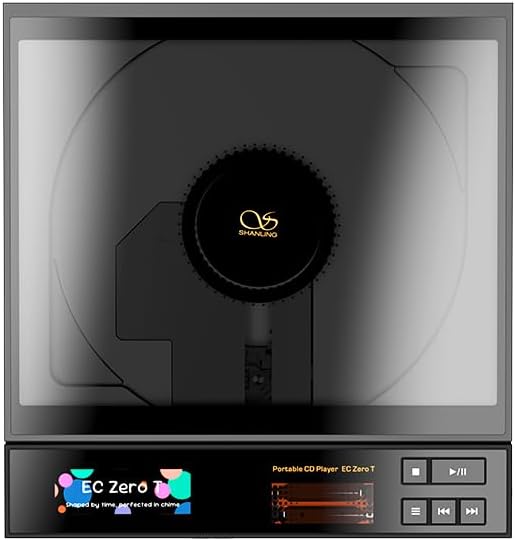
Image 1.1: Front view of the Shanling EC Zero T Portable CD Player, showcasing its screen and control buttons.
2. Package Contents
Ensure all items are present in the package:
- Shanling EC Zero T CD Player
- USB-C Charging Cable
- User Manual (this document)
3. Product Overview: Components and Controls
3.1 Front and Side Controls

Image 3.1: Overview of the Shanling EC Zero T, highlighting its dimensions and front/side controls.
- Play/Pause Button: Initiates or pauses CD playback.
- Stop Button: Halts CD playback.
- Previous Track Button: Skips to the beginning of the current track or the previous track.
- Next Track Button: Skips to the next track.
- Function Switch: Used for menu navigation or mode selection.
- Volume Slider: Adjusts the output volume.
- 1.67-inch Screen: Displays track information, settings, and battery status.

Image 3.2: Detailed view of the sliding potentiometer for volume control.

Image 3.3: Close-up of the transparent visual tubes, indicating real-time operation.
3.2 Rear Panel Connectivity

Image 3.4: Rear panel of the Shanling EC Zero T, showing various input and output ports.
- 4.4mm Balanced Line-Out: For balanced audio output to compatible amplifiers or headphones.
- 3.5mm Line-Out: Standard unbalanced audio output.
- 3.5mm SPDIF Coaxial/Optical: Digital audio output.
- Bluetooth Antenna: For wireless Bluetooth connectivity.
- USB-C DAC Input: Connects to a computer or other device for USB DAC functionality.
- USB-C Power Input: For charging the device and external power.
- Power Mode Switch: Toggles between battery and external power modes.
4. Setup
4.1 Charging the Device
- Connect the provided USB-C cable to the USB-C Power Input port on the rear of the EC Zero T.
- Connect the other end of the USB-C cable to a compatible USB power adapter (not included) or a computer USB port.
- The screen will indicate charging status. A full charge provides up to 8 hours of 3.5mm output playback or 7.5 hours of 4.4mm output playback.
4.2 Inserting a CD
- Gently open the CD cover.
- Place the CD onto the spindle, ensuring it is centered and flat.
- Close the CD cover securely.

Image 4.1: Proper method for inserting a CD into the player.
4.3 Connecting Headphones or External Audio Devices
- For headphones, connect to either the 3.5mm Line-Out or 4.4mm Balanced Line-Out port on the rear panel.
- For external amplifiers or DACs, use the appropriate Line-Out or Digital Out port.
5. Operating Instructions
5.1 Power On/Off
- To power on, press and hold the Play/Pause button until the screen illuminates.
- To power off, press and hold the Play/Pause button until the screen turns off.
5.2 Basic CD Playback
- Insert a CD as described in Section 4.2.
- Press the Play/Pause button to begin playback.
- Use the Previous Track and Next Track buttons to navigate between songs.
- Adjust the volume using the Volume Slider.
- Press the Stop button to end playback.
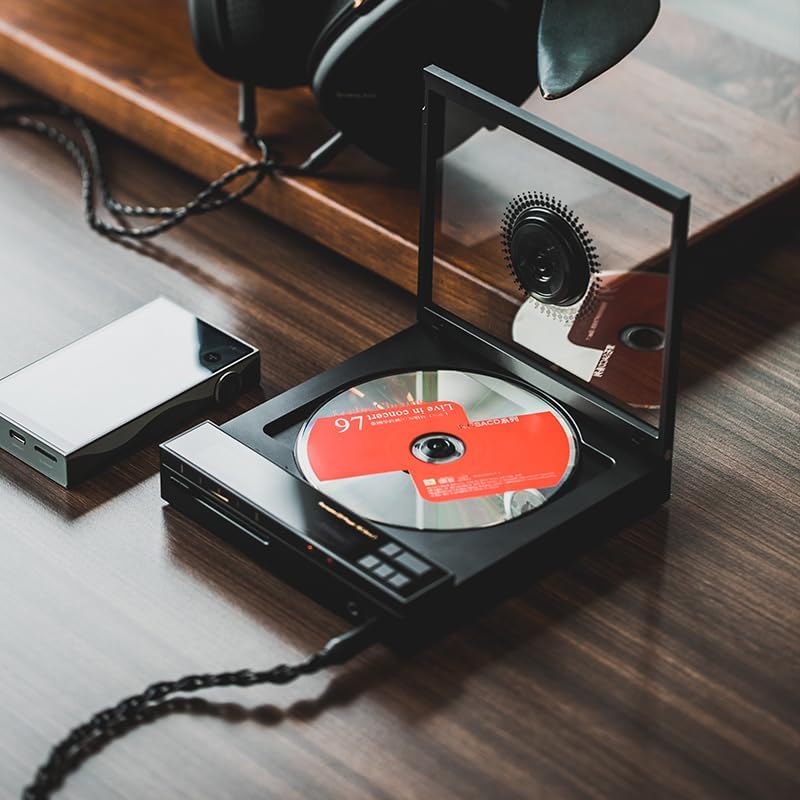
Image 5.1: The EC Zero T in operation, playing a CD with headphones connected.
5.3 Bluetooth Connectivity
The EC Zero T supports Bluetooth 5.3 with APTX for high-quality wireless audio transmission.
- Ensure the Bluetooth antenna is connected to the rear panel.
- Access the Bluetooth settings via the Function Switch and screen menu.
- Enable Bluetooth and put the EC Zero T into pairing mode.
- On your Bluetooth receiving device (e.g., headphones, speaker), search for and select "Shanling EC Zero T" to pair.
5.4 USB DAC Function
The device can function as a USB Digital-to-Analog Converter (DAC) when connected to a computer or other compatible source.
- Connect the EC Zero T to your computer using a USB-C cable via the USB-C DAC Input port.
- Select the EC Zero T as the audio output device in your computer's sound settings.
- Audio from your computer will now be processed and output through the EC Zero T.
5.5 CD Ripping Function
The EC Zero T allows you to convert audio CDs into digital files.
- Insert the CD you wish to rip.
- Navigate to the CD Ripping function in the device's menu using the Function Switch.
- Follow the on-screen prompts to select ripping options (e.g., format, destination if applicable).
- Initiate the ripping process. The device will convert the CD tracks into lossless digital files.
6. Maintenance
- Cleaning: Use a soft, dry cloth to clean the exterior of the device. Avoid abrasive cleaners or solvents.
- CD Care: Handle CDs by their edges. Clean dirty CDs with a soft, lint-free cloth, wiping from the center outwards.
- Storage: Store the player in a cool, dry place away from direct sunlight and extreme temperatures.
- Battery: For optimal battery life, avoid fully discharging the battery frequently. If storing for extended periods, charge the battery to approximately 50%.
7. Troubleshooting
| Problem | Possible Cause | Solution |
|---|---|---|
| Device does not power on. | Low battery or no power. | Charge the device using the USB-C power input. Ensure the power mode switch is set correctly. |
| CD does not play or skips. | CD is dirty, scratched, or improperly inserted. | Clean the CD, check for scratches, and re-insert it correctly. Ensure the CD cover is fully closed. |
| No sound output. | Volume too low, headphones/cables not connected, or incorrect output selected. | Increase volume. Check headphone/cable connections. Verify correct output port is used. |
| Bluetooth pairing fails. | Device not in pairing mode, or receiving device is too far. | Ensure EC Zero T is in pairing mode. Move receiving device closer. Re-attempt pairing. |
| CD ripping issues. | Insufficient storage, CD error, or incorrect settings. | Check available storage. Ensure CD is clean and undamaged. Review ripping settings. |
8. Specifications
| Feature | Detail |
|---|---|
| Model Name | EC-Zero-T |
| Product Dimensions | 6.22 x 5.9 x 1.1 inches |
| Item Weight | 1.54 pounds (698.5g) |
| Battery | 5500mAh Nonstandard Battery (included) |
| Playback Time (3.5mm Output) | Up to 8 hours |
| Playback Time (4.4mm Output) | Up to 7.5 hours |
| Bluetooth Version | 5.3 (Supports APTX) |
| Special Features | Bluetooth, CD-R/RW Compatible, Lightweight, Portable, Rechargeable, CD Ripping, R2R DAC, Dual Tube Amplifier |
| Included Components | EC Zero T CD Player |
9. Warranty and Support
SHANLING products are covered by a limited warranty. For specific warranty terms and conditions, please refer to the warranty card included with your product or visit the official SHANLING website.
For technical support, troubleshooting assistance, or service inquiries, please contact SHANLING customer service through their official channels. You can find more information and contact details on the SHANLING Store on Amazon.


