
Black Shark X Pro
Contents
Black Shark Watch X Pro Smartwatch User Manual
Model: X Pro
Introduction
This user manual provides comprehensive instructions for the Black Shark Watch X Pro Smartwatch. Please read this manual carefully before using your device to ensure proper operation and to maximize its features.
The Black Shark Watch X Pro is a feature-rich smartwatch designed for independent communication, health tracking, and entertainment. It runs on Android, offering a versatile and responsive user experience.
Package Contents
Upon unboxing your Black Shark Watch X Pro, please ensure all items are present:
- Black Shark Watch X Pro Smartwatch
- Charging Cable
- User Manual (this document)

Image: The Black Shark Watch X Pro Smartwatch with its included charging cable and an extra watch strap.
Device Overview
Familiarize yourself with the key components of your Black Shark Watch X Pro.

Image: An overview highlighting the smartwatch's features: 4G independent calling with SIM slot, Android operating system, app download capability, 1.75-inch AMOLED display, seamless Wi-Fi connectivity, and a 180-degree rotating camera.
- 1.75'' AMOLED Display: Vibrant screen with 466x466 resolution and 60Hz refresh rate.
- Rotating Camera: 2MP high-definition camera that rotates 180 degrees for versatile photo and video capture.
- SIM Card Slot: Supports Nano-SIM for independent 4G communication.
- Physical Buttons: Power button and menu button for navigation and control.
- Optical Sensors: Located on the back for health tracking.
Setup
1. Initial Charging
Before first use, fully charge your Black Shark Watch X Pro. Connect the magnetic charging cable to the charging contacts on the back of the watch and plug the USB end into a compatible power adapter (not included) or a computer's USB port.

Image: The smartwatch display indicating a full 100% charge, demonstrating the magnetic charging contacts.
2. Powering On/Off
- To Power On: Press and hold the Power button until the Black Shark logo appears.
- To Power Off: Press and hold the Power button, then select "Power Off" from the options on the screen.
3. SIM Card Installation (Optional)
The Black Shark Watch X Pro supports independent 4G communication via a Nano-SIM card. To install:
- Locate the SIM card slot on the side of the watch.
- Carefully insert a Nano-SIM card into the slot with the gold contacts facing down, ensuring it clicks into place.
- To remove, gently press the SIM card to eject it.

Image: A close-up of the Black Shark Watch X Pro showing a Nano-SIM card being inserted into the dedicated slot, illustrating its 4G independent communication capability.
4. Initial Configuration
Follow the on-screen prompts to complete the initial setup, including language selection, Wi-Fi connection, and Google account login (if desired for app downloads).
Operating the Smartwatch
Navigation
- Touchscreen: Swipe up, down, left, or right to navigate through menus and notifications. Tap to select items.
- Power Button: Short press to return to the watch face or wake the screen. Long press for power options.
- Menu Button: Short press to access the app drawer or specific functions depending on the context.
Key Features
4G Independent Communication
With a Nano-SIM card installed, you can make and receive calls, send texts, and use online applications directly from your watch without needing a paired smartphone. The watch supports 2G/3G/4G full-band compatibility.
Rotating Camera
The 2MP camera can rotate 180 degrees, allowing you to capture photos and videos from various angles. Access the camera app from the app drawer and twist the camera module to adjust its orientation.

Image: The Black Shark Watch X Pro demonstrating its 180-degree rotating camera, positioned to capture a scene, alongside a visual representation of various downloadable applications like Instagram, TikTok, Gmail, Netflix, and Facebook.
Health and Fitness Tracking
The watch features optical sensors for continuous monitoring of heart rate, blood oxygen, steps, and calories. It supports multiple sports modes (running, cycling, badminton) and multi-system GPS for accurate activity tracking.

Image: A visual representation of the smartwatch's fitness tracking capabilities, showing icons for Heart Rate, Blood Oxygen, Steps, and Calories, with a person engaged in running, indicating its use as a fitness companion.
App Downloads and Entertainment
With 4GB RAM and 32GB ROM, the Android-powered watch allows you to download and store a wide range of applications, music, and videos. Enjoy streaming content from platforms like TikTok and YouTube, or play games directly on your wrist.
Customizable Watch Faces
Choose from over 300 free watch faces, including mechanical, minimalist, and dynamic designs, to personalize your device's appearance.
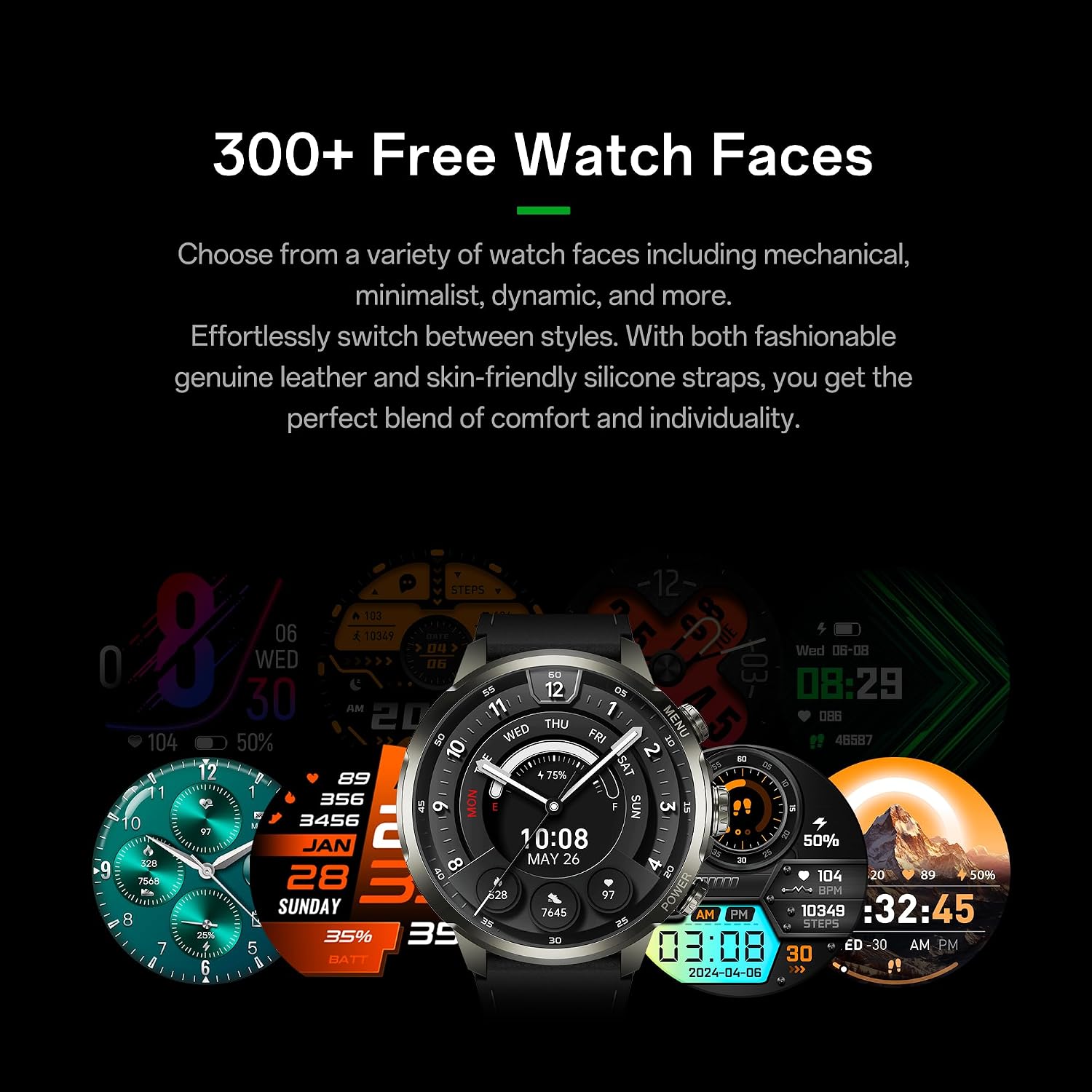
Image: A collection of diverse watch faces displayed on the Black Shark Watch X Pro, illustrating the wide range of customization options available to users.
Maintenance
Cleaning
Wipe the watch and strap with a soft, damp cloth. Avoid using harsh chemicals or abrasive materials, as they may damage the device.
Water Resistance
The watch has an IPX5 water resistance rating and IP6X dust protection. This means it is splash-proof and suitable for wearing during exercise (sweat exposure), in the rain, and when washing hands. It is not designed for swimming, snorkeling, diving, hot water showers, hot springs, saunas, or high-speed water activities. Water resistance is not permanent and may decrease with wear. Please avoid using the watch in conditions beyond its intended use.
Battery Care
To prolong battery life, avoid exposing the watch to extreme temperatures. Charge the device regularly, but avoid leaving it fully charged or fully discharged for extended periods.
Troubleshooting
| Problem | Possible Solution |
|---|---|
| Watch does not power on. | Ensure the watch is fully charged. Connect it to the charging cable and a power source for at least 30 minutes. |
| Cannot make calls with SIM card. | Check if the Nano-SIM card is correctly inserted and activated. Verify network signal strength. Ensure your plan supports 4G communication. |
| Screen is unresponsive. | Restart the watch by holding the Power button until the power options appear, then select restart. If unresponsive, force restart by holding the Power button for approximately 10-15 seconds. |
| Battery drains quickly. | Reduce screen brightness, disable unnecessary background apps, turn off Wi-Fi/Bluetooth/GPS when not in use, or limit notifications. |
Specifications
| Feature | Detail |
|---|---|
| Model Name | Watch X Pro |
| Brand | Black Shark |
| Screen Size | 1.75 Inches AMOLED |
| Resolution | 466x466 |
| Refresh Rate | 60Hz |
| Operating System | Android 8.1 |
| RAM | 4 GB |
| Storage | 32 GB |
| Camera | 2MP, 180° Rotating |
| Connectivity | 4G (Nano-SIM), Bluetooth, Wi-Fi |
| GPS | Built-in GPS |
| Battery Life | Up to 75 hours (typical use) |
| Water Resistance | IPX5 (splash-proof) |
| Dust Protection | IP6X |
| Item Weight | 9.5 ounces |
| Dimensions (Watch Body) | 56mm (width) |
| Strap Width | 22mm |
| Wrist Circumference | 150-205mm |

Image: A technical diagram illustrating the physical dimensions of the Black Shark Watch X Pro, including the watch body width (56mm), strap width (22mm), and the adjustable wrist circumference range (150-205mm).
Warranty and Support
Information regarding product warranty and customer support is typically provided with your purchase documentation or on the manufacturer's official website. Please refer to those resources for detailed warranty terms and contact information for support.
For further assistance, you may visit the official Black Shark website or contact their customer service department.
Note: Specific warranty details were not available in the provided product data.
Documents and downloads
Ask a question about this manual
Ask about setup, troubleshooting, compatibility, parts, safety, or missing instructions. Manuals+ will review the question and use this page’s manual context to help answer it.