1. Introduction
This manual provides detailed instructions for the safe and efficient operation of the Mechanivis H3DKZ-A2 Time Relay. This device is designed for precise timing control in various industrial automation, motor control, and household appliance applications. Please read this manual thoroughly before installation and operation to ensure proper use and to prevent damage or injury.
2. Product Overview
The Mechanivis H3DKZ-A2 is a versatile time relay offering multiple working modes for various delay functions. Its compact design allows for easy integration into control panels and systems. Key features include:
- Multiple Working Modes: Supports various delay modes for flexible timing control.
- Easy Installation: Compact design with adaptable installation methods.
- Safety Protection: Incorporates overload and short circuit protection functions.
- Strong Adaptability: Engineered to operate reliably in challenging environments.
- Wide Application: Suitable for industrial automation, household appliances, lighting control, and motor control.

Figure 1: Mechanivis H3DKZ-A2 Time Relay, showing its compact design and terminal connections.
3. Safety Information
Always observe the following safety precautions to prevent electric shock, fire, or damage to the product:
- Ensure power is disconnected before installation, wiring, or maintenance.
- Installation and wiring should only be performed by qualified personnel.
- Verify that the supply voltage matches the relay's specifications.
- Do not operate the relay in environments exceeding its specified temperature or humidity limits.
- Avoid exposing the relay to direct sunlight, corrosive gases, or excessive vibration.
- Ensure all connections are secure to prevent loose contacts and potential hazards.
4. Setup and Installation
The H3DKZ-A2 time relay is designed for easy installation. Follow these steps for proper setup:
- Mounting: Securely mount the relay in a suitable enclosure or panel using its integrated mounting mechanism. Ensure adequate ventilation.
- Wiring: Refer to the wiring diagram provided on the relay's casing or in the specific product documentation for your model variant. Connect the power supply to the designated terminals (e.g., A1, A2) and the load to the output terminals (e.g., 15, 16, 18, 21, 22, 24). Ensure correct polarity for DC applications.
- Terminal Connections: Use appropriate wire gauges and ensure all terminal screws are tightened to prevent loose connections.
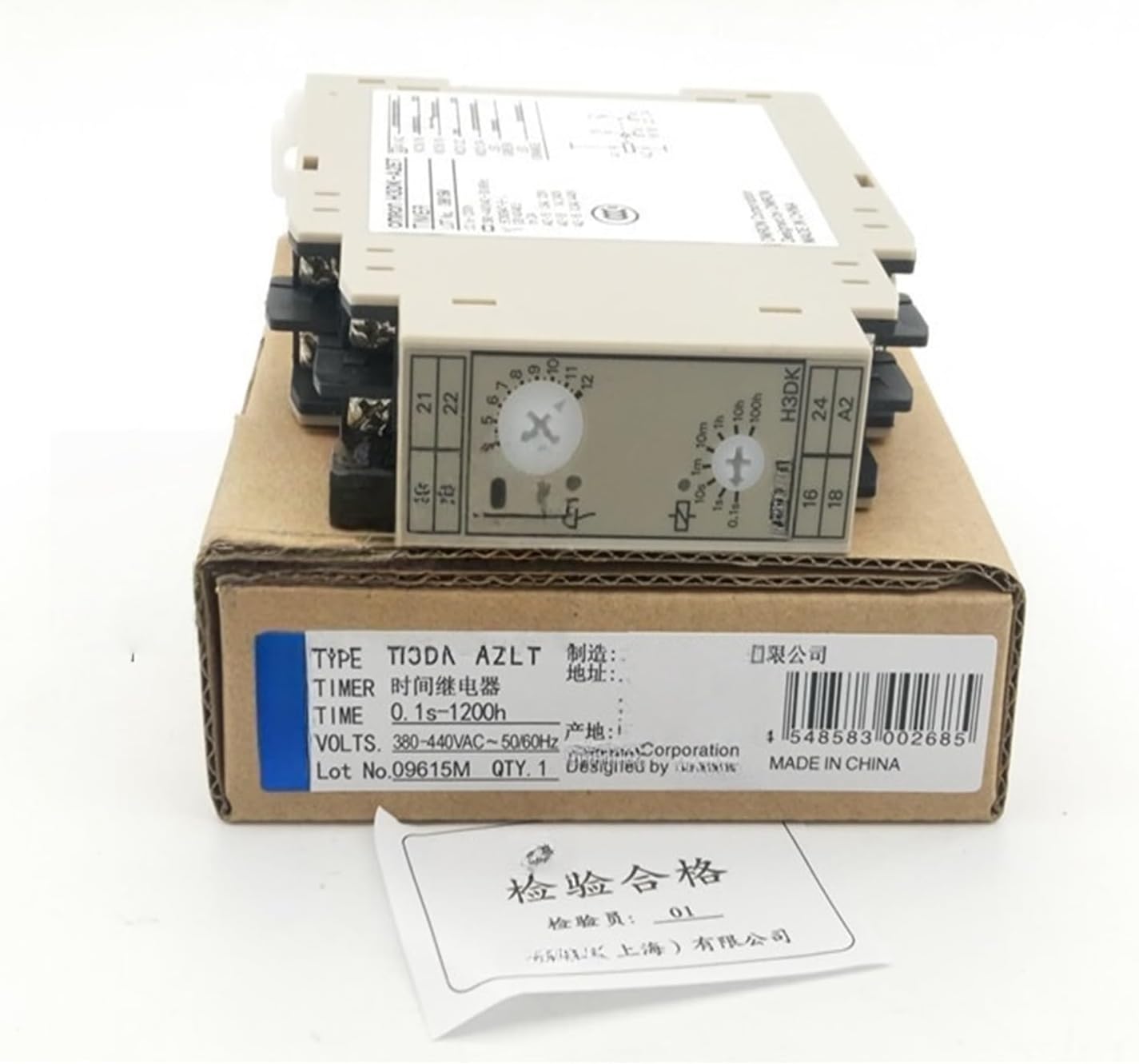
Figure 2: Mechanivis H3DKZ-A2 Time Relay in its packaging, showing product labels and model information. The UPC for this product is 4548583002685.
5. Operating Instructions
The H3DKZ-A2 time relay features adjustable settings for time range and operating mode. The specific adjustment methods may vary slightly between H3DKZ-A2, H3DKZ-A1A, H3DKZ-A2A, and H3DK-A2ET models, but the general principles apply.
- Time Range Selection: Use the rotary switch or dip switches on the front panel to select the desired time range (e.g., 0.1s-10s, 1s-100s, 0.1m-10m, 1m-100m, 0.1h-10h, 1h-100h).
- Time Setting: Adjust the fine-tuning knob or potentiometer within the selected time range to set the precise delay duration.
- Mode Selection: If applicable, select the operating mode (e.g., ON-delay, OFF-delay, Interval, Flicker) using the designated switch or selector. Refer to the product's specific datasheet for detailed mode descriptions.
- Power On: Once all settings are configured and wiring is verified, apply power to the relay. The relay will begin its timing sequence according to the selected mode and time.
Note: Always consult the markings on your specific relay unit for exact terminal designations and setting procedures.
6. Maintenance
The Mechanivis H3DKZ-A2 Time Relay is designed for long-term, reliable operation with minimal maintenance. However, periodic checks can help ensure optimal performance:
- Inspection: Regularly inspect the relay for any signs of physical damage, discoloration, or loose connections.
- Cleaning: Keep the relay free from dust and debris. Use a soft, dry cloth for cleaning. Do not use solvents or abrasive cleaners.
- Environmental Conditions: Ensure the operating environment remains within the specified temperature and humidity ranges.
Always disconnect power before performing any maintenance.
7. Troubleshooting
If the time relay is not functioning as expected, refer to the following common issues and solutions:
| Problem | Possible Cause | Solution |
|---|---|---|
| Relay does not power on. | No power supply; incorrect wiring; faulty power source. | Check power connections and voltage; verify wiring against diagram; test power source. |
| Relay does not switch after delay. | Incorrect time setting; wrong operating mode; faulty load connection. | Adjust time and mode settings; check load wiring and functionality. |
| Relay switches immediately. | Incorrect operating mode selected (e.g., instantaneous contact instead of delayed). | Verify and correct the operating mode setting. |
| Overload or short circuit protection activated. | Excessive current draw; short circuit in the load or wiring. | Identify and rectify the overload or short circuit condition. Ensure load current is within relay specifications. |
If problems persist after attempting these solutions, contact qualified technical support.
8. Specifications
The following are general specifications for the Mechanivis H3DKZ-A2 Time Relay. Specific values may vary slightly by model variant.
- Model: H3DKZ-A2 (also applicable to H3DKZ-A1A, H3DKZ-A2A, H3DK-A2ET variants)
- Manufacturer: Mechanivis
- Package Dimensions: 0.39 x 0.39 x 0.39 inches
- Item Weight: 6.61 pounds
- Number of Pieces: 1
- Assembly Required: No
- ASIN: B0F6N271XM
- Typical Time Range: 0.1s to 1200h (depending on model and setting)
- Operating Voltage: 380-440V AC ~ 50/60Hz (as seen on packaging for a variant, verify for specific model)
9. Warranty and Support
For warranty information and technical support, please contact Mechanivis directly or refer to the documentation included with your purchase. Ensure you have your product model number (H3DKZ-A2) and purchase details available when seeking support.


