
1. Introduction
Thank you for choosing the ANCHEER 3-in-1 Foldable Treadmill. This innovative fitness equipment is designed to provide a versatile and convenient workout experience in the comfort of your home or office. It combines the functionalities of an under-desk walking pad, a traditional treadmill, and an incline treadmill, catering to various fitness levels and exercise preferences. Please read this manual thoroughly before initial use to ensure proper operation, safety, and maintenance of your new treadmill.
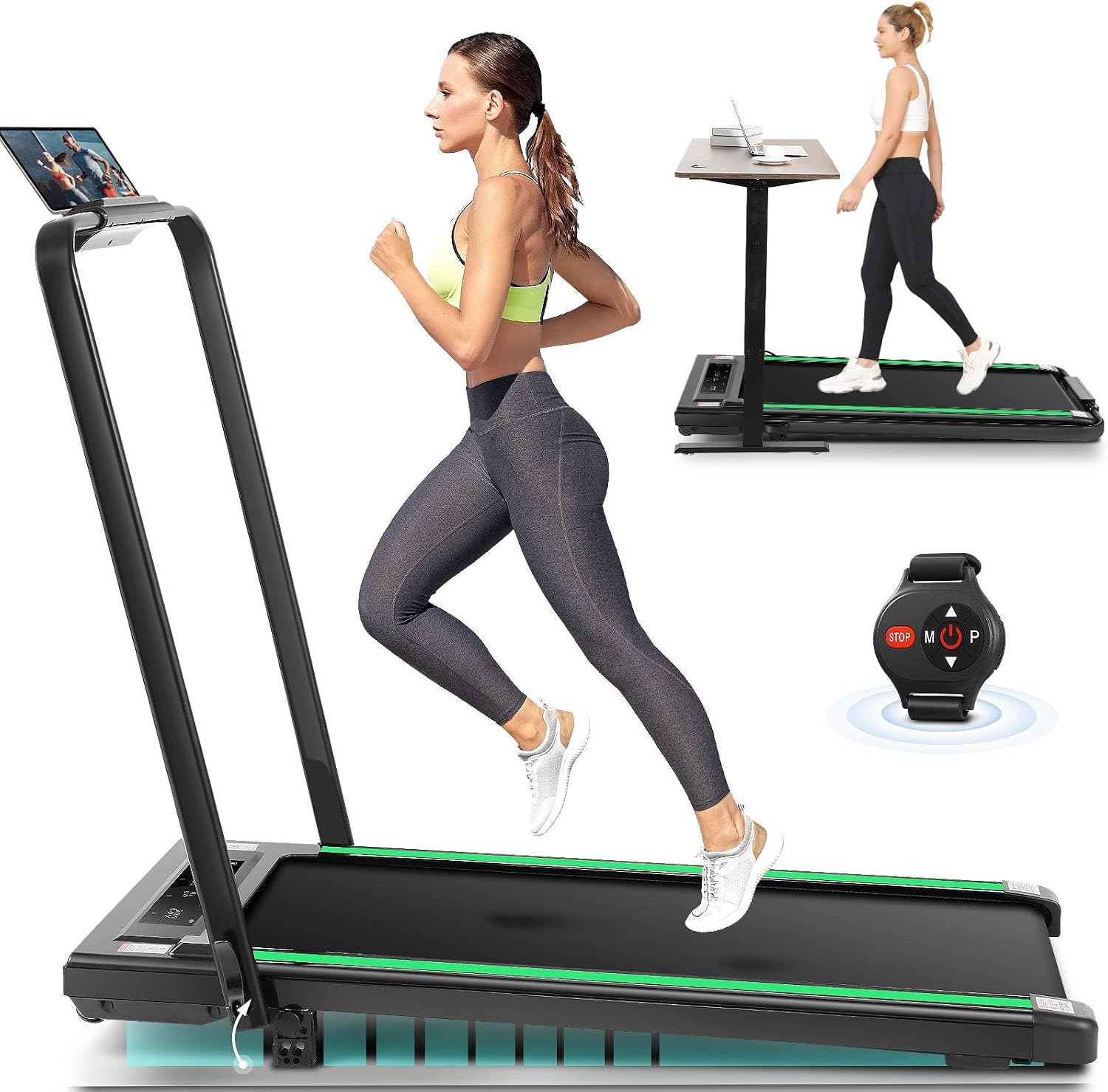
Figure 1.1: The ANCHEER 3-in-1 Foldable Treadmill in its running and under-desk walking configurations.
2. Safety Information
Your safety is paramount. Please observe the following precautions to prevent injury or damage to the equipment:
- Read all instructions in this manual before using the treadmill.
- Ensure the treadmill is placed on a flat, stable surface with adequate clearance around it (at least 2 feet on sides and rear).
- Keep children and pets away from the treadmill during operation.
- Do not exceed the maximum weight capacity of 330 lbs (150 kg).
- Always attach the safety key clip to your clothing before starting the treadmill. In case of an emergency, pulling the safety key will immediately stop the machine.
- Wear appropriate athletic footwear and clothing.
- If you experience pain, dizziness, or shortness of breath, stop exercising immediately.
- Unplug the treadmill from the power outlet when not in use or before cleaning/maintenance.
- Do not operate the treadmill if it has a damaged cord or plug, or if it is not working properly.
3. Package Contents
Carefully unpack your ANCHEER 3-in-1 Foldable Treadmill and verify that all components are present and undamaged. If any items are missing or damaged, please contact customer support.
- Folding Electric Treadmill x1
- User Manual x1
- Remote Control x1
- Power Cord x1
- Removable Tablet Stand x1
- Tool Kit x1 (includes Wrench, Lubricant)
- Safety Key x1

Figure 3.1: All components included in the ANCHEER 3-in-1 Foldable Treadmill package.
4. Setup
The ANCHEER 3-in-1 Foldable Treadmill is designed for installation-free setup, allowing you to use it right out of the box. Follow these steps to prepare your treadmill for use:
4.1 Unfolding the Treadmill
- Carefully remove the treadmill from its packaging and place it on a flat, stable surface.
- Lift the handle bar until it locks into the upright position. Ensure the fixed lock valve is securely engaged.
- If desired, attach the removable tablet stand to the designated slot on the handle bar.

Figure 4.1: Quick adjustment of the handle bar for upright use.
4.2 Adjusting Incline (Optional)
This treadmill features 2-levels of manual incline (5 and 10 degrees) for a more challenging workout. To adjust the incline:
- Ensure the treadmill is powered off and unplugged.
- Locate the adjustable incline feet at the rear of the treadmill.
- Lift the rear of the treadmill slightly and adjust the feet to the desired incline level. Ensure both sides are set equally.
- Carefully lower the treadmill back down, ensuring it is stable before use.

Figure 4.2: Manual incline adjustment points on the treadmill.
4.3 Initial Power On
Plug the power cord into a grounded electrical outlet. Turn on the main power switch, usually located near the power cord connection point. The display will illuminate, indicating the treadmill is ready for use.
4.4 Setup Demonstration Video
Video 4.1: This video demonstrates the initial setup, including unfolding the treadmill and preparing it for use.
5. Operating Instructions
Your ANCHEER treadmill offers three distinct modes of operation and multiple ways to control your workout.
5.1 Understanding the Modes
- Walking Mode (0.6-4 MPH): Ideal for light exercise or use as an under-desk walking pad. The handle bar can be folded down for this mode.
- Running Mode (4-7.5 MPH): For more intense cardio workouts. The handle bar should be in the upright position for stability and safety.
- Incline Mode (4-7.5 MPH): Combines running mode with manual incline for increased calorie burn and muscle engagement.

Figure 5.1: The three operational modes of the treadmill.
5.2 Control Options
The treadmill can be controlled via the multifunctional touch screen, shortcut buttons on the handrail, or the remote watch.
- Touch Screen Display: Provides real-time data including distance, speed, time, and calories burned. Use the touch controls to start/stop and adjust speed.
- Handrail Buttons: Conveniently located buttons on the handle bar allow for quick adjustments to speed and start/stop functions.
- Remote Watch: Wearable remote for easy control of speed and on/off functions from a distance.

Figure 5.2: Control panel and remote watch for speed adjustment.

Figure 5.3: The LCD display and remote control for monitoring and adjusting your workout.
5.3 Using Preset Programs
The treadmill comes with 12 preset programs (P1-P12) designed to offer varied workout routines. Refer to the specific program details on the display or in the quick start guide for each program's speed and duration profile. To select a program, use the mode selection button on the control panel or remote.
5.4 Operating Demonstration Video
Video 5.1: This video demonstrates the various operating modes and control methods of the treadmill.
6. Maintenance
Regular maintenance ensures the longevity and optimal performance of your treadmill.
- Cleaning: Wipe down the treadmill surfaces with a damp cloth after each use. Avoid using abrasive cleaners or solvents.
- Lubrication: The running belt requires periodic lubrication to reduce friction and wear. Apply the provided lubricant under the belt as instructed in the quick start guide, typically every few months depending on usage.
- Belt Tension and Alignment: Check the running belt tension and alignment regularly. If the belt feels loose or is drifting to one side, adjust it using the provided wrench according to the instructions in the quick start guide.
- Storage: When not in use, fold the treadmill for compact storage. The integrated transport wheels allow for easy movement. Store in a dry, cool place away from direct sunlight.

Figure 6.1: Folded dimensions for space-saving storage.
7. Troubleshooting
If you encounter any issues with your treadmill, refer to the following common problems and solutions:
| Problem | Possible Cause | Solution |
|---|---|---|
| Treadmill does not power on. | Power cord not plugged in; main switch off; circuit breaker tripped. | Check power connection; turn on main switch; reset circuit breaker. |
| Running belt stops or slips. | Belt too loose; insufficient lubrication; motor overload. | Adjust belt tension; lubricate belt; reduce user weight or speed. |
| Unusual noise during operation. | Loose components; lack of lubrication; foreign object under belt. | Check for loose screws; lubricate belt; inspect under belt for debris. |
| Display not working correctly. | Loose connection; power issue; internal fault. | Ensure all connections are secure; power cycle the machine; contact support if issue persists. |
| Remote control not responding. | Battery low or dead; remote not paired. | Replace CR2025 battery; refer to quick start guide for pairing instructions. |
If the problem persists after attempting these solutions, please contact ANCHEER customer support.
8. Specifications
| Feature | Detail |
|---|---|
| Brand | ANCHEER |
| Model Name | treadmill |
| Color | Dark green |
| Product Dimensions (LxWxH) | 47.05"D x 26.38"W x 45.12"H |
| Folded Size (LxWxH) | 47.05"D x 26.38"W x 5.7"H |
| Item Weight | 53 Pounds |
| Material | Alloy Steel |
| Maximum Weight Recommendation | 330 Pounds (Note: Product features state 330lbs, specifications state 300lbs. Using 330lbs as per product title.) |
| Motor Horsepower | 3.0 HP (Note: Product features state 3.0HP, specifications state 2.5HP. Using 3.0HP as per product title.) |
| Speed Range | 0.6 - 7.5 Miles per Hour |
| Adjustable Incline Levels | 2 levels (5 and 10 degree) |
| Running Area (Deck Length x Width) | 40 Inches x 16 Inches |
| Number of Programs | 12 |
| Assembly Required | No (Installation-Free) |
| Power Source | Corded Electric |
9. Warranty and Support
ANCHEER provides a warranty for this product within 365 days from the date of purchase. Additionally, we offer a lifetime replacement accessories service.
For any issues, concerns, or technical assistance, please do not hesitate to contact our customer support team. We are committed to providing 100% satisfying customer service, ensuring that any inquiries you may have will be answered within 24 hours.
Please retain your proof of purchase for warranty claims.


