
1. Introduction
Thank you for choosing the ZAFRO Portable Air Conditioner. This manual provides essential information for the safe operation, installation, maintenance, and troubleshooting of your unit. Please read it thoroughly before use and retain it for future reference.
Safety Information
- Always place the unit on a flat, stable surface.
- Ensure the power supply matches the unit's requirements (115 Volts).
- Do not block air inlets or outlets. Maintain at least 20 inches of clearance around the unit.
- Do not operate the unit with a damaged power cord or plug.
- Keep children and pets away from the unit during operation.
- Unplug the unit before cleaning or performing any maintenance.
- This appliance uses R32 refrigerant. Handle with care and ensure proper ventilation during installation and servicing.
2. Package Contents
Carefully unpack your ZAFRO Portable Air Conditioner and check that all items are present and in good condition. If any items are missing or damaged, contact customer support.
- ZAFRO Portable Air Conditioner Unit
- Exhaust Hose
- Window Seal Plate Kit (Components A, B, C, D)
- Remote Control
- User Manual (this document)

3. Product Features
The ZAFRO Portable Air Conditioner is designed to provide efficient and quiet cooling for various spaces.
- Cooling Capacity: 14,000 BTU (ASHRAE 128) / 10,000 BTU (SACC) for effective cooling.
- Quiet Operation: Operates at a low noise level of 46dB, suitable for bedrooms and offices.
- Multiple Control Options: Control via WiFi/App, Remote Control, or the integrated Digital Panel.
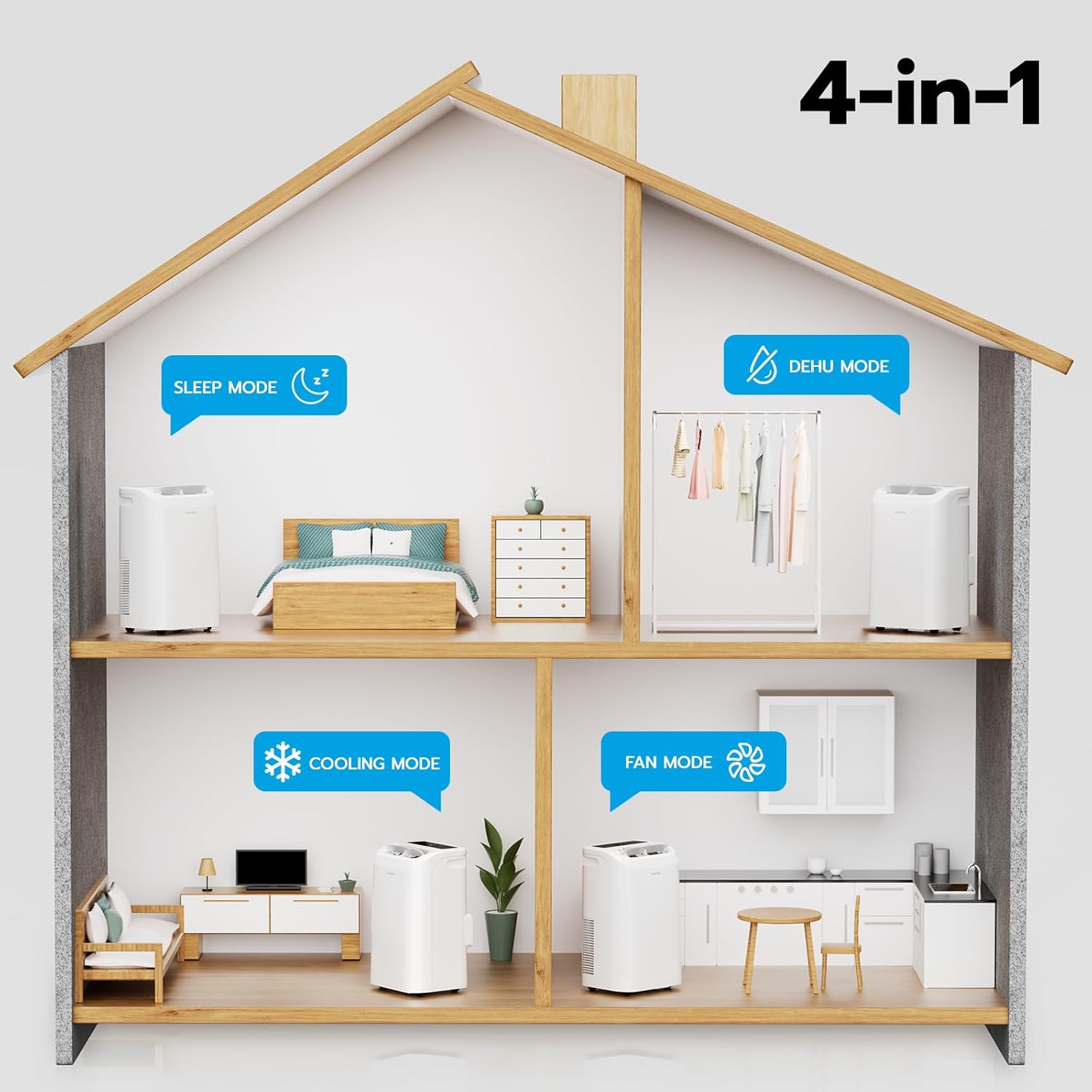
- 4-in-1 Functionality: Offers Cooling, Fan, Dehumidifier, and Sleep modes.
- 24-Hour Timer: Program the unit to turn on or off automatically.
- Eco-Friendly Refrigerant: Uses R32 refrigerant, which is ozone-safe and non-toxic.
- Self-Draining Technology: Features an auto-evaporation system that minimizes the need for manual drainage.
- Easy-Clean Filter: Removable and washable filter with smart clog detection for optimal air quality and efficiency.
- Portability: Equipped with 360° wheel casters for easy movement between rooms.
- Airflow: Provides 265 CFM for rapid air circulation.
- Temperature Range: Adjustable cooling from 61°F to 86°F.
- Dehumidifying Range: Adjustable humidity setting from 30% to 70%.
- Energy Efficient: Ultra-low standby power consumption of 0.5W.


4. Setup and Installation
Proper installation is crucial for the efficient operation of your portable air conditioner. Follow these steps carefully.
Placement
- Place the unit on a firm, level surface near a window and a grounded electrical outlet.
- Ensure there is at least 20 inches (50 cm) of space around the unit for proper airflow.
- Avoid placing the unit in direct sunlight or near heat sources.
Window Kit Installation
The included window seal plate kit is designed for most standard vertical and horizontal sliding windows.
- Assemble the Window Kit: Select the appropriate window panel components (A, B, C, D) based on your window size. Slide the panels together and adjust their length to fit your window opening. Secure them with screws if necessary.
- Install the Exhaust Hose: Attach one end of the exhaust hose to the air outlet on the back of the air conditioner unit. Twist clockwise to secure.
- Connect to Window Kit: Attach the other end of the exhaust hose to the adapter on the window seal plate. Ensure a tight seal to prevent air leakage.
- Seal the Window: Close the window firmly against the window seal plate to create a good seal. Use foam seals if provided to block any gaps.


5. Operating Instructions
Your ZAFRO Portable Air Conditioner offers multiple ways to control its functions.
Control Panel
The digital control panel on top of the unit allows direct access to all functions.
- Power Button: Turns the unit on or off.
- Mode Button: Cycles through Cooling, Fan, Dehumidifier, and Sleep modes.
- Temperature Buttons (+/-): Adjusts the desired temperature in Cooling mode.
- Fan Speed Button: Selects Low, Mid, High, or Auto fan speed in Cooling or Fan mode.
- Timer Button: Sets the 24-hour timer for automatic operation.

Remote Control
The included remote control provides convenient operation from a distance.
- All functions available on the control panel are also accessible via the remote.
- Ensure the remote control is pointed towards the unit's receiver.

WiFi and App Control
Control your unit remotely using the ZAFRO mobile app.
- Download App: Search for the 'ZAFRO' app in your smartphone's app store.
- Create Account: Follow the in-app instructions to create a user account.
- Connect Device: Power on the air conditioner. In the app, select 'Add Device' and follow the pairing instructions. This typically involves putting the unit into pairing mode (refer to the app or unit display for specific steps).
- Remote Operation: Once connected, you can adjust settings, set schedules, and monitor temperatures from your smartphone.

Operating Modes
- Cooling Mode: Provides powerful cooling. Set your desired temperature between 61°F and 86°F.
- Fan Mode: Circulates air without cooling. Choose from Low, Mid, High, or Auto fan speeds.
- Dehumidifier Mode: Reduces humidity in the room. The adjustable humidity setting range is 30-70%.
- Sleep Mode: Operates quietly with reduced fan speed and gradually increases the set temperature for comfortable sleep.
6. Maintenance
Regular maintenance ensures optimal performance and extends the lifespan of your air conditioner.
Filter Cleaning
The unit features an easy-clean, removable filter and smart alerts for cleaning reminders (after approximately 600 hours of use).
- Power Off: Always unplug the unit before cleaning.
- Remove Filter: Gently pull out the air filter from its slot (usually on the back or side of the unit).
- Clean Filter: Wash the filter with warm, soapy water. Rinse thoroughly and allow it to air dry completely before reinserting. Do not use harsh chemicals or abrasive materials.
- Reinstall Filter: Slide the dry filter back into its position.
Drainage
This unit features a self-draining (auto-evaporation) system, which typically eliminates the need for manual drainage by evaporating condensate. However, in extremely humid conditions, some water may accumulate.
- If water accumulation occurs, the unit may display a 'Full Tank' indicator.
- Locate the drainage port (usually at the bottom rear of the unit).
- Place a shallow pan or connect a drainage hose (not included) to the port to drain the water.


7. Troubleshooting
Refer to this section for common issues and their solutions. If the problem persists, contact customer support.
| Problem | Possible Cause | Solution |
|---|---|---|
| Unit does not turn on. | No power supply; power cord damaged; unit is off. | Check power outlet and plug connection. Ensure power cord is not damaged. Press the power button. |
| Unit is not cooling effectively. | Air filter is dirty; exhaust hose is blocked or disconnected; room is too large; windows/doors are open; temperature setting is too high. | Clean the air filter. Check exhaust hose for blockages or disconnections. Ensure room size is within unit capacity. Close all windows and doors. Lower the set temperature. |
| Water leakage. | Drainage plug is loose; unit is not level; condensate pan is full (in high humidity). | Ensure drainage plug is securely closed. Place unit on a level surface. If condensate pan is full, drain water manually. |
| WiFi connection issues. | Incorrect WiFi password; unit not in pairing mode; router too far; app issues. | Verify WiFi password. Ensure unit is in WiFi pairing mode (refer to app or unit display). Move unit closer to router or check router signal. Restart the app or reinstall if necessary. |
| Unit is noisy. | Unit is not on a level surface; fan speed is too high; internal components vibrating. | Ensure unit is on a flat, stable surface. Reduce fan speed. If unusual noises persist, contact support. |
8. Specifications
| Specification | Detail |
|---|---|
| Brand | ZAFRO |
| Model Number | A9046D-10K |
| Cooling Capacity (ASHRAE 128) | 14,000 BTU |
| Cooling Capacity (SACC) | 10,000 BTU |
| Item Weight | 55.7 pounds |
| Product Dimensions (D x W x H) | 14.09 x 16.5 x 27.07 inches |
| Annual Energy Consumption | 1200 Kilowatt Hours Per Year |
| Noise Level | 46 dB |
| Voltage | 115 Volts |
| Wattage | 1500 watts |
| Refrigerant | R-32 |
| Special Features | Dehumidifier, Fast Cooling, Remote Controlled, WiFi Enabled |
| Color | White |
9. Warranty and Support
For warranty information, please refer to the documentation included with your purchase or contact ZAFRO customer support directly. If you encounter any issues not covered in this manual or require further assistance, please reach out to our support team.
Customer Support: For assistance, please visit the ZAFRO official website or contact their customer service line. Details can typically be found on the product packaging or the ZAFRO brand store on Amazon: ZAFRO Store


