
1. Introduction
This user manual provides essential information for the safe and efficient operation of your SYLVOX Outdoor TV, Cinema Pro/2025 model. Please read this manual thoroughly before using the product and retain it for future reference. This television is designed for outdoor use, featuring high brightness and robust weather resistance.

Figure 1.1: Front view of the SYLVOX 65 inch Outdoor TV. The screen displays a detailed image of a lion's head, highlighting the display's clarity and color capabilities. The TV features a sleek, dark bezel and the SYLVOX logo at the bottom center.
2. Safety Information
Always adhere to the following safety precautions to prevent injury or damage to your television.
- Power Supply: Ensure the power source matches the voltage requirements specified on the TV's label. Use only the provided power cord.
- Water Resistance (IP55): The TV is IP55 rated for water and dust resistance, meaning it is protected against dust ingress and low-pressure water jets from any direction. Do not submerge the TV or expose it to high-pressure water sprays. Ensure all port covers are securely closed when not in use.
- Temperature: Operate the TV within the recommended temperature range. Avoid direct exposure to extreme heat sources or prolonged direct sunlight beyond normal outdoor viewing conditions, despite its high brightness.
- Ventilation: Do not block ventilation openings. Ensure adequate airflow around the TV to prevent overheating.
- Mounting: Use appropriate mounting hardware and follow installation instructions carefully. Ensure the mounting surface can support the TV's weight.
- Cleaning: Disconnect power before cleaning. Use a soft, damp cloth. Avoid harsh chemicals or abrasive cleaners.
- Lightning: For added protection during a lightning storm or when left unattended for long periods, unplug the TV from the power outlet.
3. What's in the Box
Carefully unpack your SYLVOX Outdoor TV and check for the following items:
- SYLVOX Outdoor TV Unit
- Remote Control
- AAA Batteries (x2) for Remote Control
- Power Cord
- User Manual (this document)
- Warranty Card
- Screws for mounting/assembly
- Screwdriver
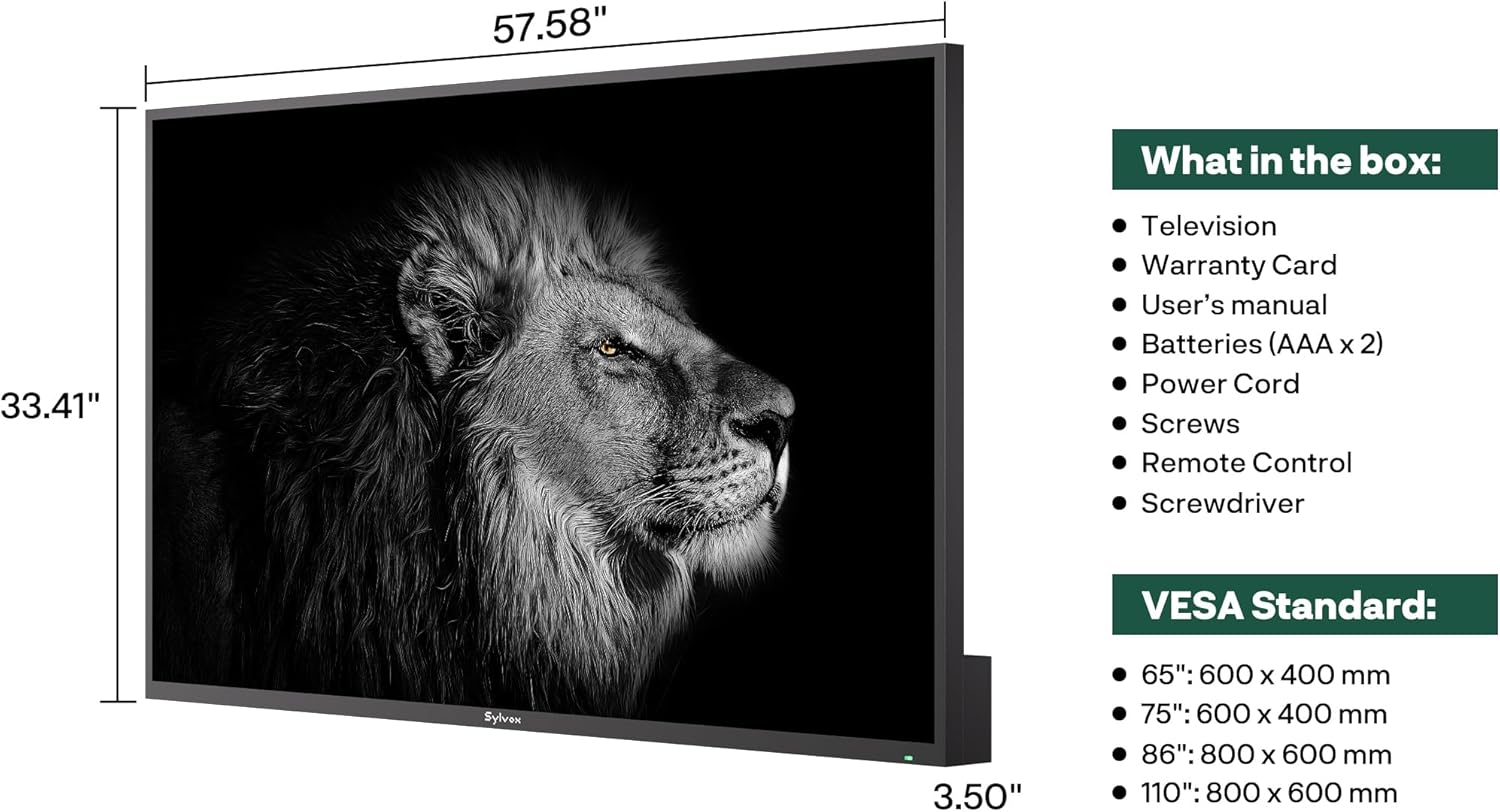
Figure 3.1: Illustration of the SYLVOX Outdoor TV's dimensions (57.58" W x 33.41" H x 3.50" D) and a list of included accessories, confirming the contents of the product packaging. Also shows VESA standard sizes for various models.
4. Setup
4.1 Mounting the TV
The SYLVOX Outdoor TV supports VESA standard mounting for secure installation. Ensure you use a compatible outdoor-rated wall mount (not included) that can support the TV's weight of approximately 84 pounds (38.1 kg).
- VESA Standard: For the 65-inch model, the VESA mounting pattern is 600 x 400 mm.
- Location: Choose a shaded area if possible to minimize direct sun exposure, even with the high brightness. Ensure the mounting surface is sturdy and level.
- Installation: Follow the instructions provided with your VESA wall mount. Use the included screws to attach the mounting brackets to the TV's rear panel.

Figure 4.1: Rear view of the SYLVOX Outdoor TV, illustrating the VESA mounting holes and the general layout of the back panel, designed for robust outdoor installation.
4.2 Connecting Peripherals
The TV features various input and output ports for connecting external devices.
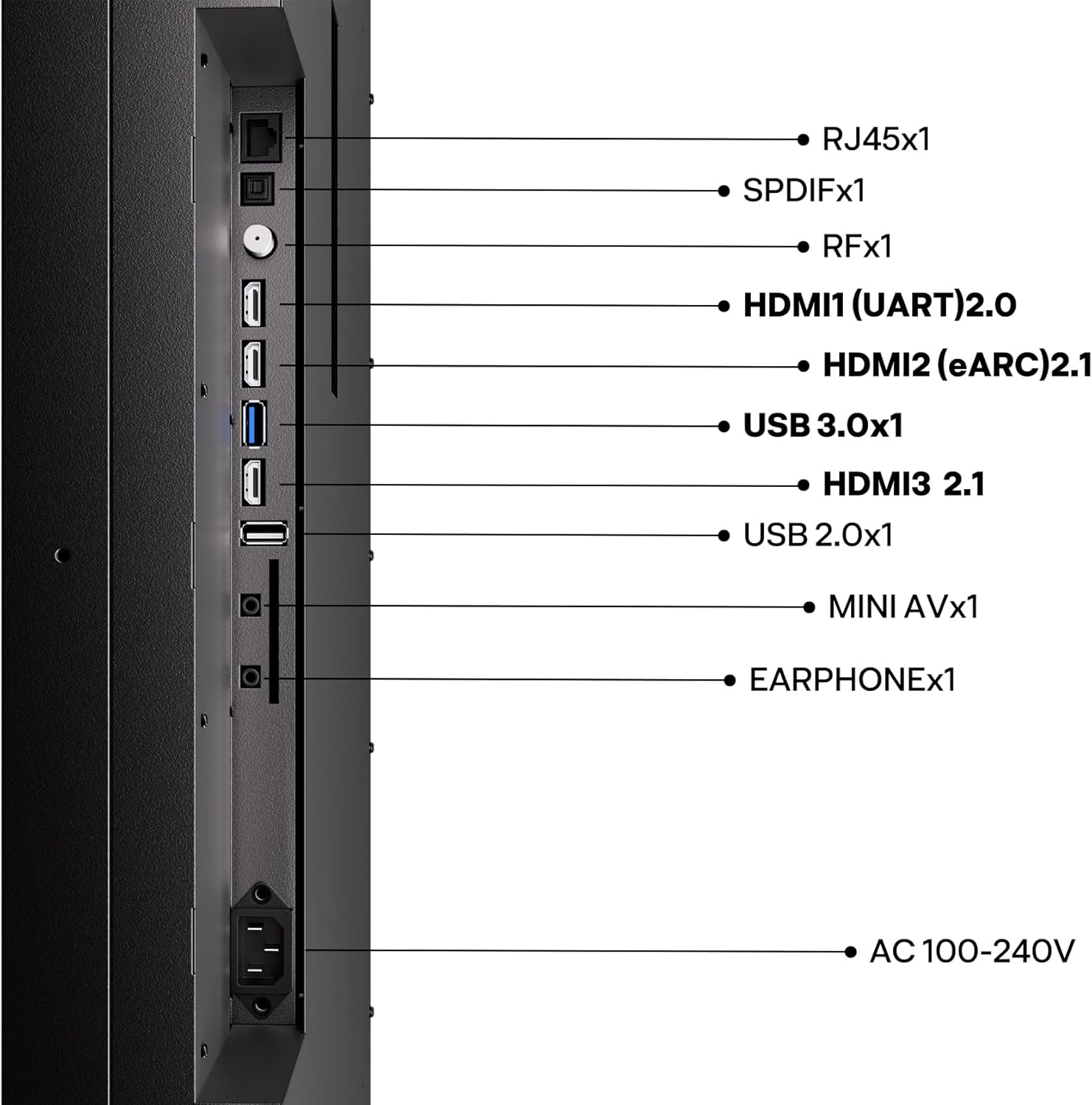
Figure 4.2: Detailed diagram of the SYLVOX Outdoor TV's side-mounted connectivity ports, including RJ45 (Ethernet), SPDIF, RF, HDMI (2.0 and 2.1 with eARC), USB (3.0 and 2.0), Mini AV, and Earphone out, along with the AC 100-240V power input.
- HDMI: Connect Blu-ray players, gaming consoles, or other HDMI-enabled devices. HDMI2 supports eARC for enhanced audio return.
- USB: Use USB 3.0 or USB 2.0 ports for media playback from USB drives.
- Ethernet (RJ45): For a stable wired internet connection.
- Wi-Fi & Bluetooth: The TV supports wireless connectivity for internet and Bluetooth devices.
- Power: Connect the provided power cord to the AC 100-240V input and then to a suitable outdoor-rated power outlet.
4.3 Initial Power On and Google TV Setup
After connecting all necessary cables and powering on the TV, follow the on-screen instructions to complete the initial setup, including network connection, Google account login, and channel scanning.

Figure 4.3: The SYLVOX Outdoor TV seamlessly integrated into an outdoor patio, displaying the Google TV interface. This image demonstrates the TV's smart capabilities and its suitability for outdoor entertainment spaces.
5. Operating the TV
5.1 Remote Control
The included remote control allows full navigation and control of your SYLVOX Outdoor TV. Insert the two AAA batteries into the remote before first use.

Figure 5.1: A hand holding the SYLVOX remote control, which is designed to be waterproof, suitable for outdoor environments.
5.2 Picture and Sound Features
Your SYLVOX Outdoor TV is equipped with advanced display and audio technologies for an optimal outdoor viewing experience.
- Helio QLED Technology (Mini-LED + QLED): This combination delivers superior contrast, vibrant colors, and exceptional brightness.
- High Brightness: With 3,500-5,000 nits peak brightness, the TV is designed to combat glare even in direct sunlight.
- 120Hz Refresh Rate & MEMC: Ensures smooth motion for fast-paced content like sports and action movies, and reduces motion blur.
- Dolby Atmos Sound: Integrated 2x30W speakers provide immersive 3D surround sound.

Figure 5.2: A visual summary of key features including MiniLED dynamic backlight control, Quantum Dot technology for over a billion colors, Wide Color Gamut, 120Hz refresh rate, Premium Picture Engine with MEMC, and IP55 waterproof rating.

Figure 5.3: An exploded view illustration demonstrating the layers of the SYLVOX Cinema Pro Series TV, highlighting the Mini-LED backlight and its contribution to the striking brightness of 3500-5000 nits, making content pop day or night.

Figure 5.4: An image illustrating the benefit of the 120Hz panel refresh rate, showing clear, fast action in a fencing scene, ideal for movies, sports, and gaming.
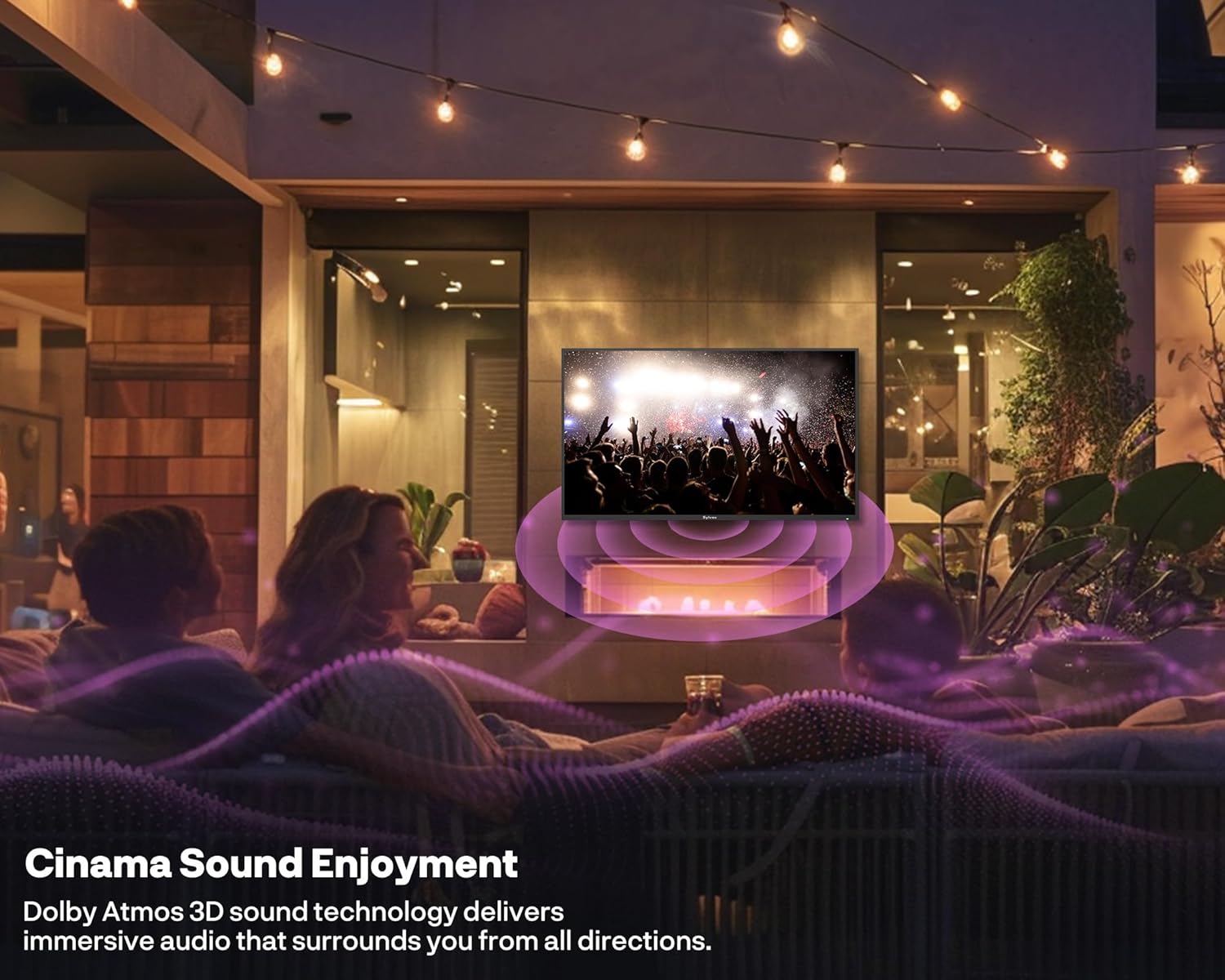
Figure 5.5: An outdoor patio setting with the SYLVOX TV displaying a concert, overlaid with sound waves to represent the immersive Dolby Atmos 3D sound experience that surrounds viewers from all directions.
5.3 Smart TV Features (Google TV)
The SYLVOX Outdoor TV is powered by Google TV, offering a personalized entertainment experience.
- Voice Control: Use voice commands via the remote to search for content, control playback, and manage smart home devices.
- Apps: Access a vast library of streaming apps from the Google Play Store.
- Chromecast Built-in: Cast content directly from your smartphone or tablet to the TV.

Figure 5.6: A couple enjoying video games on the SYLVOX Outdoor TV in a bright outdoor setting, demonstrating the TV's suitability for gaming with its 120Hz refresh rate and HDMI 2.1 connectivity.
6. Maintenance
Proper maintenance ensures the longevity and performance of your outdoor TV.
- Cleaning the Screen: Gently wipe the screen with a soft, lint-free cloth. For stubborn marks, slightly dampen the cloth with water. Do not spray liquid directly onto the screen.
- Cleaning the Body: Use a soft, damp cloth to clean the TV's rust-proof metal body. Avoid abrasive materials or strong chemical cleaners.
- Port Covers: Always ensure all port covers are securely closed when not in use to maintain the IP55 water and dust resistance.
- Environmental Protection: While designed for outdoor use, consider covering the TV during prolonged periods of extreme weather (e.g., heavy storms, blizzards) to extend its lifespan.

Figure 6.1: A close-up image showing water droplets on the frame of the SYLVOX Outdoor TV, visually confirming its IP55 waterproof rating and robust construction against outdoor elements.
7. Troubleshooting
If you encounter issues with your SYLVOX Outdoor TV, refer to the following common problems and solutions:
| Problem | Possible Cause | Solution |
|---|---|---|
| No Power | Power cord not connected; Power outlet issue; Remote control batteries dead. | Ensure power cord is securely plugged in. Test the outlet with another device. Replace remote control batteries. |
| No Picture / Black Screen | Incorrect input source selected; External device not powered on or connected properly. | Press the "Input" or "Source" button on the remote to select the correct input. Check all cable connections and power for external devices. |
| No Sound | Volume muted or too low; External audio system not connected correctly. | Unmute the TV or increase volume. Check audio cable connections to external sound systems. |
| Wi-Fi Connection Issues | Router too far; Incorrect Wi-Fi password; Router malfunction. | Move router closer or use a Wi-Fi extender. Re-enter Wi-Fi password. Restart your router. Consider using a wired Ethernet connection. |
| Remote Control Not Responding | Batteries low or incorrectly inserted; Obstruction between remote and TV. | Replace batteries, ensuring correct polarity. Remove any obstructions. |
If the problem persists after trying these solutions, please contact SYLVOX customer support.
8. Specifications
| Feature | Detail |
|---|---|
| Brand Name | SYLVOX |
| Model | Cinema Pro/2025 |
| Screen Size | 65 Inches |
| Display Technology | Mini LED, QLED |
| Resolution | 4K (3840 x 2160) |
| Refresh Rate | 120 Hz |
| Brightness | 3500-5000 nits (peak) |
| Waterproof Rating | IP55 |
| Audio | Built-In 2×30W Speaker, Dolby Atmos |
| Smart Features | Google TV, Chromecast, Voice Control |
| Connectivity | Bluetooth, Wireless (Wi-Fi), Ethernet, HDMI 2.1 (with eARC), USB 3.0, USB 2.0, Mini AV, SPDIF, RF |
| Product Dimensions (D x W x H) | 3.5" x 57.56" x 33.41" (8.89 x 146.2 x 84.86 cm) |
| Item Weight | 84 pounds (38.1 kg) |
| Country of Origin | China |
| Included Components | User Manual, Remote Control, Warranty Card, Power Cord, Batteries, Screws, Screwdriver |
9. Warranty and Support
SYLVOX stands behind the quality of its products. Your SYLVOX Outdoor TV comes with a 2-year warranty.
For technical assistance, installation advice, or any other inquiries, our dedicated team of TV specialists is ready to assist you 24/7. Please refer to the Warranty Card included in your package for detailed terms and conditions, or visit the official SYLVOX website for contact information.
We are committed to ensuring your outdoor entertainment system performs flawlessly for years to come.


