
1. Product Overview
The Lefant M3 Max is an advanced robot vacuum and mop combo designed for comprehensive floor cleaning. It features powerful suction, self-emptying capabilities, automatic mop washing and drying, and intelligent navigation for a hands-free cleaning experience.
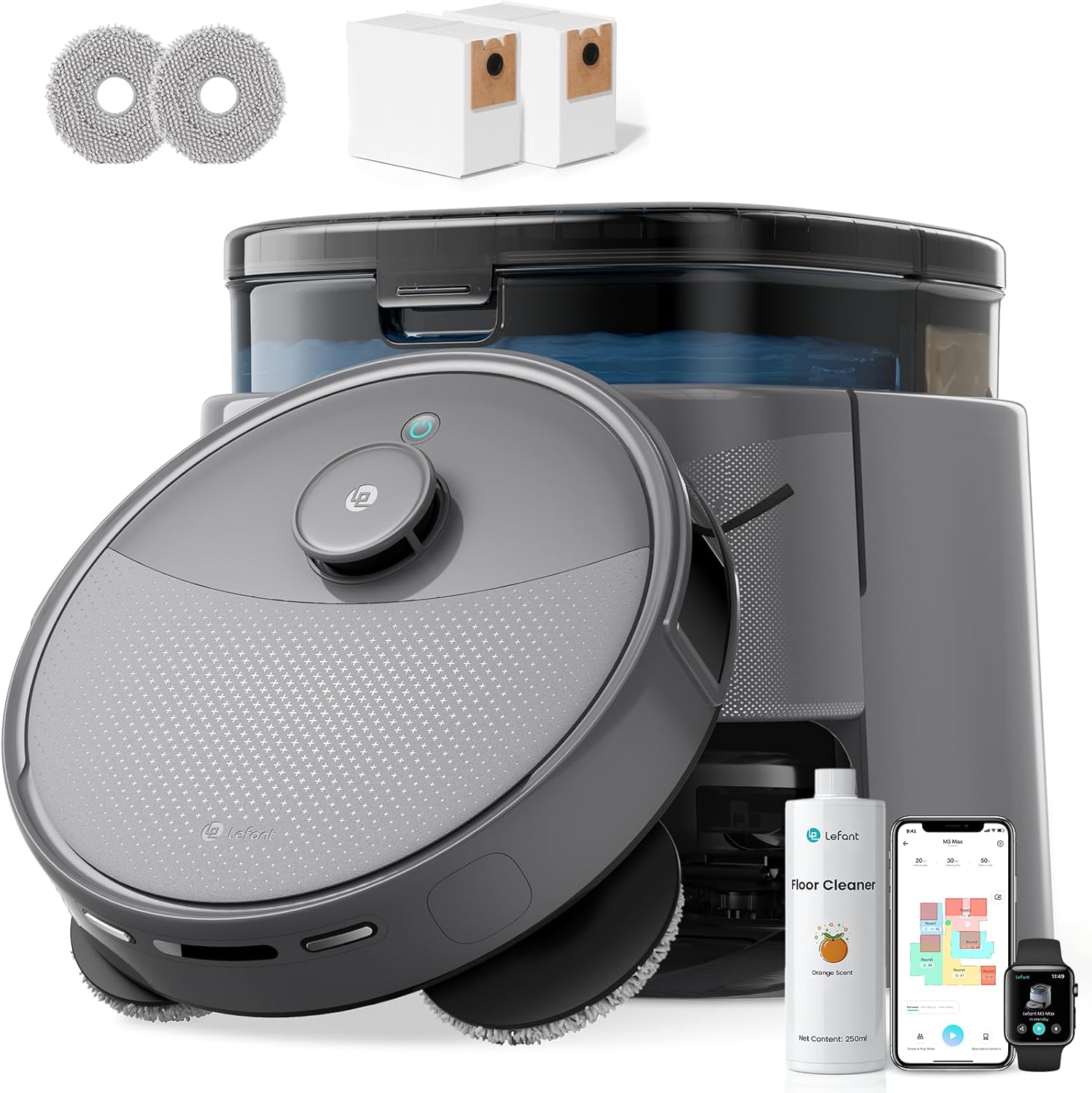
Image: The Lefant M3 Max robot vacuum and mop, alongside its multifunctional docking station, cleaning fluid, and mobile app interface.
What's in the Box?
The following components are included with your Lefant M3 Max:
- Robot Vacuum (1)
- Multifunctional Dock (1)
- Dock Base (1)
- Power Cord (1)
- Dust Bag (2)
- Side Brush (2)
- Washable Mop (4)
- Mop Holder (2)
- HEPA Filter (2)
- Cleaning Fluid (1)
- Cleaning Tool (1)
- User Manual (1)

Image: A visual representation of all items included in the Lefant M3 Max package, such as the robot, dock, brushes, mops, and cleaning tools.
2. Setup
2.1 Docking Station Placement
Place the multifunctional dock on a hard, level surface against a wall. Ensure there is adequate clear space around the dock (at least 0.5 meters on each side and 1.5 meters in front) for the robot to easily return and depart.
2.2 Initial Charging
Connect the power cord to the dock and plug it into a wall outlet. Place the robot onto the charging contacts of the dock. Ensure the robot is properly aligned and charging indicators are active. Fully charge the robot before its first use.
2.3 App Connection and Initial Mapping
The Lefant M3 Max can be controlled via the Lefant App, offering advanced features and customization. It supports Bluetooth 5.0 and dual-band WiFi (2.4GHz/5GHz) for stable connectivity.
- Download the "Lefant App" from your device's app market.
- Add your M3 Max robot vacuum to the app.
- Connect your device to a 2.4GHz/5GHz Wi-Fi network.
- Power on the robot vacuum by pressing the button.
- Press and hold the start button for 6 seconds to enter network configuration mode.
- Select the M3 Max in the app and wait for it to pair successfully.

Image: Instructions for connecting the Lefant M3 Max to the mobile application, showing the app interface and robot pairing steps.
2.4 Voice Assistant Integration (Alexa)
The M3 Max can be controlled using voice commands through Amazon Alexa or Google Assistant.
- Open the "Lefant APP" and navigate to "Mine-Voice third-party access service."
- Record your voice account and password.
- Open the "Alexa APP" and go to "More-Skills & Games."
- Search for "Smart Life."
- Click "Enable To Use."
- Select your region and enter the voice account and password from Step 2.
- Wait for the successful connection.

Image: Instructions for integrating the Lefant M3 Max with Amazon Alexa for voice control, showing the necessary app screens.
2.5 Apple Watch Control
Control your Lefant robot directly from your Apple Watch.
- Download the Lefant App and Watch App on your mobile phone.
- Pair the Watch App with your Apple Watch.
- Select the Lefant App on your Apple Watch.
- You will be prompted to click on the Lefant APP on your iPhone and log in. If connection fails, restart iPhone and open Watch App.
- Once logged in, connect your Lefant robot.
- Return to your Apple Watch; you can now control your robot.

Image: Instructions for controlling the Lefant M3 Max via Apple Watch, illustrating the app and watch interface.
3. Operating Instructions
3.1 Cleaning Modes and Navigation
The M3 Max utilizes advanced LiDAR laser navigation for precise mapping and path planning, ensuring thorough cleaning even in low-light conditions. Freemove Tech 3.0 and 190° PSD (Precision Obstacle Detection) allow it to navigate around furniture, cords, and other obstacles, preventing collisions and getting stuck.
- Vac+Mop Combo: Simultaneous vacuuming and mopping for comprehensive cleaning.
- Mop Lift: Automatically lifts the mop pads by 9mm when detecting carpets to prevent wetting.
- Turbo Carpet Mode: Boosts suction power on carpets for deeper cleaning.
- Carpet Avoidance: Prevents the robot from mopping carpeted areas.
- Carpet Priority Cleaning: Prioritizes vacuuming carpets before mopping hard floors.

Image: The Lefant M3 Max navigating a living room, demonstrating its 360° LiDAR navigation for complete coverage and obstacle avoidance.

Image: A comparison illustrating the Lefant M3 Max's precise 190° PSD obstacle detection compared to other robots, highlighting its ability to avoid objects accurately.

Image: The Lefant M3 Max demonstrating its smart carpet protection system, automatically lifting its mop by 9mm and boosting suction when encountering a carpet.
3.2 App Control Features
The Lefant App provides extensive control over your M3 Max:
- Schedule Cleaning: Set specific times for cleaning cycles.
- Do Not Disturb Mode: Define periods when the robot should not operate.
- No-Go Zones: Create virtual boundaries to restrict the robot from certain areas.
- Smart Mapping: View and manage multi-floor layouts (up to 3 levels).
- Targeted Zone Cleaning: Direct the robot to clean specific rooms or areas.
- Tap-to-Clean Anywhere: Initiate cleaning in any mapped location with a tap.
- Room-by-Room Customization: Adjust cleaning settings for individual rooms.

Image: The Lefant App's comprehensive control panel, displaying options for scheduling, no-go zones, smart mapping, and targeted cleaning.

Image: The Lefant M3 Max demonstrating its ability to respect custom no-go zones, avoiding areas designated by the user in the app.
3.3 Suction Power and Mopping
The M3 Max delivers 20,000Pa of suction power, effectively removing pet hair, dust, and debris from various floor types. Its dual spinning mops operate at 200 RPM, providing deep cleaning for tough stains.

Image: The Lefant M3 Max showcasing its powerful 20,000Pa suction, effectively cleaning up pet hair, food, and crumbs.

Image: The Lefant M3 Max utilizing its dual spinning mops at 200 RPM to effectively clean tough stains on a hard floor.
3.4 Battery Life
Equipped with a 5,200mAh battery, the M3 Max provides up to 220 minutes of cleaning time, covering areas up to 2,366 sq.ft (220m²). Charging is 30% faster than previous models.

Image: A visual representation of the Lefant M3 Max's extended cleaning range and runtime, demonstrating its ability to clean large homes efficiently.
4. Maintenance
The M3 Max is designed for minimal manual maintenance thanks to its all-in-one docking station.
4.1 Self-Emptying and Mop Washing Station
The docking station automates several maintenance tasks:
- Self-Emptying: The robot automatically empties collected dust into a large 3.2L dustbag, requiring replacement only once every 8 weeks.
- Auto Mop Washing: Mop pads are washed with 113°F hot water at the station.
- Auto Cool Drying: After washing, the mop pads are dried with cool air to prevent warping and odor.
- Detergent Dispensing: The station features built-in detergent dispensing for lasting freshness.

Image: The Lefant M3 Max's hands-free docking station, illustrating its self-emptying, hot water mop washing, and cool air drying functions.

Image: The Lefant M3 Max docking station demonstrating its 3.2L self-emptying dust bag, designed for up to two months of maintenance-free use.
4.2 Tangle-Free Brush System
The M3 Max features a V-shaped dual-comb brush that actively gathers and cuts through hair, preventing tangles and clogs. This reduces the need for manual brush cleaning, especially for pet owners.

Image: A visual comparison highlighting the Lefant M3 Max's V-shaped dual-comb brush system, designed to prevent hair tangles compared to standard brushes.
4.3 Cleaning the Dock Base
The station's base is designed to be easily removed for quick and convenient cleaning of accumulated debris or dirty water.

Image: A demonstration of the Lefant M3 Max's self-cleaning system, showing how the detachable dock base can be easily removed and cleaned under running water.
4.4 Filter and Mop Pad Replacement
Regularly inspect and replace the HEPA filters and mop pads as needed to maintain optimal cleaning performance. Refer to the Lefant App for notifications on replacement schedules.
5. Troubleshooting
If you encounter issues with your Lefant M3 Max, please refer to the following common troubleshooting steps:
- Robot Not Charging: Ensure the power cord is securely connected to the dock and the wall outlet. Verify that the robot is properly aligned with the charging contacts on the dock.
- Robot Stuck: Clear any obstacles such as loose cables, small toys, or thick rugs from the cleaning path. The M3 Max's obstacle avoidance technology minimizes this, but extreme clutter can still cause issues.
- Poor Cleaning Performance: Check if the dustbin is full and empty it. Ensure mop pads are clean and properly attached. Verify that the side brushes are not tangled with hair or debris.
- App Connectivity Issues: Ensure your Wi-Fi network is stable and the robot is within range. Try restarting your router, the robot, and the Lefant App. Confirm you are connected to a 2.4GHz or 5GHz network as supported.
- Unusual Noises: Inspect the main brush, side brushes, and wheels for any foreign objects that might be causing obstruction.
For specific error codes or persistent issues, consult the detailed troubleshooting section within the Lefant App or contact customer support.
6. Specifications
| Feature | Specification |
|---|---|
| Brand | Lefant |
| Model Name | M3 Max |
| Suction Power | 20,000Pa |
| Battery Life | Up to 220 minutes (5,200mAh) |
| Dustbag Capacity | 3.2L (8 weeks hands-free) |
| Water Tank Capacity | 2.5L |
| Mop Washing Temperature | 113°F (Hot Water) |
| Navigation Technology | Precision LiDAR Laser Navigation (360°, 15m range) |
| Obstacle Avoidance | Freemove Tech 3.0, 190° PSD |
| Connectivity | Bluetooth 5.0, Dual-band Wi-Fi (2.4GHz/5GHz) |
| Control Method | App, Alexa, Google Home, iWatch |
| Product Dimensions | 12.6"L x 12.6"W x 3.74"H |
| Item Weight | 29.3 pounds |
| Filter Type | HEPA Filter |
| UPC | 643985179240 |
7. Warranty and Support
7.1 Warranty Information
For detailed warranty information, please refer to the documentation included with your purchase or contact Lefant customer support. Warranty terms typically cover manufacturing defects and may vary by region.
7.2 Customer Support
Lefant is committed to providing excellent customer service. If you have any questions, concerns, or require assistance with your M3 Max robot vacuum and mop, please contact our dedicated customer support team. You can typically find contact information on the official Lefant website or within the Lefant App.
For additional resources and product information, visit the official Lefant Store.