
1. Product Overview
The DROK LM2596 LED Display Buck Converter is a DC-DC step-down module designed to convert a higher input voltage to a lower, adjustable output voltage. It features an integrated LED display for monitoring input voltage, output voltage, and output current, along with buttons for mode selection and output control. This module is suitable for various electronic projects requiring a stable and adjustable power supply.
Key Features:
- Input Voltage Range: DC 4.0V-32.0V
- Output Voltage Range: DC 1.25V-30.0V (adjustable)
- Maximum Output Current: 3A
- Continuous Operating Current: 1.5A (total output power within 20W)
- Display: LED screen showing input voltage, output voltage, and output current.
- Protection: Input reverse connection protection and short circuit protection.

Figure 1: DROK LM2596 Buck Converter with key dimensions. The module measures approximately 6.0cm (2.4in) in length, 3.4cm (1.34in) in width, and 1.3cm (0.51in) in height.
2. Setup and Wiring
Proper wiring is essential for the safe and correct operation of the buck converter. Refer to the diagram below for connection points.
Wiring Instructions:
- IN+: Connect the positive terminal of your DC input power source.
- IN-: Connect the negative terminal of your DC input power source.
- OUT+: Connect the positive terminal of your load (device to be powered).
- OUT-: Connect the negative terminal of your load.
Important: Ensure the input voltage is at least 2V higher than the desired output voltage for proper step-down conversion.

Figure 2: Component descriptions and wiring terminals. The input positive (IN+) and negative (IN-) terminals are on the left, and output positive (OUT+) and negative (OUT-) terminals are on the right.
3. Operation
Adjusting Output Voltage:
The output voltage is adjusted using the potentiometer located on the module. Use a small screwdriver to turn the screw on top of the potentiometer.
- Turning the screw clockwise will increase the output voltage.
- Turning the screw counter-clockwise will decrease the output voltage.
It is recommended to adjust the voltage while monitoring the output on the LED display or with an external multimeter for precise setting.
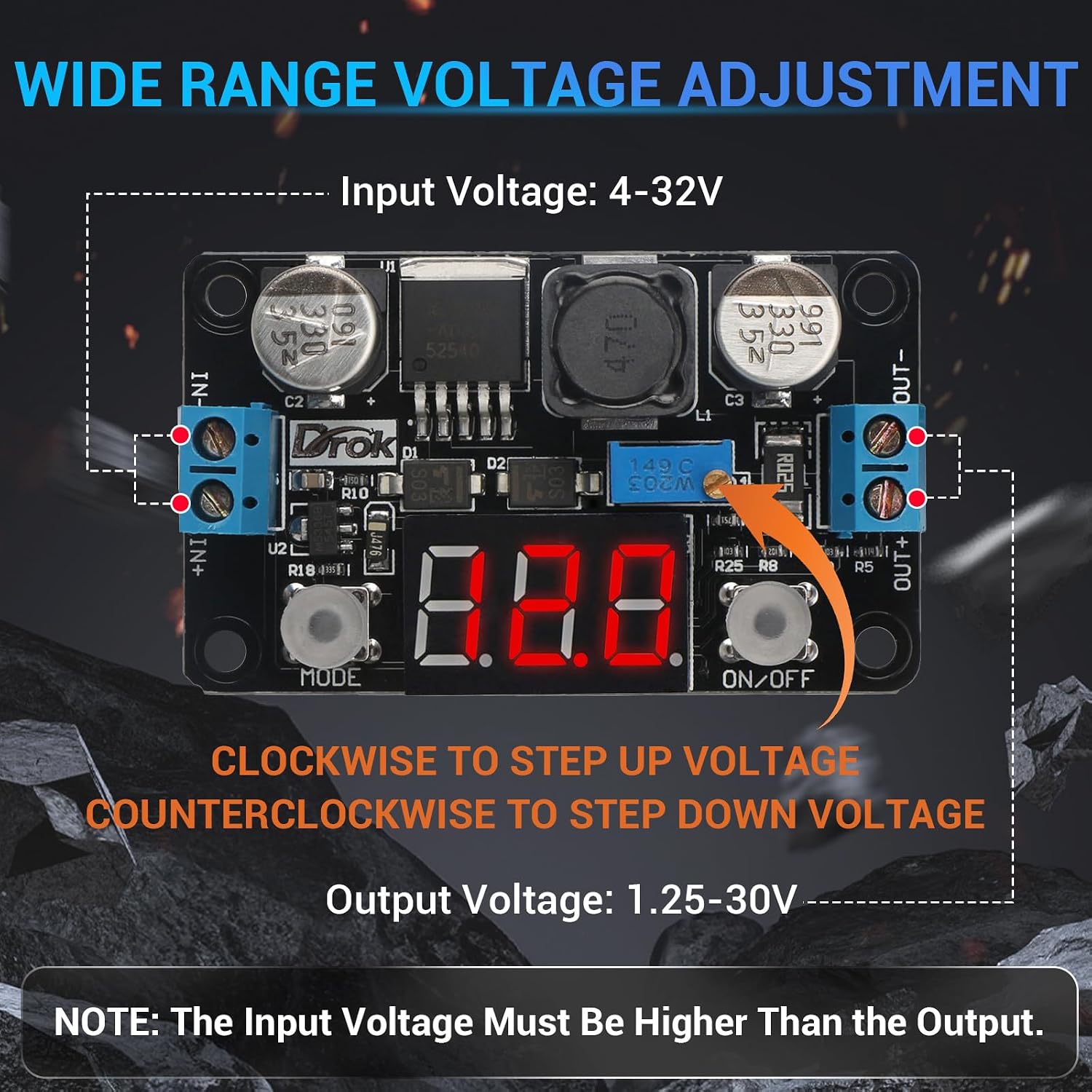
Figure 3: Illustration of the potentiometer for voltage adjustment. Turn clockwise to increase voltage, counter-clockwise to decrease.
Display Mode Button (MODE):
Press the "MODE" button to cycle through the displayed values on the LED screen:
- Output Voltage
- Output Current
- Input Voltage
The module will automatically memorize the last selected display mode.
Output ON/OFF Button:
Press the "ON/OFF" button to alternately turn the output voltage on or off. When the output is off, the display will show "OFF". The module will automatically memorize the last switch status.
4. Specifications
| Parameter | Value |
|---|---|
| Brand | DROK |
| Model Number | 180057_2x |
| Input Voltage Range | DC 4.0V - 32.0V |
| Output Voltage Range | DC 1.25V - 30.0V (Adjustable) |
| Maximum Output Current | 3A |
| Continuous Operating Current | 1.5A (Total output power within 20W) |
| Voltage Measurement Accuracy | ± (1% + 2 digits) |
| Current Measurement Accuracy | ± 2 digits |
| Product Dimensions (L x W x H) | 6.0 x 3.4 x 1.3 cm (2.3 x 1.3 x 0.5 inches) |
| Power Source | DC |
5. Protection Features
The DROK LM2596 Buck Converter includes built-in protection mechanisms to ensure safe operation and protect connected devices:
- Input Reverse Connection Protection: Prevents damage to the module if the input power source polarity is accidentally reversed.
- Short Circuit Protection: Safeguards the module and connected load from damage in case of an output short circuit.
6. Maintenance
The DROK LM2596 Buck Converter is designed for reliable operation with minimal maintenance. To ensure longevity and optimal performance:
- Keep the module clean and free from dust and debris.
- Ensure adequate ventilation, especially when operating at higher currents, to prevent overheating.
- Avoid exposing the module to moisture or extreme temperatures.
- Regularly check wiring connections to ensure they are secure and free from corrosion.
7. Troubleshooting
| Problem | Possible Cause | Solution |
|---|---|---|
| No display or output power. |
|
|
| Output voltage is unstable or incorrect. |
|
|
| Module gets excessively hot. |
|
|
8. Warranty Information
This DROK LM2596 LED Display Buck Converter is covered by a 1-Year Manufacturer Warranty from the date of purchase. This warranty covers defects in materials and workmanship under normal use. It does not cover damage caused by misuse, accident, unauthorized modification, or improper installation.
Please retain your proof of purchase for warranty claims.
9. Customer Support
For technical assistance, troubleshooting, or warranty inquiries, please contact DROK customer support through the official DROK store on Amazon or their official website. When contacting support, please provide your product model number (180057_2x) and a detailed description of the issue.
DROK Store Link: Visit the DROK Store


