
GLEAM GKX-88
Contents
GLEAM GKX-88 Keyboard Stand and Bench Set Instruction Manual
Model: GKX-88
Introduction
This manual provides detailed instructions for the assembly, operation, and maintenance of your GLEAM GKX-88 Double X-Style Keyboard Stand and Padded Bench Set. Please read this manual thoroughly before use to ensure proper setup and safe operation.
Safety Information
- Ensure all components are securely fastened before placing an instrument on the stand or sitting on the bench.
- Do not exceed the maximum load capacity of 200 lbs for the keyboard stand. For optimal performance, a recommended load of 100 lbs is advised.
- Keep fingers clear of moving parts during adjustment to prevent pinching.
- Place the stand and bench on a stable, level surface to prevent tipping.
- Regularly inspect the stand and bench for any signs of wear or damage. Discontinue use if damage is found.
Package Contents
Verify that all items listed below are present in your package:
- 1 x GLEAM Double X-Style Keyboard Stand
- 1 x GLEAM Padded Piano Bench
- Assembly Hardware (if applicable, usually pre-assembled for X-style)
Setup Instructions
1. Keyboard Stand Assembly and Initial Setup
The GLEAM Double X-Style Keyboard Stand typically arrives pre-assembled. Unfold the stand carefully, ensuring the X-frame expands smoothly.

Figure 1: Keyboard Stand Dimensions and Height Options. The stand offers 7 height adjustments from 11.8 inches to 38.1 inches, accommodating both seated and standing playing.
Observe the detailed workmanship of the stand, including the foot covers and adjustment knob.

Figure 2: Stand Workmanship Details. This image highlights the quality construction, including the foot covers and the height adjustment knob.
The stand features a robust double X-frame design for enhanced stability, capable of supporting various digital pianos and keyboards.

Figure 3: Dual X-Shaped Frame. This design provides superior stability and a maximum load capacity of 200 lbs.
Ensure the anti-skid sleeves on the feet and the secure straps on the top arms are properly positioned to prevent movement and protect your instrument.

Figure 4: Non-Slip Rubber Sleeves and Secure Straps. These features ensure stability and protect your keyboard from scratches and accidental drops.
2. Piano Bench Assembly and Initial Setup
The piano bench also features an X-style folding design for easy setup and portability. Unfold the bench until it locks into position.

Figure 5: Piano Bench Dimensions. The bench is designed for portability and offers adjustable height settings.
The bench is equipped with 2-inch (5 cm) thickened padding for comfort during extended playing sessions.

Figure 6: Bench Padding Thickness. The GLEAM bench features 2 inches (5 cm) of high-resilience foam padding for superior comfort.
Operation
1. Adjusting Keyboard Stand Height
To adjust the height of the keyboard stand, locate the spring-loaded lock pin mechanism on the side of the X-frame. Pull the pin outwards, then adjust the legs to your desired height. Once the desired height is reached, release the pin, ensuring it securely locks into one of the 7 available holes. The stand offers height options from 12.2 inches to 38.2 inches.

Figure 7: Keyboard Stand Height Adjustment. The stand can be adjusted to 7 different heights, ranging from 12.2 inches to 38.2 inches.
2. Adjusting Piano Bench Height
The piano bench offers 3 adjustable height levels. To change the height, fold the bench slightly to disengage the locking mechanism, then extend or retract the legs to the desired position. Ensure the bench is fully unfolded and locked before use. Available heights range from 14.5 inches to 18.5 inches.
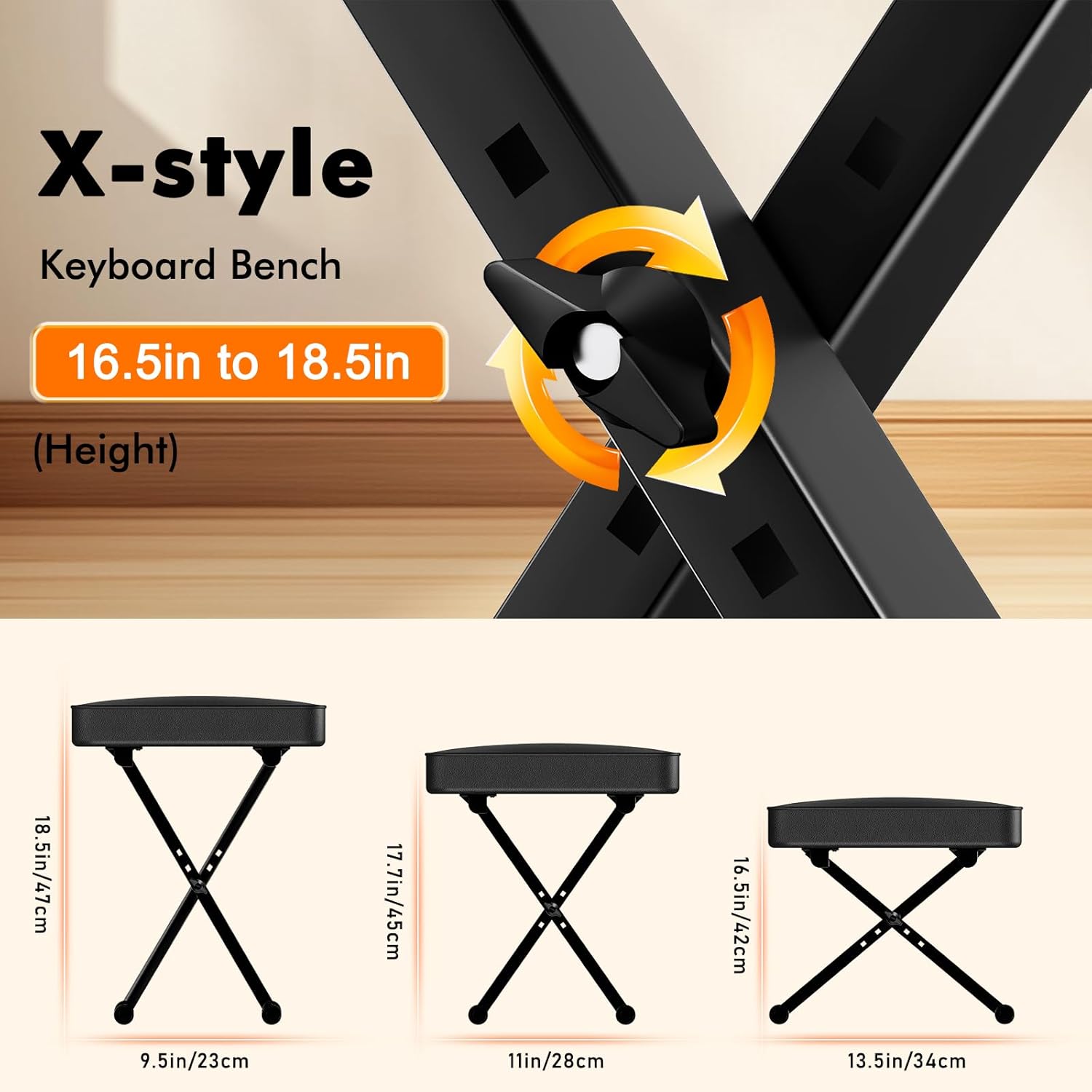
Figure 8: Piano Bench Height Adjustment. The bench can be set to three different heights for user comfort.
Product Overview Video
Video 1: Keyboard Piano Stand and Bench Overview. This video demonstrates the setup and features of the GLEAM keyboard stand and bench set.
Maintenance
- Cleaning: Wipe down the stand and bench with a soft, damp cloth. Avoid abrasive cleaners or solvents that could damage the finish or upholstery.
- Inspection: Periodically check all bolts, screws, and adjustment pins to ensure they are tight and secure.
- Storage: When not in use, the stand and bench can be folded for compact storage. Store in a dry environment away from extreme temperatures.
Troubleshooting
| Problem | Possible Cause | Solution |
|---|---|---|
| Stand/Bench is wobbly | Not fully extended or locked; uneven surface; loose fasteners. | Ensure the adjustment pin is fully engaged. Place on a level surface. Check and tighten all bolts. |
| Difficulty adjusting height | Pin mechanism obstructed or stiff. | Ensure the pin is pulled completely out before attempting to adjust. Apply a small amount of lubricant if stiff. |
| Keyboard slides on stand | Anti-skid sleeves or secure straps not properly used. | Verify that the anti-skid sleeves are on the top arms and the secure straps are attached to your keyboard. |
Specifications
- Model: GKX-88
- Brand: GLEAM
- Material: Alloy Steel
- Color: Black
- Keyboard Stand Height Adjustment: 7 positions, from 12.2 inches to 38.2 inches
- Keyboard Stand Load Capacity: Maximum 200 lbs (Recommended: 100 lbs for optimal performance)
- Piano Bench Height Adjustment: 3 levels, from 14.5 inches to 18.5 inches
- Piano Bench Padding: 2 inches (5 cm) thickened high-resilience foam
- Assembly Required: Yes (minimal, mainly unfolding and adjusting)
Warranty and Support
For warranty information or technical support, please refer to the documentation included with your purchase or visit the official GLEAM website. Contact details for customer service can typically be found on the product packaging or the brand's online support page.
GLEAM Official Website: GLEAM Music & Sports Store on Amazon
Ask a question about this manual
Ask about setup, troubleshooting, compatibility, parts, safety, or missing instructions. Manuals+ will review the question and use this page’s manual context to help answer it.