
Lenovo ideapad 1i
Lenovo IdeaPad 1i Laptop User Manual
Model: IdeaPad 1i (15" Intel)
1. Introduction
This manual provides essential information for setting up, operating, maintaining, and troubleshooting your Lenovo IdeaPad 1i laptop. Please read this guide thoroughly to ensure optimal performance and longevity of your device.

Image: The Lenovo IdeaPad 1i laptop, highlighting its design and efficiency.
The Lenovo IdeaPad 1i is designed for efficiency and mobility, featuring an Intel Celeron N4500 Dual-Core Processor, a 15.6" HD anti-glare display, and Windows 11. It includes a 1-year subscription to Microsoft 365 for enhanced productivity.

Image: An infographic showcasing key features of the Lenovo IdeaPad, such as its Intel Celeron processor, Intel UHD Graphics, Wi-Fi, Dolby Audio, and storage options.
2. Setup
2.1 Unboxing and Initial Inspection
Carefully remove your laptop and all accessories from the packaging. Verify that all components are present.

Image: A visual representation of the items included in the box: the IdeaPad 1i laptop, AC Adapter, Internal Battery, and Quick Start Guide.
What's in the box:
- Lenovo IdeaPad 1i (15" Intel) Laptop
- AC Adapter
- Internal Battery (pre-installed)
- Quick Start Guide
2.2 Powering On and Charging
- Connect the AC adapter to the laptop's power-in port and then to a power outlet.
- Open the laptop lid. The laptop may power on automatically, or you may need to press the power button.
- Allow the battery to charge fully before initial use.
2.3 Initial Windows 11 Setup
Follow the on-screen instructions to complete the Windows 11 setup process. This includes:
- Selecting your region and keyboard layout.
- Connecting to a Wi-Fi network.
- Signing in with or creating a Microsoft account.
- Setting up a PIN for quick login.
2.4 Activating Microsoft 365
Your laptop includes a 1-year Microsoft 365 subscription. To activate:
- Once Windows 11 setup is complete, open any Microsoft 365 application (e.g., Word, Excel).
- Follow the prompts to sign in with your Microsoft account and activate your subscription.

Image: The laptop displaying Microsoft 365 applications, emphasizing the included 1-year subscription and its benefits.
3. Operating Your Laptop
3.1 Keyboard and Touchpad
- The laptop features a full-size, non-backlit US English keyboard with a numeric keypad.
- The touchpad supports multi-touch gestures for navigation. Refer to Windows settings for customization.
3.2 Connecting Peripherals (Ports & Slots)
Your IdeaPad 1i offers various ports for connectivity:

Image: A detailed diagram illustrating the location and type of ports on the Lenovo IdeaPad 1i, including USB, HDMI, USB-C, and an SD card reader.
- USB-A 2.0: For older USB devices.
- USB-A 3.2 Gen 1: For high-speed data transfer with compatible devices.
- USB-C 3.2 Gen 1: Versatile port for data transfer and connecting modern peripherals.
- HDMI: Connect to external displays or projectors.
- SD Card Reader: For reading and writing to SD memory cards.
- Headphone / Mic Combo Jack: For audio input/output.
3.3 Wireless Connectivity
- Wi-Fi 6 (802.11ax): Connect to wireless networks for internet access. Manage Wi-Fi settings through the Windows taskbar or Settings app.
- Bluetooth 5.1: Pair with Bluetooth-enabled devices such as headphones, mice, or keyboards.
3.4 Audio and Webcam
- Audio: Features Stereo speakers with Dolby Audio and a dual-array microphone for clear sound and communication.
- Webcam: An HD 720p webcam with a privacy shutter is integrated for video calls. Ensure the privacy shutter is open when using the camera.
3.5 Productivity and Entertainment

Image: A user working on the Lenovo IdeaPad 1i in a cafe, illustrating its portability and suitability for on-the-go productivity.

Image: The Lenovo IdeaPad 1i displaying a video, with graphics representing sound waves, highlighting its entertainment capabilities.
4. Maintenance
4.1 Cleaning Your Laptop
- Use a soft, lint-free cloth slightly dampened with water or a screen cleaner to clean the display.
- For the keyboard and chassis, use a soft cloth. Avoid harsh chemicals or abrasive materials.
- Regularly clean dust from vents to ensure proper airflow.
4.2 Software Updates
Keep your Windows operating system and drivers updated to ensure security and optimal performance. Windows Update typically handles this automatically, but you can manually check in Windows Settings > Update & Security.
4.3 Storage Management
Your laptop comes with a combination of SSD and eMMC storage, along with 1TB of cloud storage via Microsoft 365. Regularly manage your files to optimize performance:
- Utilize cloud storage for large files or backups.
- Periodically delete unnecessary files and empty the Recycle Bin.
- Consider using Windows' built-in Disk Cleanup tool.
5. Troubleshooting
This section addresses common issues you might encounter with your Lenovo IdeaPad 1i.
5.1 Power Issues
- Laptop not turning on: Ensure the AC adapter is securely connected and the power outlet is functional. Try holding the power button for 10-15 seconds.
- Battery not charging: Check the AC adapter and cable for damage. Ensure the power port on the laptop is clean.
5.2 Display Problems
- No display: Connect an external monitor via HDMI to check if the issue is with the laptop's screen or graphics output.
- Dim screen: Adjust brightness using the function keys (Fn + F5/F6) or through Windows Display settings.
5.3 Connectivity Issues
- Wi-Fi not connecting: Verify your Wi-Fi router is working. Restart the laptop and the router. Check Wi-Fi settings in Windows.
- Bluetooth device not pairing: Ensure the Bluetooth device is in pairing mode and within range. Check Bluetooth settings in Windows.
5.4 General Performance
- Slow performance: Close unnecessary applications. Check for background processes in Task Manager. Ensure sufficient free storage space.
- System freezes: If the system is unresponsive, press and hold the power button until the laptop shuts down, then restart.
6. Specifications
Detailed technical specifications for the Lenovo IdeaPad 1i laptop.
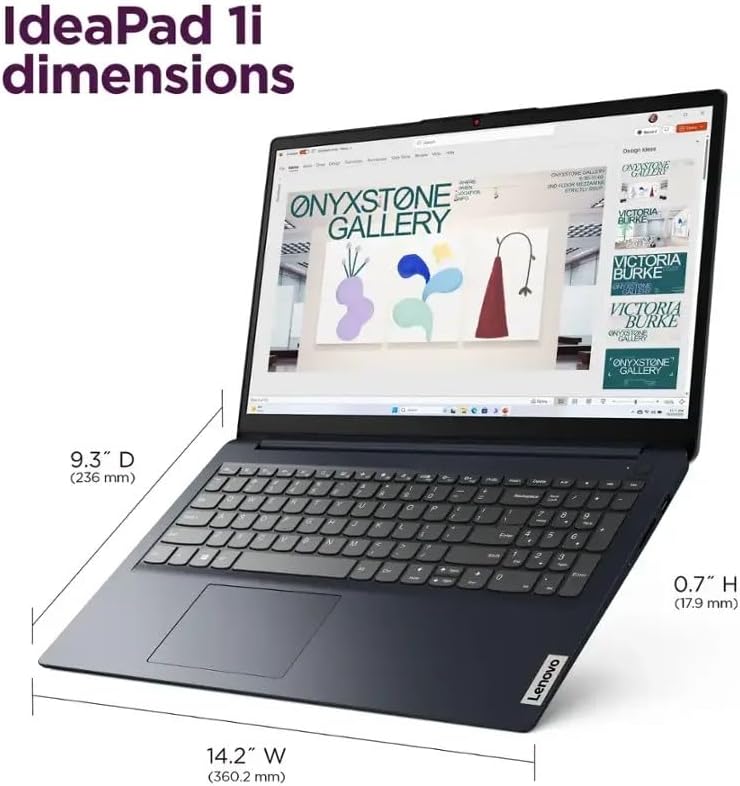
Image: A diagram illustrating the physical dimensions of the IdeaPad 1i laptop.
| Feature | Detail |
|---|---|
| Model Name | IdeaPad 1i |
| Processor | Intel Celeron N4500 (1.1GHz, up to 2.8GHz Dual-Core) |
| Graphics | Intel UHD Graphics |
| Operating System | Windows 11 (64-bit) |
| Display | 15.6" HD (1366x768) Anti-glare, 220 nits |
| RAM | 20GB DDR4 SDRAM |
| Storage | 256GB SSD (Primary) + 128GB eMMC (Secondary) + 1TB Cloud Storage (via Office 365) |
| Wireless | Wi-Fi 6 (802.11ax 2x2), Bluetooth 5.1 |
| Audio | High Definition (HD) Audio, Stereo speakers (1.5W x2), Dolby Audio, Dual-array microphone |
| Keyboard | US English, Non-Backlit Full Size Keyboard with Numeric Keypad |
| Webcam | HD 720p with Privacy Shutter |
| Ports | 1x USB-A 2.0, 1x USB-A 3.2 Gen 1, 1x USB-C 3.2 Gen 1, 1x HDMI, 1x SD Card reader, 1x Headphone / Mic Combo Jack |
| Battery Life | Up to 10 Hours (Average) |
| Color | Abyss Blue |
| Dimensions (LxWxH) | 14.17 x 9.26 x 0.71 inches (360.2 x 236 x 17.9 mm) |
| Weight | 3.5 lbs (1.59 kg) |
7. Warranty and Support
7.1 Product Warranty
Your Lenovo IdeaPad 1i laptop is covered by a standard manufacturer's warranty. The specific terms and duration of the warranty may vary by region and purchase agreement. Please refer to the warranty card included with your product or visit the official Lenovo support website for detailed warranty information.
7.2 Technical Support
For technical assistance, driver downloads, or further troubleshooting not covered in this manual, please contact Lenovo customer support. You can find contact information and support resources on the official Lenovo website:
- Lenovo Support Website: support.lenovo.com
When contacting support, please have your laptop's serial number and model information ready. This can usually be found on a sticker on the bottom of the laptop or within the Windows System Information.