1. Introduction
This manual provides essential instructions for the safe and efficient operation, setup, and maintenance of the ZW9400/ZW9500 Power Supply, ZW9480 Advertising Machine, SLX-S900 Educational Machine, and ZW9550 components. Please read this manual thoroughly before installation and use to ensure proper functionality and to prevent damage.
2. Safety Information
- Electrical Safety: Ensure all power connections are secure and meet the specified voltage requirements. Disconnect power before performing any maintenance or installation.
- Ventilation: Do not obstruct ventilation openings. Adequate airflow is crucial to prevent overheating.
- Environment: Operate the devices in a dry, stable environment, away from direct sunlight, excessive heat, moisture, and corrosive substances.
- Handling: Handle all components with care to avoid physical damage.
- Qualified Personnel: Installation and servicing should only be performed by qualified personnel.
3. Package Contents
Verify that all items are present in the package. If any items are missing or damaged, contact your supplier immediately.
- ZW9400/ZW9500 Power Supply Unit
- ZW9480 Advertising Machine Module
- SLX-S900 Educational Machine Module
- ZW9550 Component
- Power Cables (if applicable)
- Connecting Cables (if applicable)
- User Manual (this document)
4. Product Overview
The system comprises several interconnected modules designed for specific functions. Below is an image of a typical module, likely a power supply or a core processing unit, illustrating the general form factor and mounting points.
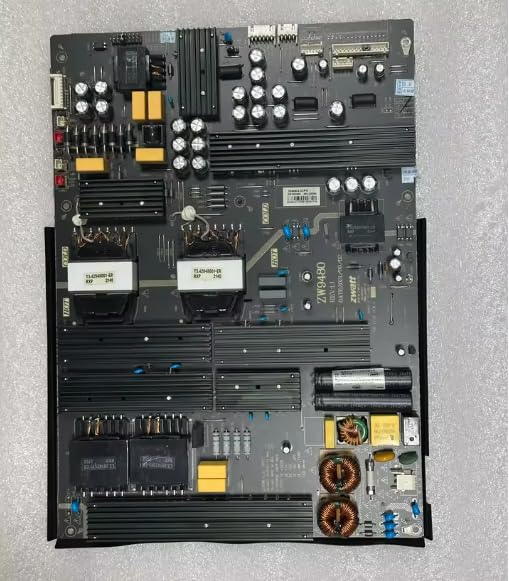
Figure 1: A black rectangular electronic module, possibly the ZW9400/ZW9500 power supply or another core component. It features multiple green-colored screws for mounting or securing internal components, indicating a robust, enclosed design.
4.1 ZW9400/ZW9500 Power Supply
These units provide stable power to the connected advertising and educational machine modules. They are designed for reliable performance within the specified voltage and current ranges.
4.2 ZW9480 Advertising Machine
This module is designed for displaying digital content. It typically connects to a display unit and receives data from a control source. Refer to its specific interface for content loading and management.
4.3 SLX-S900 Educational Machine
The SLX-S900 is an educational module, likely featuring specific interfaces for interactive learning or data processing. Its functionality depends on the software and peripherals connected.
4.4 ZW9550 Component
The ZW9550 acts as an integral component within the system, facilitating communication or specific processing tasks between the other modules. Its exact function is dependent on the overall system configuration.
5. Setup
Follow these steps for initial setup. Ensure all power is disconnected before making any physical connections.
- Mounting: Securely mount the ZW9400/ZW9500 Power Supply, ZW9480 Advertising Machine, SLX-S900 Educational Machine, and ZW9550 components in their designated locations using appropriate fasteners. Ensure adequate space for ventilation.
- Power Connection: Connect the ZW9400/ZW9500 Power Supply to a suitable power source using the provided power cable. Ensure the power supply is switched off.
- Inter-Module Connections: Connect the ZW9480, SLX-S900, and ZW9550 modules to the power supply and to each other using the appropriate data and power cables as per your system diagram. Pay attention to port labels and cable types.
- Peripheral Connections: Connect any necessary peripherals (e.g., display, input devices) to the respective modules.
- Initial Power-Up: Once all connections are secure, switch on the power supply. Observe the indicator lights on each module for proper initialization.
6. Operating Instructions
6.1 Powering On/Off
- To Power On: Ensure all connections are correct, then switch the main power supply to the 'ON' position. Allow modules to initialize.
- To Power Off: Safely shut down any operating software or processes on connected devices first. Then, switch the main power supply to the 'OFF' position.
6.2 ZW9480 Advertising Machine Operation
Refer to the specific software interface for the ZW9480 to upload, schedule, and manage advertising content. Ensure the display unit is properly connected and configured.
6.3 SLX-S900 Educational Machine Operation
The SLX-S900 operates based on the installed educational software or connected peripherals. Follow the instructions provided with the specific educational applications for its use.
7. Maintenance
- Cleaning: Use a soft, dry cloth to clean the exterior surfaces of the modules. Do not use liquid cleaners or solvents. Ensure power is off before cleaning.
- Ventilation: Periodically check that ventilation openings are clear of dust and debris.
- Cable Connections: Regularly inspect all cables for wear or damage. Ensure connections remain secure.
- Firmware Updates: If applicable, check the manufacturer's website for firmware updates for the ZW9480, SLX-S900, and ZW9550 modules to ensure optimal performance and security.
8. Troubleshooting
- No Power:
- Check if the power cable is securely connected to both the power supply and the wall outlet.
- Verify the power outlet is functional.
- Ensure the power supply switch is in the 'ON' position.
- Module Not Responding:
- Check all data and power connections to the specific module.
- Restart the entire system by powering off and then on again.
- Consult the specific module's documentation for further troubleshooting steps.
- Overheating:
- Ensure adequate ventilation around all components.
- Remove any obstructions from air vents.
- Operate in a cooler environment if possible.
9. Specifications
| Feature | Detail |
|---|---|
| Brand | Generic |
| Model Numbers | ZW9400, ZW9500, ZW9480, SLX-S900, ZW9550 |
| ASIN | B0F6M3LRPX |
| Country/Region of Origin | China |
| Number of Items | 1 (referring to the bundle) |
10. Warranty and Support
For warranty information and technical support, please refer to the documentation provided at the time of purchase or contact your vendor. Keep your purchase receipt as proof of purchase.


