
Introduction
The LiftMaster 050ACTBMC is a genuine replacement Bluetooth Enabled Receiver Logic Board Kit. It is crucial to ensure compatibility with your existing garage door opener model and manufacturing year before installation. This board features a yellow learn button for programming accessories.
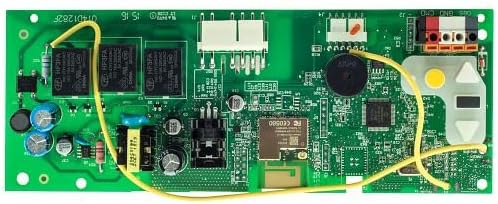
Image: An overhead view of the green circuit board for the LiftMaster 050ACTBMC, showing various electronic components, relays, capacitors, and connectors. A yellow wire is visible across the board, connecting different sections. A yellow learn button is also visible on the right side.
Compatibility
This replacement logic control board is compatible with various LiftMaster and Chamberlain Wi-Fi AC Belt Drive and Chain Drive Garage Door Openers manufactured between 2011 and 2025. It is identified by a yellow learn button. Always consult your garage door opener's existing installation manual or replacement parts diagram to confirm compatibility before proceeding.
Known compatible garage unit models include:
- 81550MC
- 8155WMC
- 81640MC
- 8164WMC
- 81650MC
- 8165WMC
- 8355W
- 83650
- 8365W
- 8557W
This board is also known by previous part numbers: 1D8088-1, 050ACTWFMC, 050ACTWF, 1D8808-3, 041D8088.
Setup and Installation
Installation of a garage door opener logic board involves working with electrical components and mechanical systems. It is highly recommended that installation be performed by a qualified technician. If you choose to proceed yourself, exercise extreme caution and follow all safety guidelines provided in your original garage door opener manual.
Safety Precautions
- ALWAYS disconnect power to the garage door opener before beginning any installation or maintenance.
- Wear appropriate personal protective equipment.
- Refer to your specific garage door opener's manual for detailed wiring diagrams and safety instructions.
General Installation Steps
- Disconnect Power: Unplug the garage door opener from the electrical outlet or turn off the circuit breaker supplying power to the unit.
- Access Control Board: Carefully open the garage door opener's housing to access the existing logic control board.
- Document Connections: Before disconnecting any wires, take clear photos or make a detailed diagram of all existing wire connections to the old board. This is critical for correct re-connection.
- Remove Old Board: Disconnect all wires and mounting screws securing the old logic board. Carefully remove it.
- Install New Board: Position the new LiftMaster 050ACTBMC board in place and secure it with the mounting screws.
- Reconnect Wires: Refer to your documentation (photos/diagrams) and carefully reconnect all wires to the corresponding terminals on the new board. Ensure all connections are secure.
- Close Housing: Securely close the garage door opener's housing.
- Restore Power: Plug the garage door opener back into the electrical outlet or restore power at the circuit breaker.
- Test Operation: Test the garage door opener's basic functions (open, close) using a wall control or remote.
Operation
Once installed, the 050ACTBMC logic board functions as the central control unit for your garage door opener. Its primary user-facing feature is the yellow learn button, used for programming remote controls, keypads, and other accessories.
Programming Accessories (Yellow Learn Button)
To program a new remote control, wireless keypad, or other compatible accessory to your garage door opener:
- Locate the yellow learn button on the 050ACTBMC logic board.
- Press and immediately release the yellow learn button. The learn indicator light will glow steadily for 30 seconds.
- Within 30 seconds, press and hold the button on your remote control or the desired button on your keypad that you wish to operate the garage door.
- Release the button when the garage door opener lights flash or two clicks are heard. This indicates that the accessory has been successfully programmed.
- Test the accessory to ensure it operates the garage door correctly.
For detailed instructions on programming specific accessories or advanced features, refer to the instruction manual provided with your accessory or your main garage door opener manual.
Maintenance
The LiftMaster 050ACTBMC logic control board is designed for reliable operation and generally requires minimal maintenance. However, periodic checks can help ensure its longevity and proper function.
- Visual Inspection: Periodically inspect the board for any signs of dust accumulation, loose connections, or visible damage.
- Cleaning: If necessary, gently clean the board with a soft, dry brush or compressed air to remove dust. Ensure power is disconnected before cleaning.
- Connection Checks: Ensure all wire connections to the board remain secure and free from corrosion.
Avoid using liquids or abrasive cleaners directly on the circuit board.
Troubleshooting
If your garage door opener experiences issues after installing the 050ACTBMC logic board, consider the following general troubleshooting steps. For specific error codes or complex problems, consult your main garage door opener manual or contact LiftMaster customer support.
- No Power: Ensure the garage door opener is plugged in and the circuit breaker is on. Check all power connections to the board.
- Remote Not Working: Re-attempt the programming steps for the yellow learn button. Ensure the remote has fresh batteries.
- Intermittent Operation: Check all wire connections for looseness. Ensure no wires are pinched or damaged.
- Lights Not Flashing/Clicks Not Heard During Programming: Verify you are pressing and releasing the learn button correctly and within the 30-second window.
If issues persist, it may indicate a problem with other components of the garage door opener system or require professional diagnosis.
Specifications
| Feature | Detail |
|---|---|
| Model Number | 050ACTBMC |
| Previous Part Numbers | 1D8088-1, 050ACTWFMC, 050ACTWF, 1D8808-3, 041D8088 |
| Compatibility | LiftMaster and Chamberlain Wi-Fi AC Belt Drive and Chain Drive Garage Door Openers (2011-2025) with yellow learn button. |
| Included Components | Control Board |
| Product Dimensions | 7 x 3 x 1 inches |
| Manufacturer | LiftMaster |
Warranty and Support
The LiftMaster 050ACTBMC is a genuine LiftMaster replacement part. For specific warranty information, please refer to the documentation included with your original garage door opener or contact LiftMaster directly. Using genuine replacement parts ensures optimal performance and maintains product warranty.
For technical assistance, troubleshooting beyond this manual, or to locate authorized service providers, please visit the official LiftMaster website or contact their customer support.
LiftMaster Official Website: www.liftmaster.com


