
Introduction
Thank you for choosing the SACOSDING LG89155 Quartz Watch. This manual provides essential information for the proper setup, operation, and maintenance of your new timepiece. Please read these instructions carefully to ensure optimal performance and longevity of your watch.
Product Overview
The SACOSDING LG89155 is a men's quartz analog watch featuring a durable stainless steel strap, a blue dial, and a robust alloy case. It includes a date display and luminous hands for visibility in low light conditions. The watch is designed with a high-hardness glass mirror for enhanced durability.

Image: The SACOSDING LG89155 Quartz Watch displayed on a man's wrist, showcasing its design and fit.
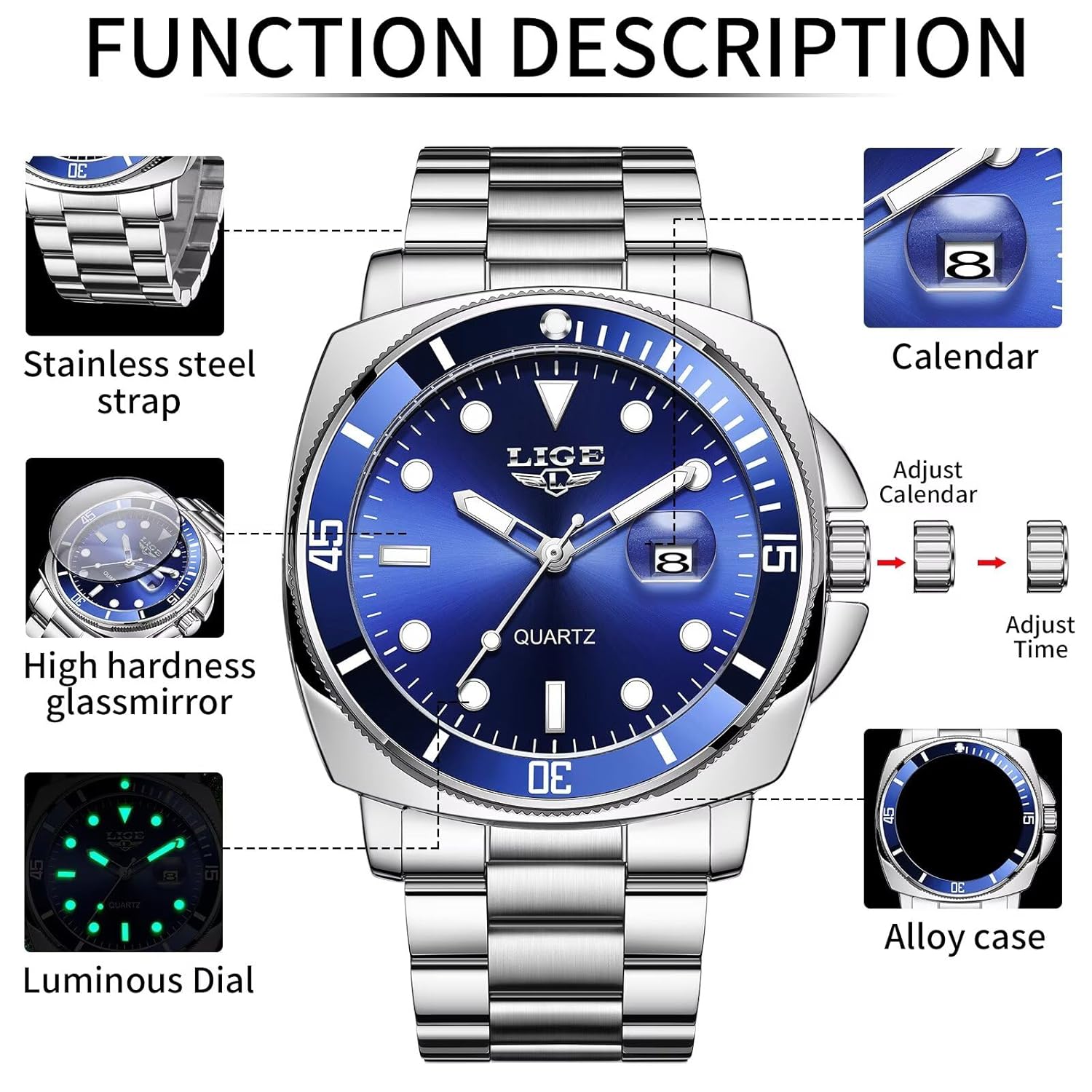
Image: A detailed diagram illustrating the key features of the watch, including the stainless steel strap, high hardness glass mirror, luminous dial, calendar display, time adjustment crown, and alloy case.
Setup
Initial Activation
Upon receiving your watch, locate and remove the small plastic clip (if present) inserted around the crown. This clip prevents battery drain during shipping. Once removed, the watch should begin running.
Adjusting the Strap
The stainless steel strap can be adjusted to fit your wrist. A link removal tool is typically included with the watch for this purpose. Follow these steps to adjust the strap:
- Identify the removable links on the strap. These usually have small arrows indicating the direction to push the pins.
- Place the strap in the link removal tool, aligning the pin of the tool with the pin of the watch link.
- Carefully push the pin out in the direction of the arrow.
- Remove the desired number of links.
- Reassemble the strap by inserting the pins back into the links in the opposite direction. Ensure pins are fully seated.
If you are unsure, it is recommended to seek assistance from a professional jeweler for strap adjustment.
Operating Instructions
Your SACOSDING LG89155 watch features a single crown for setting the time and date.
Setting the Time
- Pull the crown out to position 2 (the outermost position).
- Turn the crown clockwise or counter-clockwise to move the hands and set the correct time.
- Once the time is set, push the crown back into position 0 (normal operating position) to start the watch movement.
Setting the Date
- Pull the crown out to position 1 (the first click).
- Turn the crown to adjust the date. Avoid setting the date between 9 PM and 3 AM, as this can interfere with the automatic date change mechanism.
- Once the date is set, push the crown back into position 0.

Image: The watch submerged in water droplets, highlighting its 3ATM water resistance feature.
Water Resistance
This watch is rated for 3 ATM (30 meters) water resistance. This means it is suitable for daily use and can withstand splashes, rain, or brief immersion in water. It is not suitable for swimming, showering, diving, or any activities involving prolonged water exposure or high-pressure water jets. Avoid operating the crown while the watch is wet.
Maintenance
Cleaning
Wipe the watch case and strap regularly with a soft, dry cloth to remove dust and dirt. For the stainless steel strap, a slightly damp cloth can be used, followed by a dry cloth. Avoid using chemical cleaners, as they may damage the watch's finish or seals.
Battery Replacement
The watch is powered by a standard button cell battery. When the watch stops or the time becomes inaccurate, the battery may need replacement. It is recommended to have the battery replaced by a qualified watch technician to ensure the water resistance seal is properly maintained.
Storage
When not in use, store your watch in a cool, dry place away from direct sunlight and strong magnetic fields. The original watch box provides excellent protection.

Image: The watch's dial glowing in the dark, demonstrating its luminous hands and markers for night visibility.
Troubleshooting
- Watch not running: Ensure the plastic battery clip (if any) has been removed from the crown. If the watch still does not run, the battery may be depleted and require replacement.
- Time is inaccurate: This could indicate a low battery. Replace the battery. Strong magnetic fields can also affect quartz watch accuracy; keep the watch away from magnets.
- Date not changing: Check if the date was set between 9 PM and 3 AM. Adjust the time past 3 AM and then reset the date.
- Bezel is stiff or difficult to turn: The rotating bezel may initially be stiff. To loosen it, firmly grip the watch face in one palm and apply pressure with the other palm against the back, then twist your palms in opposite directions. Repeat a few times. This should help free up the bezel for easier rotation.
Specifications
| Model Name | LG89155 |
| Movement Type | Quartz |
| Display Type | Analog |
| Case Material | Metal Alloy |
| Case Diameter | 42 Millimetres |
| Case Thickness | 12 Millimetres |
| Band Material | Stainless Steel |
| Band Width | 24 Millimetres |
| Dial Colour | Blue |
| Crystal Material | Glass |
| Water Resistance Depth | 30 Metres (3 ATM) |
| Closure Type | Foldover Clasp |
| Item Weight | 220 g |
| Battery | 1 Nonstandard Battery (included) |
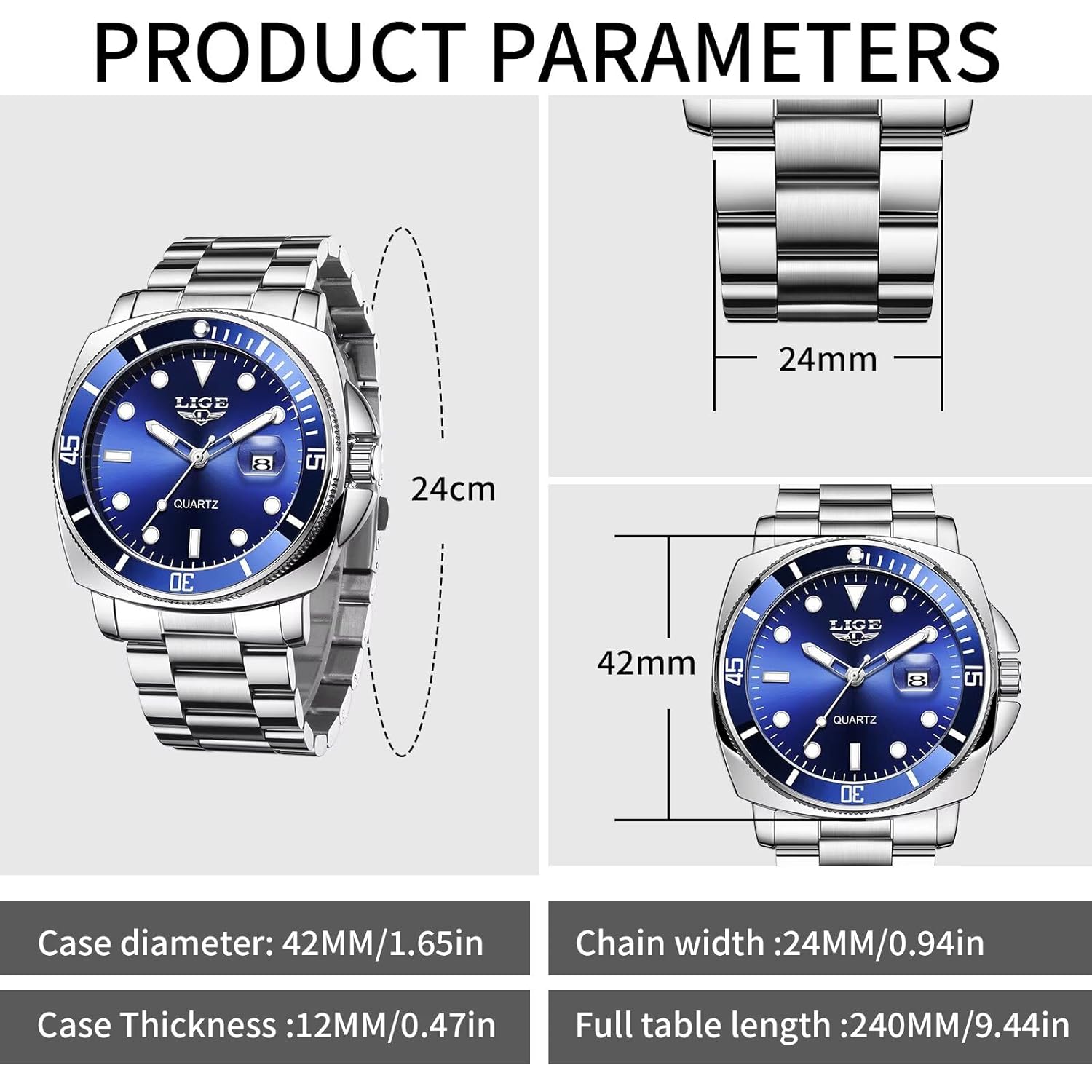
Image: A visual representation of the watch's key dimensions, including case diameter, case thickness, and chain width.
Warranty and Support
For information regarding warranty coverage, returns, or technical support, please refer to the documentation provided at the time of purchase or contact the seller directly. Keep your purchase receipt as proof of purchase.