1. Introduction
This manual provides essential information for the installation, operation, and maintenance of the ScYWdLi RG100 PRO Drone 4PCS Arm Set. This accessory is designed to replace or upgrade the motor arms of your RG100 PRO quadcopter, ensuring optimal flight performance and stability.
2. Compatibility
This 4PCS Arm Set is specifically designed for the RG100 PRO quadcopter model. Ensure your drone is an RG100 PRO model for proper fit and function.
3. Package Contents
- 4 x Motor Arm Assemblies (A1, A2, B1, B2)
- Instruction Manual (this document)
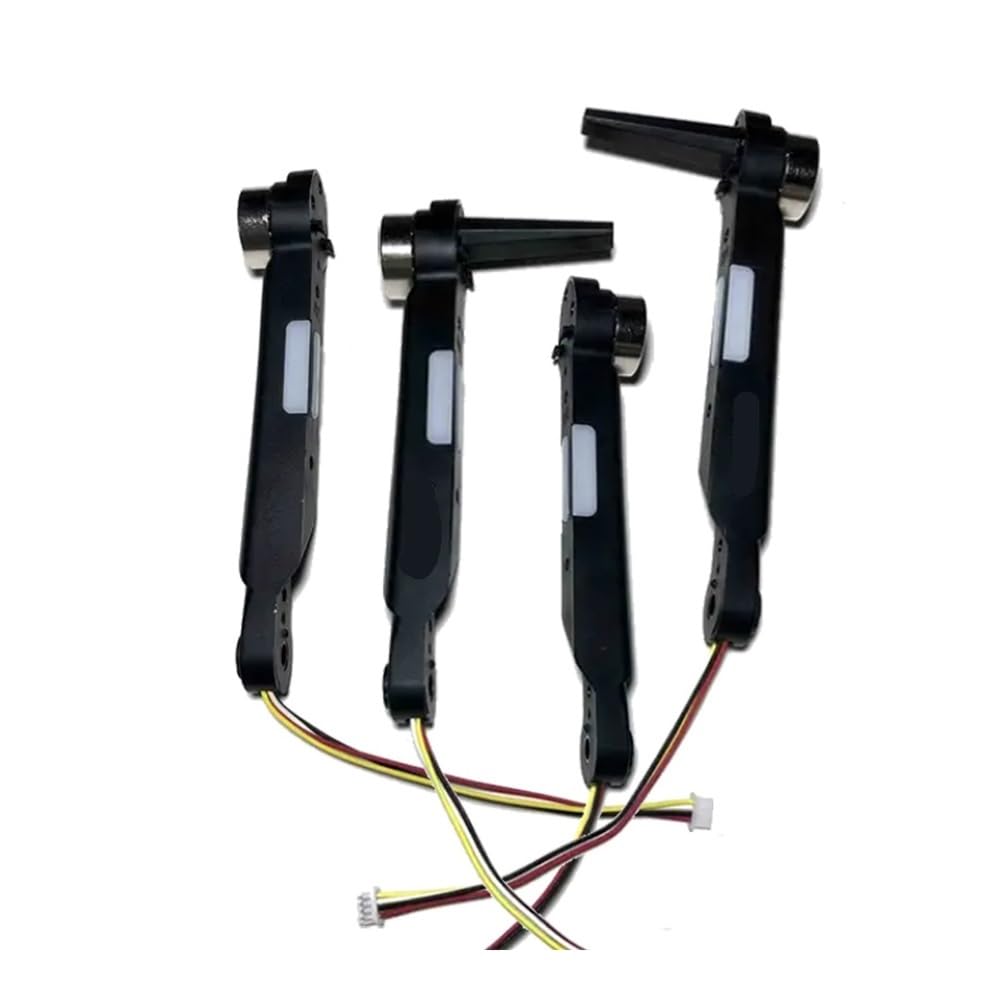
Figure 1: Contents of the 4PCS Arm Set, including the motor arms.
4. Installation Guide
Follow these steps to correctly install the 4PCS Arm Set on your RG100 PRO drone. It is recommended to perform this installation on a clean, flat surface.
- Power Off Drone: Ensure your RG100 PRO drone is completely powered off and the battery is removed before beginning any installation or replacement procedures.
- Identify Arms: The set includes four distinct arm assemblies: Front-Left (A1), Front-Right (A2), Rear-Left (B1), and Rear-Right (B2). Each arm is typically labeled. Match the new arms to their corresponding positions on the drone chassis.
- Remove Old Arm (if replacing): If replacing a damaged arm, carefully disconnect any wiring (if applicable) and unfasten the screws securing the old arm to the drone body. Gently remove the old arm.
- Attach New Arm: Align the new arm assembly with its designated slot on the drone chassis. Ensure all connection points are properly seated.
- Secure Arm: Fasten the new arm using the appropriate screws (typically from the original drone hardware, or included if specified). Do not overtighten.
- Connect Wiring: If the arm requires electrical connection, carefully connect the motor wires to the drone's main board according to the drone's original wiring scheme. Pay attention to polarity if applicable.
- Repeat for all Arms: Repeat the process for all four arm assemblies.
- Final Check: Once all arms are installed, gently test their stability and ensure all connections are secure.
Warning: Improper installation can lead to drone malfunction or damage. If unsure, seek professional assistance.
5. Operating Considerations
Once installed, the new arm set should integrate seamlessly with your RG100 PRO drone's flight system. The maple leaf propeller design is intended to enhance flight stability. Always perform a pre-flight check after any component replacement to ensure all parts are functioning correctly.
- Pre-Flight Check: Before each flight, visually inspect all arms and propellers for any signs of damage or looseness.
- Motor Function: Ensure all motors spin freely and without obstruction.
- Propeller Balance: Check that propellers are securely attached and not bent or chipped.
6. Maintenance
Regular maintenance will extend the lifespan of your drone's arm set and ensure continued optimal performance.
- Cleaning: Periodically clean the arms and motors to remove dust, dirt, and debris. Use a soft, dry cloth. Avoid using harsh chemicals.
- Inspection: After any hard landing or crash, thoroughly inspect the arms for cracks, bends, or other damage. Replace any damaged components immediately.
- Screw Tightness: Occasionally check the tightness of the screws securing the arms to the drone body. Do not overtighten.
7. Troubleshooting
| Problem | Possible Cause | Solution |
|---|---|---|
| Drone unstable after arm replacement | Incorrect arm placement (A1/A2/B1/B2), loose arm, damaged propeller. | Verify each arm is in its correct position. Ensure all screws are tightened. Inspect and replace any damaged propellers. |
| Motor not spinning | Loose wiring connection, motor damage, debris obstructing motor. | Check all motor wire connections. Clean any debris from the motor. If motor is damaged, replace the arm assembly. |
| Unusual noise during flight | Loose propeller, damaged motor bearing, debris in motor. | Ensure propellers are securely fastened. Inspect motors for smooth operation and clear any debris. |
8. Specifications
- Compatibility: RG100 PRO Quadcopter
- Part Type: Motor Arm Set (4PCS)
- Design: Integrated motor and propeller mount
- Material: Reinforced composite
- Package Dimensions: 0.39 x 0.39 x 0.39 inches
- Item Weight: 1.76 ounces (50 Grams)
- Model Number: ScYWdLi190101
- Manufacturer: ScYWdLi
9. Support
For further assistance or inquiries regarding your ScYWdLi RG100 PRO Drone 4PCS Arm Set, please contact your retailer or the manufacturer directly. Keep your purchase receipt and product model number (ScYWdLi190101) handy for faster service.