
Introduction
Thank you for purchasing the TTArtisan 35mm F1.4 Tilt Lens. This manual provides detailed instructions for the proper use, setup, and maintenance of your new lens. The 35mm F1.4 Tilt Lens is a manual focus, large aperture lens designed for APS-C mirrorless cameras, offering unique creative control over the plane of focus and perspective.
This lens allows photographers to manipulate the depth of field and create distinctive visual effects, such as the miniature effect or selective focus, by tilting the optical axis relative to the image sensor. Please read this manual thoroughly to ensure optimal performance and longevity of your lens.
Safety Precautions
- Do not look directly at the sun or other strong light sources through the lens, as this may cause permanent eye damage.
- Keep the lens away from water and moisture to prevent damage to internal components.
- Avoid exposing the lens to extreme temperatures or rapid temperature changes.
- Do not attempt to disassemble or repair the lens yourself. Contact authorized service personnel for assistance.
- Store the lens in a dry, dust-free environment when not in use.
Package Contents
Verify that all items are present in your package:
- 1 x TTArtisan Tilt APS-C 35mm F1.4 Lens
- 1 x Front Lens Cap
- 1 x Rear Lens Cap
- 1 x Box
- 1 x User Manual
- 1 x Card
Product Overview
The TTArtisan 35mm F1.4 Tilt Lens features a robust metal construction and intuitive controls for both standard and tilt photography.
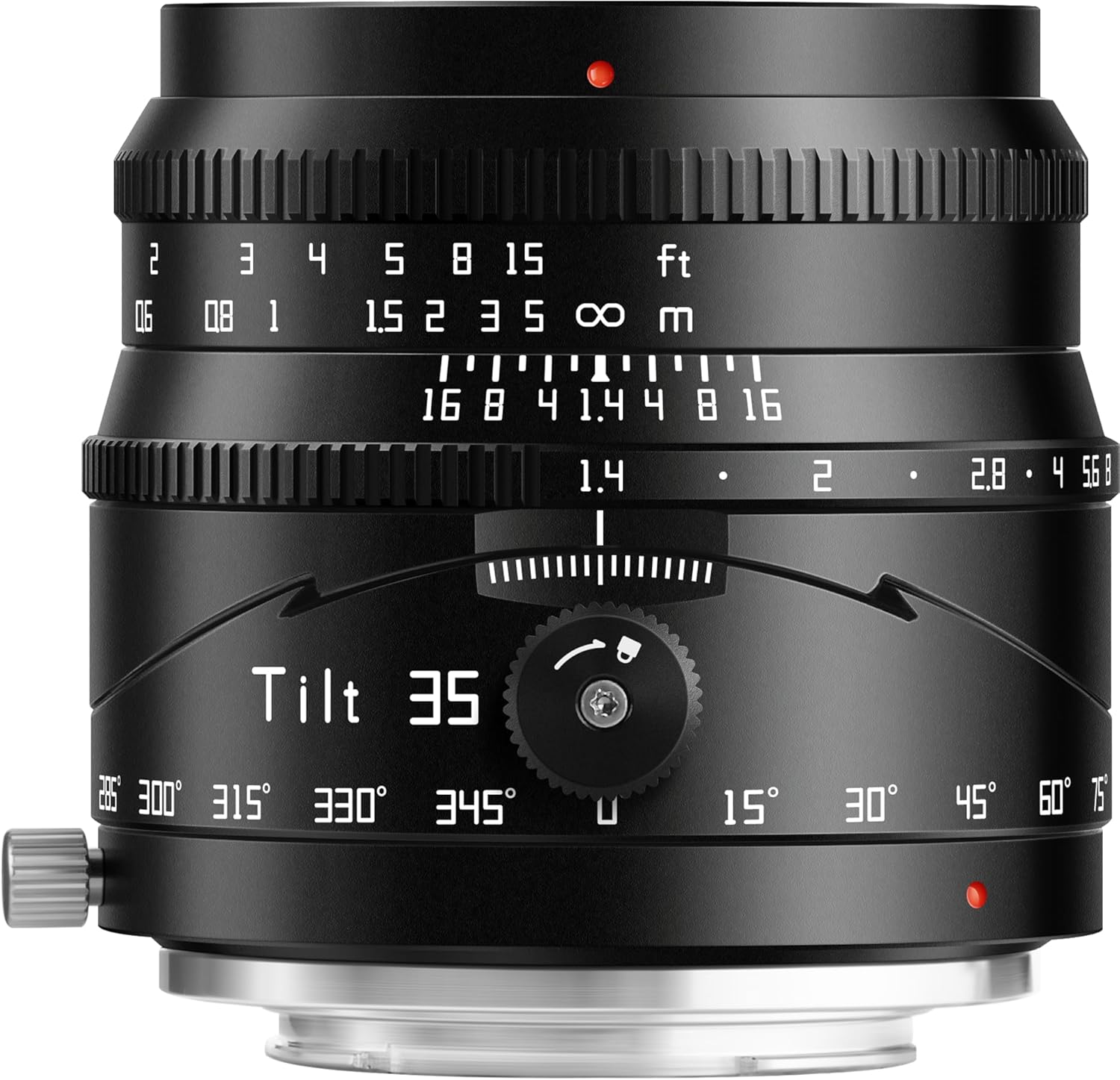
Figure 1: The TTArtisan 35mm F1.4 Tilt Lens in its standard, non-tilted configuration. Visible are the focus ring, aperture ring, and the tilt mechanism lock.

Figure 2: The TTArtisan 35mm F1.4 Tilt Lens with the front element tilted, illustrating the lens's primary feature for creative focus control.

Figure 3: Detailed view of the lens controls, highlighting the focus and aperture rings, as well as the tilt and rotation mechanisms with their respective markings.
Key Components:
- Focus Ring: Used for manual focusing.
- Aperture Ring: Adjusts the lens aperture (F1.4 to F16). This lens features a clickless aperture for smooth adjustments, particularly useful for video.
- Tilt Mechanism: Allows the front lens group to tilt up to 8° left or right, altering the plane of focus.
- Tilt Lock Knob: Secures the tilt mechanism in place once the desired angle is set.
- Rotation Mechanism: Enables 360° rotation of the tilt mechanism, providing flexibility in directing the focus plane.
Setup and Installation
Attaching the Lens
- Align the red dot on the lens barrel with the corresponding mark on your Fuji X-Mount camera body.
- Gently insert the lens into the camera mount.
- Rotate the lens clockwise until it clicks into place, indicating it is securely locked.

Figure 4: The TTArtisan 35mm F1.4 Tilt Lens correctly mounted onto a compatible mirrorless camera body.
Camera Settings
Since this is a manual lens with no electronic contacts, you may need to adjust your camera settings:
- Enable 'Shoot Without Lens': Many mirrorless cameras require this setting to be enabled to operate without an electronically connected lens. Refer to your camera's manual for specific instructions on how to find and activate this option.
- Set to Manual Focus (MF): Ensure your camera is set to manual focus mode. You will use the lens's focus ring to achieve sharp focus.
Operating the TTArtisan 35mm F1.4 Tilt Lens
Manual Focus
Rotate the focus ring on the lens barrel to adjust the focus. Utilize your camera's focus peaking or magnification features for precise manual focusing.
Aperture Control
The aperture ring allows you to set the desired aperture from F1.4 to F16. The F1.4 large aperture is ideal for low-light conditions and creating shallow depth of field with pleasing bokeh.

Figure 5: An example of a night scene captured with the F1.4 aperture, showcasing the lens's ability to produce smooth background blur (bokeh).
Understanding the Tilt Function
The tilt function allows you to pivot the lens's optical axis relative to the camera's sensor. This changes the plane of focus, enabling creative effects not possible with standard lenses.

Figure 6: Comparison of focus planes. With Tilt: The focus area can be angled, allowing sharp focus on diagonally positioned subjects. Without Tilt: The focus area remains parallel to the sensor, limiting selective focus on angled subjects.
By tilting the lens, you can achieve sharp focus on subjects that are not parallel to the camera's sensor, or create a narrow band of focus across the image while blurring the rest.

Figure 7: Examples of portraits using the tilt function to control the focus plane, resulting in artistic selective blur effects.
Rotating the Lens
The lens features a 360° rotation mechanism. This allows you to orient the tilt effect in any direction (horizontal, vertical, or diagonal) relative to your camera's sensor, providing maximum creative flexibility.
Creating the Miniature Effect
One popular application of the tilt function is to create a 'miniature' or 'diorama' effect. By tilting the lens, you can simulate the shallow depth of field typically seen in close-up photography of small objects, making real-world scenes appear like tiny models.

Figure 8: An urban landscape transformed into a miniature scene using the tilt function of the lens.
Vignetting Notice
When the lens is tilted, vignetting (darkening of the image corners) on one side may become more pronounced. This is a common characteristic of tilt lenses and is part of their optical behavior. It can sometimes be used creatively or corrected in post-processing if desired.

Figure 9: Illustration of vignetting. The image on the left shows no tilt. The middle and right images show increased vignetting when the lens is tilted to the right and left, respectively.
Maintenance and Care
- Cleaning the Lens: Use a soft, lint-free cloth or a lens brush to remove dust from the lens surfaces. For smudges or fingerprints, use a specialized lens cleaning solution and a microfiber cloth. Apply the solution to the cloth, not directly to the lens.
- Cleaning the Lens Body: Wipe the lens body with a soft, dry cloth. Do not use organic solvents like thinner or benzene.
- Storage: When not in use, attach both the front and rear lens caps. Store the lens in a cool, dry, and well-ventilated place, away from direct sunlight and chemicals. Consider using a desiccant to prevent mold growth in humid environments.
- Avoid Impact: Protect the lens from drops or strong impacts, which can damage the optical elements or mechanical components.
Troubleshooting
- Camera not recognizing the lens: Ensure your camera's 'Shoot Without Lens' setting is enabled. This is a common requirement for manual lenses without electronic contacts.
- Difficulty achieving sharp focus: This is a manual focus lens. Practice using your camera's focus peaking or magnification assist features. Ensure the aperture is not too wide if you are struggling with depth of field.
- Lens feels loose on the camera mount: Double-check that the lens is fully rotated and locked into place. If the issue persists, ensure the lens mount and camera mount are clean and free of debris.
- Unwanted vignetting: Vignetting is a natural characteristic of tilt lenses, especially at extreme tilt angles. If it is excessive, try reducing the tilt angle or adjusting in post-processing.
Technical Specifications
| Feature | Specification |
|---|---|
| Focal Length | 35mm |
| Maximum Aperture | F1.4 |
| Minimum Aperture | F16 |
| Closest Focus Distance | 0.35m |
| Diaphragm Blades | 10pcs |
| Frame | APS-C |
| Focus Method | Manual Focus (MF) |
| Angle of View | 45° |
| Tilt Angle | 8° |
| Rotation Angle | 360° |
| Optical Design | 7 Elements in 6 Groups |
| Mount | Fuji X-Mount (E/X/Z/RF/M43 variants available) |
| Filter Size | 52mm |
| Weight | Approx. 341-350g (1.08 pounds) |
| Product Dimensions | 2.6 x 2.6 x 2.6 inches |
Compatible Fuji X-Mount Cameras
This lens is compatible with Fuji X-Mount mirrorless cameras, including but not limited to:
- X-A1, X-A10, X-A2, X-A3, X-A5, X-A7
- X-T1, X-T10, X-T2, X-T20, X-T3, X-T30, X-T30II, X-T4, X-T5, X-T50, X-T100, X-T200
- X-Pro1, X-Pro2, X-Pro3
- X-E1, X-E2, X-E2S, X-E3, X-E4
- X-S10, X-S20
- X-H1, X-H2, X-H2S
Warranty and Support
TTARTISAN products are manufactured to high quality standards. For warranty information, technical support, or service inquiries, please refer to the warranty card included in your package or visit the official TTARTISAN website. Please retain your proof of purchase for warranty claims.
For further assistance, you may contact TTARTISAN customer support through their official channels.

