
Introduction
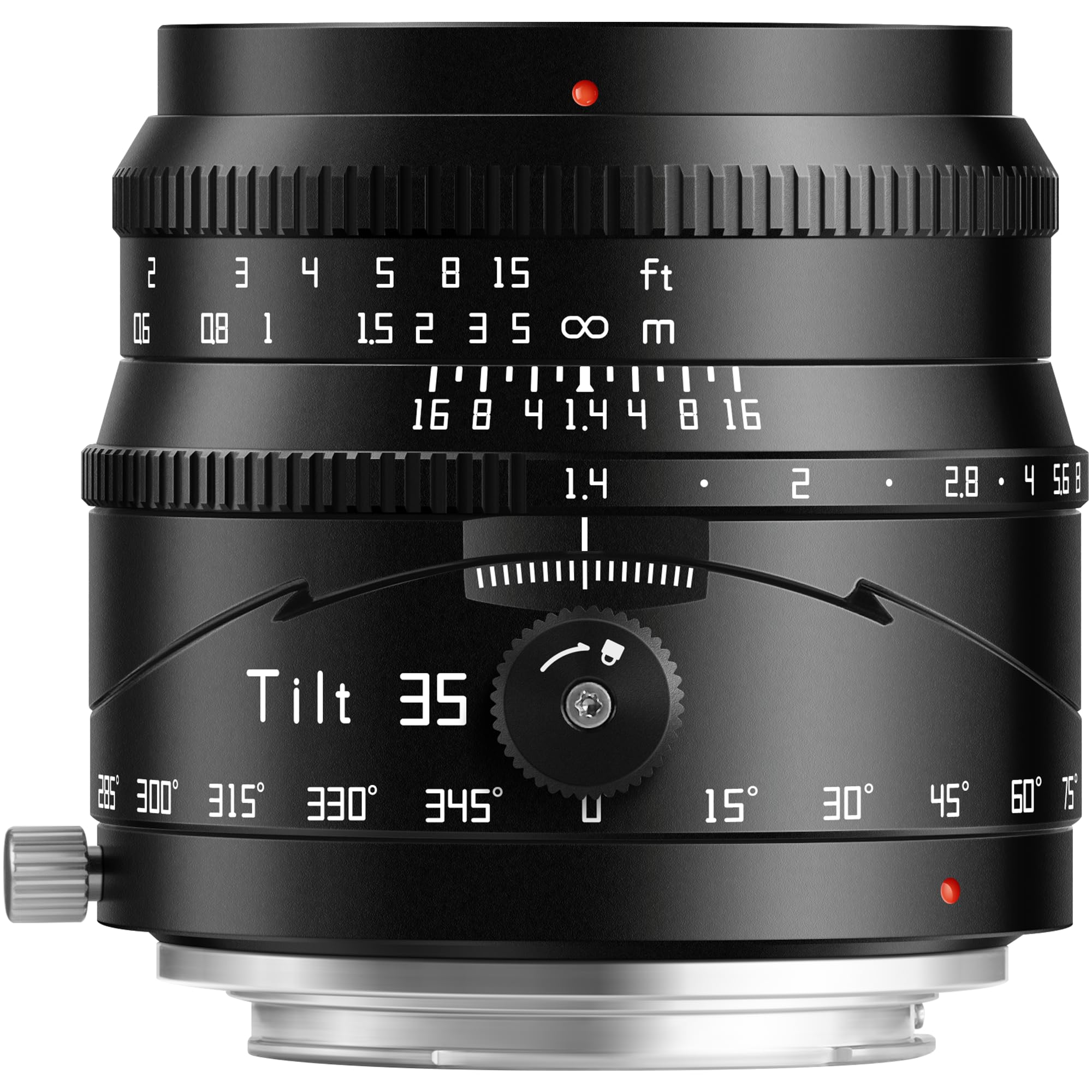
This manual provides detailed instructions for the proper use and care of your TTArtisan 35mm F1.4 Tilt Lens. This manual focus, large aperture APS-C lens is designed for Sony E-Mount mirrorless cameras and features a unique tilt mechanism for creative photographic effects.
Key Features
- Tilt Functionality: Allows for manipulation of the plane of focus, enabling effects such as miniature-look photography and selective focus.
- F1.4 Large Aperture: Provides excellent low-light performance and shallow depth of field for artistic bokeh.
- Manual Focus: Offers precise control over focusing.
- APS-C Format: Optimized for APS-C sensor cameras, but can be used on full-frame cameras in crop mode.
Package Contents
Upon unpacking, please ensure all the following items are included in your package:
- 1 x Tilt APS-C 35mm F1.4 Lens
- 1 x Front Lens Cap
- 1 x Rear Lens Cap
- 1 x Product Box
- 1 x User Manual (this document)
- 1 x Warranty Card

Setup and Installation
Camera Compatibility
This lens is compatible with Sony E-Mount mirrorless cameras, including models such as a7, a7II, a7III, a7R, a7RII, a7RIII, a7RIV, a7S, a7SII, a9, a7C. For full-frame cameras, ensure your camera is set to APS-C crop mode to avoid vignetting.

Attaching the Lens
- Align the red dot on the lens barrel with the corresponding mark on your camera's lens mount.
- Gently insert the lens into the camera mount.
- Rotate the lens clockwise until it clicks into place, indicating it is securely locked.
Detaching the Lens
- Press and hold the lens release button on your camera body.
- Rotate the lens counter-clockwise until it stops.
- Carefully remove the lens from the camera body.
Operating Instructions
Manual Focus
This is a manual focus lens. To focus, rotate the focus ring on the lens barrel until your subject appears sharp in the viewfinder or on the camera's LCD screen. Many mirrorless cameras offer focus peaking or magnification assistance to aid in precise manual focusing.

Aperture Control
The lens features a manual aperture ring. Rotate the aperture ring to select your desired f-stop (from F1.4 to F16). The F1.4 large aperture is ideal for low-light conditions and creating shallow depth of field with smooth bokeh.

Using the Tilt Function
The tilt mechanism allows you to adjust the angle of the lens relative to the camera sensor, altering the plane of focus.
- Adjusting Tilt Angle: Loosen the thumb screw on the tilt section of the lens. Gently tilt the front lens group up to 8 degrees left or right. Tighten the thumb screw to secure the desired tilt angle.
- Rotating the Tilt Mechanism: The tilt mechanism can be rotated 360 degrees, allowing you to apply the tilt effect in any direction.

Creative Effects with Tilt
Miniature Effect
By tilting the lens, you can create a shallow depth of field that makes real-world scenes appear like miniature models. This effect is often achieved by tilting the lens to create a narrow band of focus.

Selective Focus
The tilt function allows you to keep specific areas of your subject in sharp focus while blurring others, even if they are on the same focal plane. This provides greater control over artistic composition.


Vignetting Notice
When using the tilt function, especially at wider apertures, you may observe increased vignetting on one side of the image. This is a characteristic of tilt lenses and is considered normal. It can often be corrected in post-processing if desired.

Maintenance and Care
- Keep the lens caps on when not in use to protect the front and rear elements from dust and scratches.
- Use a soft, clean microfiber cloth specifically designed for optics to gently wipe dust or smudges from the lens surfaces. Avoid harsh chemicals or abrasive materials.
- Store the lens in a dry, cool place, away from direct sunlight, high humidity, and extreme temperatures.
- Avoid touching the glass elements directly with your fingers, as oils and dirt can leave marks.
- When cleaning the lens body, use a slightly damp cloth and then dry thoroughly with a clean, soft cloth.
Troubleshooting
Image is blurry or out of focus.
- Ensure the lens is properly mounted and locked onto the camera body.
- Verify that your camera's focus mode is set to manual focus (MF).
- Use your camera's focus peaking or magnification features to assist with precise manual focusing.
- Check that the tilt mechanism is securely locked if you are not intentionally using a tilt effect.
Dark corners or edges (vignetting) appear in images.
- If using a full-frame camera, ensure it is set to APS-C crop mode. This lens is designed for APS-C sensors.
- Vignetting can be a natural characteristic when using the tilt function, especially at wider apertures. This can often be corrected in post-processing software.
Lens feels loose on the camera body.
- Re-attach the lens, ensuring it is rotated clockwise until it clicks firmly into place.
- If the issue persists, inspect the lens mount and camera mount for any obstructions or damage.
Specifications
| Feature | Detail |
|---|---|
| Focal Length | 35mm |
| Maximum Aperture | F1.4 |
| Minimum Aperture | F16 |
| Frame | APS-C |
| Focus Method | Manual Focus (MF) |
| Angle of View | 45 Degrees |
| Tilt Angle | 8 Degrees |
| Rotation Angle | 360 Degrees |
| Optical Design | 7 Elements in 6 Groups |
| Mount | Sony E |
| Filter Size | 52 Millimeters |
| Closest Focus Distance | 0.35m |
| Diaphragm Blades | 10pcs |
| Weight | Around 341-350g |

Warranty Information
The TTArtisan 35mm F1.4 Tilt Lens comes with a 1-year manufacturer's warranty. This warranty covers defects in materials and workmanship under normal use. Please retain your proof of purchase for warranty claims. For specific terms and conditions, refer to the warranty card included in your package or contact TTArtisan customer support.
Support
For further assistance, technical support, or service inquiries, please visit the official TTArtisan website or contact their customer service department.
Official TTArtisan Store: Visit Store