
Introduction
This manual provides detailed instructions for the installation, operation, and maintenance of your JOYING JY-UTD13N8-MR 13.3-inch Double Din Car Stereo. Please read this manual thoroughly before using the product to ensure proper function and to prevent damage.
What's in the Box
The package for your JOYING JY-UTD13N8-MR 13.3-inch Double Din Car Stereo includes the following components:
- 13.3" radio unit
- Double Din Cage
- Left & Right Bracket
- Reinforced Shims
- Installation Manual
- WiFi Antenna
- GPS Antenna
- 4G Antenna (x2)
- External Microphone
- USB Cable (x2)
- AR Cable
- Screen Ribbon Cable
- ISO Cable
- User Manual

Image: Components included in the JOYING car stereo package, showing the main unit, mounting cage, brackets, and various connection cables and antennas.
Setup and Installation
Installation of the JOYING car stereo requires careful attention to wiring and mounting. It is recommended that installation be performed by a qualified professional.
General Installation Notes:
- An installation frame kit with an inner size of 178 x 102mm may be required, depending on your vehicle.
- A special ISO harness, amplifier adapter, or CANbus decoder might be necessary based on your car's specific configuration.
- This unit does not support factory car GPS antennas, backup rear cameras, Bluetooth, USB, or microphones. Only JOYING accessories are supported for these functions.

Image: Rear panel of the car stereo, illustrating the various ports for power, audio output, USB, HDMI, and antenna connections.
Operating Instructions
Fast Boot Feature
After the initial startup (which takes approximately 30-40 seconds), the unit will boot up and enter the user interface within 2 seconds when the car key is turned on.
Manual Screen Rotation
The 13.3-inch display supports manual rotation, allowing you to adjust the screen orientation for optimal viewing. The screen can be rotated 90 degrees to switch between landscape and portrait modes.

Image: Illustration demonstrating the manual 90-degree rotation of the car stereo display, allowing for both horizontal and vertical screen orientations.
High-Quality Sound Output
The unit features a TDA7851 DSP chip and a 48-band graphic equalizer, providing a maximum output power of 4x50W. It supports aftermarket amplifiers with 4 audio outputs, 1 SUB output, Fiber Optical Output, SPDIF Coaxial Output, and Center Channel Output for enhanced sound quality.

Image: Visual representation of the car stereo's audio capabilities, highlighting the DSP chip, 48-band equalizer, and multiple audio outputs for connecting external amplifiers and speakers.
Split-screen Multitasking
The split-screen function allows you to run two applications simultaneously on the display. To activate, tap the recent apps icon, find the desired app, click the split-screen icon, and then select a second app from recent applications.

Image: Step-by-step visual guide on how to use the split-screen multitasking feature, displaying a navigation app and a video player side-by-side.
HDMI Output
The unit includes an HDMI output port, enabling the display of uncompressed audio and video signals to external screens such as headrest monitors. This allows passengers to watch movies while the driver uses the main screen for navigation. The HDMI cable is not included.

Image: Illustration of the HDMI output feature, showing the main unit connected to rear-seat monitors, allowing for synchronized video output.
Built-in 4G Module
Insert a SIM card into the dedicated slot for internet access. This module supports FDD-LTE (B2/B4/B5/B7/B12/B13/B14/B17/B25/B26/B38/B66/B71) and TDD-LTE (B41) bands. Note that it does not support phone calls or SMS messaging.
GPS Navigation
The stereo includes precise GPS engines and an antenna for accurate positioning and faster real-time navigation. It supports offline maps; you can download and save Google offline map data for use in areas without internet connectivity. Mobile phone map data can also be synchronized via CarPlay or Android Auto.
Built-in CarPlay & Android Auto
Connect your smartphone via USB cable or Bluetooth to utilize CarPlay or Android Auto. This allows you to access your phone's navigation, make calls, and listen to music directly from the car stereo's larger screen.

Image: Depiction of the Apple CarPlay and Android Auto interfaces as they appear on the car stereo, showing app integration and phone mirroring capabilities.
Steering Wheel Control
The unit supports steering wheel controls, allowing for easy switching of songs, radio channels, and volume adjustment. For vehicles with a CAN system, an additional CANbus cable may be required to enable this feature.

Image: An in-car view of the stereo display alongside a steering wheel, indicating compatibility with steering wheel controls for convenient operation.
Personalized Settings
Customize your car stereo experience with personalized settings, including changeable car boot logos, customizable wallpapers, adjustable screen brightness, and changeable button colors.

Image: Examples of the personalized settings available on the car stereo, such as custom boot logos, wallpapers, and adjustable button lighting.
Other Features
- AM/FM Radio: Integrated radio tuner for local broadcasts.
- Hands-free Call: Bluetooth connectivity for safe, hands-free phone calls.
- Picture-in-Picture: Display a smaller video window over other applications.
- 3 USB Ports: Multiple USB ports for media playback and device charging.
- Micro SD Card Slot: For additional storage and media.
- 4G SIM Card Slot: For mobile internet connectivity.

Image: A collection of icons and a screenshot illustrating additional features such as fast boot, GPS navigation, AM/FM radio, hands-free calling, picture-in-picture, multiple USB ports, Micro SD card slot, and 4G SIM card slot.
Cooling System
The unit features a dual heat sink design for superior heat dissipation and improved temperature control, enhancing performance stability. A warning value can be set for CPU temperature or radio volume; if exceeded, the fan will automatically activate to prevent overheating.

Image: Internal view of the car stereo highlighting the dual heat sink design and cooling fan, along with a screenshot of the fan control settings.
WiFi Signal
An independent WiFi antenna ensures stable signal quality and provides fast, smooth internet access. It supports 802.11a/b/g/n/AC standards with 2.4GHz/5GHz spectral bands.
Maintenance
To ensure the longevity and optimal performance of your JOYING car stereo, follow these general maintenance guidelines:
- Keep the screen clean using a soft, dry, lint-free cloth. Avoid abrasive cleaners or solvents.
- Ensure proper ventilation around the unit to prevent overheating. Do not block air vents.
- Regularly check cable connections to ensure they are secure.
- Perform software updates as recommended by JOYING to ensure system stability and access to new features.
Troubleshooting
If you encounter issues with your JOYING car stereo, consider the following general troubleshooting steps:
- No Power: Check all power connections and fuses. Ensure the car's ignition is on.
- No Sound: Verify speaker connections, volume levels, and audio output settings. Check if an external amplifier is properly connected and powered.
- Touchscreen Unresponsive: Try restarting the unit. If the issue persists, a factory reset might be necessary (consult the detailed installation manual for instructions).
- GPS Signal Issues: Ensure the GPS antenna is properly installed and has a clear view of the sky.
- 4G/WiFi Connectivity Problems: Check SIM card insertion, signal strength, and network settings. Ensure the WiFi antenna is connected.
For persistent issues or complex problems, please contact JOYING customer support for assistance.
Specifications
| Feature | Description |
|---|---|
| Brand | JOYING |
| Model Number | JY-UTD13N8-MR |
| Screen Size | 13.3 inches |
| Operating System | Android 13 |
| Memory | 8GB RAM + 128GB Storage |
| Connectivity Technology | Bluetooth, Ethernet, HDMI, USB, Wi-Fi, 4G |
| Controller Type | Android, Touch |
| Special Features | DSP, Equalizer, RCA, RDS, Screen Mirroring, Manual Rotation |
| Compatible Devices | Amplifier, Smartphone, Speaker |
| Total HDMI Ports | 1 (Output) |
| Connector Type | Coaxial, Optical |
| Audio Output Mode | Stereo |
| Surround Sound Channel Configuration | 5.1 |
| Video Encoding Support | H264/H265/MP4/AVI/MKV/FLV |
| Number of Channels | 6 |
| Supported Internet Services | Netflix, YouTube |
| Audio Output Type | Optical, RCA, Speakers |
| Wireless Technology | Bluetooth, Wi-Fi |
| Item Weight | 1200 Grams |
| Color | Black |

Image: Visual comparison of the various screen sizes offered by JOYING, including the 13.3-inch model, with their respective dimensions.
Optional Accessories
The following accessories are not included in the standard package but can be ordered separately to enhance your car stereo's functionality:
- OBD2 Scanner: Connects via Bluetooth to retrieve real-time data and trouble codes from your vehicle's computer.
- AR Front Camera: Records the front road automatically while driving.
- AR Rear Camera: Automatically switches to a reverse display when backing up the car.
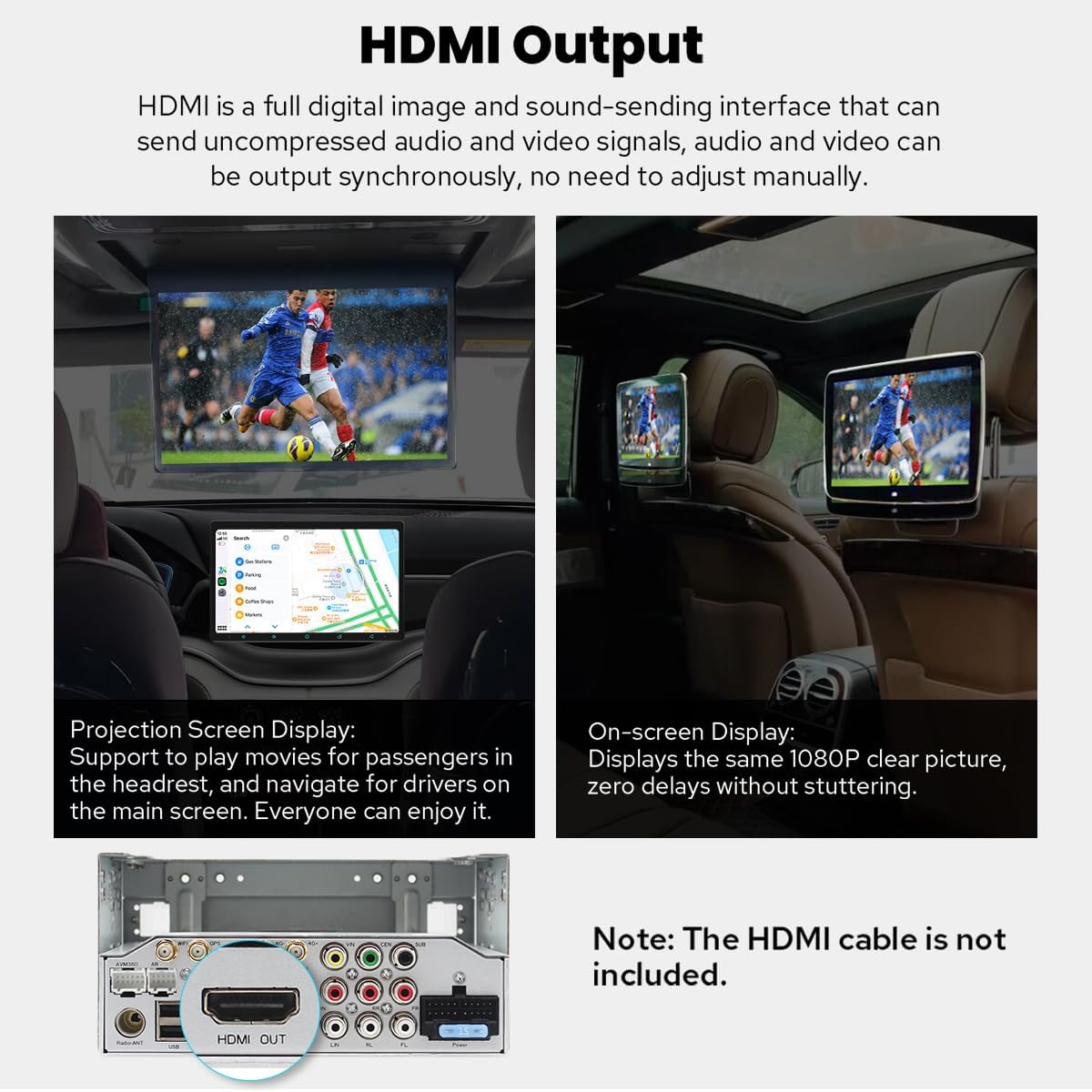
Image: Display of optional accessories available for purchase, including an OBD2 scanner, AR front camera, and AR rear camera, with brief descriptions of their functions.
Warranty and Support
The JOYING JY-UTD13N8-MR car stereo comes with a 2-year warranty. For warranty claims, technical support, or any inquiries regarding your product, please contact JOYING customer service. The seller for this product is carjoying.
For additional support and resources, you may visit the JOYING Store on Amazon.
