
Wuzhi Audio ZK-AS21P
Contents
ZK-AS21P Bluetooth Amplifier Board User Manual
Model: ZK-AS21P | Brand: Wuzhi Audio
1. Introduction
This manual provides comprehensive instructions for the installation, operation, and maintenance of your Wuzhi Audio ZK-AS21P Bluetooth Amplifier Board. The ZK-AS21P is a high-performance 2.1-channel audio amplifier designed to deliver clear, powerful sound for various audio setups. Please read this manual thoroughly before using the product to ensure proper function and longevity.
2. Product Overview
The ZK-AS21P amplifier board integrates advanced audio technology to provide a superior listening experience. Key features include:
- 2.1-Channel Design: Supports two passive speakers and one subwoofer for a full audio spectrum.
- High-Fidelity Audio: Powered by dual TPA3255 amplifier chips and six low-noise NE5532 preamplifiers for ultra-low distortion and crystal-clear HD audio.
- Powerful Output: Delivers 300W per channel (left/right) and 600W for the subwoofer.
- Versatile Audio Inputs: Supports Bluetooth 5.1, USB flash drives, USB sound card mode, and 3.5mm AUX input.
- Advanced Protection: Built-in safeguards against over/under-voltage, overheating, and short-circuit.
- Efficient Cooling: Features a whisper-quiet, long-life cooling fan for optimal heat dissipation.
2.1 Component Identification
Familiarize yourself with the various components and connection points of the ZK-AS21P amplifier board.

Figure 2.1: ZK-AS21P Amplifier Board Layout. This image displays the top view of the amplifier board, clearly labeling the power input, USB input, 3.5mm AUX input, subwoofer small signal output, expansion ports, and control knobs for subwoofer frequency, subwoofer R&L volume, R&L treble, R&L bass, and main volume.

Figure 2.2: Audio Input Modes. This image highlights the three primary audio input options available on the ZK-AS21P: Bluetooth 5.1, 3.5mm AUX input, and USB input (for USB sound card mode or flash drives).
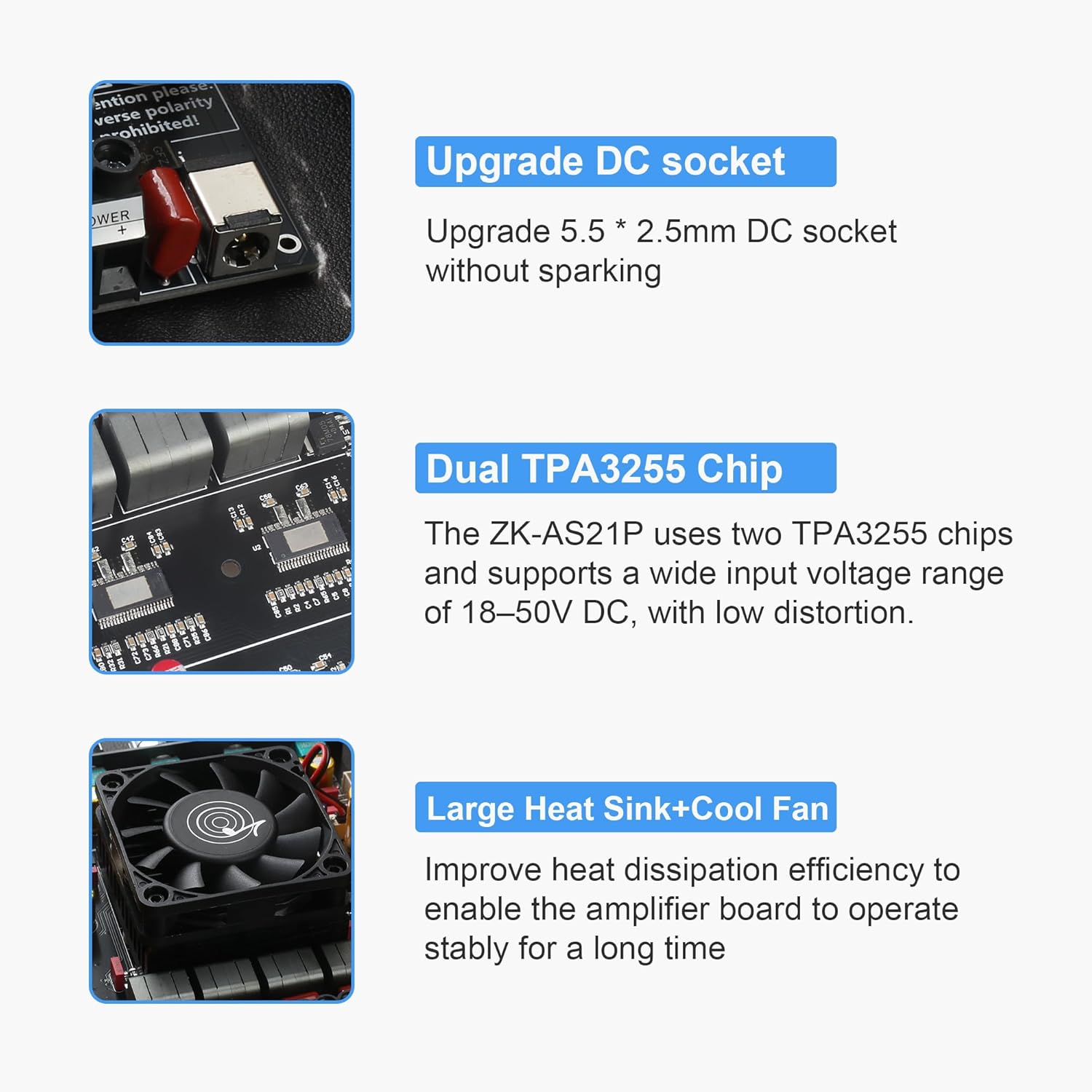
Figure 2.3: Key Internal Components. This image details the upgraded 5.5*2.5mm DC socket for power input, the dual TPA3255 amplifier chips responsible for high-performance audio, and the large heat sink with an integrated cooling fan for efficient heat dissipation.
3. Setup Instructions
Follow these steps to properly set up your ZK-AS21P amplifier board.
3.1 Power Supply Connection
- Ensure the amplifier board is disconnected from all other components before connecting power.
- Connect a DC power supply (18-50V DC, 10A or higher recommended) to the "DC18-50V" input terminal or the 5.5x2.5mm DC jack.
- Important: Observe correct polarity. Reverse polarity is prohibited and will damage the device. The board has built-in protection against reverse polarity, but always double-check connections.
3.2 Speaker Connection
Connect your passive speakers and subwoofer to the appropriate terminals.
- Left/Right Speakers: Connect your passive left and right speakers to the "L+" and "L-" terminals, and "R+" and "R-" terminals respectively.
- Subwoofer: Connect your passive subwoofer to the "S+" and "S-" terminals.
- Ensure speaker impedance is within recommended ranges for optimal performance and to prevent damage (refer to Specifications section).

Figure 3.1: Connection Diagram. This diagram illustrates how to connect the ZK-AS21P to a pure rear power amplifier board via the subwoofer small signal output and to a MIC front stage board using Expansion Port 1 and Expansion Port 2. Note the instruction to remove three 0 ohm resistors (R76, R75, and R74) when using expansion port 1 and 2.
3.3 Audio Input Connection
Choose one of the following methods to connect your audio source:
- Bluetooth 5.1: Power on the board. The Bluetooth indicator will flash. Search for "ZK-AS21P" on your device and pair. The indicator will become solid blue upon successful connection.
- 3.5mm AUX Input: Connect your audio source (e.g., smartphone, PC) to the 3.5mm AUX input jack using an audio cable.
- USB Input (Flash Drive/Sound Card): Insert a USB flash drive (FAT32 format, ≤32GB) into the USB port for direct playback. Alternatively, connect the USB port to a computer to use the board as a USB sound card.
- Pro Tip: When using the AUX input, ensure Bluetooth is disconnected for uninterrupted playback.

Figure 3.2: Multiple Audio Inputs. This image visually confirms the locations of the Bluetooth 5.1 antenna, 3.5mm AUX input, and USB input mode port on the amplifier board, illustrating the versatility of audio source connections.
4. Operating Instructions
Once connected, you can control the audio output using the onboard knobs.
- Main Volume: Controls the overall output volume.
- Single Press: Play/Pause
- Double Press: Next Track
- Triple Press: Previous Track
- Long Press: Power On/Off
- Subwoofer R&L Volume: Adjusts the volume of the subwoofer output.
- R&L Treble: Adjusts the high-frequency response of the left and right channels.
- R&L Bass: Adjusts the low-frequency response of the left and right channels.
- Subwoofer Frequency (20-200Hz): Fine-tunes the crossover frequency for the subwoofer, allowing you to optimize bass integration with your main speakers.
5. Maintenance
To ensure the longevity and optimal performance of your ZK-AS21P amplifier board, follow these maintenance guidelines:
- Cleaning: Use a soft, dry cloth to gently wipe the surface of the board. Do not use liquid cleaners or solvents.
- Ventilation: Ensure the cooling fan and heat sink areas are free from dust and obstructions to maintain proper airflow and heat dissipation.
- Environment: Operate the amplifier in a dry, well-ventilated environment, away from direct sunlight, excessive heat, and moisture.
- Handling: Handle the board with care to avoid damaging components. Avoid static discharge.
6. Troubleshooting
If you encounter issues with your ZK-AS21P amplifier board, refer to the following common problems and solutions:
| Problem | Possible Cause | Solution |
|---|---|---|
| No sound output |
|
|
| Bluetooth connection issues |
|
|
| Distorted sound |
|
|
| Amplifier shuts off unexpectedly |
|
|
7. Specifications
| Feature | Detail |
|---|---|
| Model Number | ZK-AS21P |
| Channels | 2.1 (Left, Right, Subwoofer) |
| Amplifier Chip | Dual TPA3255 |
| Preamplifiers | Six NE5532 |
| Power Output (Peak) | 300W (Left) + 300W (Right) + 600W (Subwoofer) |
| Power Supply Range | DC 18V-50V (Recommended: ≥10A) |
| Audio Inputs | Bluetooth 5.1, 3.5mm AUX, USB (Flash Drive/Sound Card) |
| Bluetooth Range | <15 meters (unobstructed) |
| Protection Features | Input undervoltage, overvoltage, overheating, overcurrent, short circuit protection. No input anti-reverse protection (positive and negative poles cannot be reversed). |
| Product Dimensions (L x W x H) | 150mm x 120mm x 40mm (approx. 5.91 x 4.72 x 1.57 inches) |
| Item Weight | 12.35 ounces |
7.1 Output Power Table (@1KHz)
The following table details the typical output power under various DC voltage and speaker impedance conditions.

Figure 7.1: ZK-AS21P Output Power Table. This table provides detailed power output specifications at 1KHz, showing how power varies with DC input voltage (24V, 36V, 50V), channel (R&L, SUB), and speaker impedance (8Ω, 4Ω, 2Ω). It also notes that if the input voltage is 50V, the speaker impedance for R&L channels must be ≥4 ohms, and the subwoofer channel impedance must be ≥2 ohms.
8. Support and Contact
For further assistance, technical support, or inquiries regarding your Wuzhi Audio ZK-AS21P amplifier board, please contact your retailer or the manufacturer directly. Refer to your purchase documentation for specific contact information.
Ask a question about this manual
Ask about setup, troubleshooting, compatibility, parts, safety, or missing instructions. Manuals+ will review the question and use this page’s manual context to help answer it.