
1. Introduction
This manual provides essential information for the proper installation, operation, and maintenance of the Bolisila IND141 Weighing Display Controller Instrument. The IND141 is a summation amplifier specifically designed for precise force measurement applications.
It is engineered for compatibility with various industrial load cells and features a robust design to ensure reliable performance in demanding industrial environments. The instrument is suitable for applications in manufacturing, testing, and research settings.
2. Safety Information
Please read and understand all safety instructions before operating the IND141 instrument. Failure to follow these instructions may result in injury or damage to the equipment.
- Electrical Safety: Ensure the instrument is connected to a properly grounded power source. Disconnect power before performing any maintenance or making connections.
- Environmental Conditions: Operate the instrument within specified environmental limits (temperature, humidity) to prevent damage.
- Handling: Handle the instrument with care to avoid physical damage. Do not drop or subject it to excessive force.
- Qualified Personnel: Installation and servicing should only be performed by qualified personnel.
3. Product Overview
The Bolisila IND141 is a compact and versatile weighing display controller. It features multiple connection ports for load cells and system integration, along with indicator lights for power and status.

Figure 3.1: Front view of the Bolisila IND141 Weighing Display Controller Instrument. This image displays the device's front panel, including various ports for connectivity, indicator lights for power and status, and control buttons. The labeling on the ports indicates connections for load cells (EXC, SIG, SHIELD, SEN) and communication interfaces (RJ45 ports). The overall robust casing is visible.
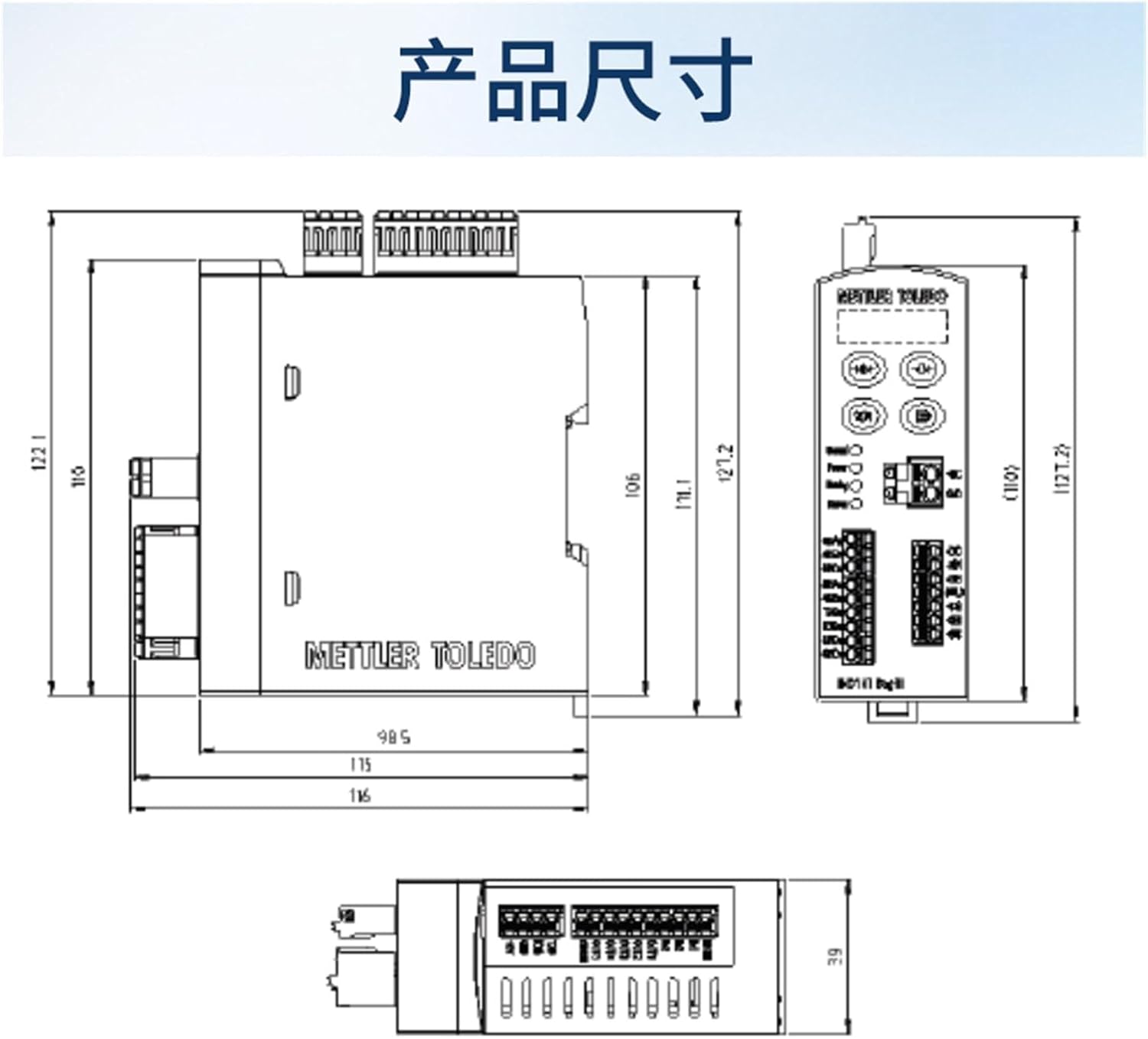
Figure 3.2: Dimensional drawing of the Bolisila IND141 Weighing Display Controller Instrument. This technical drawing provides precise measurements of the instrument's length, width, and height, along with the placement of mounting points and connectors. All dimensions are indicated in millimeters, crucial for proper installation and integration into industrial setups.
4. Setup and Installation
The IND141 is designed for easy installation and integration with existing systems. Follow these general steps for setup:
- Mounting: Securely mount the IND141 in a suitable location, considering environmental factors and accessibility for connections. Refer to Figure 3.2 for dimensional details.
- Load Cell Connection: Connect your industrial load cells to the designated terminals on the IND141. Ensure correct wiring for excitation (EXC), signal (SIG), and sense (SEN) lines, as well as proper shielding.
- Power Connection: Connect the instrument to a stable and appropriate power supply. Verify that the power indicator light illuminates upon connection.
- System Integration: Integrate the IND141 with your control system via the available communication ports (e.g., RJ45). Refer to your system's documentation for specific communication protocols and settings.
- Initial Power-Up: After all connections are secure, power on the device. Observe the status indicators for normal operation.
5. Operating Instructions
Once installed, the IND141 functions as a weighing display controller. Specific operational procedures will depend on the connected load cells and the overall system configuration. General operational aspects include:
- Calibration: Perform initial calibration according to the load cell manufacturer's instructions and the IND141's specific calibration mode (if available). This ensures accurate weight readings.
- Display Readings: Monitor the display for weight or force measurements. The instrument processes the signals from the load cells and presents the data.
- Parameter Configuration: Access the instrument's settings (if applicable via a connected interface) to configure parameters such as measurement units, filtering, and communication settings.
- Data Output: The IND141 provides data output to integrated systems, allowing for further processing, logging, or control actions based on the force measurements.
6. Maintenance
Regular maintenance helps ensure the longevity and accurate performance of your IND141 instrument. Its robust design minimizes maintenance requirements, but periodic checks are recommended.
- Cleaning: Keep the instrument clean and free from dust, dirt, and moisture. Use a soft, dry cloth for cleaning. Avoid abrasive cleaners or solvents.
- Connection Checks: Periodically inspect all electrical connections for tightness and signs of corrosion or damage.
- Environmental Monitoring: Ensure the operating environment remains within the specified temperature and humidity ranges.
- Recalibration: Depending on application requirements and usage, periodic recalibration may be necessary to maintain measurement accuracy.
7. Troubleshooting
This section outlines common issues and potential solutions for the IND141 Weighing Display Controller Instrument.
- No Power / No Display:
- Check the power supply connection and ensure it is securely plugged in.
- Verify that the power source is active and providing the correct voltage.
- Inspect the power cable for any damage.
- Incorrect or Unstable Readings:
- Ensure load cells are correctly wired and securely connected to the IND141.
- Check for any physical obstructions or external forces affecting the load cells.
- Perform a recalibration of the instrument and load cells.
- Verify that the load cell capacity matches the application requirements.
- Communication Errors:
- Check the network cables and connections to the communication ports.
- Verify that the communication settings (e.g., baud rate, protocol) on the IND141 and the connected system are correctly configured.
- Ensure there are no IP address conflicts if using Ethernet-based communication.
If the issue persists after attempting these solutions, contact customer support for further assistance.
8. Specifications
The following are the technical specifications for the Bolisila IND141 Weighing Display Controller Instrument:
- Model Number:
- IND141 (T14100D100000SF031)
- Brand:
- Bolisila
- Item Weight:
- 2.2 pounds
- Package Dimensions:
- 0.39 x 0.39 x 0.39 inches
- Assembly Required:
- No
- Number of Pieces:
- 1
9. Warranty and Support
For warranty information, technical support, or service inquiries, please contact your authorized Bolisila distributor or the manufacturer directly. Keep your purchase receipt and model number readily available when seeking support.