
Introduction
This manual provides detailed instructions for the XINFUTE HUAYU RM-F989+2 Universal Fan Remote Control. This remote is designed to operate various ceiling and wall fans, including models from Panasonic and Midea. Please read this manual thoroughly before use to ensure proper operation and longevity of your device.

Image: Front view of the XINFUTE HUAYU RM-F989+2 universal fan remote control, showcasing its design and button arrangement.
Setup
1. Battery Installation
The remote control requires two AAA batteries (not included).
- Locate the battery compartment cover on the back of the remote control.
- Slide the cover downwards to open the compartment.
- Insert two AAA batteries, ensuring the positive (+) and negative (-) terminals align correctly with the markings inside the compartment.
- Slide the battery compartment cover back into place until it clicks securely.
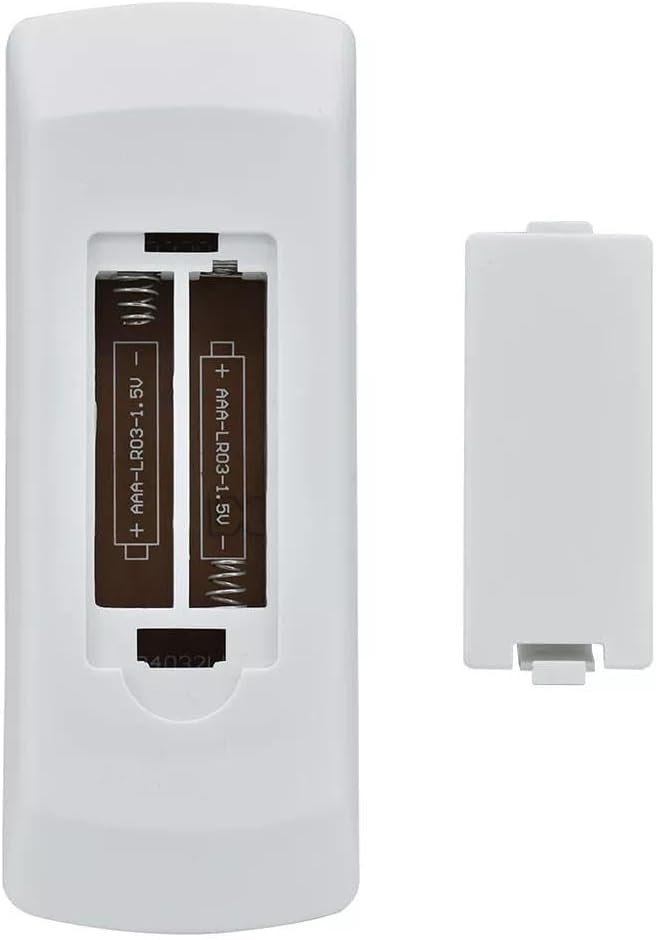
Image: Back of the remote control with the battery compartment open, illustrating the correct orientation for AAA battery insertion.
2. Initial Setup / Pairing (Universal Code Search)
This universal remote control can be used directly for most compatible fan models. If your fan does not respond immediately, follow these steps to pair the remote:
- Ensure your fan is powered on.
- Press and hold the SET button on the remote control for approximately 5 seconds until the indicator light on the remote begins to flash.
- While the indicator light is flashing, press the ON/OFF button repeatedly until your fan responds (e.g., turns on or off).
- Once your fan responds, immediately press the SET button again to confirm the code. The indicator light will flash three times to confirm successful pairing.
- Test all functions to ensure full compatibility. If some functions do not work, repeat the process.
Note: Some older or less common fan models may not be fully compatible. Refer to your fan's original manual for specific remote control codes if available.
Operating Instructions
Familiarize yourself with the buttons on your XINFUTE HUAYU RM-F989+2 remote control:
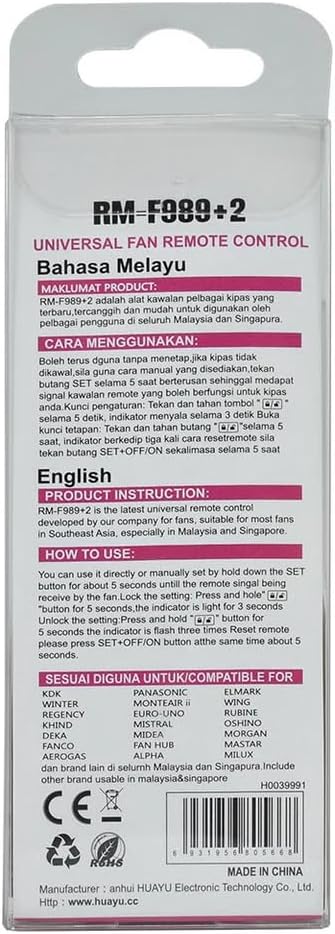
Image: Front view of the remote control, highlighting the layout and labels of all operational buttons.
- OFF/ON: Powers the fan on or off.
- STBY (Standby): Puts the fan into a low-power standby mode.
- YURAGI (Natural Breeze): Activates a natural breeze simulation mode, varying fan speed to mimic natural wind.
- 1, 2, 3, 4, 5: Adjusts fan speed levels. '1' is the lowest speed, '5' is the highest.
- ON/OFF SLEEP MODE: Activates or deactivates the sleep mode, which typically reduces fan speed gradually over time for comfortable sleep.
- OSCIL (Oscillation): Controls the oscillation function of the fan (if supported by the fan).
- LAMP: Turns the fan's light on or off (if equipped).
- REVERSE: Changes the direction of the fan blades (e.g., for summer cooling or winter heat distribution).
- 1 Hr, 3 Hr, 6 Hr (ON TIMER): Sets the fan to turn on after the specified duration.
- 1 Hr, 3 Hr, 6 Hr (OFF TIMER): Sets the fan to turn off after the specified duration.
- CANCEL: Cancels any active timer settings.
- SET: Used for initial pairing and confirming settings.
- Lock/Unlock (5S): Press and hold for 5 seconds to lock or unlock the remote control buttons, preventing accidental presses.
Maintenance
Battery Replacement
Replace batteries when the remote's indicator light dims or the remote becomes unresponsive. Always replace both batteries simultaneously with new AAA batteries. Do not mix old and new batteries, or different types of batteries.
Cleaning
Wipe the remote control with a soft, dry cloth. Do not use liquid cleaners or abrasive materials, as these can damage the remote's surface or internal components.
Storage
If the remote control will not be used for an extended period, remove the batteries to prevent leakage and potential damage.
Troubleshooting
| Problem | Possible Cause | Solution |
|---|---|---|
| Remote not responding to fan. | Dead or incorrectly installed batteries. Remote not paired correctly. Obstruction between remote and fan receiver. Fan is off or unplugged. | Replace batteries, ensuring correct polarity. Re-attempt the initial setup/pairing process. Ensure a clear line of sight. Check fan power supply. |
| Some functions do not work. | Partial pairing or incompatibility with specific fan features. | Re-attempt the pairing process. Verify if your fan model supports the specific function (e.g., oscillation, reverse). |
| Indicator light does not flash during setup. | Low batteries or faulty remote. | Replace batteries. If the issue persists, contact customer support. |
Specifications
- Model: RM-F989+2
- Brand: XINFUTE
- Dimensions: 8 x 4 x 2 inches (approximately)
- Item Weight: 2.82 ounces (without batteries)
- Material: ABS
- Power Source: 2 x AAA batteries (1.5V each)
- Compatible Devices: Universal fit for most Panasonic and Midea ceiling and wall fans.
Warranty and Support
This product comes with a one-year warranty from the date of purchase. If you encounter any issues or have questions regarding the operation or functionality of your XINFUTE HUAYU RM-F989+2 Universal Fan Remote Control, please contact XINFUTE customer support. All goods are inspected before shipment. If you are not satisfied with your purchase, you may contact us within 24 hours of receipt.
For support, please refer to the contact information provided with your purchase or visit the official XINFUTE store on Amazon.