
1. Introduction
The ANBERNIC RG557 is a high-performance handheld game console running on Android 14. It features a powerful Dimensity 8300 processor, a vibrant 5.48-inch AMOLED display, and extensive connectivity options, providing a versatile gaming experience for various platforms.
2. Package Contents
Please check the box for the following items:
- 1 x ANBERNIC RG557 Game Console
- 1 x USB Charging Cable
- 1 x User Manual (this document)
- 1 x Screen Protector
- 1 x Wiping Sheet
3. Product Overview
3.1. Device Layout
The ANBERNIC RG557 features an ergonomic design for comfortable handheld gaming. Below is an overview of the device's front and back.

Image: Front and back view of the ANBERNIC RG557 handheld game console, showcasing its white casing and transparent back panel.
3.2. Controls and Ports
Familiarize yourself with the buttons, joysticks, and ports on your RG557 for optimal control and connectivity.

Image: Detailed diagram illustrating the layout of buttons, joysticks, and ports on the ANBERNIC RG557, including shoulder buttons, volume controls, power button, USB-C port, and microSD slot.
- Directional Pad / Joysticks: For navigation and game control.
- A/B/X/Y Buttons: Standard action buttons.
- L1/L2/R1/R2 Triggers: Shoulder buttons for gaming.
- START/SELECT Buttons: For in-game menus and selections.
- Function Key: Switches between Android and game frontend.
- Volume +/-: Adjusts audio output.
- Power Button: Turns the device on/off and manages sleep mode.
- USB Type-C Port: For charging and DisplayPort output.
- MicroSD Card Slot: For expandable storage.
- 3.5mm Headphone Jack: For audio output to headphones.
- Dual Speakers: Integrated high-fidelity audio output.
3.3. Display
The RG557 features a high-quality AMOLED display for immersive visuals.

Image: Close-up of the ANBERNIC RG557's 5.48-inch AMOLED display, highlighting its vibrant colors and full-screen view.
- Size: 5.48-inch
- Type: AMOLED, OCA full-fit multi-touch screen
- Resolution: 1080 x 1920 pixels
- Features: Reduces reflection, improves light transmittance, enhances touch response for smoother operation.
4. Setup
4.1. Initial Power On
- Press and hold the Power button until the device turns on.
- Upon first boot, you will be prompted to select your preferred language.
- Follow the on-screen instructions to complete the initial setup configuration.
4.2. Charging the Device
The RG557 is equipped with a 5500mAh Lithium Polymer battery. A 5V/2A charging cable is included.
- Connect the USB charging cable to the device's USB Type-C port and a compatible 5V/2A power adapter (not included).
- The indicator light will turn red during charging.
- Once fully charged (approximately 3.5 hours), the indicator light will turn green.
4.3. Applying the Screen Protector
Use the included screen protector and wiping sheet to protect your device's display.
- Clean the screen thoroughly with the wiping sheet to remove dust and smudges.
- Carefully align the screen protector with the device's display.
- Gently apply the protector, smoothing out any air bubbles.
5. Operating Instructions
5.1. Android Main Screen Operation
The device runs on Android 14, offering a familiar interface.
- Directional Pad / Joysticks: Select applications.
- A Key / START Key / Touch Screen: Confirm or enter selections.
- SELECT Key: Opens menus.
- B Key: Cancels or dismisses menus.
- Volume Keys (+/-): Adjusts volume.
- Function Key: Toggles between the Android interface and the dedicated game frontend.
- Back Key: Short press for RETURN, long press for HOME.
5.2. Using the RG Android Game Frontend
The RG557 includes a dedicated game frontend for easy access to your game library and emulators.
- From the Android quick settings, tap the RG icon to open the game frontend.
- Follow on-screen instructions to launch emulators like RetroArch.
- Load and play your desired games.
- To return to the Android interface, use the Function Key.
Frontend Button Functions:
| Button | Emulator Main Screen | Game Launch Screen |
|---|---|---|
| A Button | Confirm | Confirm |
| B Button | Cancel (Back) | Cancel (Back) |
| X Button | Scan & Refresh Games (after TF card replacement) | Collect Game |
| SELECT Button | Settings | Install Game |
| START Button | Search | Search |
| Directional Pad / Joystick | Move Cursor | Move Cursor |
Note: Moving the cursor with the game joystick may switch to the Android frontend.
5.3. Key Mapping
The RG557 supports customizable key mapping. To access and configure shortcut keymaps, open the keymap settings. Refer to the in-app user manual for detailed instructions on advanced key mapping.
5.4. Connectivity

Image: Visual representation of the ANBERNIC RG557 supporting various entertainment modes, including handheld, PC game streaming via Moonlight, screen casting to a TV, and wireless multiplayer.
- Wi-Fi 6E: For high-speed online multiplayer and stable wireless connections.
- Bluetooth 5.3: Connect wireless accessories for an enhanced gaming experience.
- USB Type-C DisplayPort Output: Supports 1080p wired screen casting to external displays.
- Wireless Screen Casting: Cast your game to a larger screen wirelessly.
- Moonlight Streaming: Play PC games on your RG557 from another room or location.
6. Game Management
- Supported Formats: The RG557 supports downloading games in over 25 different formats, including Android games and various console emulators.
- Emulator Support: The device is compatible with dozens of emulators, allowing you to play a wide range of classic and modern titles.
- Game Collection: Use the X button in the game launch screen to collect games into your favorites.
7. Maintenance
7.1. Active Cooling System
The RG557 features an active cooling system to maintain optimal performance during extended gaming sessions.

Image: Internal view of the ANBERNIC RG557 highlighting its active cooling system, which includes a high-speed fan and pure copper heat sink for smart temperature control.
- The system uses a high-speed fan and a pure copper heat sink.
- Smart temperature control adjusts fan speed based on temperature and power consumption.
- The fan supports auto mode and multi-mode operation.
7.2. Battery Care
- Avoid exposing the device to extreme temperatures.
- Do not puncture, disassemble, or throw the battery into fire or water.
- For optimal battery life, avoid fully discharging the battery frequently.
7.3. System Updates (FOTA)
The RG557 supports FOTA (Firmware Over-The-Air) wireless upgrades. This allows for continuous maintenance and updates to the official system, ensuring improved functionality and performance.
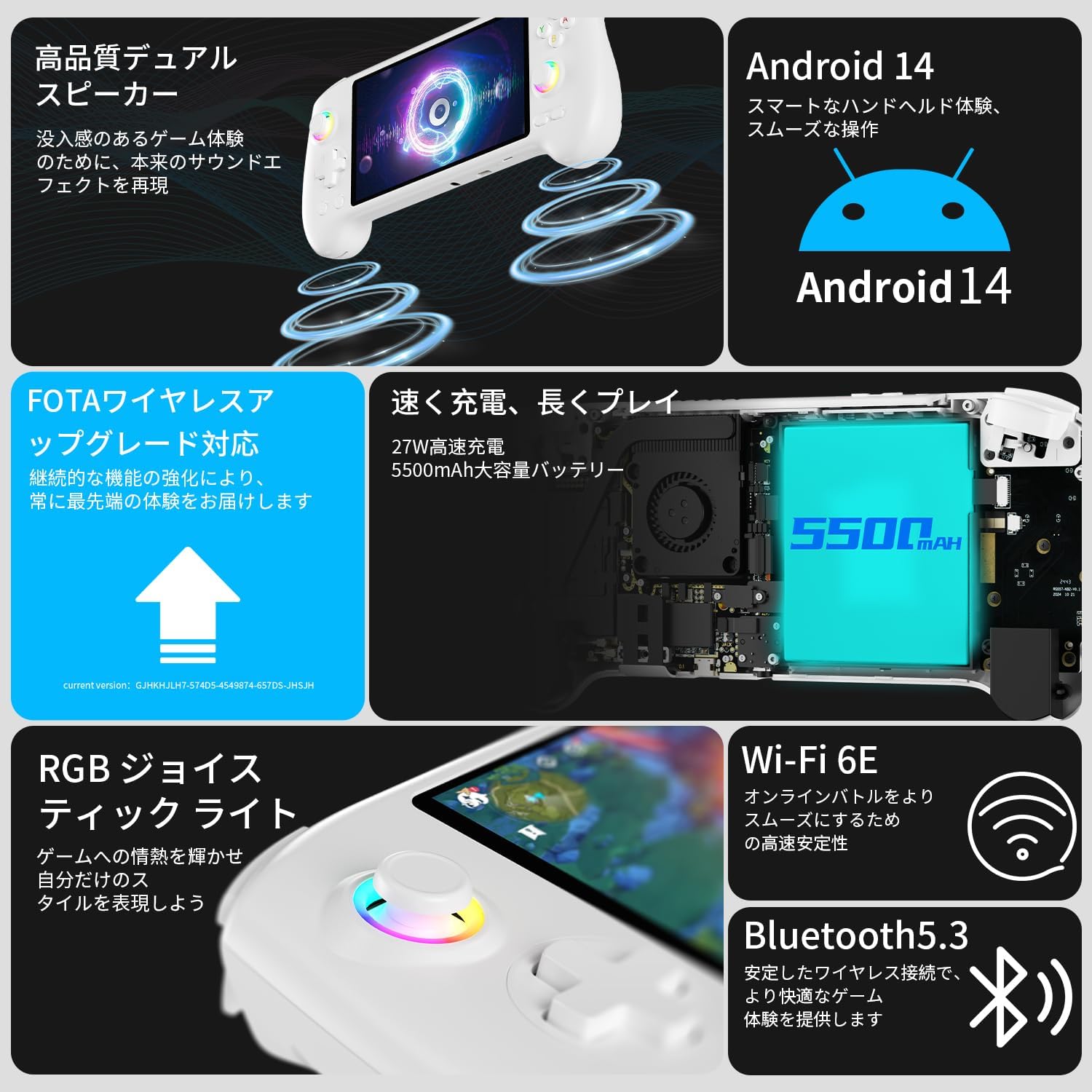
Image: Overview of ANBERNIC RG557 features, including FOTA wireless upgrade capability, fast charging, dual speakers, and RGB joysticks.
8. Troubleshooting
If you encounter any issues with your ANBERNIC RG557, please refer to the following general troubleshooting tips:
- Device not powering on: Ensure the device is fully charged. Connect it to the charger and wait for the green indicator light.
- Games not loading/running: Verify that the game files are in a supported format and correctly placed on the microSD card. Ensure the emulator is properly configured.
- Screen issues: If the screen is unresponsive, try restarting the device. Ensure the screen protector is applied correctly without air bubbles.
- Connectivity problems (Wi-Fi/Bluetooth): Check your network settings and ensure the device is within range of the Wi-Fi signal or Bluetooth accessory.
- System lag/slow performance: Close unnecessary background applications. Ensure the device's cooling system is functioning correctly. Consider performing a system update via FOTA.
For more specific issues, consult the in-app user manual or contact customer support.
9. Specifications
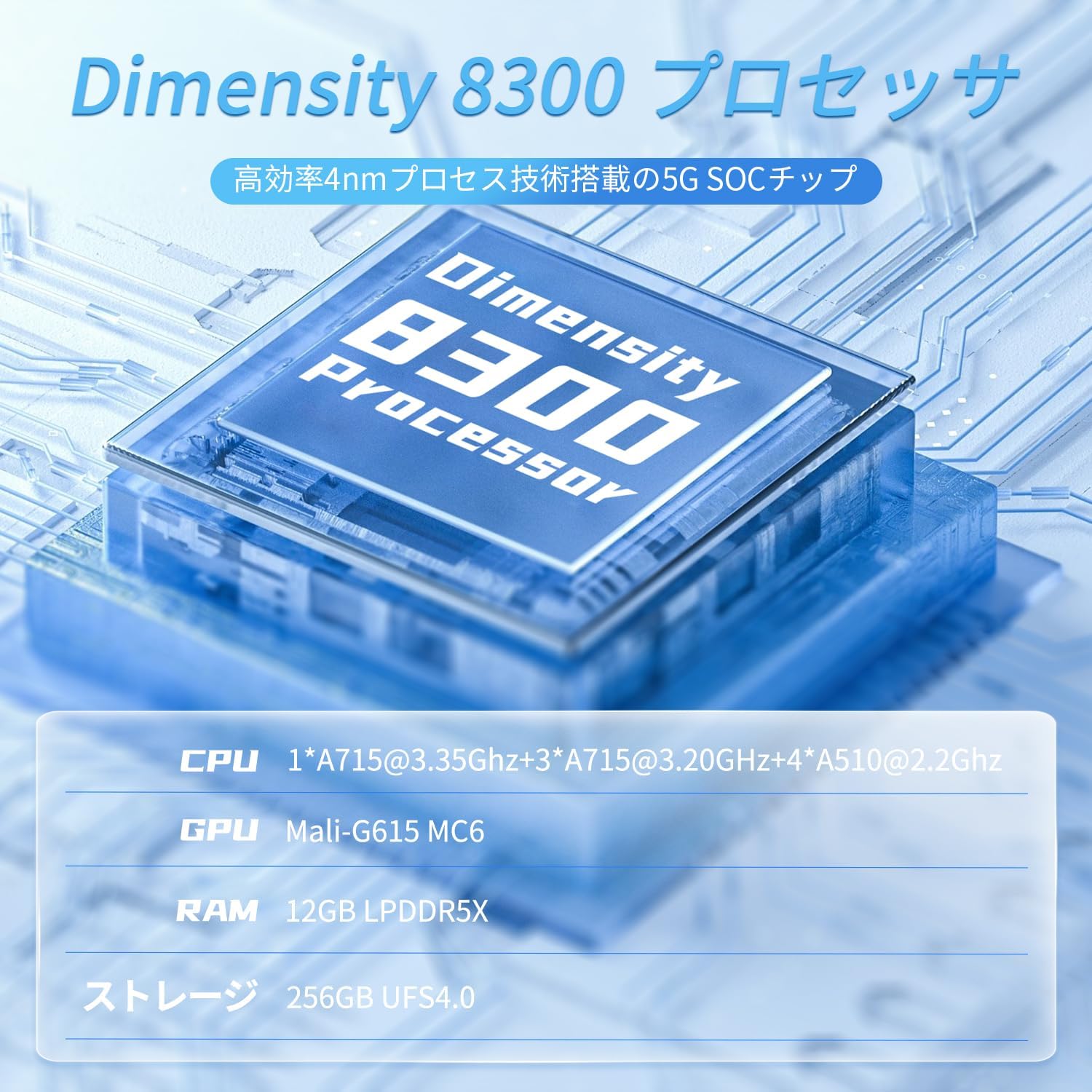
Image: Diagram illustrating the Dimensity 8300 processor, highlighting its octa-core CPU, Mali-G615 MC6 GPU, 12GB LPDDR5X RAM, and 256GB UFS4.0 storage.
| Feature | Description |
|---|---|
| Operating System | Android 14 |
| Processor | Dimensity 8300 Processor (High-efficiency 4nm process technology 5G SOC chip) Octa-core CPU: 1*A715@3.35GHz + 3*A715@3.20GHz + 4*A510@2.2GHz |
| GPU | Mali-G615 MC6 |
| RAM | 12GB LPDDR5X |
| Storage | 256GB UFS4.0 |
| Display | 5.48-inch AMOLED, OCA full-fit multi-touch screen (1080 x 1920) |
| Battery | 5500mAh Lithium Polymer (up to 8 hours continuous use) |
| Charging | 5V/2A (approx. 3.5 hours for full charge) |
| Connectivity | 5G WiFi, Bluetooth 5.3 |
| Audio | High-fidelity dual speakers, 3.5mm stereo headphone jack |
| Other Features | 6-axis gyroscope, Hall effect joysticks and triggers, active cooling system (high-speed fan + heat pipe), FOTA wireless upgrade, USB Type-C 1080p DisplayPort output, vibration motor, RGB joystick lighting, power saving settings. |
| Dimensions | 22.3 x 9 x 1.5 cm |
| Weight | 570 g |
| Country of Origin | China |
| Age Target | 12 years and older |

Image: Features of the ANBERNIC RG557's professional-level control experience, including capacitive joysticks, Hall triggers, 6-axis gyroscope, vibration motor, ergonomic grip design, and D-pad.
10. Warranty and Support
For warranty information and technical support, please refer to the documentation included with your purchase or visit the official ANBERNIC website. Keep your proof of purchase for warranty claims.
Official support website: https://anbernic.com


