
1. Introduction and Overview
This manual provides essential instructions for the safe and effective use of the SLMLSGB PM30-15N Photomicrosensor Switch. The PM30-15N is a compact, non-contact sensing device designed to detect the presence or absence of objects by emitting and receiving light. It is commonly used in industrial automation, assembly lines, and various control systems where precise object detection is required.
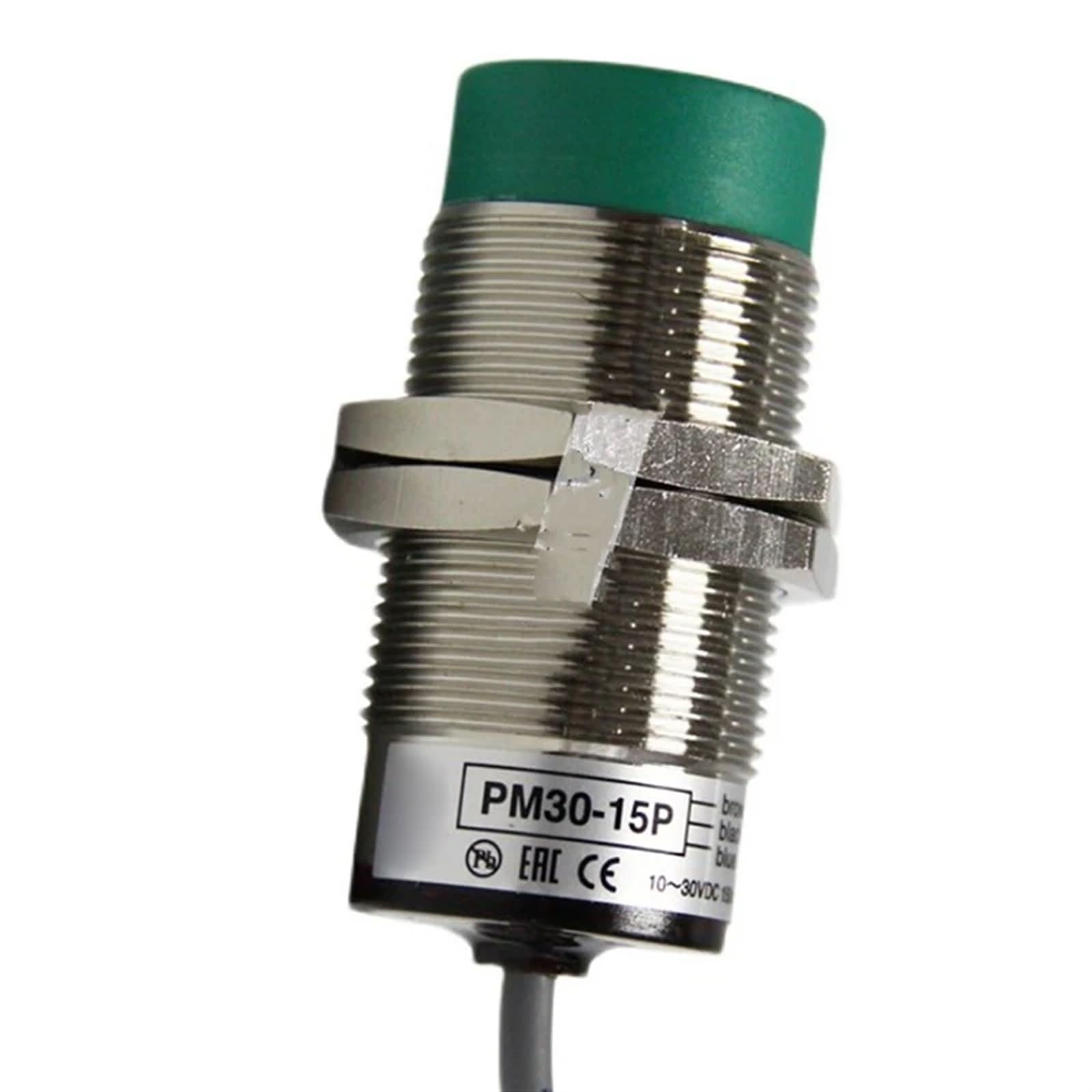
Figure 1: The SLMLSGB PM30-15N Photomicrosensor Switch. This image displays the cylindrical body of the sensor, typically featuring a threaded housing for mounting, and the wiring leads. It illustrates the compact design suitable for integration into various systems.
2. Safety Information
Please read and understand all safety instructions before installing, operating, or maintaining the PM30-15N sensor. Failure to follow these instructions may result in personal injury or equipment damage.
- Electrical Safety: Ensure power is disconnected before wiring or performing any maintenance. Only qualified personnel should perform electrical connections.
- Operating Environment: Do not expose the sensor to environments exceeding its specified temperature, humidity, or vibration limits.
- Proper Use: This sensor is designed for object detection. Do not use it for safety-critical applications without additional safety measures and redundant systems.
- Damage Inspection: Before use, inspect the sensor for any visible damage. Do not use a damaged sensor.
3. Package Contents
Verify that all items are present and undamaged upon opening the package.
- 1 x SLMLSGB PM30-15N Photomicrosensor Switch
- (Optional) Mounting nuts and washers (may vary by specific product packaging)
- (Optional) Basic instruction leaflet (this comprehensive manual is available online)
4. Setup and Installation
Follow these steps for proper installation of your PM30-15N sensor.
- Mounting:
Securely mount the sensor in the desired location using appropriate brackets or by threading it into a compatible fixture. Ensure the sensing face is clear of obstructions and aligned correctly with the target object's path. Avoid mounting in areas subject to excessive vibration or direct sunlight/strong artificial light sources that could interfere with detection.
- Wiring:
Refer to the wiring diagram provided with your specific sensor model (if applicable) or the general wiring conventions for NPN/PNP sensors. Typically, these sensors have three wires:
- Brown: +VDC (Power Supply Positive)
- Blue: 0VDC (Power Supply Negative / Ground)
- Black: Output Signal
Connect the wires to a stable DC power supply within the specified voltage range and to your control system's input. Ensure all connections are secure and insulated.
- Power On:
Once mounting and wiring are complete, apply power to the sensor. An indicator LED (if present) should illuminate, indicating power is supplied.
5. Operating Instructions
The PM30-15N operates by detecting changes in light. When an object enters the sensing field, it either interrupts or reflects the light beam, causing the sensor's output to change state.
- Detection Principle: The sensor emits a light beam (often infrared) and detects if this beam is returned (diffuse reflective type) or blocked (through-beam or retro-reflective type). The PM30-15N is typically a diffuse reflective type, meaning it detects objects by sensing the light reflected off their surface.
- Output Signal: When an object is detected, the sensor's output (black wire) will change state. For NPN sensors, the output will switch to ground (0V). For PNP sensors, the output will switch to the supply voltage (+VDC). Consult your sensor's specific model for its output type.
- Sensitivity Adjustment: Some models may feature a sensitivity adjustment potentiometer. If present, rotate it to fine-tune the detection range or to ignore background objects. Test the detection thoroughly after any adjustments.
- Indicator LED: A detection indicator LED (if present) will typically illuminate when an object is successfully detected, providing visual feedback.
6. Maintenance
Regular maintenance ensures optimal performance and longevity of your sensor.
- Cleaning: Periodically clean the sensing face of the sensor with a soft, dry cloth. Avoid abrasive cleaners or solvents that could damage the lens.
- Inspection: Regularly inspect the sensor and its wiring for any signs of physical damage, wear, or loose connections.
- Environmental Check: Ensure the operating environment remains within the specified limits for temperature, humidity, and dust.
7. Troubleshooting
If you encounter issues with your PM30-15N sensor, refer to the following troubleshooting guide:
| Problem | Possible Cause | Solution |
|---|---|---|
| Sensor not powering on (no power LED) | No power supply, incorrect wiring, faulty power supply. | Check power connections (Brown to +V, Blue to 0V). Verify power supply voltage. Ensure power supply is active. |
| Sensor not detecting objects | Misalignment, sensing face dirty, object too far/close, incorrect sensitivity, object material not reflective enough. | Adjust sensor position and alignment. Clean sensing face. Verify object is within detection range. Adjust sensitivity (if available). Consider using a retro-reflective or through-beam sensor for difficult materials. |
| Sensor detects continuously (false positives) | Background interference, excessive sensitivity, sensor too close to a reflective surface. | Reduce sensitivity. Reposition sensor to avoid background reflections. Ensure no reflective surfaces are within the detection zone when no object is present. |
| Output signal is incorrect or unstable | Incorrect wiring (NPN/PNP mismatch), electrical noise, faulty sensor. | Verify output wiring matches your control system's input type (NPN/PNP). Check for sources of electrical noise. If issues persist, the sensor may be faulty. |
8. Specifications
Key technical specifications for the SLMLSGB PM30-15N Photomicrosensor Switch:
| Model Number | PM30-15N |
| Brand | SLMLSGB |
| Detection Type | Photomicrosensor (typically diffuse reflective) |
| Package Dimensions | 5.91 x 5.91 x 5.91 inches |
| Item Weight | 1.76 ounces |
| Assembly Required | No |
| Number of Pieces | 1 |
| Manufacturer | SLMLSGB |
9. Warranty and Support
For warranty information, technical support, or service inquiries regarding your SLMLSGB PM30-15N Photomicrosensor Switch, please contact the seller or manufacturer directly. Retain your purchase receipt for warranty claims.
Manufacturer: SLMLSGB
For further assistance, please visit the official SLMLSGB website or contact their customer service department.