
1. Introduction and Overview
Thank you for choosing the US Automatic 050700 Premium Hardwired Metal Keypad. This manual provides detailed instructions for the installation, operation, and maintenance of your new keypad. Designed for durability and security, this weather-resistant device is compatible with all gate openers and electric door locks in hardwired, non-solar environments.
The keypad features a rugged die-cast aluminum cover, a stainless steel blue LED backlit keypad, and supports up to 1000 permanent or temporary access codes. Its advanced features include programmable keypad and night lights, and two relays for versatile control of your access system.

Figure 1: US Automatic 050700 Premium Hardwired Metal Keypad. This image shows the front view of the keypad, highlighting its metallic finish and the included physical key for the locking cover.
2. Safety Information
Please read all safety instructions carefully before installation and operation. Failure to follow these instructions may result in injury, damage to the product, or property damage.
- Always disconnect power before performing any wiring or maintenance.
- Ensure all wiring is performed by a qualified professional and complies with local electrical codes.
- Do not expose the keypad to excessive force or impact.
- Verify power requirements (12-24 VAC/VDC) before connecting to a power source.
- Keep children away from the keypad during programming and operation.
3. Package Contents
Upon unpacking, please verify that all components are present and undamaged:
- US Automatic 050700 Hardwired Metal Keypad
- Mounting Hardware (screws, anchors)
- Keys for Locking Cover
- Instruction Manual (this document)
4. Setup and Installation
4.1 Mounting the Keypad
The keypad is designed for outdoor use and can be mounted on a flat surface or a gooseneck post. Choose a location that is easily accessible and provides clear line of sight to the gate or door.
- Open the keypad's locking cover using the provided key.
- Mark the drilling points on the mounting surface using the keypad as a template.
- Drill pilot holes and secure the keypad using the provided mounting hardware.
- Ensure the keypad is securely fastened and level.
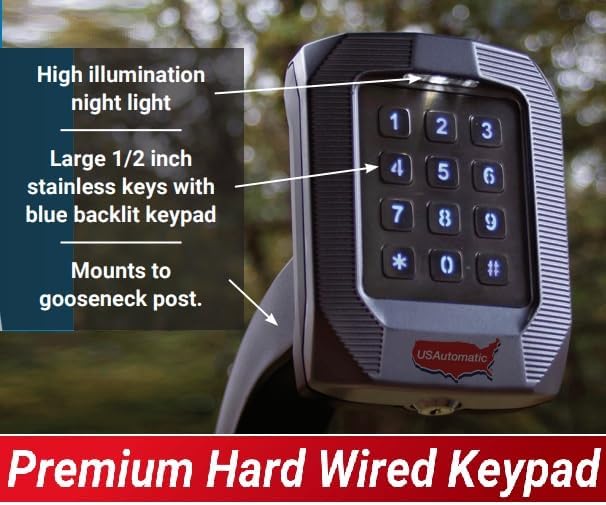
Figure 2: Keypad mounted on a gooseneck post, illustrating the high illumination night light and large blue backlit stainless steel keys.
4.2 Wiring Connections
The keypad requires a 12-24 VAC/VDC power source. Refer to the wiring diagram provided with your gate opener or electric door lock for specific connections. The keypad features two relays and a request-to-exit input.
- Connect the power wires to the designated power terminals on the keypad.
- Connect Relay 1 and Relay 2 outputs to your gate opener or door lock control inputs as required.
- Connect the Request to Exit input if this feature is desired.
- Ensure all connections are secure and insulated.
4.3 Initial Programming
The keypad supports 1000 access codes, which can be permanent or temporary, with a length of 2-5 digits. Consult the detailed programming guide (usually included with the product or available online) for specific steps on adding, deleting, and managing access codes.
- Access the programming mode (refer to programming guide).
- Enter the master code to begin programming.
- Follow prompts to add new user codes, set relay functions, and configure light settings.
4.4 Keypad and Night Light Configuration
The keypad lights are programmable for full-time illumination or only when keys are pressed. The night light has adjustable sensitivity and can be set for full-time on, full-time off, or twilight sensor operation.
- Enter programming mode to adjust keypad backlight behavior.
- Configure night light settings, including sensitivity and activation mode.
5. Operating Instructions
5.1 Entering Access Codes
To activate the gate opener or electric door lock, simply enter a valid 2-5 digit access code on the keypad. The blue LED backlight will illuminate upon key press.
5.2 Relay Operation
The two relays can be configured for timed activation (1-99 seconds) or for a hold-open function (maintaining contact). The specific relay triggered depends on the programming of the access code.
5.3 Lockout Feature
For security, the keypad will lock out for 60 seconds after 7 incorrect access codes are entered consecutively. During this lockout period, no codes will be accepted.
6. Maintenance
The US Automatic 050700 Keypad is designed for minimal maintenance. Regular cleaning and inspection will ensure optimal performance.
- Cleaning: Use a soft, damp cloth to wipe the keypad surface. Avoid abrasive cleaners or solvents.
- Inspection: Periodically check for any loose wiring, physical damage, or signs of wear. Ensure the locking cover is secure.
7. Troubleshooting
If you encounter issues with your keypad, refer to the following common problems and solutions:
| Problem | Possible Cause | Solution |
|---|---|---|
| Keypad not responding | No power; Loose wiring; Keypad in lockout mode | Check power supply; Inspect wiring connections; Wait 60 seconds if in lockout mode |
| Codes not working | Incorrect code entered; Code not programmed; Relay not configured | Verify code accuracy; Reprogram code; Check relay settings in programming |
| Keypad lights not working | Light settings incorrect; Faulty LED | Adjust light settings in programming; Contact support if LED is faulty |
| Night light not activating | Sensitivity setting too low; Twilight sensor disabled | Increase sensitivity; Enable twilight sensor in programming |
8. Specifications
- Model: 050700
- Brand: US Automatic
- Material: Die-cast Aluminum
- Dimensions (L x W x H): 5 x 4 x 3 inches
- Power Source: 12-24 VAC/VDC
- Access Codes: 1000 (permanent or temporary)
- Code Length: 2-5 digits
- Relays: 2 (timed activation 1-99 seconds or hold open)
- Keypad: Stainless steel, blue LED backlit
- Special Features: Weather-resistant, Request to Exit input, Programmable keypad lights, Adjustable night light with twilight sensor, 60-second lockout after 7 incorrect codes
9. Warranty Information
Warranty information for the US Automatic 050700 Premium Hardwired Metal Keypad is typically provided by the manufacturer. Please refer to the warranty card included with your product or visit the official US Automatic website for detailed terms and conditions regarding coverage, duration, and claims procedures.
10. Support
For technical assistance, troubleshooting beyond this manual, or inquiries regarding your US Automatic 050700 Keypad, please contact US Automatic customer support. Contact details can typically be found on the manufacturer's official website or on the product packaging.
Online Resources: Visit the US Automatic website for FAQs, updated manuals, and additional support resources.