
1. Introduction
Thank you for choosing the DESHUO 1" SDS-Plus Lightweight Rotary Hammer Drill LD26. This manual provides essential information for the safe and efficient operation, maintenance, and troubleshooting of your new tool. Please read all instructions carefully before use and retain this manual for future reference.
2. General Safety Instructions
WARNING: Read all safety warnings, instructions, illustrations, and specifications provided with this power tool. Failure to follow all instructions listed below may result in electric shock, fire, and/or serious injury.
- Work Area Safety: Keep work area clean and well-lit. Do not operate power tools in explosive atmospheres, such as in the presence of flammable liquids, gases, or dust.
- Electrical Safety: Power tool plugs must match the outlet. Never modify the plug. Avoid body contact with earthed or grounded surfaces. Do not expose power tools to rain or wet conditions.
- Personal Safety: Always wear eye protection, hearing protection, and a dust mask when operating the tool. Dress properly; do not wear loose clothing or jewelry. Keep hair and clothing away from moving parts.
- Tool Use and Care: Do not force the power tool. Use the correct power tool for your application. Disconnect the plug from the power source before making any adjustments, changing accessories, or storing power tools.
- Service: Have your power tool serviced by a qualified repair person using only identical replacement parts.
3. Product Components and Included Accessories
The DESHUO LD26 Rotary Hammer Drill comes with a comprehensive set of components and accessories to facilitate various tasks. Familiarize yourself with each part before operation.
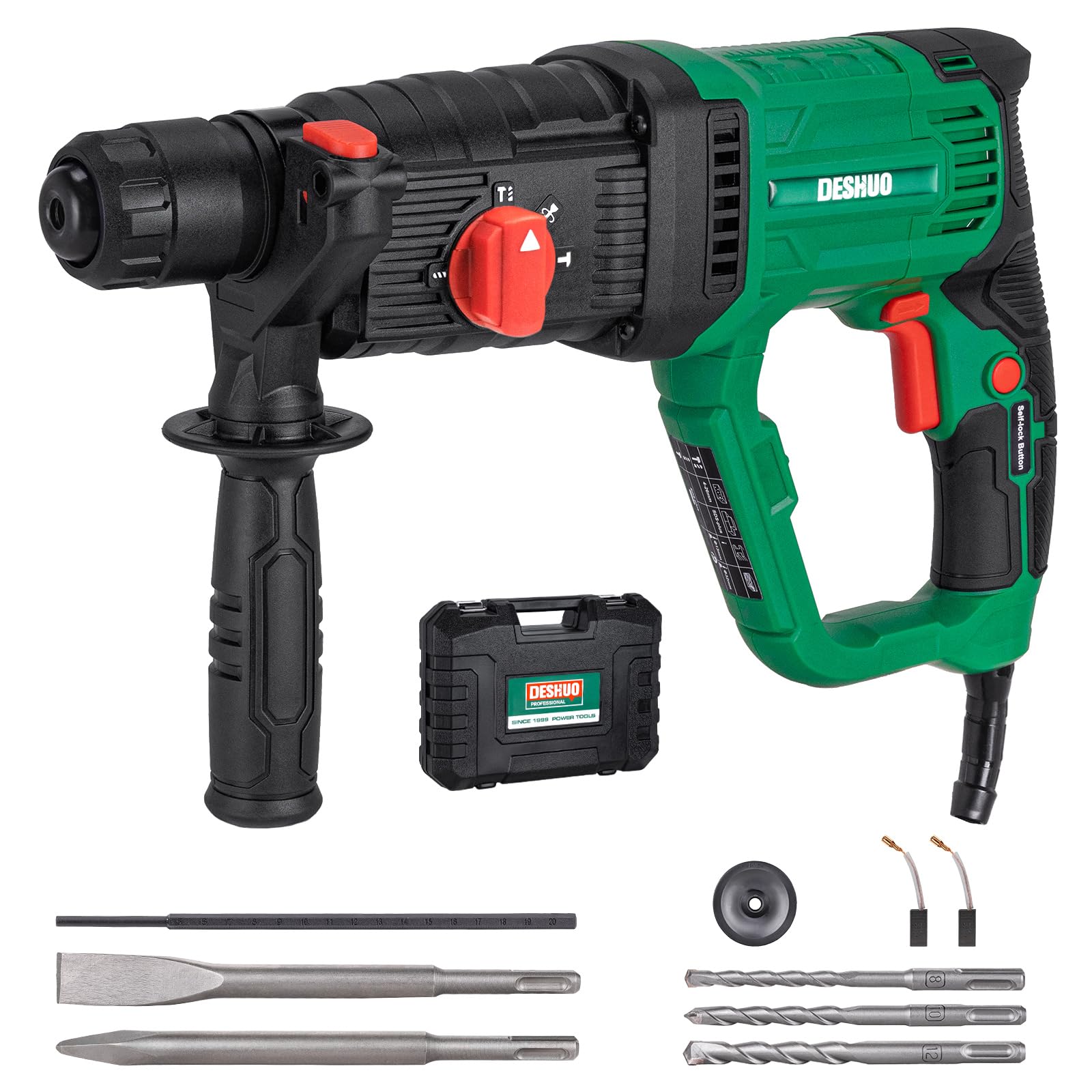
Figure 3.1: This image displays the DESHUO 1-inch SDS-Plus Rotary Hammer Drill, highlighting its key components such as the SDS-Plus tool-free system, depth gauge slot, 4-function knob, forward/reverse button, ON/OFF switch, lock-on button, and ergonomic rubber handle. Also shown are the included accessories: depth gauge, SDS-Plus flat chisel, SDS-Plus point chisel, three SDS-Plus drill bits (5/16", 3/8", 1/2"), dust cover, replaceable carbon brushes, and adjustable handle.
Key Components:
- SDS-Plus Tool Free System: For quick and easy bit changes.
- Depth Gauge Slot: To insert and secure the depth gauge.
- 4 Function Knob: Selects operating mode.
- Forward & Reverse Button: Changes rotation direction.
- Switch ON / OFF: Power activation.
- Lock-On Button: For continuous operation.
- Ergonomic Rubber Handle: Provides comfortable grip and reduces vibration.
- 360° Adjustable Handle: For optimal control and comfort.
Included Accessories:
- 1 x Rotary Hammer Drill
- 3 x SDS-Plus Drill Bits (1/2"; 3/8"; 5/16")
- 1 x SDS-Plus Flat Chisel
- 1 x SDS-Plus Point Chisel
- 1 x Depth Gauge
- 1 x Carrying Case
- 1 x Replaceable Carbon Brushes
- 1 x Adjustable Handle
- 1 x User Manual
4. Setup
4.1 Installing SDS-Plus Bits
The SDS-Plus system allows for quick, tool-free bit changes. To install a bit:
- Pull back the chuck collar.
- Insert the SDS-Plus bit into the chuck until it clicks into place.
- Release the collar. Pull on the bit to ensure it is securely locked. A slight back-and-forth movement of the bit after installation is normal and necessary for the hammer mechanism.
4.2 Adjusting the Auxiliary Handle
The 360° adjustable handle provides enhanced control and comfort. Loosen the handle by twisting it counter-clockwise, adjust it to your desired position, and then tighten it by twisting clockwise until secure.
4.3 Setting the Depth Gauge
To set the drilling depth:
- Insert the depth gauge into its slot on the auxiliary handle.
- Adjust the gauge to the desired depth, measuring from the tip of the drill bit.
- Tighten the auxiliary handle to secure the depth gauge in place.
Video 4.1: This video demonstrates the installation of an SDS-Plus drill bit, the adjustment of the 4-function selector knob for different modes (Rotary Only, Rotary Hammer, Hammer Only, Vario-lock), and the use of the 360° adjustable handle on the DESHUO LD26 Rotary Hammer Drill.
5. Operating Modes
The DESHUO LD26 features a 4-function knob to select the appropriate operating mode for your task.

Figure 5.1: A detailed view of the 4-function selector knob on the DESHUO Rotary Hammer Drill. This knob allows users to switch between four operating modes: Rotary Only for standard drilling, Rotary Hammer for drilling with impact, Hammer Only for chiseling and demolition, and Vario-lock for adjusting the chisel's position.
- Rotary Only (Drill Mode): For drilling in wood, metal, plastic, and other materials that do not require impact.
- Rotary Hammer (Hammer Drill Mode): Combines rotation with hammering action for efficient drilling in concrete, brick, and masonry.
- Hammer Only (Chisel Mode): Provides hammering action without rotation, ideal for chiseling, chipping, and light demolition work.
- Vario-Lock (Chisel Position Adjustment): Allows the chisel to be rotated and locked into various positions for optimal working angles during chiseling tasks. To engage, turn the knob to the Vario-Lock symbol, adjust the chisel, then turn the knob to 'Hammer Only' to lock it.
6. Operation
6.1 Starting and Stopping
- To Start: Press the ON/OFF switch. The variable speed trigger allows for precise control over the drilling speed.
- To Stop: Release the ON/OFF switch.
- Lock-On Button: For continuous operation, press the ON/OFF switch and then press the lock-on button. To release, press the ON/OFF switch again.
- Forward & Reverse: Use the forward/reverse button to change the rotation direction, useful for removing tightened bits or screws.
6.2 Drilling in Concrete and Masonry (Rotary Hammer Mode)
Select the 'Rotary Hammer' mode. Apply steady, firm pressure. The tool's impact mechanism will do most of the work. Do not apply excessive force, as this can reduce efficiency and damage the bit or tool.

Figure 6.1: This image shows the rotary hammer drill actively drilling into a concrete surface, highlighting its powerful rotary hammer mode suitable for tough materials.
6.3 Chiseling and Demolition (Hammer Only Mode)
Select the 'Hammer Only' mode. For precise work, use the Vario-Lock function to set the chisel angle. Hold the tool firmly and guide the chisel along the desired line or area to be removed.

Figure 6.2: The rotary hammer drill is shown in action, performing a slotting task on a wall. This illustrates the 'Hammer Only' mode or chiseling function, effectively removing material to create channels.
6.4 Overhead and Downward Applications
The lightweight design (7.19 lbs) of the LD26 makes it suitable for overhead and downward drilling applications, reducing user fatigue during prolonged use.

Figure 6.3: The drill is depicted being used for an overhead drilling application, demonstrating its lightweight design (7.19 lbs) which makes it suitable for extended use in various orientations.
Video 6.1: An overview video showcasing the DESHUO SDS-Plus Lightweight Rotary Hammer LD26 in various applications, including drilling into concrete, chiseling, and general demolition tasks. It highlights the tool's power and versatility for different construction and renovation needs.
7. Maintenance
Regular maintenance ensures the longevity and optimal performance of your rotary hammer drill.
- Cleaning: Keep the ventilation slots clear and clean. Regularly clean the tool housing with a soft, damp cloth. Do not use harsh chemicals or abrasive cleaners.
- Bit Care: Clean bits after each use. Apply a thin layer of grease to the SDS-Plus shank of bits before insertion to reduce wear and improve performance.
- Carbon Brushes: The tool includes replaceable carbon brushes. Check them periodically for wear. Replace both brushes simultaneously when they are worn down to approximately 1/4 inch (6mm) or if the motor sparks excessively. Refer to the detailed instructions in the included user manual for replacement procedures.
- Storage: Store the tool and accessories in the provided carrying case in a dry, secure location, out of reach of children.
8. Troubleshooting
If you encounter issues with your DESHUO Rotary Hammer Drill, refer to the following common troubleshooting steps:
- Tool Not Starting:
- Check if the power cord is securely plugged into a working outlet.
- Ensure the ON/OFF switch is fully depressed.
- Verify that the power supply voltage matches the tool's requirements.
- Reduced Power or Excessive Sparking:
- Inspect the carbon brushes for wear and replace if necessary.
- Check for blockages in the ventilation slots.
- Bit Not Engaging/Hammering:
- Ensure the bit is correctly inserted into the SDS-Plus chuck.
- Verify that the 4-function knob is set to the appropriate mode (Rotary Hammer or Hammer Only).
- Overheating:
- Allow the tool to cool down.
- Ensure ventilation slots are clear of debris.
- Avoid continuous heavy-duty operation without breaks.
For issues not covered here, please contact DESHUO customer support.
9. Specifications
| Feature | Specification |
|---|---|
| Brand | DESHUO |
| Model Number | LD26 |
| Power Source | Corded Electric |
| Voltage | 120 Volts (AC) |
| Amperage | 9 Amps |
| Maximum Power | 1050 Watts |
| Maximum Rotational Speed | 0-1100 RPM |
| Blows Per Minute (BPM) | 0-5300 BPM |
| Impact Energy | 2.21 ft.lbs (3 Joules) |
| Maximum Chuck Size | 1 Inch |
| Item Weight | 7.19 Pounds |
| Product Dimensions | 15.15"L x 8.85"W x 3.93"H |
| Material | Metal, Plastic |
| Special Features | Adjustable Handle, Keyless Chuck, Lock Speed Button, Reverse Rotation, Variable Speed |
10. Warranty and Support
DESHUO provides a 24-month warranty service for this product. For warranty claims, technical support, or any questions regarding your DESHUO Rotary Hammer Drill, please refer to the contact information provided in your purchase documentation or visit the official DESHUO website. Please retain your proof of purchase for warranty validation.