
1. Introduction
This manual provides detailed instructions for the installation, operation, and maintenance of your Joying JY-UTD13N8 13.3-inch Double Din Car Stereo. This advanced head unit features Android 13, Apple CarPlay, Android Auto, GPS navigation, Bluetooth, and a built-in 4G module, designed to enhance your in-car entertainment and connectivity experience. Please read this manual thoroughly before use to ensure proper functionality and safety.

Image 1.1: Overview of the Joying 13.3-inch Double Din Car Radio, highlighting its Android 13 operating system, powerful processor, high-resolution IPS screen, and adaptable user interfaces for left-hand drive (LHD) and right-hand drive (RHD) vehicles.
2. Package Contents
Verify that all items listed below are included in your package. If any items are missing or damaged, please contact customer support.
- 13.3" Radio (1 unit)
- Double Din Cage (1 unit)
- Left & Right Bracket (1 set)
- Reinforced Shims (1 set)
- Plastic Trim Out (1 unit)
- Installation Manual (1 copy)
- WiFi Antenna (1 unit)
- GPS Antenna (1 unit)
- 4G Antenna (2 units)
- External Mic (1 unit)
- USB Cable (2 units)
- AR Cable (1 unit)
- Screen Ribbon Cable (1 unit)
- ISO Cable (1 unit)
- User Manual (1 copy)
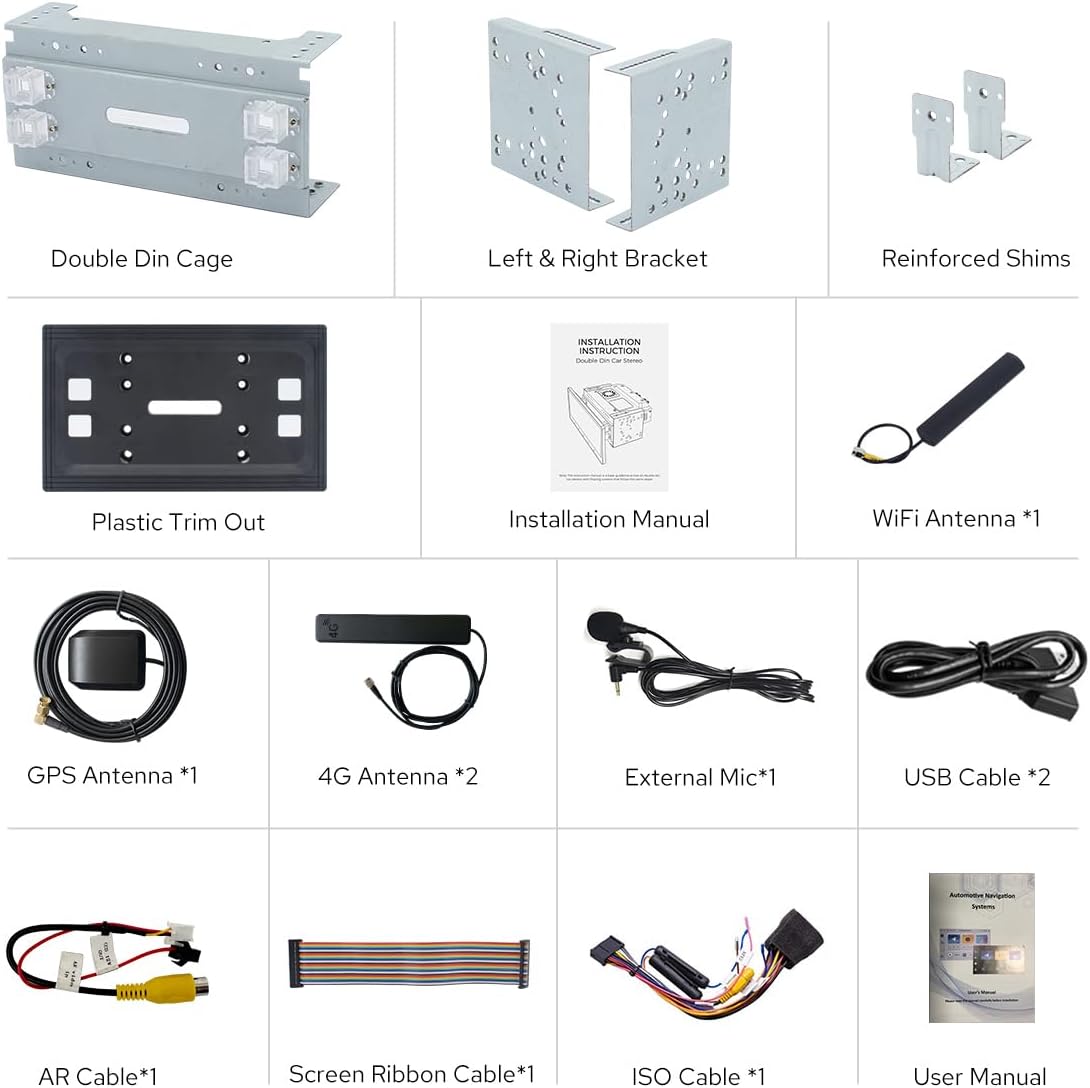
Image 2.1: All components included in the Joying JY-UTD13N8 package, such as the double din cage, mounting brackets, various cables, antennas, and documentation.
3. Product Features
3.1. Core Performance
- Fast Boot: The unit starts up and enters the user interface in approximately 2 seconds after the car key is inserted. Initial boot may take 30-40 seconds.
- Android 13 Operating System: Provides a modern and efficient user experience.
- High-Resolution Display: 13.3-inch IPS screen with 1920x1080 resolution for clear visuals.
- Powerful Processor: Qualcomm Snapdragon 6125 Octa-Core 2.0GHz for smooth operation.
- Enhanced Cooling: Dual heat sink design with automatic fan activation based on CPU temperature or volume to prevent overheating.
- Upgraded WiFi Signal: Independent WiFi antenna supports 802.11a/b/g/n/AC (2.4GHz/5GHz) for stable internet access.

Image 3.1: Illustration of the upgraded cooling system, featuring a dual heat sink and an internal fan that activates automatically to maintain optimal operating temperature.

Image 3.2: The independent WiFi antenna, designed to ensure stable and fast internet connectivity for the head unit.
3.2. Connectivity & Navigation
- Built-in Apple CarPlay & Android Auto: Connect your smartphone via USB or Bluetooth for seamless access to navigation, calls, and music on the larger screen.
- Built-in 4G Module: Insert a SIM card for internet access (data only, no calls/SMS). Supports FDD-LTE: B2/B4/B5/B7/B12/B13/B14/B17/B25/B26/B38/B66/B71 and TDD-LTE: B41.
- GPS Navigation: Precise GPS engine with included antenna for accurate, real-time navigation. Supports offline maps.
- Bluetooth: For hands-free calls and audio streaming.
- Mirror Link: Display your phone's screen on the head unit.
- Multiple USB Ports: Includes 3 USB ports for various connections.

Image 3.3: The integrated Apple CarPlay and Android Auto features, allowing smartphone connectivity for navigation, communication, and media playback.
3.3. Audio & Video
- High-Quality Sound: TDA7851 DSP chip, 48-band graphic equalizer, and 4x50W maximum output power.
- Optical Fiber and Coaxial Digital Output: For direct connection to external amplifiers with digital inputs, ensuring optimal sound quality.
- Aftermarket Amplifier Support: Features 4 audio outputs, 1 subwoofer output, fiber optical output, SPDIF coaxial output, and center channel output.
- AM/FM Radio: Built-in tuner for radio reception.
- HDMI Output: Full digital image and sound output for projection screens or on-screen displays, supporting 1080P. HDMI cable not included.

Image 3.4: Details on the high-quality sound capabilities, including the DSP chip, equalizer, maximum output power, and comprehensive support for external amplifiers.

Image 3.5: The HDMI output feature, enabling connection to external displays for passenger entertainment or synchronized display of the main screen content.
3.4. User Interface & Customization
- Split-screen Multitasking: Run two applications simultaneously on the screen.
- Personalized Settings: Customize car boot logo, wallpapers, button colors, and screen brightness.
- Steering Wheel Control (SWC): Supports steering wheel controls for easy song, radio channel, and volume adjustments. Requires an additional CANbus cable for vehicles with CAN system.

Image 3.6: Instructions for using the split-screen multitasking feature, allowing two applications to be viewed and operated concurrently.

Image 3.7: Examples of personalized settings available, such as custom boot logos, wallpapers, button lighting colors, and screen brightness adjustments.
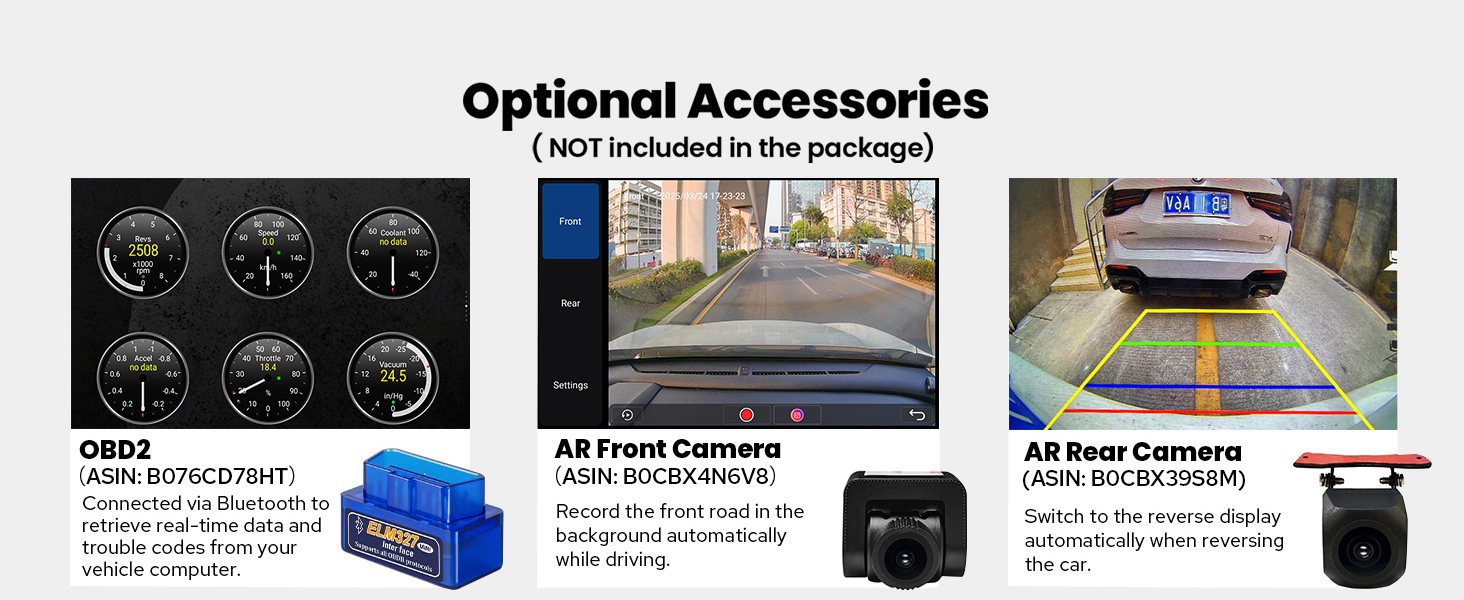
Image 3.8: The steering wheel control feature, allowing users to manage media and volume directly from their steering wheel for convenience and safety.
4. Installation
Proper installation is crucial for the optimal performance and safety of your car stereo. It is recommended that installation be performed by a qualified professional.
4.1. Pre-Installation Considerations
- You may need an installation frame kit with an inner size of 178 x 102mm, a special ISO harness, an amplifier adapter, or a CANbus decoder depending on your car's specific requirements.
- The unit does not support factory car GPS antenna, backup rear camera, Bluetooth, USB, or microphone. Only JOYING accessories are supported for these functions.
- Refer to the dedicated Installation Manual included in your package for detailed, step-by-step instructions specific to your unit.
4.2. Installation Structure
The unit features an upgraded installation structure with adjustable left and right brackets to accommodate a wider range of vehicles and ensure the best fixing position in your car's center console.

Image 4.1: The upgraded installation structure with adjustable brackets, designed for flexible mounting in various vehicle types.
Note: If your car is a Hyundai or Kia brand, please contact Joying customer support to obtain a different bracket set.
5. Operating Instructions
5.1. Basic Operation
- Power On/Off: The unit powers on automatically when the car ignition is turned on. To power off, turn off the car ignition.
- User Interface: Navigate through applications and settings using the touchscreen. The main screen provides access to navigation, media, settings, and other apps.
5.2. Split-screen Multitasking
To use the split-screen feature:
- Tap the recent apps icon (usually a square or three vertical lines).
- Find the app you want to run in split-screen mode. Click the app icon to bring up the split-screen button, and tap it.
- The first app selected will display on the left side. Choose a second app from the recent apps list to display on the right side.
5.3. Personalized Settings
Access the 'Settings' menu to customize various aspects of your head unit:
- Car Boot Logo: Select a custom logo to display when the unit starts up.
- Customizable Wallpapers: Choose from pre-installed wallpapers or upload your own.
- Changeable Button Color: Adjust the color of the physical buttons on the unit.
- Adjustable Screen Brightness: Modify screen brightness for optimal visibility in different lighting conditions.
6. Connectivity
6.1. Apple CarPlay & Android Auto
Connect your compatible iPhone or Android smartphone to access features like navigation, music, and messaging directly on the head unit's screen. Connection can be established via USB cable or Bluetooth.
6.2. 4G Module
Insert a compatible SIM card into the designated slot to enable internet access. This feature supports data connectivity only and cannot be used for making phone calls or sending SMS messages directly from the unit.
6.3. Wi-Fi
The unit features an independent WiFi antenna for stable and fast internet access. Connect to available Wi-Fi networks through the settings menu.
6.4. Bluetooth
Pair your smartphone or other Bluetooth devices for hands-free calling and audio streaming. Access Bluetooth settings to manage paired devices.
7. Audio Features
7.1. Sound Customization
The built-in TDA7851 DSP chip and 48-band graphic equalizer allow for extensive sound customization. Adjust frequency bands to tailor the audio output to your preferences.
7.2. External Amplifier Support
For enhanced audio systems, the unit provides multiple outputs for connecting aftermarket amplifiers:
- 4 Audio Outputs
- 1 Subwoofer Output
- Fiber Optical Output
- SPDIF Coaxial Output
- Center Channel Output
These digital outputs ensure high-fidelity audio transmission to compatible external amplifiers.
8. Specifications
| Feature | Detail |
|---|---|
| Product Dimensions | 5.91 x 7.99 x 4.72 inches |
| Item Weight | 2.65 pounds |
| Item Model Number | JY-UTD13N8 |
| Brand | JOYING |
| Connectivity Technology | Bluetooth, Ethernet, HDMI, USB, Wi-Fi |
| Controller Type | Android |
| Special Features | DSP, Equalizer, Front View Camera Input, RCA, RDS |
| Compatible Devices | Amplifier, Camera, Smartphone, Speaker |
| Total HDMI Ports | 1 |
| Connector Type | Coaxial, Optical |
| Audio Output Mode | Stereo |
| Surround Sound Channel Configuration | 5.1 |
| Video Encoding | Supports H264/H265/MP4/AVI/MKV/FLV |

Image 8.1: Physical dimensions of the unit and a detailed layout of the rear panel connections, including USB, HDMI, optical, coaxial, and various audio outputs.
9. Optional Accessories
The following accessories are not included in the standard package but can be purchased separately to enhance your experience:
- OBD2 Scanner: Connects via Bluetooth to retrieve real-time data and trouble codes from your vehicle's computer.
- AR Front Camera: Records the road ahead automatically while driving.
- AR Rear Camera: Provides a reverse display automatically when backing up the car.
- TPMS (Tire Pressure Monitoring System)
- Steering Wheel Controller (if not using CANbus)

Image 9.1: Examples of optional accessories that can be integrated with the Joying head unit, including diagnostic tools and cameras.
10. Troubleshooting
This section addresses common issues you might encounter. For more complex problems, please refer to the support section.
10.1. Common Issues and Solutions
- Unit does not power on: Check power connections and vehicle's fuse box. Ensure the car ignition is on.
- No sound: Verify speaker connections, amplifier connections (if applicable), and volume settings. Check if the mute function is active.
- GPS signal lost or inaccurate: Ensure the GPS antenna is properly installed and has a clear view of the sky. Check GPS settings in the unit.
- SIM card not recognized: Ensure the SIM card is correctly inserted and is a supported type. Verify that the SIM card is active and has a data plan.
- Bluetooth connectivity issues: Ensure Bluetooth is enabled on both the head unit and your device. Try unpairing and re-pairing the device.
- Steering Wheel Controls not working: Confirm that the CANbus cable (if required for your vehicle) is correctly installed. Access the steering wheel control learning function in settings to configure buttons.
11. Warranty and Support
For warranty information, technical support, or service inquiries, please contact Joying customer support. Refer to the contact details provided in your product packaging or visit the official Joying website.
Note: Please retain your proof of purchase for warranty claims.
