
Introduction
This user manual provides detailed instructions for the operation and maintenance of the BSIDE Thermal Imaging Camera Multimeter. This device integrates a high-resolution thermal imager with a comprehensive digital multimeter, designed for electrical home inspection, HVAC, plumbing, and boiler inspection. It features a large touch LCD, multiple thermal palettes, and advanced measurement capabilities.
Safety Information
Always adhere to the following safety precautions to prevent injury or damage to the device:
- Do not operate the device if it appears damaged or is not functioning properly.
- Ensure proper connection of test leads before taking measurements.
- Do not exceed the maximum input ratings for any function.
- Use caution when working with live circuits. High voltage can cause severe injury or death.
- Keep the device dry and clean. Avoid exposure to extreme temperatures or humidity.
- Refer to local electrical codes and safety standards when performing electrical work.
Package Contents
Verify that all items are present in the package:
- 1 x Infrared Camera Multimeter
- 1 x Charging Cable
- 1 x Carrying Case
- 1 x User Manual
Note: The flexible AC current clamp is not included in this package.

Image showing the BSIDE Thermal Imaging Camera Multimeter along with its included accessories: charging cable, test leads, and carrying case.
Setup
- Charging the Battery: Connect the provided charging cable to the device's charging port and a suitable USB power adapter. The device is powered by a built-in 2500mAh rechargeable battery.
- Power On/Off: Press and hold the power button located on the side of the device to turn it on or off.
- Connecting Test Leads: For multimeter functions, insert the red test lead into the positive (+) input jack and the black test lead into the common (COM) input jack. Ensure a secure connection.
Operating Instructions
The BSIDE Thermal Imaging Camera Multimeter features a 3.98-inch touch LCD for intuitive operation. Navigate through functions and settings using the touch screen and the physical "WHEEL" button.
Thermal Imaging Camera Functions
The thermal imager provides a 320x320 IR resolution, allowing for detailed thermal analysis.
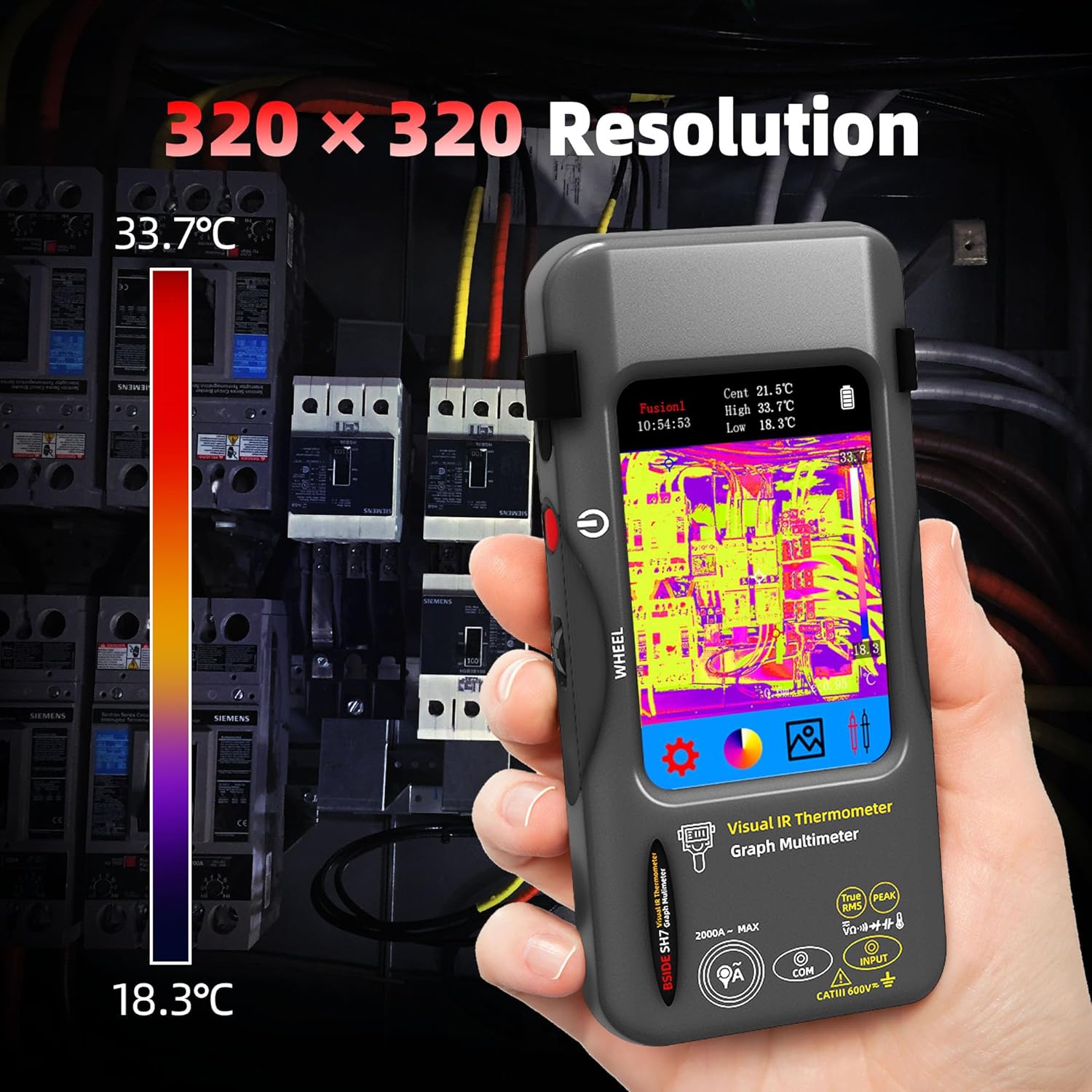
The device displays thermal images with a 320x320 IR resolution, highlighting temperature variations.
- Resolution: 320 x 320 IR resolution for clear thermal images.
- Thermal Palettes: Select from 15 different thermal palettes (e.g., white hot, black hot, rainbow, iron red) to visualize temperature differences effectively.
- Temperature Range: Measures temperatures from -20℃ to 550℃ (-4℉ to 1022℉).
- Emissivity: The emissivity of the infrared imaging camera is adjustable from 0.01 to 1, allowing for accurate readings on various surfaces.
- 3-Spots Display: The screen can display hot, cold, and central spot temperatures simultaneously for quick analysis.
- High & Low Temperature Alarm: Set alarms to notify you when temperatures exceed or fall below specified thresholds.

A selection of 15 thermal palettes is available to customize the visual representation of temperature data.

The device highlights hot, cold, and central temperature spots on the thermal image for easy identification of anomalies.
Digital Multimeter Functions
The integrated digital multimeter offers 20000 counts for precise electrical measurements.

The multimeter function provides 20000 counts for accurate readings of electrical parameters, as shown measuring DC voltage on a battery.
- Voltage Measurement: Measures AC and DC voltage.
- Resistance Measurement: Measures resistance in Ohms.
- Continuity Test: Checks for circuit continuity with an audible indicator.
- Capacitance Measurement: Measures capacitance in Farads.
- Diode Test: Tests the functionality of diodes.
- Temperature Measurement: Measures temperature using the included probes.
- AC Current Clamp: Supports measurement of AC current up to 2000A with an external flexible AC current clamp (not included).

The device is capable of measuring capacitance, useful for electronic maintenance and troubleshooting.
Data Management
The device allows for efficient data storage and export.
- Image Storage: The internal memory can store over 19,000 images.
- Data Export: Connect the device to a computer via USB to export tested data and images for further analysis.

Images and data can be exported in real-time to a computer via USB for detailed analysis and reporting.
Product Demonstration Video
Official product video demonstrating the BSIDE SH7 Thermal Camera with Multimeter Mode, showcasing its thermal imaging and electrical measurement capabilities.
Maintenance
- Cleaning: Use a soft, damp cloth to clean the device. Do not use abrasive cleaners or solvents.
- Storage: Store the device in its carrying case in a cool, dry place when not in use.
- Battery Care: To prolong battery life, charge the device regularly, even if not in frequent use. Avoid fully discharging the battery for extended periods.
Troubleshooting
| Problem | Possible Cause | Solution |
|---|---|---|
| Device does not power on. | Low battery or power button not pressed correctly. | Charge the battery. Press and hold the power button firmly. |
| Inaccurate thermal readings. | Incorrect emissivity setting or environmental factors. | Adjust emissivity for the target material. Ensure stable environmental conditions. |
| Multimeter readings are unstable. | Loose test lead connections or interference. | Check test lead connections. Move away from strong electromagnetic fields. |
| Cannot export data to computer. | USB cable issue or driver not installed. | Try a different USB cable or port. Ensure necessary drivers are installed on your computer. |
Specifications
| Feature | Detail |
|---|---|
| Display Size | 3.98 Inch TFT LCD |
| IR Resolution | 320 x 320 |
| Screen Resolution | 320 x 480 |
| Temperature Range | -20℃ to 550℃ (-4℉ to 1022℉) |
| Thermal Sensitivity (NETD) | Less than 60mk |
| Refresh Rate | 25Hz |
| Emissivity | 0.01-1 (Adjustable) |
| Thermal Palettes | 15 options |
| Multimeter MAX Display | 20000 counts |
| DC Voltage | 20mV/200mV, 2V/20V, 200V/1000V |
| AC Voltage | 20mV/200mV, 2V/20V, 200V/750V |
| Flexible AC Current | 200A/2000A (with optional clamp) |
| Resistance | 200Ω to 200MΩ |
| Capacitance | 999.99nF to 99.999mF |
| Power | 2500mAh rechargeable battery (built-in) |
| Dimensions | 169 x 81 x 26.8 mm (6.65 x 3.19 x 1.02 inches) |
| Weight | 270g (9.52 ounces) |
Warranty Information
Specific warranty terms and conditions for the BSIDE Thermal Imaging Camera Multimeter are typically provided with the product packaging or on the manufacturer's official website. Please refer to these resources for detailed warranty coverage, duration, and claim procedures. Protection plans may also be available for extended coverage.
Customer Support
For technical assistance, product inquiries, or support, please contact BSIDE customer service through their official website or the contact information provided in your product documentation. Ensure you have your product model number and purchase details ready when contacting support.