
1. Introduction
Thank you for choosing the Pamray 49 Inch L-Shaped Gaming Computer Desk. This manual provides detailed instructions for assembly, operation, maintenance, and troubleshooting to ensure optimal use of your new desk. Please read this manual thoroughly before beginning assembly and retain it for future reference.
2. Safety Information
- Ensure the desk is properly assembled with all provided 'X'-shaped back braces to maintain stability.
- Do not exceed the maximum weight recommendation of 150 pounds (68 kg) to prevent tipping or damage.
- Keep small parts and packaging materials away from children to prevent choking hazards.
- Place the desk on a level surface to prevent wobbling.
- Avoid exposing the desk to excessive moisture or direct sunlight.
- Do not stand or sit on the desk.
3. Package Contents
Before assembly, verify that all components listed below are present and undamaged. If any parts are missing or damaged, please contact customer support.
- Desktop Panels
- Metal Frame Components
- 5-Tier Shelf Panels
- Built-in Power Outlet Unit (with AC outlets and USB ports)
- LED Light Strip
- Headphone Hook
- Assembly Hardware (screws, bolts, Allen wrench)
- Instruction Manual
4. Assembly Instructions
This desk is designed for straightforward assembly. Comprehensive installation videos are available via the product page or by scanning the transparency label on the packaging. Follow the included clear installation instructions and use all necessary tools provided in the accessory box.
General Assembly Tips:
- Lay out all parts and hardware before starting. Separate components by their labels.
- Pay close attention to the orientation of boards and poles as depicted in the diagrams. Incorrect orientation can lead to misaligned holes. If holes do not align, try flipping the board or component.
- Do not fully tighten all screws until the entire frame is assembled, then tighten them securely.
- The 5-tier shelf unit is reversible and can be installed on either the left or right side of the desk. Refer to the specific instructions for your desired configuration.
Visual Guide: Reversible Design


Assembly Video:
Official video demonstrating the assembly process and key features of the L-shaped computer desk, including the reversible side storage shelves and LED lighting.
5. Features Overview
- Ample Storage Space: Features a 5-tier side shelf for organizing books, office supplies, files, decor, or gaming accessories. Includes a headphone hook for convenient storage.
- Built-in Power Outlet & Colorful LED Lights: Equipped with 3 AC outlets and 2 USB ports for charging devices. The integrated LED light strip offers 213 modes and over 10,000 color options, controllable via an app.
- Reversible 5-Tier Shelves: The side shelf can be installed on either the left or right side to suit your space and preference.
- Sturdy Structure: Enhanced stability with two "X"-shaped back braces, preventing wobbling during use.
Feature Details:


6. Operation
6.1. Power Outlet Usage
The desk includes a built-in power outlet unit with 3 AC outlets and 2 USB ports. Simply plug the desk's main power cord into a wall outlet. You can then connect your electronic devices directly to the desk's integrated outlets for convenient power access.
6.2. LED Light Control
The integrated LED light strip can be controlled via a dedicated mobile application. Download the app (details typically found in the LED light packaging or a QR code) to access various lighting modes, adjust brightness, and select from over 10,000 color options. The lights can also sync with music.
7. Maintenance
- Cleaning: Wipe the desk surfaces with a soft, damp cloth. Avoid using abrasive cleaners or harsh chemicals, which can damage the finish.
- Fasteners: Periodically check all screws and bolts to ensure they remain tight. Retighten if necessary to maintain stability.
- Weight Distribution: Distribute weight evenly across the desktop and shelves. Do not place excessively heavy items on any single point.
- Environmental Conditions: Keep the desk in a dry environment and avoid direct exposure to extreme temperatures or humidity.
8. Troubleshooting
| Problem | Possible Cause | Solution |
|---|---|---|
| Holes do not align during assembly. | Incorrect orientation of a board or frame component. | Review the instruction diagrams carefully. Try flipping the component (e.g., a shelf panel or metal bar) to ensure correct alignment. |
| Desk is wobbly after assembly. | Screws are not fully tightened; desk is on an uneven surface; X-braces not installed correctly. | Ensure all screws are securely tightened. Verify that the 'X'-shaped back braces are properly installed. Move the desk to a level surface or use adjustable feet if available. |
| LED light strip adhesive is weak. | Surface not clean; adhesive quality. | Ensure the surface is clean and dry before applying. If necessary, use additional adhesive tape (not included) to secure the strip. |
| Built-in power outlet not working. | Desk's main power cord not plugged in; outlet unit not properly connected. | Check that the desk's power cord is securely plugged into a functional wall outlet. Ensure the power outlet unit is correctly installed and connected within the desk structure. |
9. Specifications
| Attribute | Detail |
|---|---|
| Brand | Pamray |
| Model Number | S14white49 |
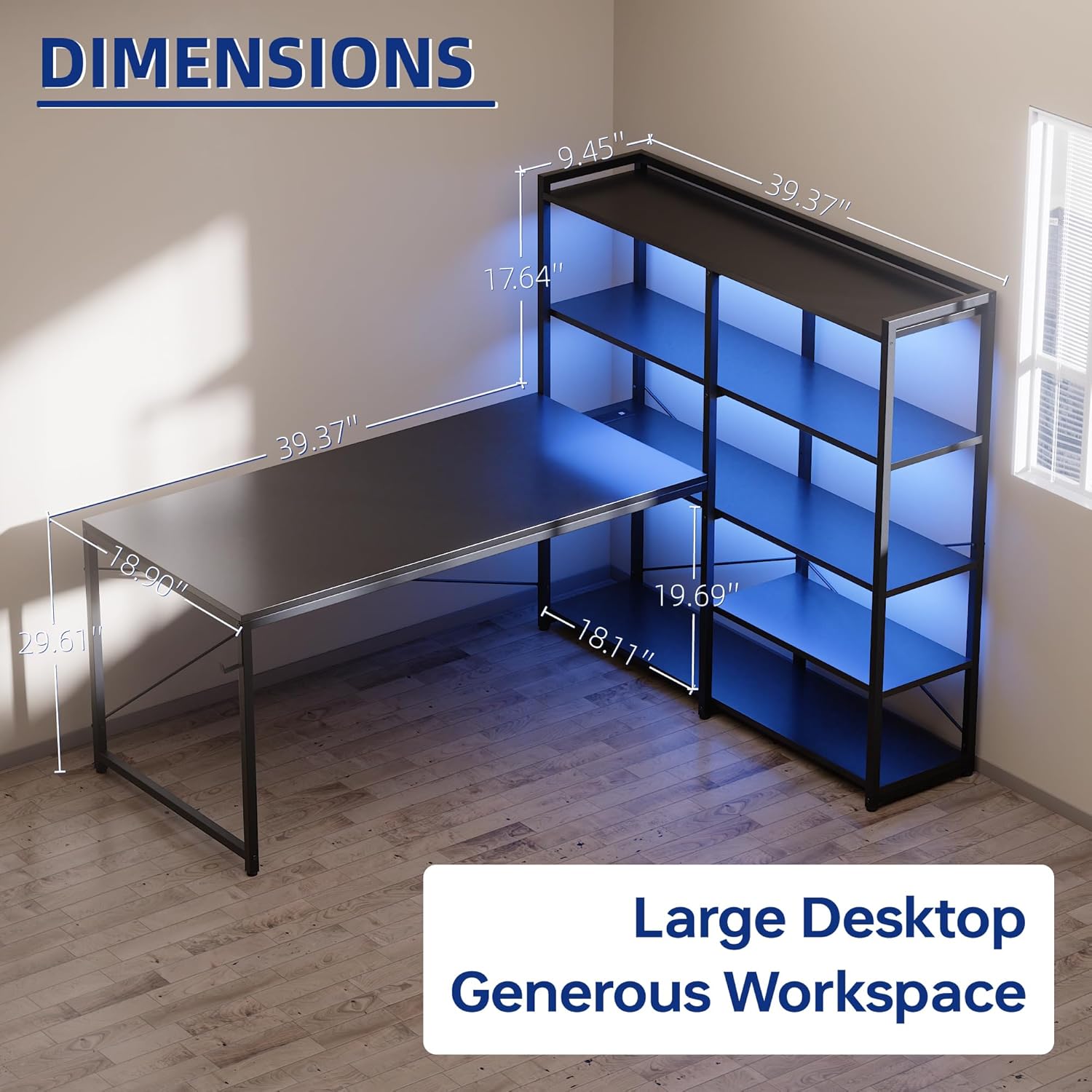
| Product Dimensions (D x W x H) | 18.9"D x 48.8"W x 29.61"H (48cm D x 124cm W x 75.2cm H) |
| Item Weight | 42.4 pounds (19.2 kg) |
| Color | White |
| Material Type | Metal, Wood (FSC-Certified Tabletop) |
| Number of Shelves | 5 |
| Maximum Weight Recommendation | 150 pounds (68 kg) |
| Included Components | Built-in Outlet, Headphone Hook, Built-in USB Port, LED Lights |
| Room Type | Bedroom, Dormitory, Living Room, Office, Study Room |
10. Warranty and Support
10.1. Warranty Information
This Pamray desk comes with a Limited Warranty. Please refer to the warranty card included in your package for specific terms, conditions, and duration of coverage. The warranty typically covers manufacturing defects under normal use.
10.2. Customer Support
For any questions, missing parts, or issues not covered in this manual, please contact Pamray customer support. Contact information can usually be found on the product packaging, the brand's official website, or through your retailer's support channels. Please have your model number (S14white49) and purchase date ready when contacting support.
