
1. Introduction
The Motorola Moto G35 is a feature-packed smartphone designed for modern life, offering an impressive 256GB storage capacity and 8GB RAM for smooth multitasking. Its stunning 6.72-inch Full HD+ display delivers vibrant visuals, while the advanced 50MP main camera, 8MP ultra-wide lens, and 16MP front camera capture life's moments in detail. With a robust 5000mAh battery and dual SIM capability, this device provides performance, style, and versatility.
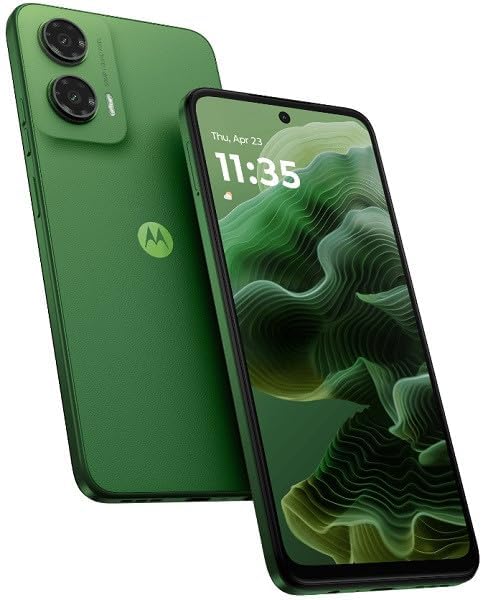
Figure 1.1: Front and back view of the Motorola Moto G35 in Leaf Green.
2. What's in the Box
Upon unboxing your Motorola Moto G35, please verify that all standard components are present:
- Motorola Moto G35 Smartphone
- Headset
- Charging Cable (USB-C)
- Power Adapter
- SIM Ejector Tool
- Quick Start Guide
- Safety and Warranty Information
3. Initial Setup
3.1. Inserting SIM Cards and microSD Card
Locate the SIM tray on the side of your device. Use the provided SIM ejector tool to open the tray. Carefully place your Nano-SIM cards (up to two) and an optional microSD card into their respective slots. Ensure the gold contacts face downwards. Gently push the tray back into the device until it clicks into place.

Figure 3.1: Overview of the Motorola Moto G35, showing ports and SIM tray.
3.2. Initial Power On and Configuration
Press and hold the power button located on the side of the device until the Motorola logo appears. Follow the on-screen prompts to select your language, connect to a Wi-Fi network, sign in with your Google account, and set up security features like fingerprint unlock or facial recognition.
3.3. Charging the Device
Before first use, it is recommended to fully charge your Moto G35. Connect the USB-C cable to the charging port at the bottom of the phone and the other end to the power adapter. Plug the adapter into a wall outlet. The device features a 5000mAh battery and typically charges fully in approximately 2 hours.
4. Operating Your Device
4.1. Display and Navigation
The Moto G35 features an immersive 6.72-inch Full HD+ display. Navigate the interface using touch gestures: tap to select, swipe to scroll, pinch to zoom. The device runs on Android 14, providing an intuitive user experience.
4.2. Camera Usage
Your Moto G35 is equipped with a versatile camera system:
- Main Camera: 50MP for high-resolution photos.
- Ultra-wide Lens: 8MP to capture broader scenes.
- Front Camera: 16MP for clear selfies and video calls.
Open the Camera app from your home screen or app drawer. Select different modes (e.g., Photo, Portrait, Video) by swiping across the screen. Tap the shutter button to capture images or start/stop video recording.

Figure 4.1: Rear camera module of the Motorola Moto G35.
4.3. Connectivity
The device supports various connectivity options:
- Cellular: 5G and 4G LTE for fast mobile data.
- Wi-Fi: Connect to wireless networks for internet access.
- Bluetooth: Pair with wireless accessories like headphones or speakers.
- GPS: For location services and navigation.
Access these settings via the Quick Settings panel (swipe down from the top of the screen) or through the main Settings app.
4.4. Battery Management
The 5000mAh battery provides extended usage. To optimize battery life, reduce screen brightness, disable unused connectivity features (Wi-Fi, Bluetooth, GPS) when not needed, and close background applications. The phone offers approximately 24 hours of talk time on a full charge.
4.5. Storage and Performance
With 256GB of internal storage and 8GB of RAM, the Moto G35 handles demanding applications and stores a large volume of media. Regularly clear cache and unnecessary files to maintain optimal performance. You can expand storage using a microSD card.
5. Maintenance
Proper maintenance ensures the longevity and optimal performance of your Motorola Moto G35.
- Cleaning: Use a soft, lint-free cloth to clean the screen and body. Avoid abrasive materials or harsh chemicals.
- Software Updates: Regularly check for and install system updates to ensure your device has the latest features, security patches, and performance improvements. Go to Settings > System > System updates.
- Data Backup: Periodically back up your important data (photos, contacts, documents) to a cloud service or a computer to prevent data loss.
- Battery Care: Avoid extreme temperatures. While the device has a large battery, prolonged exposure to very hot or cold conditions can affect battery health.
6. Troubleshooting
This section addresses common issues you might encounter with your Moto G35.
| Problem | Possible Solution |
|---|---|
| Device not powering on | Ensure the battery is charged. Connect the charger and wait a few minutes before attempting to power on. If unresponsive, perform a force restart by holding the power button for 10-15 seconds. |
| Poor battery life | Check background app usage in Settings > Battery. Reduce screen brightness. Disable Wi-Fi, Bluetooth, or GPS when not in use. Limit push notifications. |
| Connectivity issues (Wi-Fi/Bluetooth) | Toggle Wi-Fi/Bluetooth off and on. Restart your phone. For Wi-Fi, forget the network and reconnect. Ensure you are within range of the network/device. |
| Apps crashing or freezing | Clear the app's cache (Settings > Apps > [App Name] > Storage & cache > Clear cache). Update the app from the Google Play Store. If the issue persists, uninstall and reinstall the app. |
| Slow performance | Free up storage space by deleting unnecessary files or apps. Restart your device regularly. Limit the number of apps running in the background. |
7. Technical Specifications
Below are the detailed technical specifications for the Motorola Moto G35 (Model: XT2433-5):
| Feature | Specification |
|---|---|
| Model Name | Moto G35 |
| Item Model Number | XT2433-5 |
| Operating System | Android 14 |
| Display Size | 6.72 Inches |
| Resolution | Full HD+ |
| RAM Memory Installed Size | 8 GB |
| Memory Storage Capacity | 256 GB |
| Main Camera | 50MP |
| Ultra-wide Camera | 8MP |
| Front Camera | 16MP |
| Battery Capacity | 5000 Milliamp Hours |
| Phone Talk Time | 24 Hours |
| Charging Time | 2 Hours |
| Connectivity Technologies | 5G, Bluetooth, Wi-Fi, 4G LTE |
| Special Features | Dual SIM, Unlocked, 50MP Camera |
| Audio Jack | 3.5 mm |
| Color | Leaf Green |
| Product Dimensions | 6.72 x 3 x 6.72 inches |
| Item Weight | 10.4 ounces |
8. Warranty and Support
8.1. Product Warranty
Your Motorola Moto G35 comes with a limited manufacturer's warranty. Please refer to the warranty card included in your product packaging for specific terms, conditions, and duration. Keep your proof of purchase for warranty claims.
8.2. Customer Support
For further assistance, technical support, or service inquiries, please visit the official Motorola support website or contact their customer service. You can find contact information and FAQs on the Motorola website: www.motorola.com/us/support.


