1. Introduction
The XINFUTE RM-L1388 PRO is a universal replacement remote control designed for a wide range of LCD and LED televisions. It is compatible with popular brands such as LG, Samsung, Sony, and Sharp. This remote offers an ergonomic design for comfortable use and requires no complex programming or pairing. Simply insert batteries, and it is ready for operation.

Image 1.1: Front view of the XINFUTE RM-L1388 PRO universal remote control, showing all buttons including power, mute, number pad, channel, volume, and dedicated app buttons.
2. Setup
Setting up your XINFUTE RM-L1388 PRO remote control is a straightforward process that requires no complex programming.
2.1 Battery Installation
- Locate the battery compartment on the back of the remote control.
- Slide the battery compartment cover downwards or outwards to open it.
- Insert two (2) AAA alkaline batteries, ensuring the positive (+) and negative (-) terminals align correctly with the indicators inside the compartment.
- Replace the battery compartment cover by sliding it back into position until it clicks securely.
Once the batteries are installed, the remote control is ready for immediate use with compatible televisions. No pairing or code entry is required.
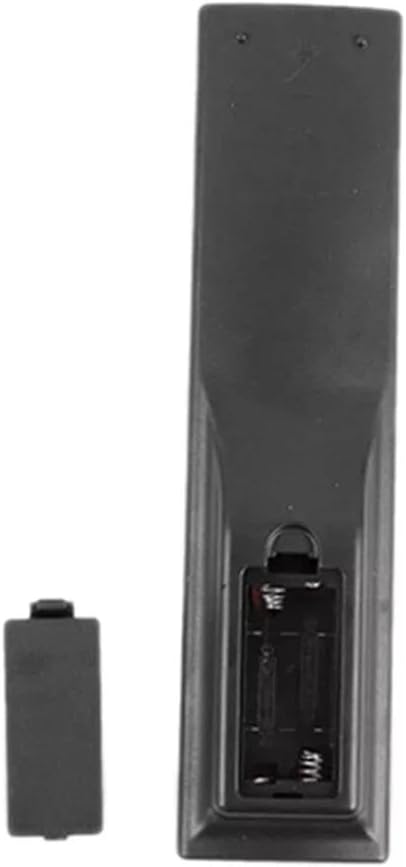
Image 2.1: Back view of the remote control, illustrating the open battery compartment for AAA battery insertion.
3. Operating Instructions
The RM-L1388 PRO remote control provides intuitive access to common television functions. Ensure there is a clear line of sight between the remote and your television's infrared receiver.
3.1 Basic Functions
- Power (Red Button): Turns the television on or off.
- Mute (Green Button): Mutes or unmutes the television audio.
- Number Buttons (0-9): Directly select channels.
- CH.LIST: Displays the channel list.
- P.MODE: Adjusts picture modes.
- GUIDE: Accesses the electronic program guide.
- S.MODE: Adjusts sound modes.
- SOURCE: Selects input sources (HDMI, AV, etc.).
- Navigation Pad (Up, Down, Left, Right, OK): Navigates menus and confirms selections.
- RETURN: Returns to the previous screen or menu.
- EXIT: Exits the current menu or application.
- VOL +/- (Green Buttons): Adjusts the volume level.
- CH ^/v (Blue Buttons): Changes channels up or down.
- DISPLAY: Shows on-screen information.
- SLEEP: Sets the sleep timer.
3.2 Advanced Functions (if supported by your TV)
- USB-1: Accesses USB input.
- HOME: Returns to the TV's home screen.
- REC: Initiates recording (requires compatible TV and storage).
- FREEZE: Freezes the current screen.
- NETFLIX, YouTube, MY APPS: Direct access buttons for streaming services and applications.

Image 3.1: Angled view of the remote, showcasing its ergonomic shape and the arrangement of various control buttons.
4. Maintenance
Proper care and maintenance will ensure the longevity and optimal performance of your remote control.
4.1 Cleaning
- Wipe the remote control with a soft, dry cloth.
- For stubborn dirt, slightly dampen the cloth with water or a mild, non-abrasive cleaner. Avoid excessive moisture.
- Do not use harsh chemicals, solvents, or abrasive cleaning pads, as these can damage the remote's surface or internal components.
4.2 Battery Care
- Replace batteries when the remote's response becomes sluggish or inconsistent.
- If the remote will not be used for an extended period, remove the batteries to prevent leakage, which can cause damage.
- Dispose of used batteries according to local regulations.
4.3 Storage
- Store the remote control in a cool, dry place, away from direct sunlight and extreme temperatures.
- Avoid dropping the remote or exposing it to strong impacts.
5. Troubleshooting
If you encounter issues with your XINFUTE RM-L1388 PRO remote control, please refer to the following common solutions:
- Remote not responding:
- Check if the batteries are inserted correctly with the correct polarity (+/-).
- Replace the batteries with new AAA alkaline batteries.
- Ensure there are no obstructions between the remote control and the TV's infrared sensor.
- Make sure you are within the effective operating range of the TV's infrared sensor.
- Certain buttons not working:
- This remote is a replacement unit designed to function as effectively as original remotes. However, some advanced or brand-specific functions not present on the RM-L1388 PRO may not be supported.
- Clean the remote control, especially around the unresponsive buttons, to remove any dirt or debris that might be interfering with button presses.
- Intermittent operation:
- This could indicate low battery power. Replace the batteries.
- Ensure no strong light sources (like direct sunlight or bright fluorescent lights) are interfering with the infrared signal.
If the issue persists after following these steps, please refer to the Warranty and Support section for further assistance.
6. Specifications
| Brand | XINFUTE |
| Model | RM-L1388 PRO |
| Compatible Devices | Televisions (LG, Samsung, Sony, Sharp LCD/LED TVs) |
| Connectivity Technology | Infrared |
| Special Features | Ergonomic design |
| Material | ABS Material |
| Battery Type | 2 x AAA Alkaline batteries (not included) |
| Product Dimensions | 15.24 x 7.62 x 2.54 cm (6 x 3 x 1 inches) |
| Product Weight | 80 g (2.82 ounces) |
7. Warranty and Support
7.1 Warranty Information
The XINFUTE RM-L1388 PRO remote control comes with a one-year warranty from the date of purchase. This warranty covers manufacturing defects and ensures that the product functions as described under normal use.
7.2 Customer Support
All merchandise is inspected before shipment to ensure quality. If you are not satisfied with your purchase or encounter any issues, please contact customer support within 24 hours of receiving your item. Provide your purchase details and a description of the problem for prompt assistance.
For support inquiries, please refer to the contact information provided by your retailer or on the product packaging.