Introduction
This manual provides comprehensive instructions for the installation, operation, and maintenance of your CO-Z Smart Automatic Dual Swing Gate Opener Kit with Electric Lock. Please read this manual thoroughly before installation and use to ensure proper function and safety. Keep this manual for future reference.
Important Safety Information
Failure to follow these safety instructions may result in serious injury or property damage. Always exercise caution when installing, operating, or maintaining the gate opener system.
- Read all instructions carefully before installation and use.
- Ensure the gate is properly installed and operates freely before installing the opener.
- Do not allow children to play near the gate or operate the gate opener controls.
- Keep hands and feet clear of the gate's path during operation.
- Disconnect power to the gate opener before performing any maintenance or repairs.
- Ensure all electrical connections are made by a qualified electrician and comply with local codes.
- The gate opener is designed for vehicular gates only. Do not use for pedestrian gates.
- Regularly inspect the gate opener system for signs of wear, damage, or misalignment.
Package Contents
Verify that all components listed below are present in your package. If any parts are missing or damaged, contact customer support.

Figure 1: Kit Components. This image displays the various parts included in the gate opener kit, such as the main body of the electric lock, two manual release keys, a pin, mounting bolts, a padlock, and a receiver.
- Dual Swing Gate Opener Arms (2)
- Control Box
- Electric Gate Lock (Main Body, Receiver, Padlock)
- Manual Release Keys (2)
- Mounting Hardware (Bolts, Pins, Brackets)
- Remote Controls (Quantity may vary by package)
- Instruction Manual
Setup and Installation
Proper installation is crucial for the safe and efficient operation of your gate opener. It is recommended that installation be performed by individuals with mechanical and electrical experience.
1. Gate Requirements
Ensure your gate meets the following specifications:
- Maximum gate weight: 440 lb (per single gate)
- Maximum gate length: 5.9 ft (per single gate)
- The gate must swing freely without obstruction.

Figure 2: Opener Dimensions and Capacity. This image illustrates the physical dimensions of the gate opener arms (28 inches and 40.9 inches extended) and highlights their capacity: 440 lb maximum capacity per single gate and 20 ft maximum length per single gate.
2. Mounting the Gate Opener Arms
Mount the gate opener arms to the gate and gate posts using the provided brackets and hardware. Ensure the arms are level and securely fastened. Refer to the detailed diagrams in the full installation guide for precise measurements and mounting positions.
3. Wiring the Control Box
Connect the gate opener arms, electric lock, and power supply to the control box. The control box allows for integration with various accessories.

Figure 3: Control Box and Compatibility. This image shows the internal components of the control box, highlighting its compatibility with external devices such as solar panels, alarm lights, digital keypads, Bluetooth devices, and wall switches.
4. Power Options
The gate opener system offers flexible power options:
- Household Power: Connect directly to a standard electrical outlet.
- Lead-Acid Batteries: Use two 12V lead-acid batteries (not included) for backup or primary power.
- Solar Energy: Integrate with a solar panel and solar controller (not included) for off-grid operation.

Figure 4: Power Supply Options. This diagram illustrates how the gate opener control box can be powered by household electricity, two 12V lead-acid batteries, or a solar panel system including a solar controller.
5. Installing the Electric Gate Lock
The electric gate lock provides enhanced security. Install it according to the diagrams provided, ensuring proper alignment with the gate and receiver.

Figure 5: Electric Lock Installation. This image provides detailed diagrams for installing the automatic electric gate lock, showing configurations for both inward and outward swinging gates, including the placement of the lock body, receiver, and wiring to the control box.
The lock is constructed from durable Q235 steel and features an IP44 weatherproof casing, allowing it to operate reliably in temperatures from 0°F to 120°F and withstand up to 2200 lb of force.
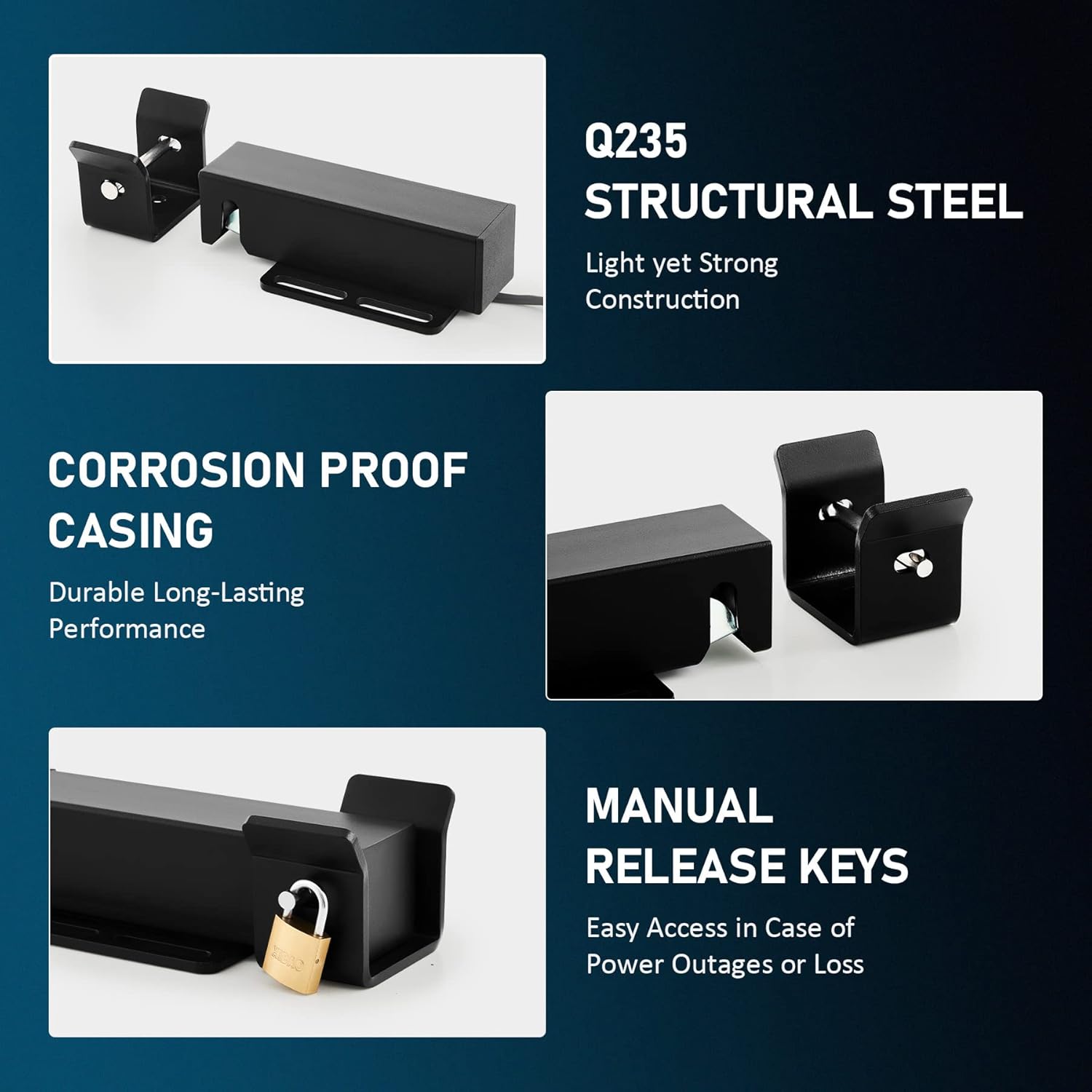
Figure 6: Electric Lock Features. This image details the robust construction of the electric gate lock, emphasizing its Q235 structural steel, corrosion-proof casing, and the inclusion of manual release keys for emergency access.

Figure 7: Weatherproof Lock. This image shows the electric gate lock installed on a gate, illustrating its design for reliable protection in various weather conditions and temperatures ranging from 0°F to 120°F.
Operating Instructions
1. Remote Control Operation
Use the provided remote controls to open and close the gate. Press the designated button to initiate gate movement. The gate will automatically stop when fully open or closed.
2. Smart App Control
The CO-Z Smart Automatic Gate Opener Kit is compatible with a mobile application for convenient control and monitoring.
- Download the official CO-Z app from your device's app store.
- Follow the in-app instructions to pair your gate opener system.
- Use the app to open, close, and monitor the status of your gate.

Figure 8: Smart App Interface. This image shows a smartphone displaying the CO-Z application, which allows users to control and monitor their gate opener, indicating the gate's current status (e.g., "CLOSED") and providing device management options.
3. Manual Release
In case of a power outage or remote control malfunction, the gate can be operated manually using the provided manual release keys. Insert the key into the lock cylinder on the gate opener arm and turn it to disengage the motor, allowing you to push the gate open or closed by hand.
4. Safety Features
The gate opener is equipped with safety features to prevent accidents. If an obstruction (person or vehicle) is detected during operation, the gate will automatically stop and reverse direction.
Maintenance
Regular maintenance ensures the longevity and reliable operation of your gate opener system.
- Monthly: Inspect the gate and opener arms for any signs of wear, damage, or loose connections. Ensure the gate moves freely without binding.
- Quarterly: Check all mounting hardware for tightness. Clean any debris from the gate's path and the opener arms.
- Annually: Lubricate moving parts of the gate and opener arms as recommended by the gate manufacturer. Check the condition of all wiring and electrical connections.
- Battery Check (if applicable): If using battery backup, check battery terminals for corrosion and ensure batteries are fully charged.
Troubleshooting
Refer to the following table for common issues and their solutions. If the problem persists, contact customer support.
| Problem | Possible Cause | Solution |
|---|---|---|
| Gate does not respond to remote/app. | No power; remote battery dead; remote not paired; obstruction. | Check power supply; replace remote battery; re-pair remote; clear obstruction. |
| Gate opens partially then stops. | Obstruction; limit switch issue; low power. | Clear obstruction; check limit switch settings; verify power supply. |
| Gate reverses direction unexpectedly. | Safety sensor triggered; obstruction. | Check safety sensors for alignment/debris; clear gate path. |
| Electric lock not engaging/disengaging. | Misalignment; wiring issue; lock mechanism jammed. | Check lock alignment; inspect wiring; clear any debris from lock mechanism. |
Specifications
| Feature | Detail |
|---|---|
| Model | SGO-D440-AP&AGO-WH00-0Z |
| Max. Gate Weight (per single gate) | 440 lb |
| Max. Gate Length (per single gate) | 5.9 ft |
| Motor Power | 40W |
| Electric Lock Material | Q235 Structural Steel |
| Electric Lock Force Resistance | Up to 2200 lb |
| Weatherproof Rating | IP44 (for casing) |
| Operating Temperature | 0°F to 120°F |
| Power Options | Household Power, 2x12V Lead-Acid Batteries (not incl.), Solar Energy (not incl.) |
Warranty and Customer Support
For warranty information, technical assistance, or to report missing/damaged parts, please contact CO-Z customer support. Refer to the product packaging or the official CO-Z website for contact details.
Website: CO-Z Official Store


