
1. Introduction
This manual provides detailed instructions for the safe and efficient operation of the Bolisila Lab DC Power Supply, Model TPS-C605. This adjustable power source is designed for laboratory and industrial applications requiring precise control over voltage and current. Please read this manual thoroughly before use and retain it for future reference.
2. Safety Instructions
- Always connect the power supply to a grounded outlet.
- Do not operate the device in wet or damp conditions.
- Ensure proper ventilation to prevent overheating.
- Do not open the casing; there are no user-serviceable parts inside. Refer servicing to qualified personnel.
- Verify the input voltage matches the power supply's requirements before connecting.
- Disconnect power before making or changing connections to the output terminals.
3. Product Overview
The Bolisila TPS-C605 is a compact and efficient DC power supply featuring a clear digital display and intuitive controls for voltage, current, and power. It includes memory functions for quick recall of settings and over-current protection (OCP) for safety.
3.1 Front Panel Layout
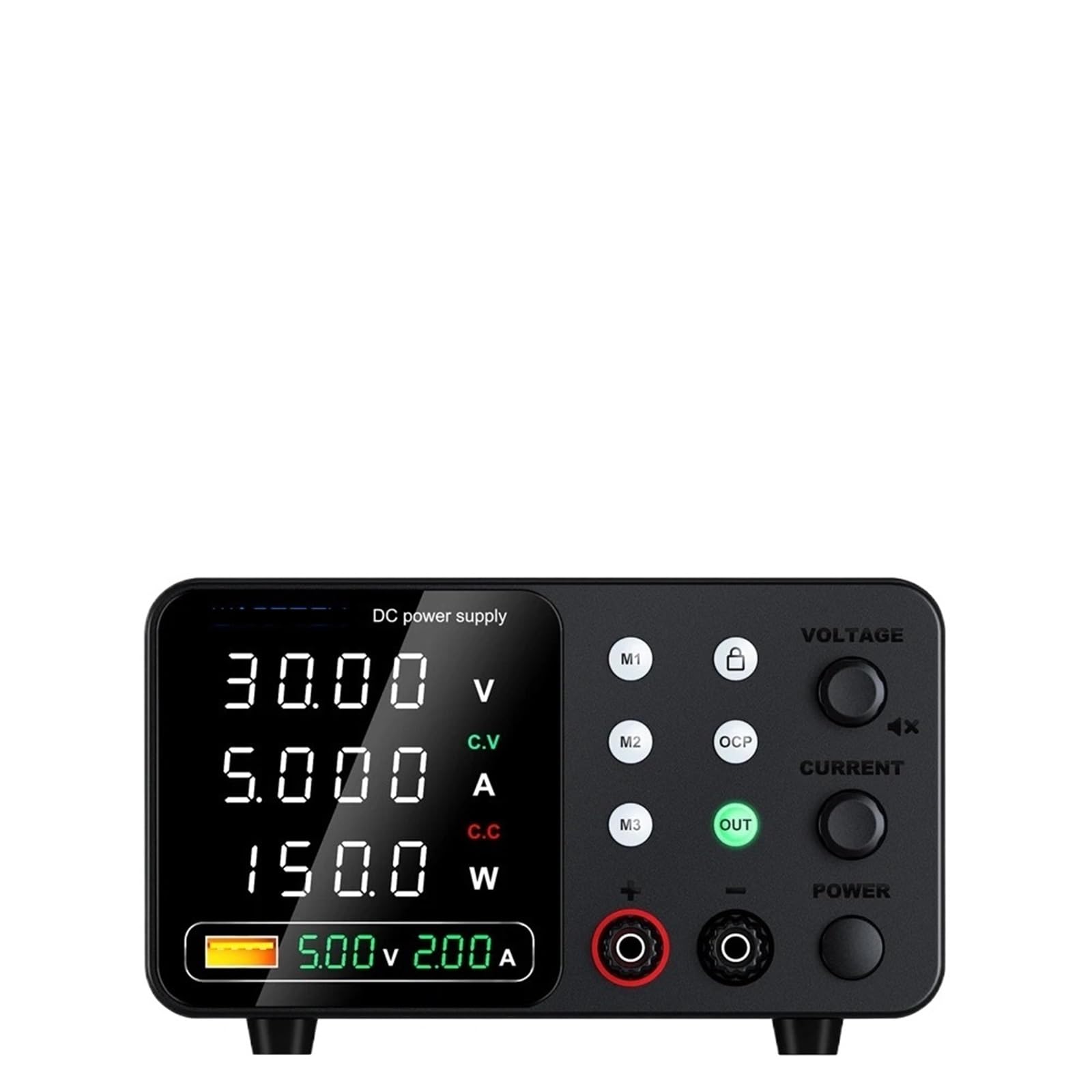
Image 1: Front panel of the Bolisila Lab DC Power Supply TPS-C605. The display shows 60.00V, 5.000A, and 300.0W. Controls include knobs for Voltage, Current, and Power, along with buttons for M1, M2, M3 (memory presets), OCP (Over Current Protection), and OUT (output enable/disable). Red and black output terminals are visible at the bottom.
- Digital Display: Shows real-time Voltage (V), Current (A), and Power (W) output. Also indicates Constant Voltage (C.V) or Constant Current (C.C) mode.
- Voltage Adjustment Knob: Used to set the output voltage.
- Current Adjustment Knob: Used to set the output current limit.
- Power Knob: Likely for overall power adjustment or fine-tuning.
- M1, M2, M3 Buttons: Memory preset buttons to save and recall frequently used voltage/current settings.
- OCP Button: Over Current Protection enable/disable.
- OUT Button: Enables or disables the power output to the terminals.
- Output Terminals: Red (+) and Black (-) terminals for connecting the load.
4. Setup
- Unpacking: Carefully remove the power supply from its packaging. Inspect for any signs of damage.
- Placement: Place the unit on a stable, level surface with adequate ventilation around all sides. Avoid placing it near heat sources or in direct sunlight.
- Power Connection: Connect the provided AC power cord to the power input socket on the rear panel of the power supply, then plug the other end into a grounded AC power outlet.
- Load Connection:
- Ensure the power supply is OFF (OUT button is disengaged or power switch is off).
- Connect the positive (+) terminal of your load to the red output terminal of the power supply.
- Connect the negative (-) terminal of your load to the black output terminal of the power supply.
- Ensure all connections are secure to prevent arcing or poor contact.
5. Operating Instructions
5.1 Power On/Off
Press the main power switch (usually located on the front or rear panel) to turn the unit ON. The display will illuminate. To turn OFF, press the main power switch again.
5.2 Setting Voltage
- Ensure the output is OFF (OUT button LED is off).
- Rotate the Voltage Adjustment Knob to set the desired output voltage. The display will show the set value.
- For fine adjustments, some models may have a separate fine-tune knob or require pressing the voltage knob. Refer to the specific model's behavior.
5.3 Setting Current Limit
- Ensure the output is OFF (OUT button LED is off).
- Rotate the Current Adjustment Knob to set the desired maximum output current. This acts as a current limit.
- It is recommended to set the current limit slightly above the expected operating current of your load to prevent accidental overcurrent.
5.4 Output Enable/Disable
After setting the desired voltage and current limit, press the OUT button to enable the power output to the terminals. The OUT button's LED will illuminate. Press it again to disable the output. Always disable output before connecting or disconnecting loads.
5.5 Memory Functions (M1, M2, M3)
The power supply allows you to save and recall up to three sets of voltage and current settings.
- To Save Settings: Set the desired voltage and current. Press and hold one of the M1, M2, or M3 buttons for approximately 3 seconds until a confirmation beep or display indication appears.
- To Recall Settings: Briefly press the desired M1, M2, or M3 button. The saved voltage and current settings will be loaded.
5.6 Over Current Protection (OCP)
The OCP function protects your load and the power supply from excessive current.
- To Enable/Disable OCP: Press the OCP button. An indicator on the display will show if OCP is active.
- OCP Trigger: If the output current exceeds the set OCP limit (which can often be adjusted via the current knob when OCP is active, or is fixed), the power supply will shut down its output to protect the connected device.
- Resetting OCP: To reset after an OCP event, disable the output (OUT button), resolve the overcurrent condition, and then re-enable the output.
6. Maintenance
- Cleaning: Disconnect the power supply from the AC outlet before cleaning. Use a soft, dry cloth to wipe the exterior. Do not use abrasive cleaners or solvents.
- Ventilation: Periodically check that the ventilation openings are clear of dust and debris.
- Storage: When not in use for extended periods, store the power supply in a cool, dry place, away from direct sunlight and extreme temperatures.
7. Troubleshooting
| Problem | Possible Cause | Solution |
|---|---|---|
| No power/Display off | Power cord disconnected; Power switch off; Blown fuse. | Check power cord connection; Ensure power switch is ON; Contact support for fuse replacement. |
| No output voltage/current | Output disabled (OUT button off); OCP triggered; Incorrect settings. | Press OUT button to enable output; Reset OCP; Verify voltage/current settings. |
| Output current is lower than set | Load resistance is too high for the set voltage; Load is drawing less current. | This is normal operation in Constant Voltage (CV) mode. The power supply delivers only what the load demands, up to the set current limit. |
| Power supply shuts down unexpectedly | Over Current Protection (OCP) triggered; Overheating. | Check load for short circuits or excessive current draw; Ensure adequate ventilation. |
8. Specifications
| Parameter | Value |
|---|---|
| Model | TPS-C605 |
| Output Voltage | 0-60V |
| Output Current | 0-5A |
| Output Power | 300W |
| Item Weight | 2.2 pounds (approx. 1 kg) |
| Package Dimensions | 0.39 x 0.39 x 0.39 inches (Note: This dimension seems incorrect and likely refers to a small component. Actual product dimensions will be larger.) |
| ASIN | B0F66YZ6TW |
| Manufacturer | Bolisila |
9. Warranty and Support
For warranty information and technical support, please refer to the documentation provided with your purchase or contact the seller/manufacturer directly. Keep your purchase receipt as proof of purchase.