
TTARTISAN E-mount
TTARTISAN Tilt 35mm f/1.4 E-Mount Lens Instruction Manual
Model: E-mount | Brand: TTARTISAN
1. Introduction
The TTARTISAN Tilt 35mm f/1.4 lens is a manual focus prime lens designed for E-Mount APS-C and full-frame (in APS-C mode) mirrorless cameras. This lens offers unique creative control through its tilt mechanism, allowing photographers to manipulate the plane of focus for selective sharpness and miniature effects. Its fast f/1.4 aperture also provides excellent low-light performance and beautiful bokeh.

Image: A city scene transformed into a miniature world using the tilt effect.
2. Package Contents
- TTARTISAN Tilt 35mm f/1.4 Lens
- Front Lens Cap
- Rear Lens Cap
- User Manual (this document)
3. Setup and Installation
3.1 Attaching the Lens to Your Camera
- Ensure your camera is powered off.
- Remove the rear lens cap from the TTARTISAN lens and the body cap from your camera.
- Align the red dot on the lens barrel with the corresponding mounting mark on your camera body.
- Gently insert the lens into the camera mount and rotate it clockwise until it clicks into place.
- Power on your camera. If using a full-frame camera, ensure it is set to APS-C mode for optimal performance with this lens.
3.2 Initial Camera Settings
Since this is a manual focus lens, you may need to enable "Release without lens" or "Shoot without lens" in your camera's menu settings. Refer to your camera's instruction manual for specific steps.

Image: The TTARTISAN Tilt 35mm f/1.4 lens securely attached to a camera body.
4. Operating Instructions
4.1 Manual Focus
The TTARTISAN Tilt 35mm f/1.4 lens features a manual focus ring. Rotate the focus ring to achieve sharp focus on your subject. Utilize your camera's focus peaking or magnification assist features for precise focusing.
4.2 Aperture Control
Adjust the aperture using the stepless aperture ring on the lens barrel. The f/1.4 aperture allows for excellent low-light performance and shallow depth of field, while stopping down to f/16 increases depth of field.
4.3 Tilt Mechanism
The lens features an 8° tilt mechanism. To use it, loosen the small knob on the side of the lens barrel. This allows the front lens group to tilt up to 8° left or right, enabling control over the direction of the focus plane. This is crucial for creating selective focus effects or the popular miniature (tilt-shift) look.
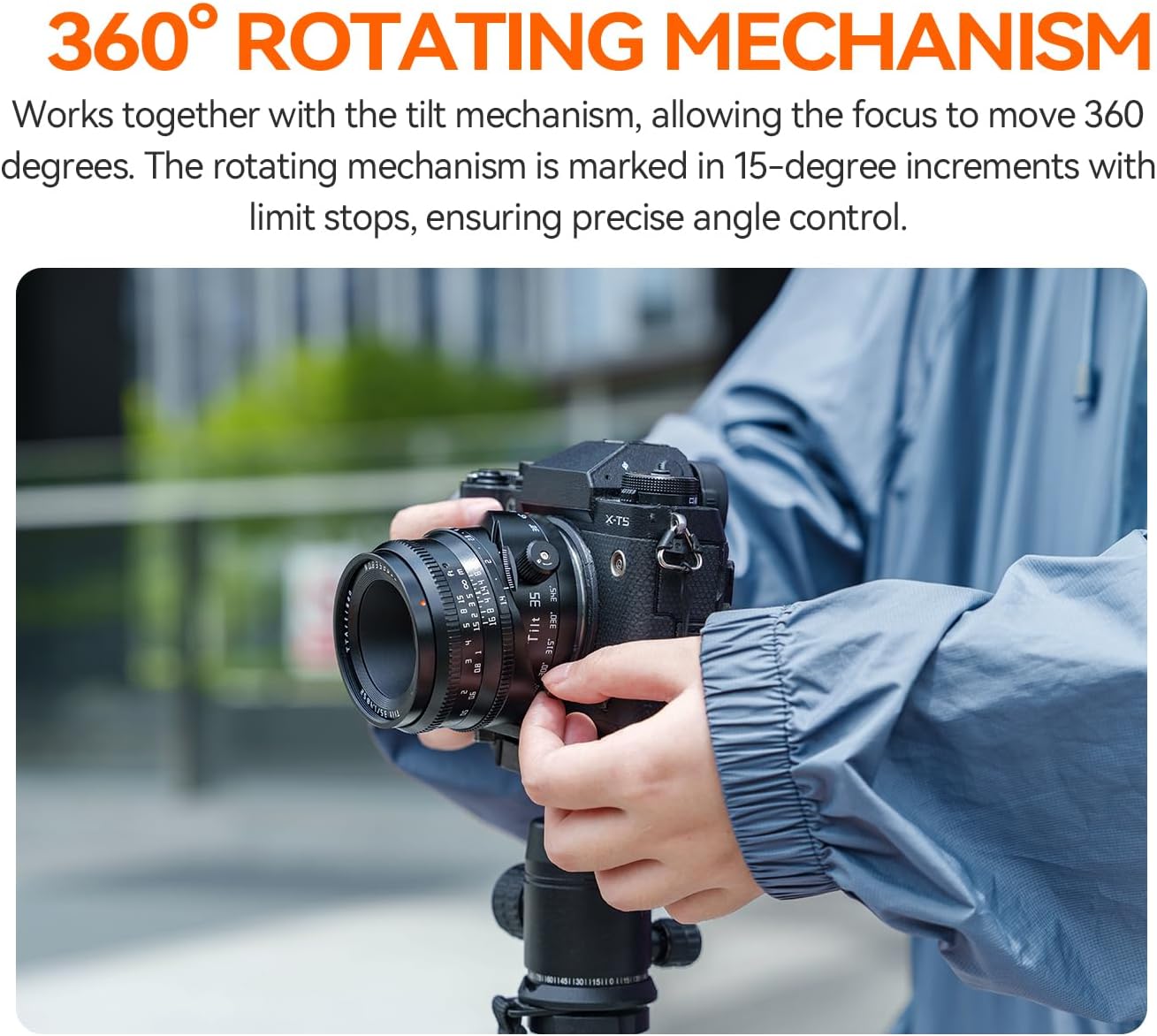
Image: Demonstrating the adjustment of the lens's tilt function.
4.4 360° Rotation
In conjunction with the tilt mechanism, the lens can rotate 360°. This allows you to orient the tilt effect in any direction. The rotating mechanism is marked in 15-degree increments with limit stops, ensuring precise angle control for your compositions.

Image: The lens being rotated to adjust the tilt direction.
4.5 Creating Tilt Effects
By tilting the lens, you shift the plane of focus away from being parallel to the camera's sensor. This creates a narrow band of sharpness, making objects outside this band appear blurred, simulating a miniature look or drawing attention to specific elements within your frame. Experiment with different tilt angles and rotation positions to achieve desired creative outcomes.

Image: Visual representation of how tilting the lens changes the focus plane.
4.6 Video Operation
The stepless aperture is beneficial for video recording, allowing for smooth exposure transitions without audible clicks. The tilt function can be used to create unique cinematic effects, such as miniature world videos, with natural bokeh and reduced noise in low-light conditions.
Video: An introductory overview of the TTARTISAN 35mm f/1.4 Tilt Lens, showcasing its features and creative potential.
Video: Demonstrations of footage captured with the TTARTISAN Tilt 35mm f/1.4 Lens, highlighting its unique visual effects.
5. Product Features and Details
- Metal Lens Body: Constructed with durable metal for robust performance and longevity.
- Metal Lens Cap: Provides secure protection for the front element.
- Compact Size: Designed to be portable and easy to handle.
- 0.35m Close-up Shots: Allows for detailed close-up photography.

Metal Lens Body

Metal Lens Cap

Compact Size

0.35m Close-up Shots
6. Specifications
| Feature | Detail |
|---|---|
| Focal Length | 35mm |
| Filter Size | 52mm |
| Frame | APS-C |
| Closest Focusing Distance | 0.35m |
| Maximum Aperture | F1.4 |
| Minimum Aperture | F16 |
| Tilt Angle | 8° |
| Diaphragm Blades | 10pcs |
| Optical Design | 7 Elements in 6 Groups |
| Focus Method | MF (Manual Focus) |
| Angle of View | Around 45° |
| Weight | 341-350g |
| Mount | E/X/Z/RF/M43 (E-mount for this model) |
| Rotation Angle | 360° |

Image: Visual summary of lens specifications.
7. Optical Design and MTF Chart
The TTARTISAN Tilt 35mm f/1.4 lens features an optical design of 7 elements in 6 groups, engineered to deliver clear images. The Modulation Transfer Function (MTF) chart below illustrates the lens's performance regarding contrast and resolution at different spatial frequencies and apertures.

Image: MTF chart showing lens performance and a diagram of the optical element arrangement.
8. Compatibility
This lens is compatible with Sony E-Mount APS-C frame cameras and Sony E-Mount full-frame cameras (when set to APS-C mode).
Compatible APS-C Frame Cameras:
- Sony A5000, A5100, A6000, A6100, A6300, A6400, A6500, A6600, A6700
- Sony NEX-3, NEX-3N, NEX-3R, NEX-C3, NEX-F3, NEX-5, NEX-5T, NEX-5R, NEX-5N, NEX-5C, NEX-6, NEX-7
- Sony ZVE-10, ZVE-10II, FX30
Compatible Full-Frame Cameras (in APS-C mode):
- Sony A7, A7M2 (A7II), A7M3 (A7III), A7M4 (A7IV)
- Sony A7R, A7RM2 (A7RII), A7RM3 (A7RIII), A7RM4 (A7RIV), A7RM5 (A7RV)
- Sony A7S, A7SM2 (A7SII), A7SM3 (A7SIII)
- Sony A7C, A7C2 (A7CII), A7CR
- Sony A1, A1II, A9, A9II, A9III, ZV-E1
9. Maintenance and Care
- Keep the lens clean: Use a soft, lint-free cloth and lens cleaning solution to gently wipe the glass elements. Avoid touching the glass with your fingers.
- Protect from dust and moisture: Always use the front and rear lens caps when the lens is not in use. Store the lens in a dry, dust-free environment.
- Avoid extreme temperatures: Do not expose the lens to extreme heat or cold for prolonged periods.
- Handle with care: Avoid dropping or subjecting the lens to strong impacts.
10. Troubleshooting
10.1 Image is blurry/out of focus
- Check focus: Ensure you are manually focusing correctly. Use your camera's focus peaking or magnification assist.
- Adjust tilt: If the tilt mechanism is engaged, the plane of focus may be angled. Adjust the tilt to align with your desired subject or return it to the neutral (0°) position for a traditional focus plane.
- Aperture setting: A wide aperture (e.g., f/1.4) results in a very shallow depth of field, making precise focus critical. Try stopping down to a narrower aperture (e.g., f/5.6 or f/8) to increase the depth of field.
10.2 Camera not recognizing the lens / "Shoot without lens" error
- This is a manual lens without electronic contacts. You must enable "Release without lens" or "Shoot without lens" in your camera's menu.
- Ensure the lens is correctly mounted and securely locked onto the camera body.
10.3 Vignetting or dark corners
- If using a full-frame camera, ensure it is set to APS-C mode. This lens is designed for APS-C sensors.
- Vignetting can be a characteristic of some lenses, especially at wider apertures. It can often be corrected in post-processing.
11. Warranty and Support
TTARTISAN products typically come with a 12-month warranty. For warranty claims, technical support, or service inquiries, please contact the seller directly or visit the official TTARTISAN store for assistance.
Official TTARTISAN Store: TTARTISAN Store on Amazon
Seller: TTArtisan (fulfilled by Amazon)
Related documentsE-mount


Ask a question about this manual
Ask about setup, troubleshooting, compatibility, parts, safety, or missing instructions. Manuals+ will review the question and use this page’s manual context to help answer it.