
Introduction
Thank you for choosing the SUNKTA GPS Military Smart Watch DM1-E-CA. This rugged smartwatch is designed for durability and functionality, featuring GPS, a compass, LED flashlight, and extensive health and fitness tracking capabilities. This manual provides detailed instructions to help you set up, operate, and maintain your device, ensuring optimal performance and longevity.
The DM1-E-CA is built to military standards, offering exceptional resistance to shocks, scratches, impacts, and corrosion, making it suitable for various challenging environments. Its ergonomic design ensures comfort during prolonged wear.
What's in the Box
- SUNKTA GPS Military Smart Watch DM1-E-CA
- Magnetic Charging Cable
- User Instructions Manual
- Magnetic Strap (pre-installed or included)
- Silicone Strap (additional)
- Strap Accessories
Please check all contents upon unboxing. If any items are missing or damaged, contact customer service immediately.
Setup Guide
1. Charging the Smart Watch
Before first use, fully charge your smartwatch. Connect the magnetic charging cable to the charging points on the back of the watch and plug the USB end into a standard USB power adapter (not included) or a computer USB port.
- Charging Time: Approximately 2.5 hours for a full charge.
- Battery Life: Up to 5-7 days with regular use, up to 45 days standby time.

Image: The back of the SUNKTA Smart Watch showing the magnetic charging connection, with a charging cable attached. The image also highlights battery life statistics.
2. App Installation and Pairing
To unlock the full potential of your smartwatch, you need to install the companion application on your smartphone and pair the devices.
- Download the App: Search for the recommended app (e.g., "GloryFitPro" or similar as per product documentation) in your smartphone's app store (Google Play Store for Android, Apple App Store for iOS).
- Compatibility: Compatible with iOS 11.0 and above (calls require iOS 13 and above), Android 5.0 and above, and Bluetooth 4.0.
- Enable Bluetooth: Ensure Bluetooth is enabled on your smartphone.
- Open the App: Launch the installed app and follow the on-screen instructions to create an account or log in.
- Pairing: Within the app, navigate to the device pairing section. The app will search for available devices. Select "DM1-E-CA" or the corresponding device name to connect. Confirm the pairing request on both your phone and the watch if prompted.
Once paired, the watch will synchronize data with your phone, and you can customize settings, receive notifications, and track your activities through the app.

Image: A person interacting with the SUNKTA Smart Watch and a smartphone, illustrating Bluetooth call and message alert functionality. Various social media app icons are shown at the bottom.
Operating Instructions
Basic Navigation
- Touchscreen: Swipe left/right, up/down to navigate through menus and features. Tap to select.
- Side Buttons: The watch features physical buttons (e.g., "POWER", "BACK") for quick access to functions or returning to the previous screen. Refer to the watch's on-screen prompts for specific button functionalities.

Image: The SUNKTA Smart Watch face showing various metrics like time, date, steps, heart rate, and battery level, with water splashing around it, emphasizing its waterproof nature.
Key Features
Bluetooth Calling & Message Notifications
With advanced Bluetooth 5.3 technology, you can answer, reject calls, and view call logs directly from your wrist. The built-in speaker and microphone ensure clear conversations. Receive real-time notifications from social media apps (Facebook, WhatsApp, Gmail, etc.) with vibration alerts.
GPS & Compass
The smartwatch supports a compass and GPS, along with satellite systems like GLONASS, Beidou, Galileo, NAVIC, and QZSS. This allows for accurate route tracking during outdoor activities. Note: GPS route tracking should be activated in open areas for optimal performance.

Image: The SUNKTA Smart Watch screen showing a green GPS route on a map, with a smartphone displaying a similar map interface. A cyclist is visible in the background, demonstrating outdoor tracking.

Image: The SUNKTA Smart Watch displaying a compass interface with degrees, altitude, and atmospheric pressure. A person is shown in the background consulting a paper map, highlighting the watch's utility for navigation.
LED Flashlight
The watch is equipped with a powerful LED flashlight function, suitable for various situations such as camping at night, searching for items, or emergency use. Activate it with a single click.
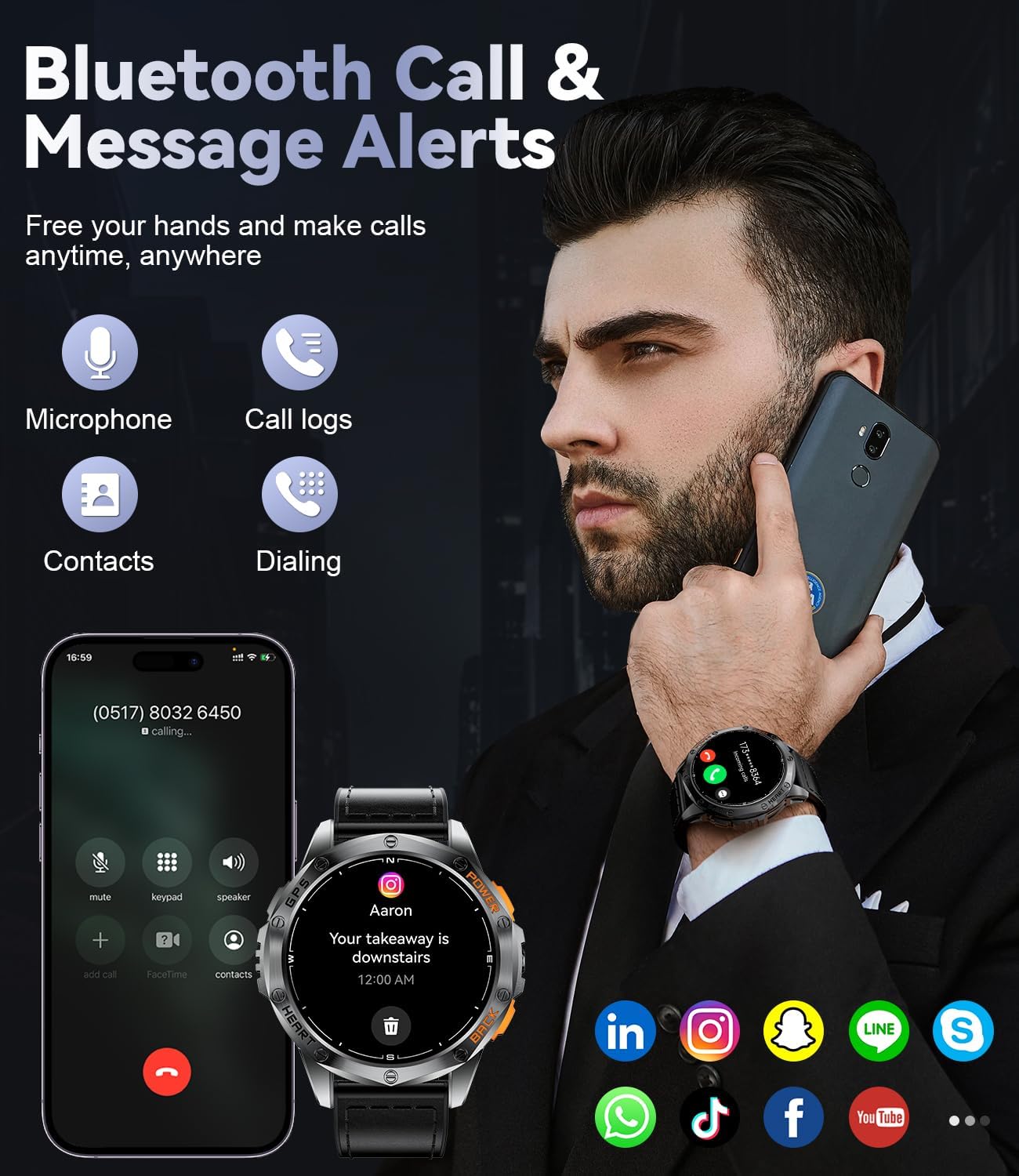
Image: The SUNKTA Smart Watch with its LED flashlight active, demonstrating its use in different scenarios such as camping, climbing, and SOS mode during outdoor adventures.
1.43'' AMOLED Screen & Battery
The 1.43-inch AMOLED Always-On Display touchscreen with 466x466 pixel resolution provides excellent image quality and color representation, ensuring clear readability in various lighting conditions. The highly sensitive touch responsiveness enhances user experience.

Image: The SUNKTA Smart Watch showcasing its 1.43-inch AMOLED HD large screen with a vibrant display of a sports car, highlighting its color accuracy and wider color gamut.
100+ Sports Modes & IP68 Waterproof
The fitness tracker supports over 100 sports modes, including running, cycling, and swimming. It monitors steps, distance, and calorie consumption in real-time. With an IP68 waterproof rating, the watch is suitable for daily handwashing, swimming, and rainy conditions. It supports specific swimming modes (freestyle, breaststroke, backstroke, butterfly). Note: Not suitable for sea water or diving.

Image: The SUNKTA Smart Watch being worn on a wrist underwater, demonstrating its IP68 waterproof capability. Icons representing over 100 sport modes are displayed, along with distance, calories, and steps metrics.
Multifunctional Features
The DM1-E-CA integrates a wide range of functions to enhance your daily life:
- Music Control: Control music playback on your smartphone.
- Camera Control: Use the watch as a remote shutter for your phone's camera.
- Calculator: Basic calculations on your wrist.
- Pedometer: Tracks your steps.
- Weather Forecast: Get real-time weather updates.
- Alarm Clock, Timer, Stopwatch: Essential time management tools.
- Water Reminder & Sedentary Reminder: Prompts to stay hydrated and active.
- Find Phone/Watch: Helps locate your paired device.
- Health Monitoring: Includes sleep tracking (deep, light, REM, awake), heart rate monitoring, blood oxygen (SpO2) tracking, and stress level monitoring.
Image: The SUNKTA Smart Watch displaying a compass interface with degrees, altitude, and atmospheric pressure. A person is shown in the background consulting a paper map, highlighting the watch's utility for navigation.
Image: The SUNKTA Smart Watch with its LED flashlight active, demonstrating its use in different scenarios such as camping, climbing, and SOS mode during outdoor adventures.
Maintenance
- Cleaning: Wipe the watch and straps regularly with a soft, damp cloth. Avoid using harsh chemicals or abrasive materials.
- Water Resistance: The watch is IP68 waterproof, suitable for swimming and daily water exposure. However, avoid hot water, steam, or prolonged submersion in sea water. Do not press buttons underwater.
- Battery Care: To prolong battery life, avoid fully discharging the watch frequently. Charge it when the battery level is low. Store in a cool, dry place if not used for extended periods.
- Strap Replacement: The watch comes with interchangeable straps (magnetic and silicone). To replace, locate the quick-release pins on the back of the strap and gently slide them to detach. Align the new strap and secure the pins.

Image: Detailed view of the SUNKTA Smart Watch straps, highlighting the outer leather material for durability, upgraded inner silicone for comfort, and the metal magnetic buckle for secure and adjustable fit.
Troubleshooting
| Problem | Possible Solution |
|---|---|
| Watch won't turn on or charge. | Ensure the charging cable is securely connected to both the watch and the power source. Try a different USB port or power adapter. Allow the watch to charge for at least 10-15 minutes before attempting to turn it on. |
| Cannot pair with smartphone. | Make sure Bluetooth is enabled on your phone. Ensure the watch is sufficiently charged. Restart both the watch and your phone. Try unpairing and re-pairing through the app. Ensure the app is updated to the latest version. |
| Notifications are not received. | Check app notification permissions on your phone. Ensure the app is running in the background. Verify that notifications are enabled within the watch's app settings. |
| GPS tracking is inaccurate. | Ensure you are in an open area with a clear view of the sky. Allow the watch sufficient time to acquire a GPS signal before starting an activity. |
| Screen is unresponsive. | Restart the watch. If the issue persists, ensure the screen is clean and dry. |
If you encounter issues not listed here or if the suggested solutions do not resolve the problem, please contact SUNKTA customer service for assistance.
Specifications
| Feature | Detail |
|---|---|
| Model | DM1-E-CA |
| Display | 1.43-inch AMOLED Always-On Display |
| Resolution | 466 x 466 pixels |
| Battery Capacity | 600 mAh Lithium Polymer |
| Charging Time | Approx. 2.5 hours |
| Battery Life (Typical Use) | 5-7 days |
| Standby Time | Up to 45 days |
| Waterproof Rating | IP68 (suitable for swimming, not for sea or diving) |
| Connectivity | Bluetooth 5.3 |
| GPS | Built-in GPS (supports GLONASS, Beidou, Galileo, NAVIC, QZSS) |
| Compatible OS | iOS 11.0+ (calls iOS 13+), Android 5.0+ |
| Memory Storage Capacity | 1 GB |
| Special Features | LED Flashlight, Compass, 100+ Sports Modes, Bluetooth Calling, Message Notifications, Heart Rate Monitor, Blood Oxygen Monitor, Sleep Tracker, Stress Monitor, Music Control, Camera Control, Pedometer, Weather Forecast, Alarm, Timer, Stopwatch, Water Reminder, Sedentary Reminder, Find Phone/Watch |
| Dimensions (Parcel) | 16.8 x 10.9 x 2.4 cm |
| Weight (Parcel) | 200 g |
Warranty and Support
SUNKTA provides comprehensive customer support for your DM1-E-CA Smart Watch.
- Warranty: Your SUNKTA Smart Watch comes with a 24-month (2-year) warranty from the date of purchase, covering manufacturing defects and quality issues.
- Online Support: 24-hour online support is available to assist you with any questions or problems you may encounter, including accessories, quality concerns, operation, or charging issues.
- Contact: For support, please refer to the contact information provided in your product packaging or visit the official SUNKTA website.
Please retain your proof of purchase for warranty claims.


