
Introduction
Thank you for choosing the DEVAISE Ergonomic Office Chair, model ABGY506WH. This manual provides detailed instructions for the assembly, operation, and maintenance of your new office chair. Please read this manual thoroughly before assembly and use to ensure proper function and safety. Keep this manual for future reference.
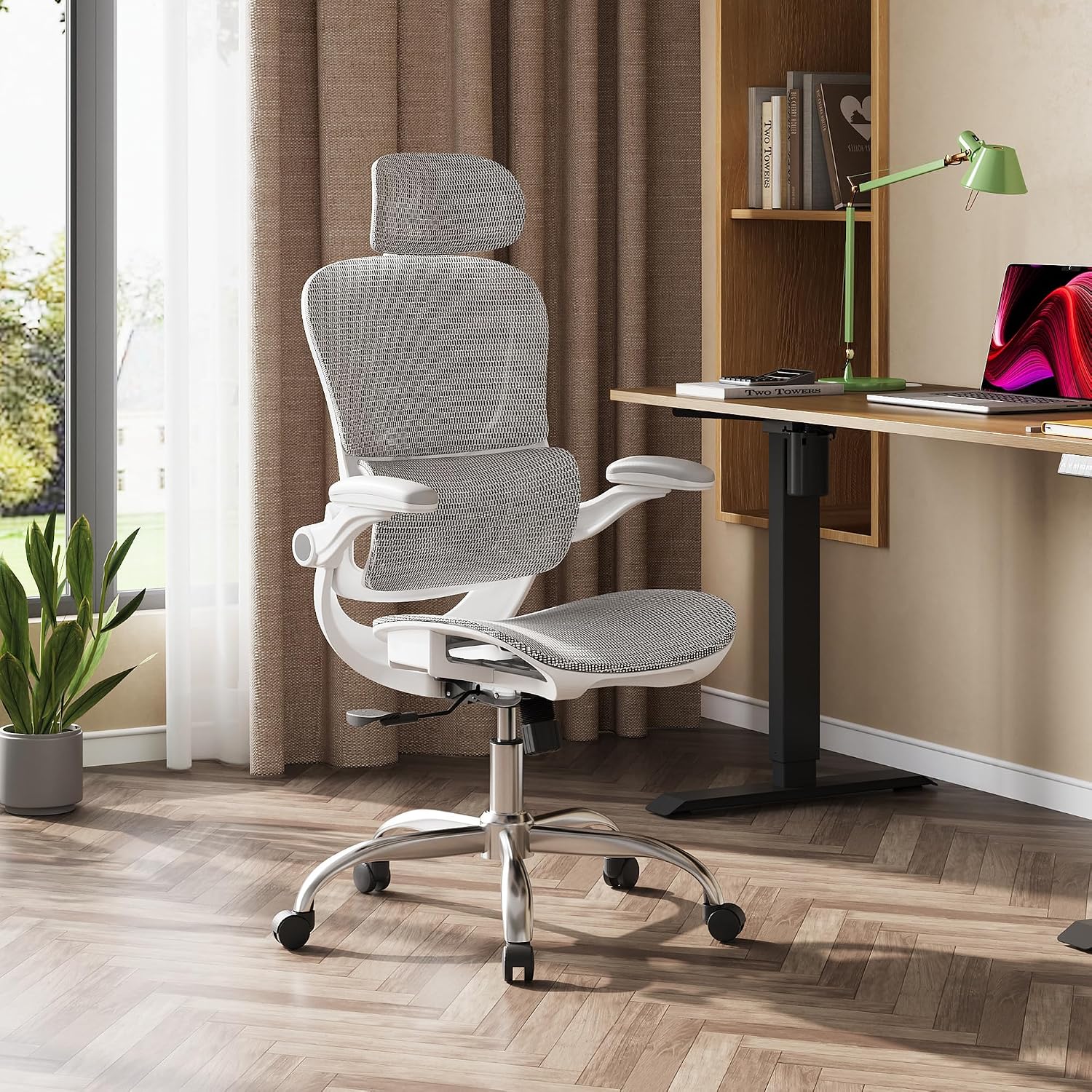
The DEVAISE ergonomic office chair, featuring a light grey mesh design, positioned in a contemporary office environment next to a desk.
Safety Information
- Do not use the chair until it is completely assembled.
- Do not exceed the maximum recommended weight of 180 kg (approximately 396 lbs).
- Maintain the chair on a stable and flat surface.
- Do not place sharp or pointed objects near the chair to avoid damaging the mesh or upholstery.
- Keep children and pets away from the chair during assembly.
Package Contents
Before beginning assembly, please ensure all parts are present and undamaged. If any parts are missing or damaged, contact customer service.
- Backrest Assembly
- Seat Cushion Assembly
- Headrest
- Armrests (2)
- Gas Lift Cylinder
- Five-Star Base
- Casters (5)
- Mechanism Plate
- Hardware Pack (screws, washers, Allen wrench)
- Instruction Manual
Assembly Instructions
Assembly typically takes approximately 20 minutes. Follow the detailed instructions provided in the separate assembly guide included in your package. Ensure all connections are secure before use.
- Attach the casters to the five-star base by pushing them firmly into the holes.
- Insert the gas lift cylinder into the center hole of the five-star base.
- Secure the mechanism plate to the underside of the seat cushion using the provided screws.
- Attach the armrests to the seat cushion using the designated screws.
- Connect the backrest assembly to the seat cushion and armrests, securing with screws.
- Insert the headrest into the top of the backrest.
- Place the assembled seat and backrest onto the gas lift cylinder.
Verify all screws are tightened and the chair is stable before sitting on it.
Operating Instructions
Your DEVAISE ergonomic office chair offers multiple adjustment features to customize your seating experience for optimal comfort and support.
1. Seat Height Adjustment
- To raise the seat: While standing, pull the lever located on the right side of the seat upwards. The seat will rise automatically. Release the lever at the desired height.
- To lower the seat: While seated, pull the lever located on the right side of the seat upwards. The seat will lower. Release the lever at the desired height.
2. Segmented Backrest and Lumbar Support Adjustment
The C-shaped segmented backrest is designed to conform to the natural curve of your spine, providing targeted support to both the upper and lower back. The lumbar support is adjustable in depth.
- To adjust lumbar support depth: Turn the knob located on the side of the backrest to move the lumbar support forward or backward by up to 4 cm.

An illustration highlighting the C-shaped segmented backrest and adjustable lumbar support of the DEVAISE office chair, with an inset showing the knob for 4 cm depth adjustment of the lumbar support.
3. Tilt Function and Locking
The chair offers an adjustable tilt range from 90° to 135°, with three locking positions.
- To recline: Pull the lever on the left side of the seat outwards to unlock the tilt mechanism. Lean back to the desired angle.
- To lock the tilt: Push the lever on the left side of the seat inwards at one of the three preset angles (90°, 110°, or 135°).
- To adjust tilt tension: Turn the round knob located underneath the seat (at the front) clockwise to increase tension (making it harder to recline) or counter-clockwise to decrease tension (making it easier to recline).

A user seated in the DEVAISE office chair, demonstrating the tilt function with locking positions at 90°, 110°, and 135°. Insets show the tilt tension knob and the height adjustment/rocking function lever.
4. 3D Adjustable Headrest
The headrest can be adjusted to support various body types and neck angles.
- Height adjustment: Grasp the headrest and slide it up or down. It can be adjusted by up to 10 cm.
- Depth adjustment: Pull the headrest forward or push it backward. It can be adjusted by up to 4 cm.
- Tilt adjustment: Tilt the headrest up or down by up to 35°.
5. 3D Adjustable Armrests
The armrests provide versatile support for various activities.
- Forward/Backward adjustment: Press the button on the side of the armrest and slide it forward or backward.
- Pivot adjustment: Rotate the armrest pad left or right by up to 5°.
- 90° Lift-up function: Lift the armrests upwards to move them out of the way, allowing the chair to fit under desks or for easier storage.

A diagram detailing the three-dimensional adjustability of the armrests, including rotation (left and right), forward and backward movement, and a 90-degree lift function.
Maintenance
Regular maintenance helps prolong the life and appearance of your chair.
- Cleaning: Wipe mesh and plastic surfaces with a soft, damp cloth. For stubborn stains, use a mild soap solution and dry thoroughly. Avoid harsh chemicals or abrasive cleaners.
- Inspection: Periodically check all screws and bolts to ensure they are tight. Retighten if necessary.
- Casters: Clean casters regularly to remove hair, dust, and debris that may hinder smooth movement.
- Gas Lift: Do not attempt to disassemble or repair the gas lift cylinder. If it malfunctions, contact customer service.
Troubleshooting
| Problem | Possible Cause | Solution |
|---|---|---|
| Chair is wobbly or unstable. | Loose screws or improper assembly. | Check all screws and bolts and tighten them securely. Ensure all parts are correctly assembled according to the manual. |
| Difficulty adjusting seat height. | Gas lift malfunction or lever obstruction. | Ensure the height adjustment lever is not obstructed. If the gas lift is unresponsive, contact customer service. |
| Chair does not recline or lock. | Tilt mechanism locked or tension too high. | Pull the tilt lever outwards to unlock. Adjust the tilt tension knob counter-clockwise to reduce tension. |
| Casters do not roll smoothly. | Debris in casters or damaged casters. | Remove any hair, dust, or debris from the caster wheels. If casters are damaged, they may need replacement. |
| Squeaking noises. | Loose connections or friction between parts. | Tighten all screws. Apply a small amount of silicone lubricant to moving parts or connection points if necessary. |
Specifications

A diagram illustrating the dimensions of the DEVAISE office chair, including height (123-133cm), backrest width (49cm), seat width (50cm), and overall depth (70cm), along with a maximum weight capacity of 181 kg.
| Feature | Detail |
|---|---|
| Brand | DEVAISE |
| Model Number | ABGY506WH |
| Color | White |
| Product Dimensions (L x W x H) | 43 x 64 x 123-133 cm (16.9 x 25.2 x 48.4-52.4 inches) |
| Item Weight | 15 Kilograms (33 lbs) |
| Maximum Weight Capacity | 180 kg (396 lbs) |
| Material | Metal, Plastic, 3D Mesh Fabric |
| Special Features | Adjustable Backrest, Ergonomic Design, Adjustable Height, Adjustable Lumbar Support, 3D Adjustable Headrest, 3D Adjustable Armrests, Tilt Lock (90°, 110°, 135°) |
| Gas Lift Class | Class 4 (SGS & TÜV certified) |
| Casters | 360° Swivel, Silent |

An image showcasing the robust five-star metal base with silent 360° swivel casters, highlighting the SGS Class 4 gas lift certification and BIFMA 5.1 certification, and a maximum load capacity of 181 kg.
Warranty and Support
DEVAISE is committed to providing high-quality products and excellent customer service. For any questions, concerns, or assistance with your chair, please contact our customer service team. Our team is available to assist you at any time.
Please refer to your purchase documentation or the DEVAISE official website for specific warranty terms and contact information.
