
XTRONS IDP90RGJA
XTRONS Android 14 Car Stereo User Manual
Model: IDP90RGJA
1. Introduction
This manual provides detailed instructions for the installation, operation, and maintenance of your XTRONS Android 14 Car Stereo, Model IDP90RGJA. Please read this manual thoroughly before using the product to ensure proper function and safety.
1.1 Vehicle Compatibility
This car stereo is designed for Jeep Renegade models manufactured between 2015 and 2020. It is engineered for plug-and-play integration, preserving original vehicle functions such as steering wheel controls, air-conditioning information, and door status displays.

Image: Comparison of the Jeep Renegade dashboard before and after the installation of the XTRONS IDP90RGJA car stereo, demonstrating seamless integration.
2. Setup and Installation
Proper installation is crucial for optimal performance. It is recommended that installation be performed by a qualified professional.
2.1 Package Contents
Verify that all components listed below are present in your package:
- 1 x ISO Wiring Harness
- 1 x CANbus Box
- 1 x Speaker
- 1 x User Manual
- 2 x Original USB Connection Cables
- 1 x Holder
- 1 x Radio Antenna Cable
- 1 x Camera Cable
- 2 x USB Cables
- 1 x SIM Card Slot Cable
- 1 x GPS Antenna
- 1 x 4G Antenna
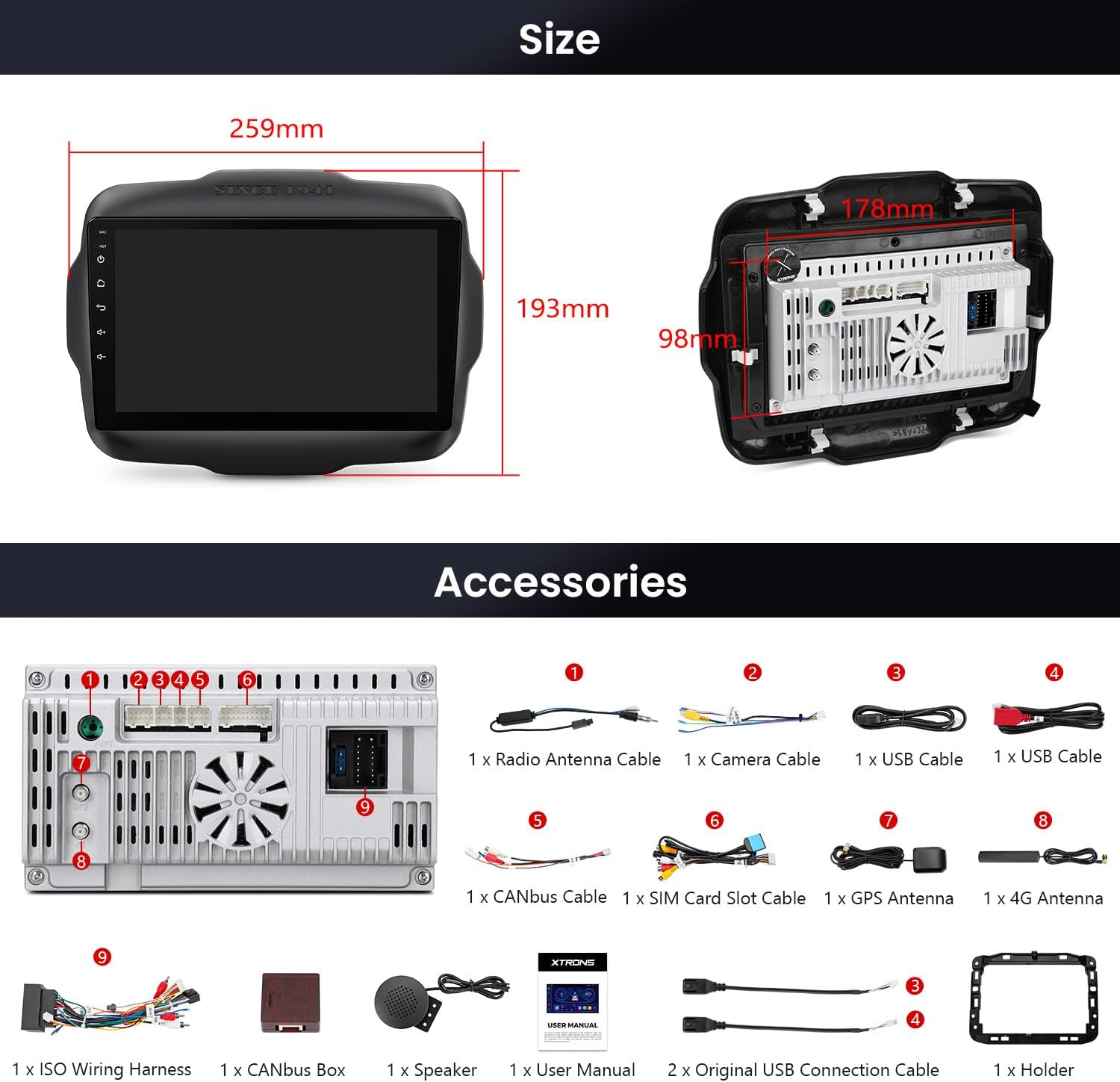
Image: Visual representation of the car stereo's dimensions and the complete set of accessories included in the package.
2.2 Wiring Diagram
Refer to the following diagram for correct wiring connections. Ensure all cables are securely connected to their corresponding ports.
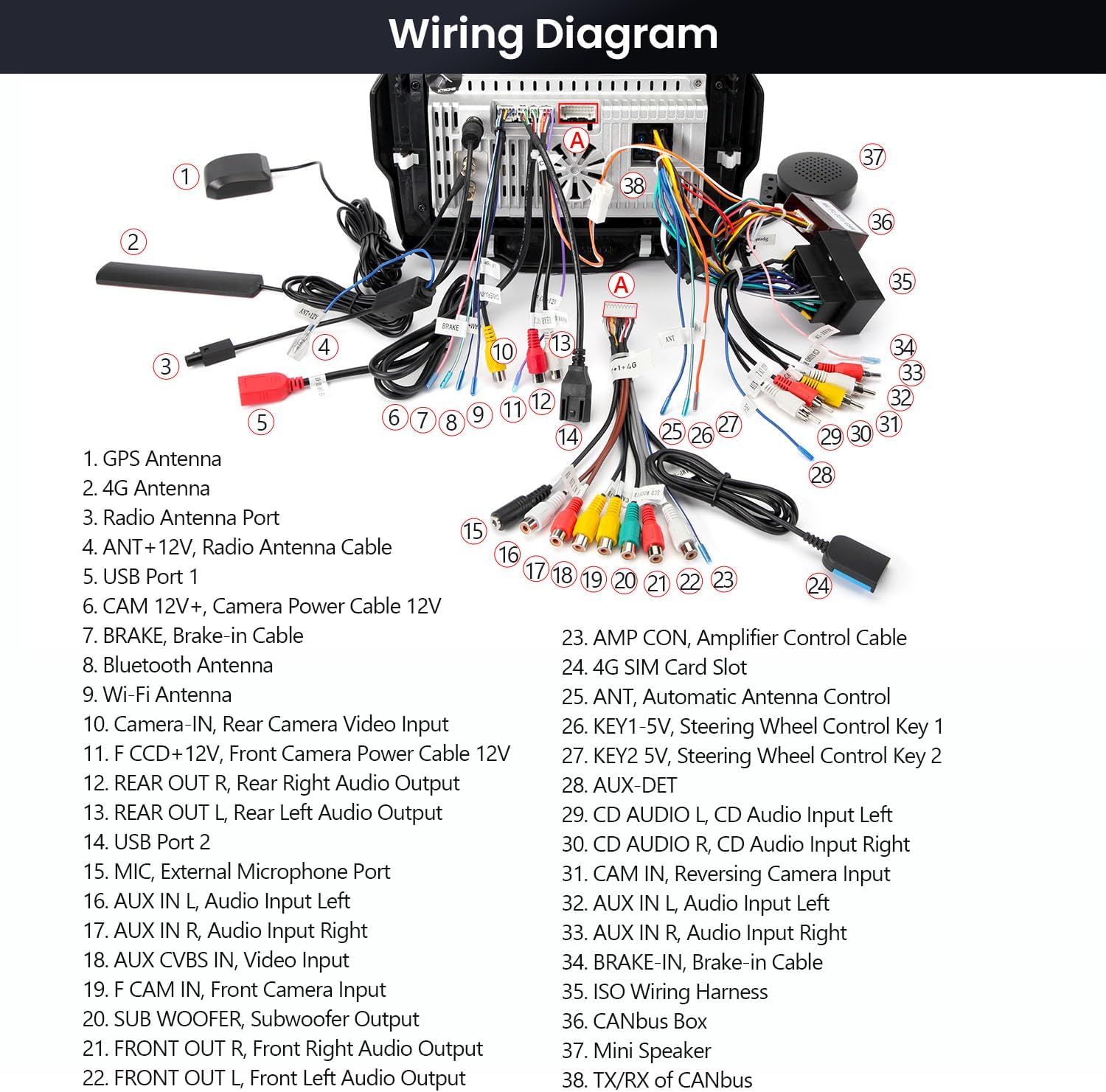
Image: Comprehensive wiring diagram illustrating the connection points for various components such as GPS antenna, 4G antenna, radio antenna, USB ports, camera inputs, and audio outputs.
Wiring Legend:
- GPS Antenna
- 4G Antenna
- Radio Antenna Port
- ANT +12V, Radio Antenna Cable
- USB Port 1
- CAM 12V+, Camera Power Cable 12V
- BRAKE, Brake-In Cable
- Bluetooth Antenna
- Wi-Fi Antenna
- Camera IN, Rear Camera Video Input
- F CCD+12V, Front Camera Power Cable 12V
- REAR OUT R, Rear Right Audio Output
- REAR OUT L, Rear Left Audio Output
- USB Port 2
- MIC, External Microphone Port
- AUX IN L, Audio Input Left
- AUX IN R, Audio Input Right
- AUX CVBS IN, Video Input
- F CAM IN, Front Camera Input
- SUB WOOFER, Subwoofer Output
- FRONT OUT R, Front Right Audio Output
- FRONT OUT L, Front Left Audio Output
- AMP CON, Amplifier Control Cable
- 4G SIM Card Slot
- ANT, Automatic Antenna Control
- KEY1 5V, Steering Wheel Control Key 1
- KEY2 5V, Steering Wheel Control Key 2
- AUX-DET
- CD AUDIO L, CD Audio Input Left
- CD AUDIO R, CD Audio Input Right
- CAM IN, Reversing Camera Input
- AUX IN L, Audio Input Left
- AUX IN R, Audio Input Right
- BRAKE-IN, Brake-In Cable
- ISO Wiring Harness
- CANbus Box
- Mini Speaker
- TX/RX of CANbus
3. Operating Instructions
3.1 System Overview
The XTRONS IDP90RGJA operates on the Android 14 system, powered by an Octa-Core CPU with 4GB RAM and 64GB ROM, providing a responsive user experience.

Image: The main display of the XTRONS car stereo highlighting its core features and specifications.
3.2 Display and Interface
The unit features a 9-inch IPS display with a 1280x720 HD resolution. The G+G touch screen technology ensures responsive control. IPS technology provides 178° ultra-wide viewing angles for clear visibility from various positions.
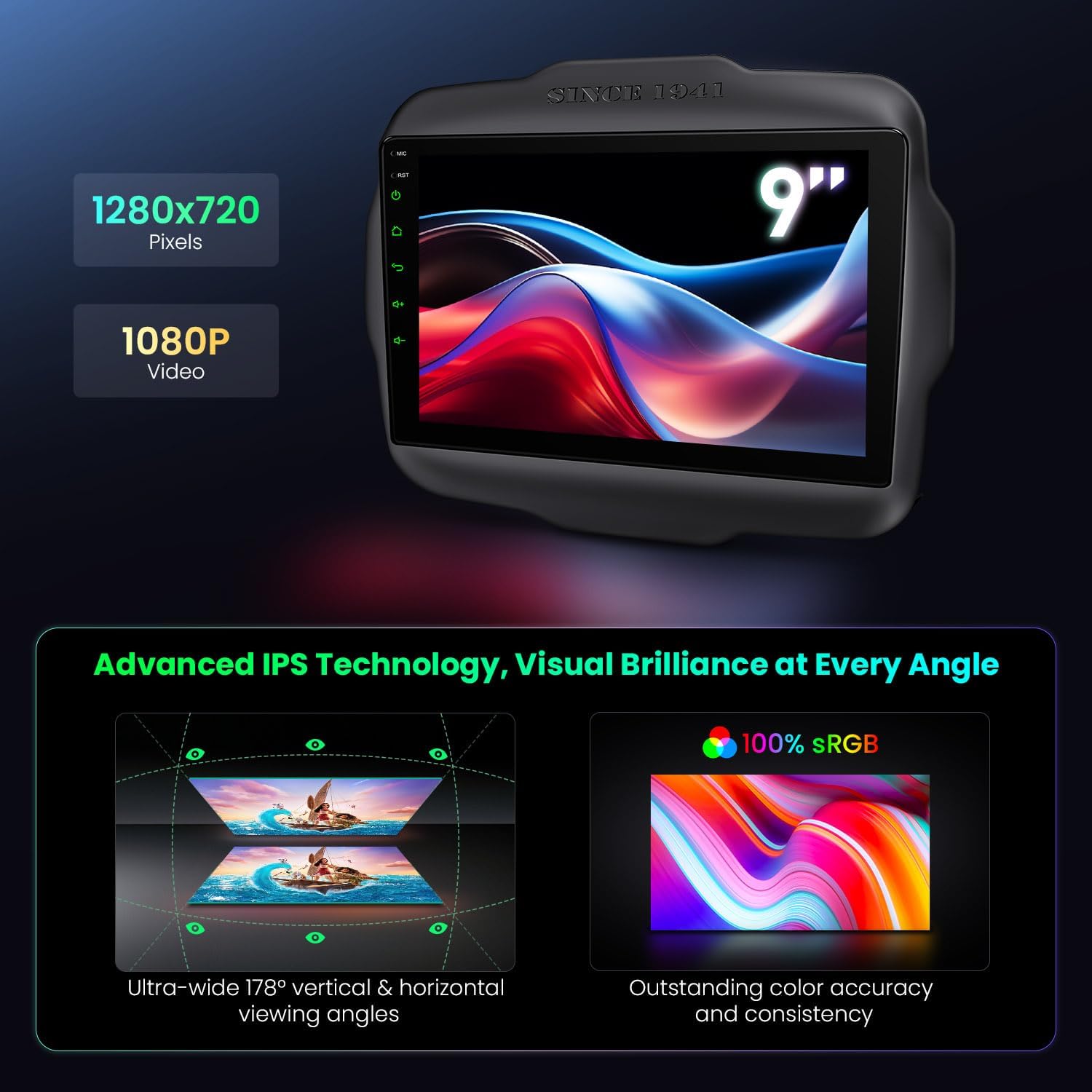
Image: Explanation of the display's technical specifications, including resolution, video support, and IPS viewing benefits.
3.3 Apple CarPlay and Android Auto
The system supports both wired and wireless Apple CarPlay and Android Auto. Connect your smartphone via Bluetooth 5.0 for quick access to navigation, music, calls, and voice commands (e.g., "Hey Siri" or "OK Google").
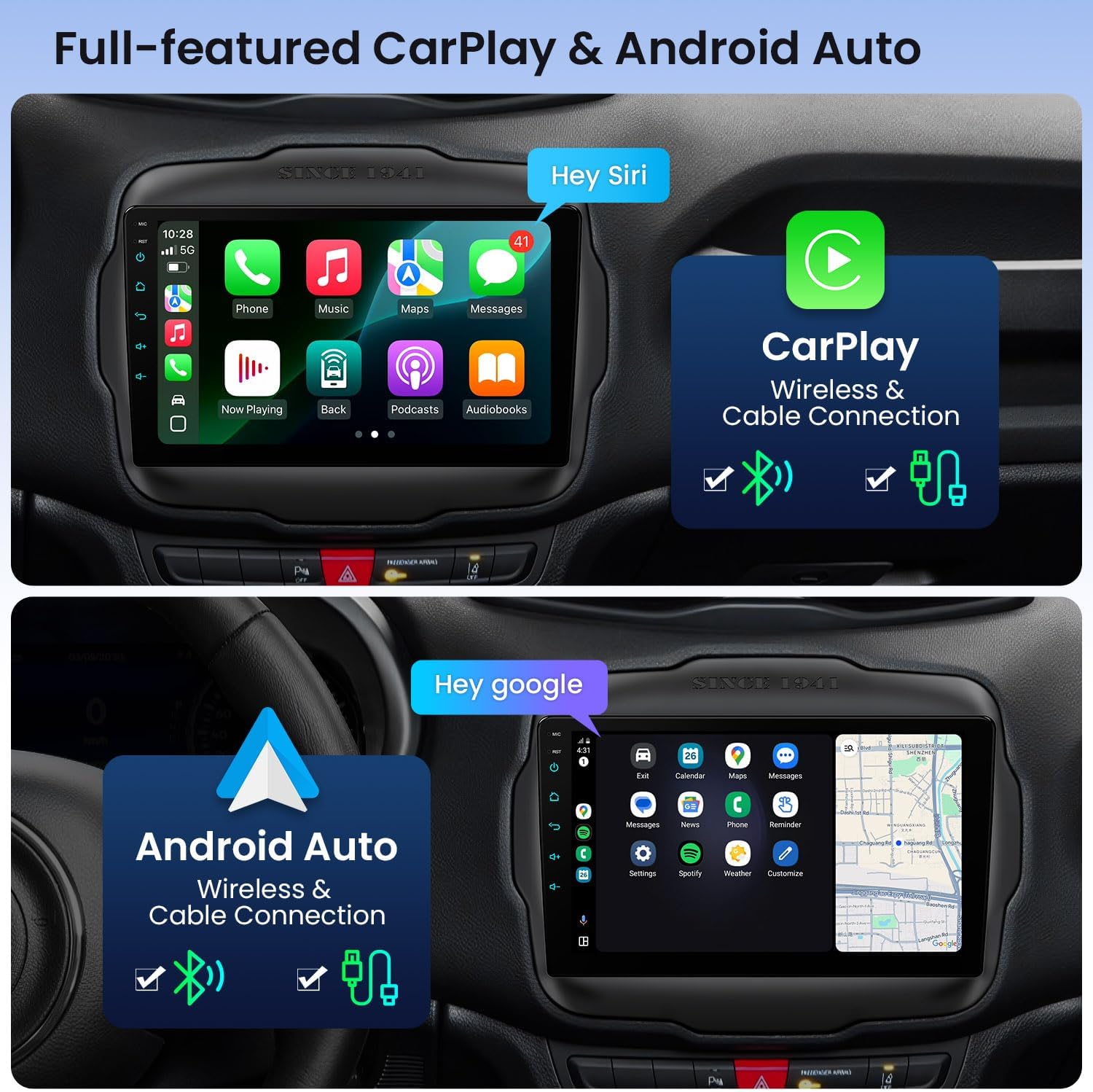
Image: Demonstrates the Apple CarPlay and Android Auto interfaces, highlighting their compatibility with both wireless and wired connections.
3.4 GPS Navigation
Utilize the built-in GPS navigation system. The unit supports multiple satellite systems (GPS, GLONASS, BDS) for accurate and fast destination location. Compatible with popular navigation applications.
3.5 Connectivity (4G LTE, Wi-Fi, Bluetooth)
- 4G LTE Module: Insert a micro-SIM card (not included) into the dedicated slot to enable independent 4G network access. Supports high-speed data transmission (up to 300Mbps download, 100Mbps upload). Refer to the wiring diagram for SIM card slot location.
- Dual Band Wi-Fi: Connect to 2.4GHz or 5GHz Wi-Fi networks for internet access and app downloads. The 5GHz band offers faster speeds, while 2.4GHz provides a stronger connection over longer distances.
- Bluetooth 5.0: Enables hands-free calling, phone book synchronization, Bluetooth music streaming (A2DP supported), and display of recent call logs.

Image: Details on the 4G LTE module's capabilities, including data speeds and compatible frequency bands.
3.6 Audio and DSP
The unit features a built-in Digital Signal Processor (DSP) for customizable audio. Adjust sound settings with a 15-band graphic equalizer, select from 8 preset EQ modes, and utilize smart field sound positioning for an optimized listening experience.

Image: Visual representation of the audio customization options, including equalizer and sound field adjustments, alongside examples of available user interface themes.
3.7 UI Customization
Explore XTRONS' built-in UI themes and extensive customization options. Additional themes are available for download from the integrated app platform, allowing personalization of your display.
3.8 CANbus Integration
The optimized CANbus decoding ensures seamless integration with your vehicle's existing systems. This includes retaining steering wheel controls and displaying original vehicle information such as air-conditioning status, door status, reversing trajectory, and compass information.
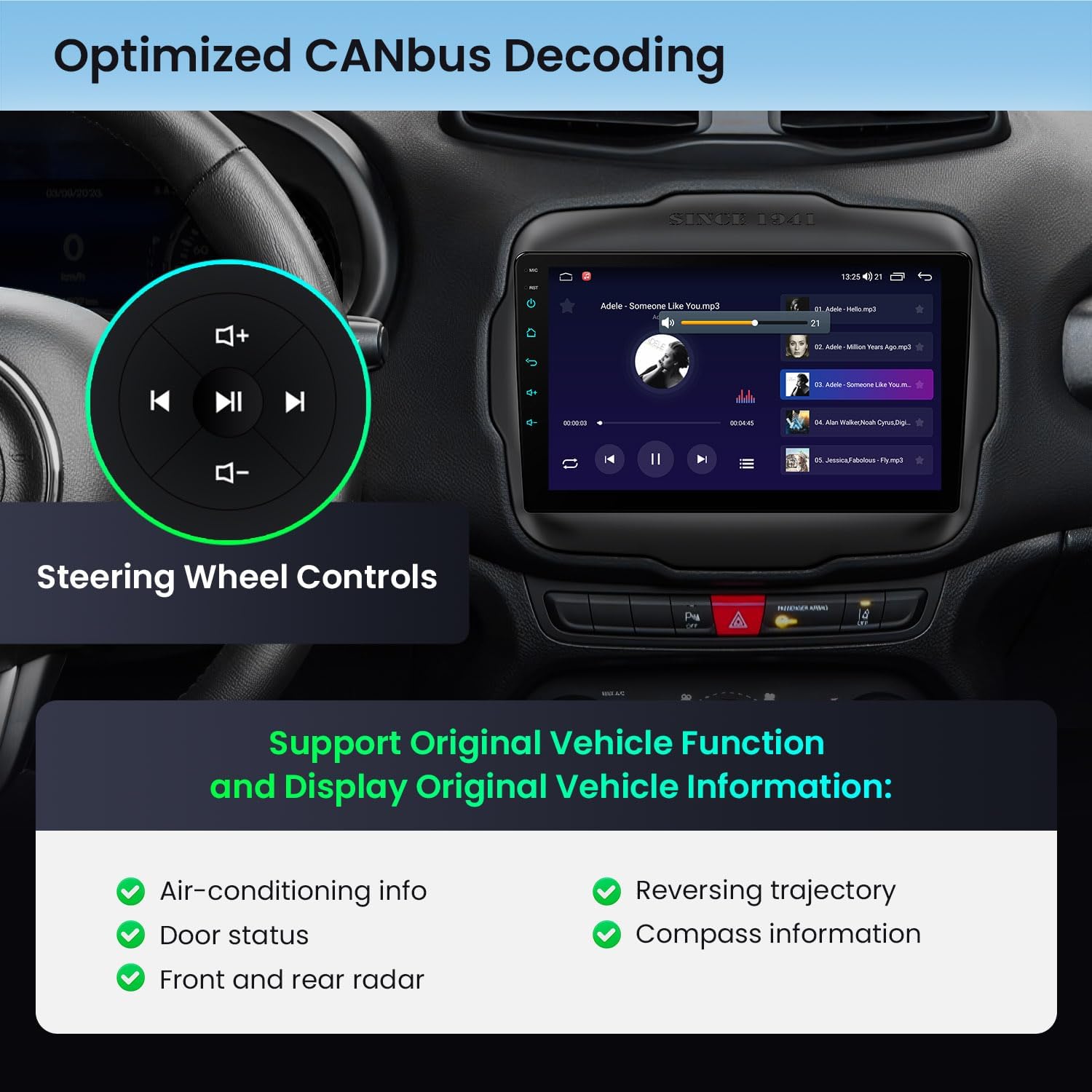
Image: Illustration of how the car stereo integrates with and displays original vehicle functions and retains steering wheel control functionality.
4. Optional Accessories
Enhance your car stereo's functionality with compatible optional accessories (sold separately):
- Tyre Pressure Monitoring System (TPMS): Monitor tire pressure in real-time for enhanced safety.
- OBD2 Function: Access vehicle diagnostic information.
- AHD Camera Support: Connect front and rear AHD cameras for real-time reversing images, wider viewing angles, and clear night vision.
5. Maintenance
To ensure the longevity and optimal performance of your XTRONS car stereo, follow these general maintenance guidelines:
- Cleaning: Use a soft, dry cloth to clean the screen and exterior. Avoid abrasive cleaners or solvents.
- Temperature: The unit is designed to operate within a wide temperature range. However, extreme temperatures can affect performance. An efficient cooling system is integrated to manage internal temperatures.
- Software Updates: Periodically check for and install available software updates to ensure the system runs efficiently and has the latest features.
6. Troubleshooting
If you encounter issues with your car stereo, refer to the following common troubleshooting steps:
- No Power: Check all power connections and fuses. Ensure the vehicle's ignition is on.
- No Sound: Verify speaker connections. Check volume levels and audio settings (EQ, balance, fader). Ensure the mute function is not active.
- Touch Screen Unresponsive: Perform a system reset. If the issue persists, contact support.
- GPS Signal Loss: Ensure the GPS antenna is correctly installed and has a clear view of the sky.
- Bluetooth Connection Issues: Ensure Bluetooth is enabled on both the stereo and your device. Delete previous pairings and attempt to re-pair.
- CarPlay/Android Auto Not Connecting: Check USB cable connection (if wired). Ensure Bluetooth is active for wireless connections. Verify your phone's compatibility and settings.
- Steering Wheel Controls Not Working: Confirm CANbus box is correctly connected and configured.
For persistent issues, consult the XTRONS support resources or contact customer service.
7. Specifications
| Feature | Specification |
|---|---|
| Model | IDP90RGJA |
| Operating System | Android 14 |
| CPU | Octa Core |
| RAM | 4GB |
| ROM | 64GB |
| Display Size | 9 Inches |
| Display Resolution | 1280 x 720 HD |
| Display Type | IPS |
| Touch Screen Type | Capacitive (G+G) |
| Connectivity | Bluetooth 5.0, Dual Band Wi-Fi (2.4GHz/5GHz), 4G LTE, USB |
| Navigation | Built-in GPS (GPS, GLONASS, BDS support) |
| Audio Features | Built-in DSP, 15-band Graphic Equalizer, 8 Preset EQ Modes |
| Vehicle Service Type | SUV (Jeep Renegade 2015-2020) |
| Item Weight | 4.81 pounds |
| Package Dimensions | 14.17 x 8.66 x 4.92 inches |
8. Warranty and Support
8.1 Manufacturer Warranty
The XTRONS IDP90RGJA car stereo comes with a 1-year manufacturer warranty. This warranty covers defects in materials and workmanship under normal use. Please retain your proof of purchase for warranty claims.
8.2 Customer Support
For technical assistance, troubleshooting, or warranty inquiries, please contact XTRONS customer support. Refer to the official XTRONS website or your purchase documentation for contact details.
Related documentsIDP90RGJA


Ask a question about this manual
Ask about setup, troubleshooting, compatibility, parts, safety, or missing instructions. Manuals+ will review the question and use this page’s manual context to help answer it.