
1. Introduction
Thank you for purchasing the Morphy Richards 52RCD Digi OTG. This digital oven toaster grill is designed for versatile cooking, offering a large 52-liter capacity and multiple functions including baking, roasting, grilling, defrosting, tandoori, pizza, dehydration, and fermentation. Please read this manual carefully before use to ensure safe and efficient operation.
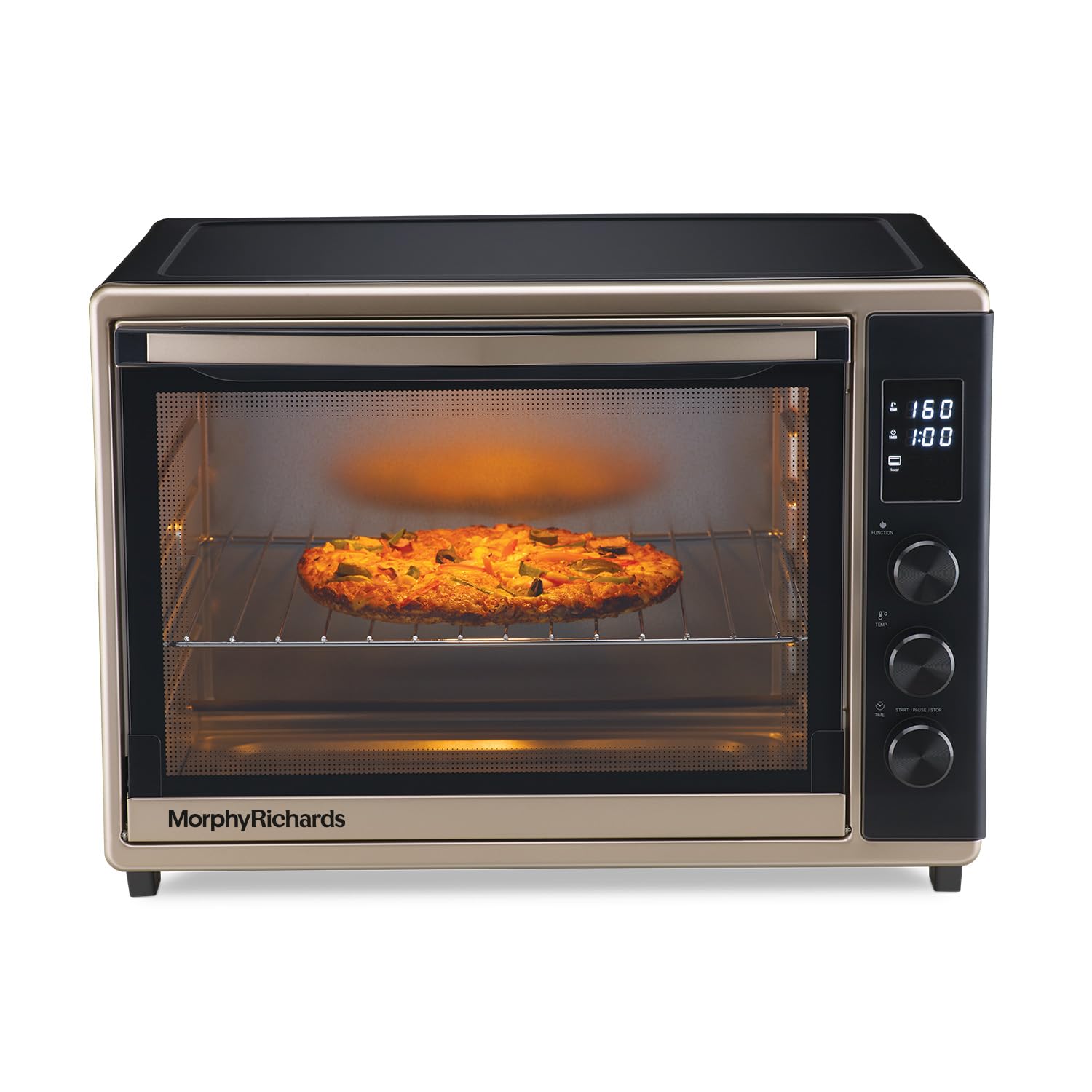
Image 1.1: Morphy Richards 52RCD Digi OTG with its door open, showcasing the interior rack and rotisserie spit.
2. Important Safety Instructions
To reduce the risk of fire, electric shock, or injury, always follow these basic safety precautions:
- Read all instructions before using the appliance.
- Do not touch hot surfaces. Use handles or knobs.
- To protect against electric shock, do not immerse the cord, plug, or any part of the appliance in water or other liquid.
- Close supervision is necessary when any appliance is used by or near children.
- Unplug from outlet when not in use and before cleaning. Allow to cool before putting on or taking off parts.
- Do not operate any appliance with a damaged cord or plug, or after the appliance malfunctions or has been damaged in any manner.
- The use of accessory attachments not recommended by the appliance manufacturer may cause injuries.
- Do not use outdoors.
- Do not let the cord hang over the edge of a table or counter, or touch hot surfaces.
- Do not place on or near a hot gas or electric burner, or in a heated oven.
- Extreme caution must be used when moving an appliance containing hot oil or other hot liquids.
- Always attach the plug to the appliance first, then plug the cord into the wall outlet. To disconnect, turn any control to 'OFF', then remove the plug from the wall outlet.
- Do not use the appliance for other than intended use.
- Oversized foods or metal utensils must not be inserted in a toaster oven as they may create a fire or risk of electric shock.
- A fire may occur if the oven is covered or touching flammable material, including curtains, draperies, walls, and the like, when in operation.
- Do not place any of the following materials in the oven: paper, cardboard, plastic, and similar products.
- Do not store any materials, other than manufacturer's recommended accessories, in this oven when not in use.
- Do not cover crumb tray or any part of the oven with metal foil. This will cause overheating of the oven.
3. Package Contents
Upon unpacking, please ensure all items are present and in good condition:
- 1N OTG (Oven Toaster Grill) Unit
- 1N Instruction Manual
- 1N Warranty Card
- Accessories: Bake Pan, Grill Tray, Rotisserie Handle, Rotisserie Fork Set, Tray Handle

Image 3.1: The Morphy Richards 52RCD Digi OTG with its various accessories, including a bake pan, grill tray, and rotisserie fork set, clearly labeled.
4. Product Features
The Morphy Richards 52RCD Digi OTG offers a range of features for diverse cooking needs:
- Large 52-Liter Capacity: Ideal for large families and various cooking requirements.
- Digital Display with 8 Preset Menus: Includes options for Preheat, Bake, Roast, Grill, Defrost, Tandoori, Pizza, and more for user convenience.
- 120-Minute Timer: Provides precise control over cooking duration.
- Convection Function: Ensures even baking and roasting for consistent results.
- Rotisserie Function: Allows for professional-style roasting of meats.
- In-built Dehydrator: Easily dehydrate fruits, vegetables, and meats at home.
- In-built Fermentation Mode: Conveniently prepare curd, dough, and batters.
- LED Display: For clear visibility of settings and cooking status.

Image 4.1: A woman whisking ingredients next to the Morphy Richards 52RCD Digi OTG, highlighting its 52-liter capacity for various culinary tasks.

Image 4.2: The Morphy Richards 52RCD Digi OTG with dehydrated fruit slices on a tray inside, demonstrating its in-built dehydrate mode.
5. Setup
- Unpacking: Carefully remove the OTG and all accessories from the packaging. Retain packaging for future storage or transport.
- Placement: Place the OTG on a stable, heat-resistant, and level surface. Ensure there is adequate ventilation around the appliance (at least 10-15 cm clearance on all sides). Do not place it near flammable materials or under cabinets.
- First Use Cleaning: Before first use, wipe the interior and exterior of the OTG with a damp cloth. Wash all accessories (bake pan, grill tray, rotisserie parts) with warm soapy water, rinse, and dry thoroughly.
- Initial Burn-in: To eliminate any manufacturing odors, operate the empty OTG for approximately 15-20 minutes at the highest temperature setting (e.g., 230°C) with the door slightly ajar. Ensure the area is well-ventilated during this process. A small amount of smoke or odor is normal during initial use.
- Power Connection: Ensure the voltage specified on the appliance matches your local power supply. Plug the power cord into a grounded electrical outlet.
6. Operating Instructions
The 52RCD Digi OTG features a digital control panel for easy operation. Refer to the specific menu options for your desired cooking method.
6.1 General Operation
- Power On/Off: Plug in the appliance. The digital display will illuminate.
- Selecting Functions: Use the function knob or buttons to cycle through the 8 preset menus (Preheat, Bake, Roast, Grill, Defrost, Tandoori, Pizza, Dehydrate, Ferment).
- Temperature Adjustment: Use the temperature control knob to set the desired cooking temperature.
- Time Adjustment: Use the timer knob to set the cooking duration, up to 120 minutes.
- Start/Pause: Press the Start/Pause button to begin or temporarily stop the cooking process.
6.2 Specific Cooking Modes
- Preheat: Select the Preheat function, set the desired temperature, and allow the OTG to reach temperature before placing food inside.
- Bake/Roast: Place food on the grill tray or bake pan. Select Bake or Roast, set temperature and time. The convection function ensures even cooking.
- Grill: Position food on the grill tray closer to the top heating elements. Select Grill, set temperature and time. Monitor closely to prevent burning.
- Defrost: Select Defrost mode to gently thaw frozen items.
- Tandoori/Pizza: Use the dedicated preset menus for optimal results when preparing tandoori dishes or pizzas.
- Dehydrator: Place thinly sliced fruits, vegetables, or meats on the grill tray. Select Dehydrate mode and set the appropriate low temperature and extended time.
- Fermentation: Select Fermentation mode for preparing curd, dough, or batters at a consistent low temperature.
- Rotisserie: For roasting whole chickens or large cuts of meat. Secure the food onto the rotisserie spit, insert it into the oven, and select the Rotisserie function.

Image 6.1: The Morphy Richards 52RCD Digi OTG baking a pizza, demonstrating its capability for various dishes.
Video 6.2: An official product video showcasing the key features and functions of the Morphy Richards 52RCD Digi OTG, including its 1800W power, fermentation mode, 52L capacity, 120-minute timer, 8 preset menus, convection, rotisserie, and dehydrator functions.
7. Maintenance and Cleaning
Regular cleaning ensures optimal performance and longevity of your OTG.
7.1 General Cleaning
- Ensure the OTG is switched off and unplugged. Allow it to cool completely to room temperature before cleaning.
- Remove all accessories and detachable parts from the oven.
- Wash removable items (bake pan, grill tray, rotisserie parts) separately using dishwashing soap and warm water. Do not use abrasive cleaners.
- Use a damp cloth, sponge, and mild detergent to wipe the interior and exterior of the OTG thoroughly. Avoid harsh chemicals or abrasive pads.
- Allow all parts to dry completely before reassembling or using the OTG again.
7.2 Crumb Tray
The crumb tray should be cleaned regularly to prevent grease buildup and potential fire hazards. Slide out the crumb tray, discard crumbs, wash with soapy water, rinse, and dry before replacing.

Image 7.1: An infographic detailing the steps for cleaning the Morphy Richards OTG, emphasizing safety and proper cleaning methods.
8. Troubleshooting
If you encounter issues with your Morphy Richards 52RCD Digi OTG, refer to the following common problems and solutions:
| Problem | Possible Cause | Solution |
|---|---|---|
| Appliance does not turn on | Not plugged in; Power outage; Faulty outlet | Ensure plug is securely in outlet; Check household circuit breaker; Try a different outlet. |
| Food not cooking evenly | Incorrect temperature/time setting; Overcrowding; Improper rack position | Adjust settings according to recipe; Do not overcrowd the oven; Use recommended rack position. Ensure convection fan is operating. |
| Excessive smoke/odor during cooking | Food spills; Grease buildup; First use burn-off | Clean interior and accessories thoroughly; Ensure crumb tray is clean. Initial smoke/odor is normal for first use. |
| Digital display not working | Power issue; Internal fault | Unplug and re-plug the appliance. If the issue persists, contact customer support. |
If the problem persists after attempting these solutions, please contact Morphy Richards customer support.
9. Specifications
| Feature | Detail |
|---|---|
| Brand | Morphy Richards |
| Model Name | 52 RCD Digi |
| Model Number | 510061 |
| Capacity | 52 Liters |
| Wattage | 1800 Watts |
| Color | Black and Champagne Gold |
| Product Dimensions (D x W x H) | 40D x 55W x 42H Centimeters |
| Item Weight | 10.8 Kilograms |
| Control Type | Button Control (Digital) |
| Power Source Type | Electric |
| Material Type | Mild Steel (Body), Glass (Door) |
| Special Features | Auto Cook Menu, LED Display, Large Capacity, Rotisserie Feature, Timer, Convection, In-built Dehydrator, In-built Fermentation Mode |
| Included Components | OTG: 1N, Instruction Manual:1N, Warranty card: 1N |
| Country of Origin | India |
10. Warranty and Support
The Morphy Richards 52RCD Digi OTG comes with a 2-year product warranty from the date of purchase. Please retain your purchase receipt and warranty card for any warranty claims.
For warranty service, technical assistance, or any product-related queries, please contact Morphy Richards customer support:
- Manufacturer: GSONS INDUSTRIES PRIVATE LIMITED
- Marketed By: Bajaj Electricals Limited
- Refer to the warranty card or the official Morphy Richards website for the most current contact information and service center details.