1. Introduction
Welcome to the CMF BY NOTHING Watch 3 Pro user manual. This guide provides essential information for setting up, operating, maintaining, and troubleshooting your new smartwatch. Please read this manual thoroughly to ensure optimal performance and a seamless user experience.
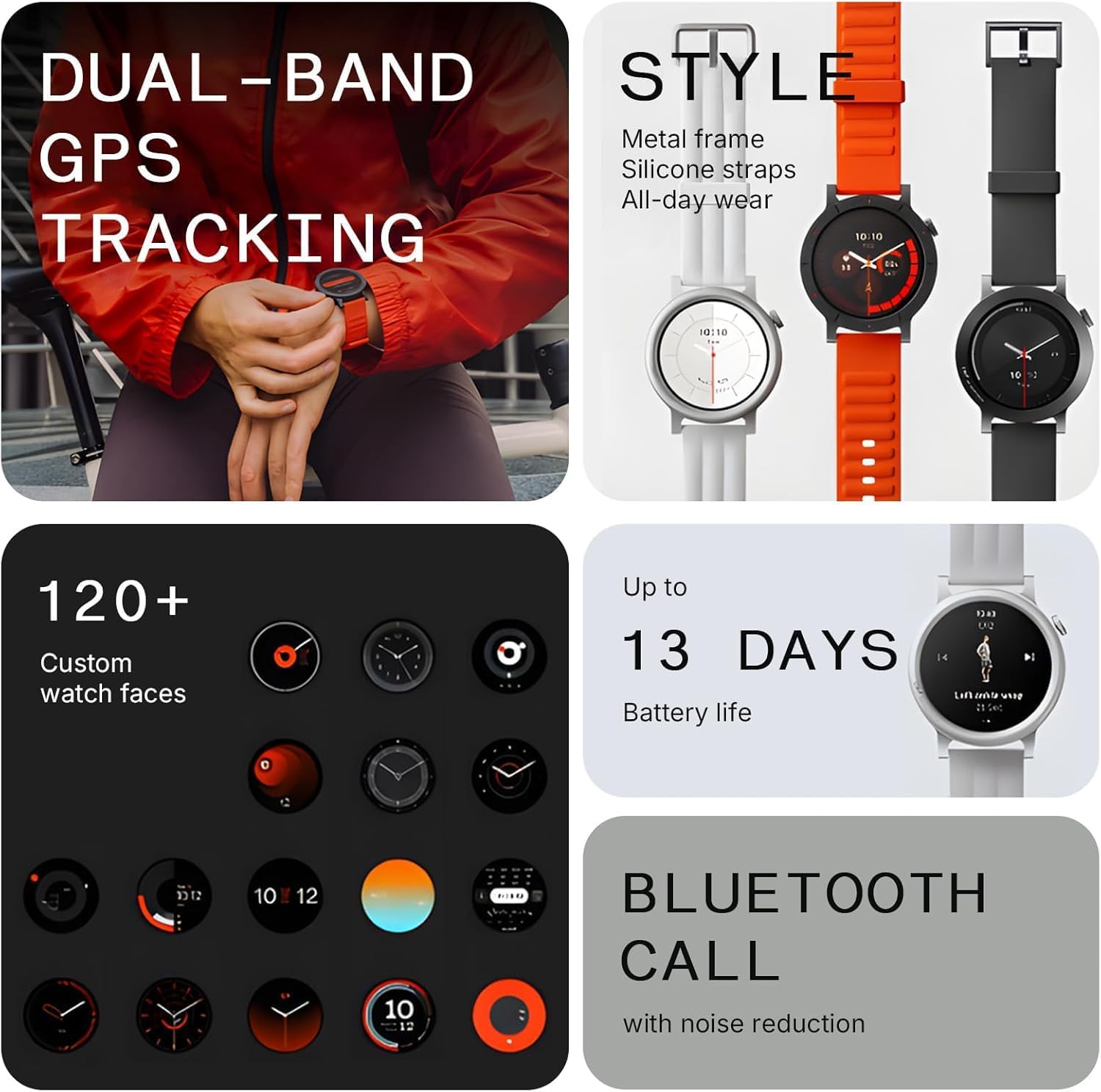
Figure 1: Front view of the CMF BY NOTHING Watch 3 Pro.
2. What's in the Box
Your CMF BY NOTHING Watch 3 Pro package includes the following items:
- CMF BY NOTHING Watch 3 Pro Smart Watch
- Charging Cable
- User Manual (this document)
- Watch Band
3. Setup
3.1 Initial Setup
- Power On: Press and hold the side button until the CMF BY NOTHING logo appears on the screen.
- Language Selection: Follow the on-screen prompts to select your preferred language.
3.2 Pairing with Your Smartphone
To unlock the full potential of your CMF Watch 3 Pro, pair it with the Nothing X App:
- Download the App: Search for and download the "Nothing X" app from the Apple App Store (for iOS devices) or Google Play Store (for Android devices). Ensure you download version 3.0 or later.
- Enable Bluetooth: On your smartphone, ensure Bluetooth is enabled.
- Open Nothing X App: Launch the Nothing X app and follow the on-screen instructions to add a new device.
- Scan for Device: The app will search for nearby CMF Watch 3 Pro devices. Select your watch from the list.
- Confirm Pairing: A pairing request will appear on both your watch and smartphone. Confirm the pairing on both devices.
- Complete Setup: Follow any remaining prompts in the app to complete the setup process, including granting necessary permissions for health tracking and notifications.

Figure 2: The Nothing X App interface for managing your CMF Watch 3 Pro.
4. Features
4.1 Display
- 1.43" AMOLED Display: Enjoy a vibrant and sharp display with a smooth 60fps refresh rate.
- Always-on Display (AOD): Choose from over 150 AOD watch faces to match your main dial, providing continuous time and information display.

Figure 3: The 1.43-inch AMOLED display of the CMF Watch 3 Pro.
4.2 Health Tracking
- Advanced Heart Rate Tracking: Utilizes a 4-channel sensor for enhanced accuracy in heart rate monitoring, especially during intense workouts.
- Precise Sleep Monitoring: Tracks sleep stages (Deep, Core, REM, Awake) and provides sleep zone tracking for improved sleep quality analysis.
- Stress Monitoring: Monitors stress levels throughout the day.
- SpO₂ Level Measurement: Measures blood oxygen saturation levels.
- Active Score (MET-Based Fitness Tracking): Helps understand daily health status by combining activity intensity, total movement, and metabolic equivalent of task (MET) values.
- Women's Health Features: Tracks menstrual cycles and provides retrospective ovulation estimates.
- Reminders: Includes smart hydration and posture reminders.
- Precision Step Counting: Powered by GOMORE technology for accurate step tracking.

Figure 4: Everyday health insights displayed on the watch.
4.3 Fitness Tracking
- 130+ Exercise Modes: Supports a wide range of sports and activities with detailed metrics.
- L1+L5 Dual Band GPS: Provides ultra-accurate navigation and tracking for outdoor activities, compatible with Glonass, Galileo, Beidou, and QZSS.
- GOMORE-Powered Performance Analysis: Offers insights into your workout performance.
- 7-Type Motion Recognition: Automatically detects certain types of motion.
- Smart Movement Algorithm: Tracks workouts in detail, including aerobic/anaerobic performance, training load, and recovery time.
- 3D Warm-up Guide: Provides guidance for effective warm-ups.
- 'My Heart Rate' Technology: Personalizes training zones based on your heart rate.
- Data Sync: Seamlessly syncs with Apple Health, Google Fit, and Strava.

Figure 5: Dual-band GPS tracking for precise outdoor activity monitoring.
4.4 Communication
- Bluetooth Calls: Make and receive crystal-clear calls directly from your wrist using the built-in mic and speaker, enhanced by AI noise reduction.
- 30 Contact Support: Sync up to 30 contacts for quick access.
- Gesture Control: Perform one-handed operations for calls and music.

Figure 6: Bluetooth calling with AI noise reduction for clear conversations.
4.5 Other Smart Features
- Music Control: Control music playback on your connected smartphone.
- Remote Camera Control: Use your watch as a remote shutter for your phone's camera.
- Weather Updates: Get real-time weather information.
- Voice Notes with Transcripts: Record voice notes and have them transcribed.
- ChatGPT on Wrist: Access ChatGPT functionality (currently only available on Nothing smartphones).
- Alarm Clock & Calendar: Set alarms and view calendar events.
- Flashlight: Use the watch display as a flashlight.
- Find My Phone: Locate your misplaced smartphone.

Figure 7: Additional smart features for daily convenience.
5. Operating Instructions
5.1 Basic Navigation
- Touchscreen: Swipe left/right, up/down to navigate through menus and widgets. Tap to select items.
- Side Button: Press to wake the screen, return to the watch face, or access the app list.
- Rotating Crown: Rotate the crown to scroll through lists and adjust settings.
5.2 Customizing Watch Faces
To change your watch face:
- On Watch: From the watch face, press and hold the screen. Swipe left or right to browse pre-installed watch faces and tap to select.
- Via Nothing X App: Open the Nothing X app on your smartphone. Navigate to the "Dial Gallery" to explore and download additional watch faces, including custom photo and video options.

Figure 8: A selection of customizable watch faces.
5.3 Using Sport Modes
To start a workout:
- Access Sport Modes: From the watch face, swipe to the app list and select "Exercise" or a specific sport mode.
- Select Activity: Choose from over 130 available sport modes (e.g., Outdoor Run, Indoor Walk, Cycling).
- Set Goals (Optional): You can set goals for distance, time, or calories for your workout.
- Start Workout: Tap "Start" to begin tracking your activity. The watch will display real-time metrics such as heart rate, duration, distance, and calories burned.
- End Workout: Swipe right or press the side button to pause or end your workout. Confirm to save the data.

Figure 9: Tracking a workout with the CMF Watch 3 Pro.
5.4 Making and Receiving Calls
With Bluetooth calling enabled:
- Make a Call: From the app list, select "Phone Call." You can dial a number or select a contact from your synced list.
- Receive a Call: When a call comes in, the watch will display the caller ID. You can answer or reject the call directly from your wrist.
- Adjust Volume: During a call, use the rotating crown or on-screen controls to adjust the volume.
5.5 Music Control
To control music on your smartphone:
- Open Music Control: From the app list, select "Music."
- Playback Control: You can play, pause, skip tracks, and adjust the volume of music playing on your connected smartphone.
6. Maintenance
6.1 Cleaning Your Watch
- Regularly clean your watch and band with a soft, damp cloth.
- Avoid using harsh chemicals or abrasive materials, as these can damage the watch.
- Ensure the charging contacts on the back of the watch are clean and dry before charging.
6.2 Water Resistance
The CMF Watch 3 Pro has an IP68 water resistance rating, meaning it is protected against dust and immersion in water up to 1.5 meters for up to 30 minutes. It is suitable for daily use, such as hand washing, rain, and shallow swimming. However, it is not recommended for hot showers, saunas, or diving, as steam and high water pressure can compromise the seals.
6.3 Battery Charging
To charge your CMF Watch 3 Pro:
- Connect Charger: Attach the magnetic charging cable to the charging contacts on the back of the watch.
- Power Source: Connect the USB end of the charging cable to a compatible USB power adapter (not included) or a computer USB port.
- Charging Indicator: The watch screen will display a charging animation.
- Battery Life: A full charge provides up to 13 days of battery life under typical usage conditions.
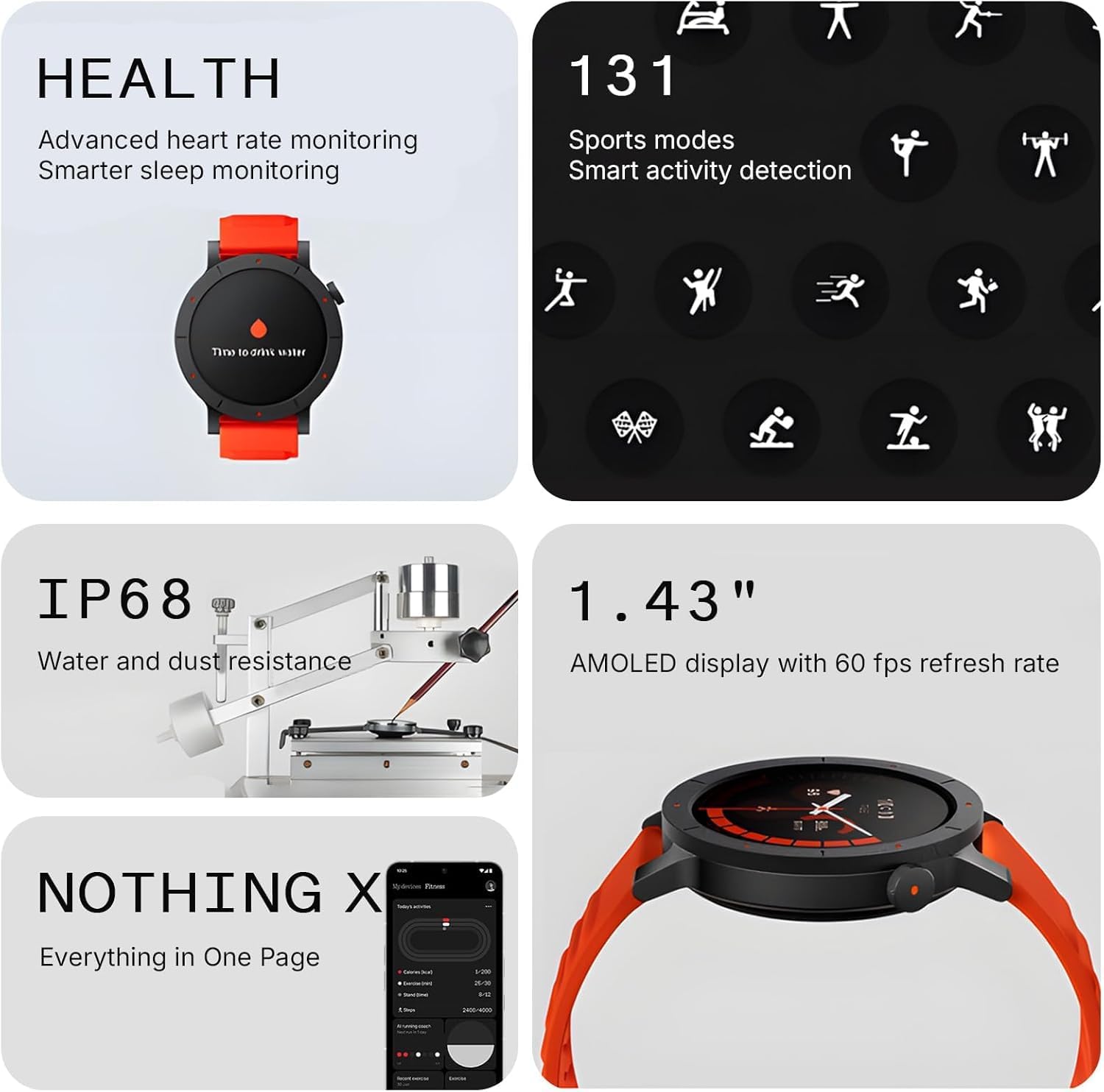
Figure 10: Rear view of the watch with charging contacts.
7. Troubleshooting
- Watch Not Turning On: Ensure the watch is fully charged. Connect it to the charger for at least 30 minutes.
- Pairing Issues: Make sure Bluetooth is enabled on your phone and the Nothing X app is open. Try restarting both your watch and smartphone.
- Inaccurate Health Data: Ensure the watch is worn snugly on your wrist, not too tight or too loose. Keep the sensor area clean.
- Notifications Not Appearing: Check notification permissions in the Nothing X app and your phone's settings. Ensure the watch is connected via Bluetooth.
- Short Battery Life: Reduce screen brightness, disable unnecessary features like Always-on Display, and limit frequent heart rate monitoring.
- Screen Unresponsive: Try restarting the watch by pressing and holding the side button until it powers off, then power it back on.
8. Specifications
| Feature | Specification |
|---|---|
| Model Number | Watch 3 Pro |
| Display | 1.43 Inches AMOLED |
| Connectivity | Bluetooth, Wi-Fi |
| GPS | Built-in GPS (L1+L5 Dual Band) |
| Water Resistance | IP68 |
| Battery Life | Up to 13 days |
| Battery Capacity | 350 mAh |
| Memory Storage | 256 MB |
| Operating System | ROTS |
| Item Weight | 1.8 ounces |
| Manufacturer | CMF BY NOTHING |
9. Warranty and Support
For warranty information, technical support, or service inquiries, please refer to the official CMF BY NOTHING website or contact their customer support directly. Keep your purchase receipt as proof of purchase for warranty claims.
10. Official Product Videos
CMF Watch 3 Pro Watch | Long Battery Life & AMOLED Display
This video provides an overview of the CMF Watch 3 Pro, highlighting its long battery life and AMOLED display. It demonstrates key features and the watch's design.
What you should know about this smart watch
This video offers essential information and tips for new users of the CMF Watch 3 Pro, covering important aspects of its functionality and usage.
Watch 3 Pro Smart Watch
A detailed video showcasing the various features and capabilities of the Watch 3 Pro Smart Watch, including its user interface and applications.
Affordable smart watch that is worth more than the iwatch
This video highlights the value proposition of the CMF Watch 3 Pro, comparing its features and affordability to other smartwatches on the market.


