
TIDRADIO TD-M15
Contents
TIDRADIO M15 Global Walkie Talkies User Manual
Model: TD-M15
1. Introduction
The TIDRADIO M15 is a state-of-the-art 4G POC (Push-to-Talk Over Cellular) walkie talkie system designed for global communication. Leveraging 4G-LTE cellular networks, it offers unlimited range and crystal-clear voice transmission, making it ideal for professional use across various industries. This manual provides comprehensive instructions for setting up, operating, and maintaining your M15 walkie talkies.

Image: Two TIDRADIO M15 walkie talkies shown with their accompanying Global IoT SIM cards, highlighting the product's core components.
2. Setup
2.1 Package Contents
Before you begin, please verify that all items are present in your package:
- 2 x TIDRADIO M15 Walkie Talkies
- 2 x Lithium Polymer Batteries (pre-installed)
- 2 x Global IoT SIM Cards (pre-installed)
- 2 x USB-C Charging Cables
- User Manual (this document)
2.2 SIM Card Installation and Activation
The TIDRADIO M15 walkie talkies come with pre-installed Global IoT SIM cards, providing one year of free unlimited high-speed data service. No additional activation steps are typically required for initial use. Ensure the SIM card is securely seated in its slot if you need to access it.

Image: The TIDRADIO M15 radio alongside a visual representation of the pre-installed SIM card and the benefit of one year of unlimited data service.
After the initial free year, service renewal can be managed through TIDRADIO to maintain uninterrupted connectivity. These SIM cards are specifically for walkie talkie use and do not incur hidden fees, subscriptions, monthly fees, or require contracts or licenses.

Image: A TIDRADIO M15 radio with clear statements emphasizing the absence of hidden fees, subscription fees, monthly fees, contracts, or licenses associated with its operation.
2.3 Charging the Battery
The M15 walkie talkies are equipped with a 3000mAh Lithium Polymer battery. Before first use, fully charge the device.
- Connect the provided USB-C charging cable to the USB-C port on the side of the walkie talkie.
- Connect the other end of the cable to a compatible USB power adapter (not included) or a computer USB port.
- The charging indicator on the device will show charging status. A full charge typically takes approximately 3-4 hours.
For optimal battery life, avoid completely draining the battery before recharging and store the device in a cool, dry place when not in use for extended periods.
3. Operating Instructions
3.1 Power On/Off
- To Power On: Press and hold the Power button (usually located on the side or top) until the screen illuminates.
- To Power Off: Press and hold the Power button until the device prompts you to power off, then confirm.
3.2 Basic Functions Overview
The TIDRADIO M15 offers a range of essential functions for effective communication:

Image: An infographic detailing the core functionalities of the TIDRADIO M15, such as Odmaster recording, global communication range, battery capacity, group call capability, OTA updates, audio output, charging method, and screen size.
- Odmaster Recording: Records conversations via the Odmaster App.
- Global Distance: Achieves communication over 5000KM using 4G-LTE.
- 3000mAh Battery: Provides long-lasting power.
- Group Call: Facilitates communication with multiple users simultaneously.
- OTA Update: Over-the-Air updates for continuous improvement.
- 2W Loud Audio Speaker: Ensures clear audio output.
- USB-C Charge: Convenient and modern charging interface.
- Large Screen: For easy navigation and information display.
3.3 Global Communication (POC)
The M15 utilizes 4G-LTE cellular networks for its Push-to-Talk Over Cellular (POC) functionality, providing truly unlimited communication range. This means you can communicate across vast distances, even globally, as long as there is 4G-LTE coverage.

Image: A visual representation of the TIDRADIO M15's global communication capabilities, showing radios communicating across continents with 5000KM coverage.
3.4 Odmaster App Integration
The Odmaster App enhances the functionality of your M15 radio, allowing for seamless communication and conversation recording.
- Talk on Phone by Odmaster App: Once your M15 radio is connected to the Odmaster app, you can conduct conversations directly through your smartphone. This allows you to set the radio aside, even on its charger, and use your phone for all communication.
- Recording Conversation on Odmaster App: The Odmaster app automatically records your conversations once connected to the M15 radio. This feature ensures that all communications are archived, allowing you to review important details at any time, even if you missed them during the live conversation.

Image: Two individuals illustrating the "Talk on Phone" feature, where one person uses the TIDRADIO M15 and the other communicates via the Odmaster app on their smartphone.
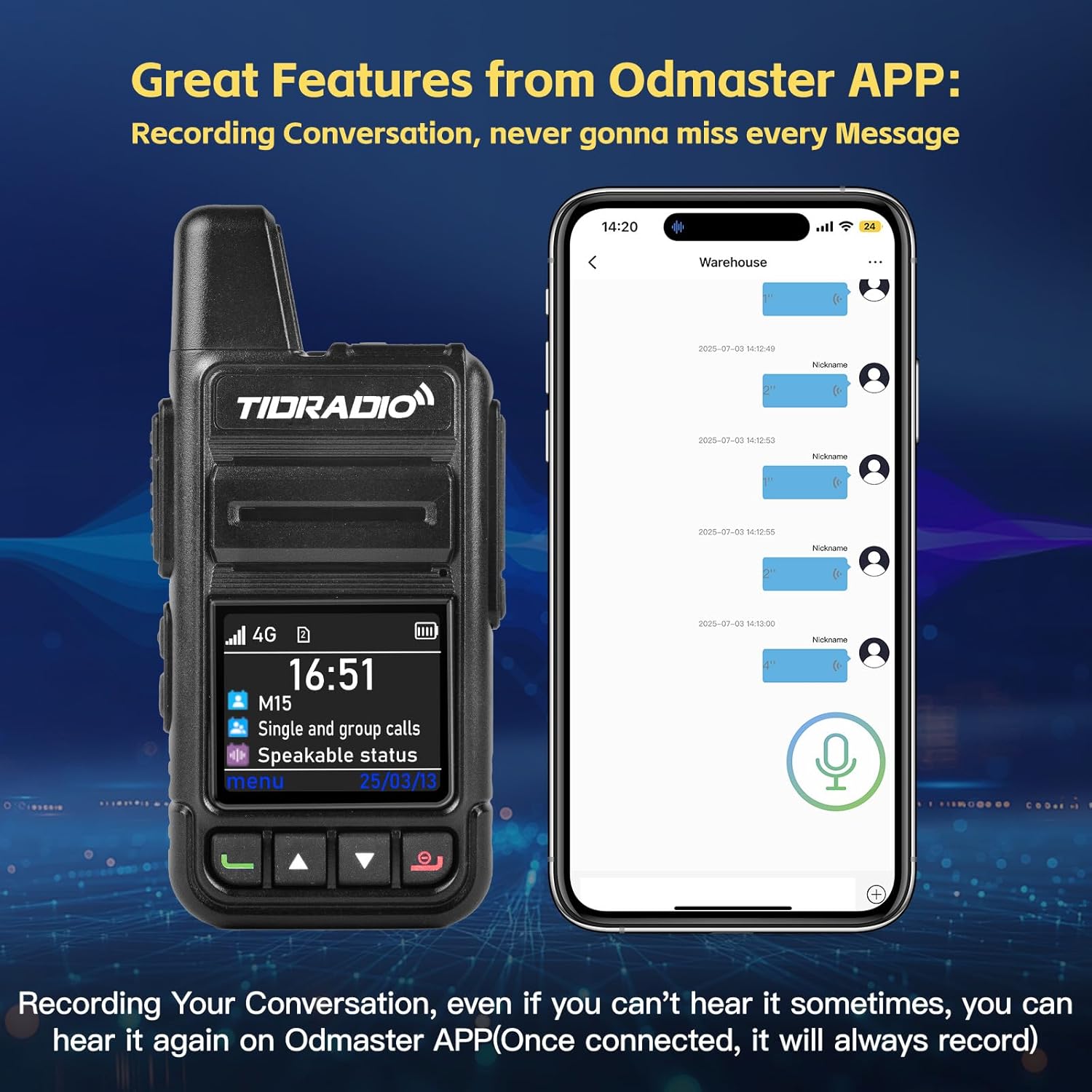
Image: The TIDRADIO M15 radio displayed next to a smartphone screen showing the Odmaster app's conversation recording interface, highlighting the automatic recording feature.
3.5 Over-the-Air (OTA) Updates
The M15 supports effortless Over-the-Air (OTA) updates, ensuring your device always has the latest features, security enhancements, and performance optimizations. This eliminates the need for complicated manual upgrades.
- How to Update: Navigate to Menu → Update on your device. With a single click, you can update your device online.

Image: A visual guide demonstrating the menu path on the TIDRADIO M15 screen to access and perform Over-the-Air (OTA) updates.
4. Maintenance
4.1 Cleaning Your Device
To maintain the performance and appearance of your M15 walkie talkie:
- Use a soft, damp cloth to wipe the exterior of the device.
- Do not use harsh chemicals, cleaning solvents, or strong detergents.
- Ensure the USB-C port cover is securely closed to protect against dust and moisture.
4.2 Battery Care and Storage
- Avoid exposing the battery to extreme temperatures (hot or cold).
- If storing the device for an extended period, charge the battery to approximately 50% before storage to preserve battery health.
- Recharge the battery every few months during long-term storage.
4.3 Water Resistance
The TIDRADIO M15 is designed with water resistance. While it can withstand splashes and light rain, it is not intended for submersion. Always ensure all port covers are sealed to maintain water resistance.
5. Troubleshooting
If you encounter issues with your TIDRADIO M15, please refer to the following common troubleshooting steps:
| Problem | Possible Cause | Solution |
|---|---|---|
| Device does not power on. | Low battery; Power button not held long enough. | Charge the battery fully. Press and hold the Power button for at least 3 seconds. |
| No signal or poor communication. | Outside 4G-LTE coverage area; SIM card issue. | Move to an area with better cellular coverage. Ensure SIM card is properly inserted. |
| Odmaster App not connecting. | Bluetooth/Wi-Fi off; App not updated; Radio not discoverable. | Ensure Bluetooth/Wi-Fi is enabled on your phone. Update the Odmaster App. Restart both the radio and the phone. |
| Cannot hear recorded conversations. | App permissions; Audio settings. | Check app permissions for microphone and storage. Adjust phone's media volume. |
If the problem persists after trying these steps, please contact customer support.
6. Specifications
| Feature | Detail |
|---|---|
| Model Number | TD-M15 |
| Item Weight | 1 pounds |
| Product Dimensions | 1 x 2 x 4 inches (D x W x H) |
| Country of Origin | China |
| Batteries | 2 Lithium Polymer batteries required (included) |
| Battery Capacity | 3000mAh |
| Color | Black |
| Number of Channels | 200 |
| Frequency Range | 4G LTE |
| Talking Range Maximum | 100,000 Miles (theoretical, based on 4G LTE coverage) |
| Tuner Technology | 4G LTE |
| Voltage | 3.7 Volts |
| Water Resistance Level | Water Resistant |
7. Warranty and Customer Support
7.1 Warranty Information
The TIDRADIO M15 comes with a manufacturer's warranty. Please refer to the warranty card included in your package for specific terms and conditions. Generally, the product is covered for manufacturing defects for a period of 1 year from the date of purchase.
7.2 Customer Support
If you have any questions, concerns, or require assistance with your TIDRADIO M15, please do not hesitate to contact us. We are committed to ensuring customer satisfaction.
You can reach TIDRADIO customer service through Amazon's messaging system for prompt assistance.
Ask a question about this manual
Ask about setup, troubleshooting, compatibility, parts, safety, or missing instructions. Manuals+ will review the question and use this page’s manual context to help answer it.