
Introduction
This manual provides detailed instructions for the installation and care of your Futanwei Screen Protector, designed specifically for the SENBONO IDW25 Smart Watch and other compatible models. This screen protector offers advanced protection against scratches, fingerprints, and daily wear, while maintaining optimal screen clarity and touch sensitivity.
Compatible Models
This screen protector is compatible with the following smartwatch models:
- WNH IDW25 Smart Watch
- VRPEFIT IDW25 Smart Watch
- KALINCO IDW25 Smart Watch
- BOOOMIC IDW25 Smart Watch
- Mikego IDW25 Smart Watch
- SENBONO IDW25 Smart Watch (1.83 Inches)
Note: This product is NOT compatible with FITVII H56 (1.7 Inches) Smart Watch or other devices not listed above.

Image: A black smartwatch, identified as SENBONO IDW25, demonstrating compatibility with the screen protector.
Features
The Futanwei Screen Protector is engineered with several key features to enhance your smartwatch experience:
- Oleophobic & Hydrophobic Coating: This specialized coating repels sweat and oil residue, preventing fingerprints and smudges on your smartwatch screen.

Image: Diagram illustrating the oleophobic coating and anti-fingerprint properties of the screen protector.
- High Touch Sensitivity: Designed to maintain the original touch response of your smartwatch screen, allowing for comfortable and precise navigation.

Image: A finger touching a smartwatch screen with the protector applied, indicating high touch sensitivity.
- Clear Picture Quality: With 99% high transparency and an ultra-thin design, the protector ensures bright and colorful image quality, preserving the original visual experience.
- Self-Healing Protection: Utilizes nano slow rebound fusion technology to automatically repair minor daily scratches within 24 hours.

Image: A visual representation of the screen protector's self-healing process, showing scratches disappearing over 24 hours.
- Bubble-Free Application: Engineered for easy, hassle-free, and bubble-free installation. Any small residual air bubbles typically disappear naturally within a few hours after application.

Image: An illustration showing a smartwatch screen protector applied without bubbles, emphasizing the bubble-free feature.
- Maximum Coverage: The flexible material allows for comprehensive coverage, even on curved smartwatch screens, ensuring full protection.

Image: A smartwatch with the screen protector applied, demonstrating its ability to provide maximum screen coverage.
Installation Guide
Follow these steps carefully for a successful and bubble-free application of your screen protector:
- Step 1: Clean the Watch Surface
Wipe the surface of your smartwatch screen thoroughly with both a dry and a wet cloth to remove any dust, smudges, or debris. Ensure the screen is completely clean and dry before proceeding. - Step 2: Remove Protective Layer
Gently pull down the label on the screen protector to begin removing the first protective layer. Be careful not to touch the adhesive side of the protector. - Step 3: Align and Place
Carefully align the screen protector with the edges of your smartwatch screen. Once aligned, slowly place it onto the watch screen, starting from one edge and allowing it to adhere gradually. - Step 4: Press and Secure
Using a soft cloth or your finger, gently press the protective film from side to side, pushing out any air bubbles towards the edges. Ensure the protector is fully adhered to the screen.
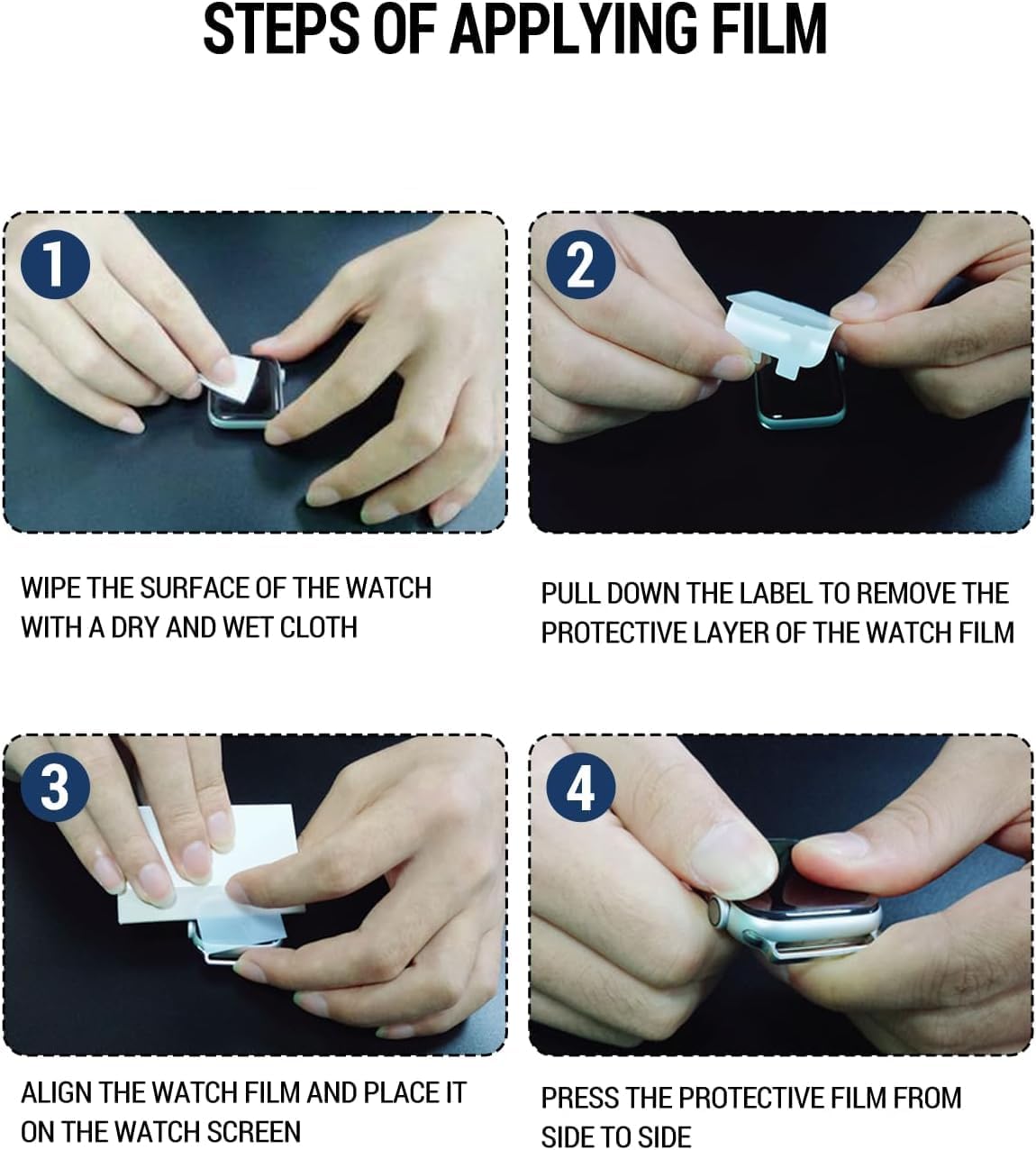
Image: A visual guide showing four steps for applying the screen protector: cleaning, peeling, aligning, and pressing.
Operating Instructions
Once installed, the screen protector operates seamlessly with your smartwatch. Its high transparency ensures no interference with display clarity, and its sensitive surface allows for normal touch interactions. No special operating procedures are required beyond the standard use of your smartwatch.
Maintenance
To maintain the longevity and clarity of your screen protector:
- Clean the screen protector regularly with a soft, lint-free cloth.
- For stubborn smudges, lightly dampen the cloth with water or a screen-safe cleaner.
- Avoid using harsh chemicals or abrasive materials, as these can damage the oleophobic coating.
- The self-healing feature will address minor scratches over time; however, avoid intentional scratching or sharp objects.
Troubleshooting
Here are solutions to common issues you might encounter:
- Bubbles After Installation: Small air bubbles are common immediately after application. Due to the self-healing properties of the film, these bubbles will typically disappear naturally within a few hours (up to 24 hours). Do not attempt to forcefully remove them with sharp objects.
- Dust Under the Protector: If dust particles are trapped under the protector, it indicates insufficient cleaning before application. Carefully lift a corner of the protector, use a dust-removal sticker (if available) or a piece of tape to lift the dust, and then reapply.
- Edges Not Sticking: Ensure the screen is completely clean and dry. If edges are lifting, gently press them down firmly for a few seconds. The flexible material should conform to the screen.
Specifications
| Brand | Futanwei |
| Compatible Devices | SENBONO IDW25 (1.83"), WNH IDW25, VRPEFIT IDW25, KALINCO IDW25, BOOOMIC IDW25, Mikego IDW25 Smart Watches |
| Material | Thermoplastic Polyurethane (TPU) |
| Item Hardness | 9H |
| Finish Type | Glossy |
| Screen Size | 1.83 Inches |
| Product Dimensions | 3"L x 2"W (approximate) |
| Item Weight | 0.317 ounces |
| Unit Count | 5.0 Count |
Support
If you encounter any issues or have questions regarding your Futanwei Screen Protector, please contact our customer support. We are committed to providing efficient solutions and assistance.
Contact information is typically provided at the point of purchase or on the product packaging.