
CMF BY NOTHING Watch Pro 3
CMF Watch 3 Pro Smart Watch User Manual
Brand: CMF BY NOTHING | Model: Watch Pro 3
Introduction
Welcome to the CMF Watch 3 Pro Smart Watch user manual. This guide provides comprehensive instructions for setting up, operating, maintaining, and troubleshooting your new smartwatch. The CMF Watch 3 Pro is designed to enhance your daily life with advanced health and fitness tracking, seamless communication features, and a customizable, vibrant display. Please read this manual carefully to ensure optimal performance and longevity of your device.

Image: The CMF Watch 3 Pro in orange, showcasing its round display and silicone strap.
Setup
What's in the Box
- CMF Watch 3 Pro Smart Watch
- Charging Cable
- Watch Band
- User Manual (this document)
Initial Charging
Before first use, fully charge your CMF Watch 3 Pro. Connect the provided charging cable to the charging port on the back of the watch and plug the USB end into a compatible power adapter (not included) or a computer's USB port. The watch display will indicate charging status. A full charge typically takes approximately 2 hours.
Pairing with Your Device
- Download the Nothing X App 3.0 from your smartphone's app store (available for Android 6.0+ and iOS 13+).
- Ensure Bluetooth is enabled on your smartphone.
- Open the Nothing X App and follow the on-screen instructions to create an account or log in.
- Select "Add Device" or a similar option within the app.
- Power on your CMF Watch 3 Pro. It should automatically enter pairing mode.
- Select "CMF Watch 3 Pro" from the list of available devices in the app.
- Confirm the pairing request on both your watch and smartphone.
- Once paired, the app will guide you through initial settings and preferences.

Image: The Nothing X App interface, demonstrating how the watch connects and displays data within the application.
Operating Your CMF Watch 3 Pro
Display and Navigation
The CMF Watch 3 Pro features a vibrant 1.43-inch AMOLED display with a smooth 60fps refresh rate. Navigate through menus and features using touch gestures and the physical dial on the side. Swipe left/right to access quick settings or widgets, swipe up/down to view notifications or the app drawer. The display offers auto-brightness for optimal viewing in various lighting conditions.

Image: A detailed view of the CMF Watch 3 Pro's 1.43-inch AMOLED display, emphasizing its large and clear interface.
Health Monitoring
Your CMF Watch 3 Pro is equipped with advanced sensors for comprehensive health tracking:
- Heart Rate Tracking: Monitors your heart rate 24/7 with enhanced accuracy, providing real-time data and historical trends.
- Sleep Monitoring: Tracks sleep stages (light, deep, REM) and provides insights into sleep quality, including sleep zone tracking.
- SpO₂ Levels: Measures your blood oxygen saturation, offering an important indicator of your overall health.
- Stress Monitoring: Assesses your stress levels throughout the day and provides guidance for relaxation.
- Women's Health: Features for tracking menstrual cycles and retrospective ovulation estimates.
- Active Score: A MET-based fitness tracking system that helps you understand your daily health status and monitor well-being effectively.
- Hydration & Posture Reminders: Smart reminders to help you maintain healthy habits.

Image: The watch display showing health insights, including heart rate and a "Time to drink water" reminder.

Image: A user interacting with the CMF Watch 3 Pro, illustrating the ease of access to expanded health tools like sleep detection and stress monitoring.
Communication
Stay connected directly from your wrist:
- Bluetooth Calls: Make and receive crystal-clear calls using the built-in mic and speaker, enhanced by AI noise reduction.
- Contact Sync: Sync up to 30 contacts for quick access.
- Notifications: Receive alerts for calls, messages, and app notifications directly on your watch.

Image: A woman wearing the CMF Watch 3 Pro, illustrating the convenience of Bluetooth calling with noise reduction.
Fitness Tracking
The CMF Watch 3 Pro is your ultimate workout partner:
- 130+ Exercise Modes: Track a wide range of activities with detailed metrics like calories burned, pace, and heart rate zones.
- Dual-Band GPS (L1+L5): Provides ultra-accurate navigation and route tracking, even in dense urban areas or forested trails. Compatible with Glonass, Galileo, Beidou, and QZSS.
- GOMORE-powered Performance Analysis: Offers in-depth analysis of your workouts, including aerobic/anaerobic performance, training load, and recovery time.
- 7-Type Motion Recognition: Automatically detects and tracks various movements.
- Custom Running Coach: Builds personalized 8-16 week training schedules based on your goals and fitness level.
- Workout Summary: Provides personalized feedback and recovery suggestions after each workout.
- Data Sync: Seamlessly syncs with Apple Health, Google Fit, and Strava.

Image: A user with the CMF Watch 3 Pro, demonstrating the precision of Dual-Band GPS tracking during outdoor activities.

Image: A visual representation of the 131 diverse sports modes supported by the CMF Watch 3 Pro, from running to yoga.
Smart Features
- Gesture Control: Operate your watch with one-handed gestures for calls, music, and more.
- Voice Notes with Transcripts: Record voice notes and get instant transcripts.
- Smart Wallpapers: Customize your watch face with smart wallpapers.
- AI Coaching: Personalized fitness coaching.
- Watch Faces: Choose from 150 AOD (Always-On Display) watch faces and customize with widgets, photos, and videos.

Image: A selection of customizable watch faces available for the CMF Watch 3 Pro, allowing users to personalize their device.

Image: A grid of icons illustrating additional smart features such as IP68 water resistance, breathing training, reminders, camera remote control, music control, voice assistant, calendar, and alarm.
Maintenance
Water Resistance (IP68)
The CMF Watch 3 Pro is IP68 rated, meaning it is resistant to dust and water splashes. It can withstand immersion in up to 1.5 meters of fresh water for up to 30 minutes. Avoid using the watch in hot water, saunas, or steam rooms, and do not press buttons underwater. After exposure to water, wipe the watch dry before charging or using the physical dial.
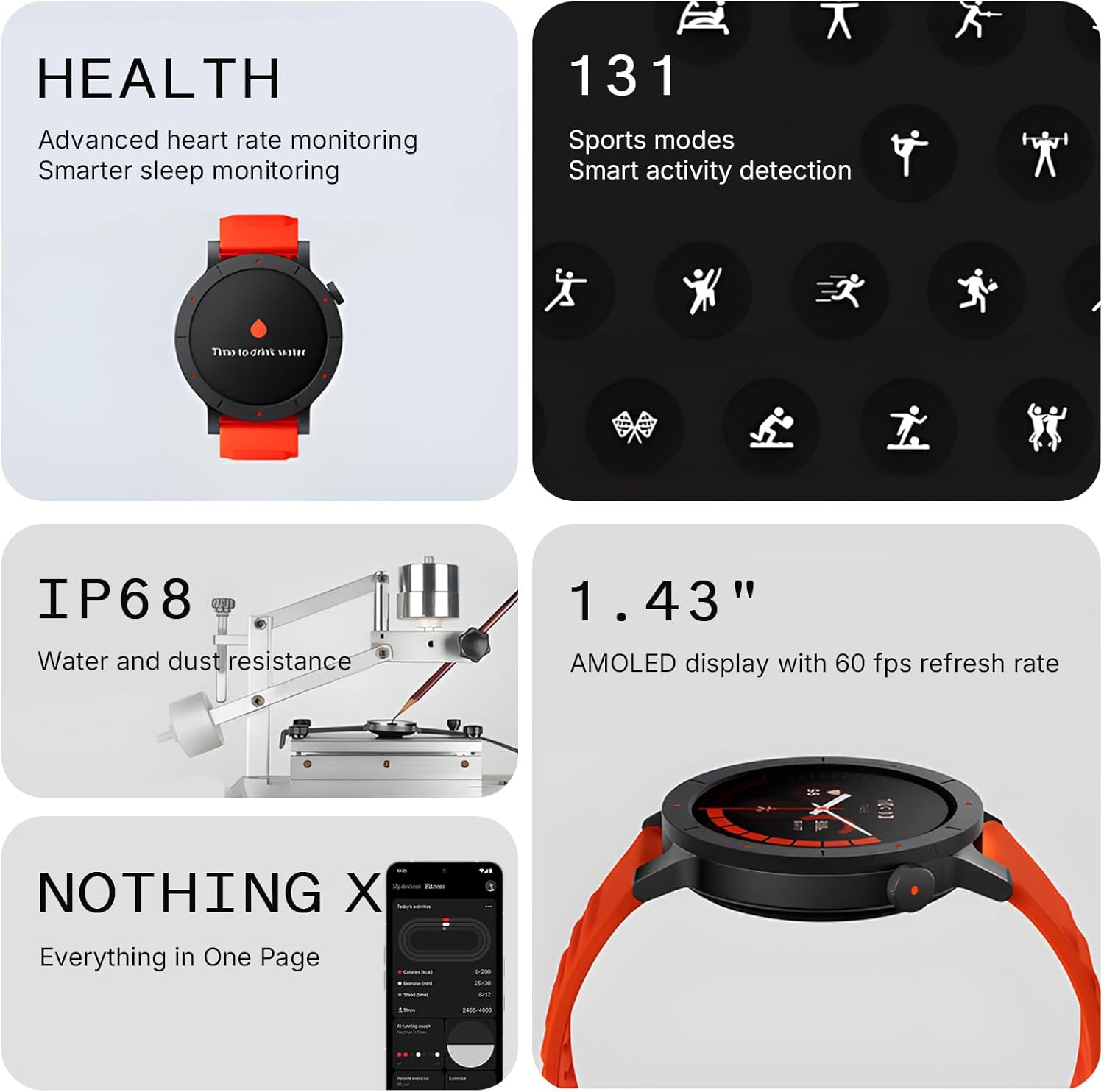
Image: The CMF Watch 3 Pro displayed alongside an icon indicating its IP68 water and dust resistance rating.
Cleaning and Care
- Regularly clean your watch and band with a soft, damp cloth.
- Avoid using harsh chemicals or abrasive materials, as these can damage the finish.
- Ensure the charging contacts are clean and dry before charging to prevent corrosion.
- Store the watch in a cool, dry place when not in use.
Troubleshooting
If you encounter any issues with your CMF Watch 3 Pro, please refer to the table below for common problems and their solutions.
| Problem | Possible Cause | Solution |
|---|---|---|
| Watch not turning on | Low battery; software glitch. | Charge the watch for at least 30 minutes. If still unresponsive, press and hold the side button for 10-15 seconds to force restart. |
| Cannot pair with phone | Bluetooth off; app issue; watch not in pairing mode. | Ensure Bluetooth is on. Restart both watch and phone. Clear Nothing X App cache/data or reinstall. Ensure watch is in pairing mode. |
| Inaccurate heart rate/GPS | Improper fit; sensor obstruction; weak GPS signal. | Ensure watch is snug but comfortable on your wrist. Clean the sensor on the back. For GPS, ensure you are in an open area with clear sky view. |
| Short battery life | High usage; AOD enabled; frequent notifications. | Reduce screen brightness, disable Always-On Display, limit background app refresh, and manage notifications. Use power-saving mode if available. |
| Display unresponsive | Software freeze; water exposure. | Force restart the watch. Ensure the screen is dry and clean. |
Specifications
| Feature | Detail |
|---|---|
| Model Number | Watch Pro 3 |
| Display | 1.43 Inches AMOLED, 60fps refresh rate |
| Connectivity | Bluetooth, Wi-Fi |
| GPS | Built-in Dual-Band GPS (L1+L5) |
| Water Resistance | IP68 |
| Battery Life (Typical) | Up to 13 days |
| Battery Life (Power Saving) | Up to 60 days |
| Battery Capacity | 350 mAh (Lithium Ion) |
| Operating System | ROTS |
| Item Weight | 1.8 ounces (51 Grams) |
| Memory Storage Capacity | 256 MB |
| Supported OS | Android 6.0+ / iOS 13+ |
| Special Features | Touchscreen, Gesture Control, Audio Recording, Activity Tracker, Alarm Clock, Phone Call, Notifications, AI Smartwatch, Energy Score, Heart Rate Tracking, Sleep Monitor, Stress Monitoring, SpO2, 130+ Sport Modes, Fitness Tracker |
Warranty and Support
The CMF Watch 3 Pro comes with a standard manufacturer's warranty. For detailed warranty terms and conditions, please refer to the warranty card included in your product packaging or visit the official CMF BY NOTHING website. For technical support, product inquiries, or service requests, please contact CMF BY NOTHING customer service through their official channels. Keep your purchase receipt as proof of purchase for warranty claims.
You can also visit the CMF BY NOTHING Store on Amazon for more information and product updates.
Related documentsWatch Pro 3


Ask a question about this manual
Ask about setup, troubleshooting, compatibility, parts, safety, or missing instructions. Manuals+ will review the question and use this page’s manual context to help answer it.