
1. Important Safety Information
Please read all instructions carefully before using the JTF Kids Electric Toothbrush. Keep this manual for future reference.
- Designed for children ages 3 and above.
- Do not allow children to chew on the brush head or use the toothbrush as a toy.
- Replace the brush head every 3 months or when bristles become worn.
- Do not use the toothbrush, brush head, or charging cable if any part is damaged.
- Do not charge the device while wet. Always ensure the charging cable is dry before connecting.
- Always follow the instructions provided with the device.
- Avoid using the toothbrush in hot water or near heat sources.
- Keep the charging cable away from water.
2. Package Contents
The JTF Kids Electric Toothbrush package includes the following items:
- 1 × JTF Rechargeable Sonic Electric Toothbrush for Kids
- 1 × Brush Head Protective Cap
- 1 × USB-C Charging Cable (Adapter not included)
- 1 × User Manual
- 1 × Fun DIY Stickers Set
- 4 × Soft Food-Grade Replacement Brush Heads

Image: All items included in the JTF Kids Electric Toothbrush package.
3. Product Overview and Features
The JTF Kids Electric Toothbrush is designed to make oral care effective and enjoyable for children. Key features include:
- Gentle Sonic Technology: Delivers a thorough yet gentle clean, removing stains effectively.
- 5 Custom Cleaning Modes: Tailored for different age groups and needs.
- 2-Minute Smart Timer: Ensures children brush for the dentist-recommended duration.
- 30-Second Pulse Reminder: Guides children to clean all four quadrants of their mouth evenly.
- Fun DIY Stickers: Allows personalization, encouraging engagement with brushing.
- Long-Lasting Battery: Up to 45 days of use on a single 2-hour charge.
- IPX7 Waterproof Design: Safe for use during bath time and easy to rinse.
- Food-Grade Materials: Soft bristles and construction meet kids' product safety standards.
- Ergonomic & Lightweight: Comfortable grip for small hands.

Image: Overview of the 5 brushing modes.

Image: Personalizing the toothbrush with DIY stickers.
4. Setup and First Use
4.1 Initial Charging
Before first use, fully charge the toothbrush. Connect the provided USB-C charging cable to the port at the bottom of the toothbrush. Plug the other end into a compatible USB power adapter (not included). The battery indicator lights will show charging progress.

Image: Charging the JTF Kids Electric Toothbrush.
4.2 Attaching the Brush Head
Align the brush head with the shaft of the toothbrush handle and push it down firmly until it clicks into place.

Image: Attaching a brush head to the toothbrush handle.
4.3 Applying Toothpaste
Apply a pea-sized amount of children's toothpaste to the brush head.
5. Operating Instructions
5.1 Power On/Off and Mode Selection
Press the power button to turn on the toothbrush. Press the button repeatedly to cycle through the 5 cleaning modes:
- Gentle Mode (3-6Y): Low-speed, ideal for delicate teeth of younger children.
- Standard Mode (7-9Y): Medium-speed, for cleaning emerging permanent teeth.
- Deep Cleaning Mode (10-12Y): High-speed, for effective plaque removal in older children.
- Polish Mode: Strong vibrations to help remove surface stains.
- Massage Mode: Gentle pulsations to protect and improve gum health.
The toothbrush has a memory function and will start in the last used mode.
5.2 Brushing Technique
Gently place the brush head against the teeth at a 45-degree angle to the gum line. Move the brush slowly across all surfaces of the teeth. Do not scrub vigorously.
5.3 Smart Timer and Quadrant Reminder
The toothbrush features a built-in 2-minute smart timer, which is the dentist-recommended brushing time. It also includes a 30-second pulse reminder to signal when to move to a different quadrant of the mouth, ensuring all areas are cleaned thoroughly.

Image: Smart timer and quadrant reminder system.
5.4 Brushing Frequency
Brush twice daily for optimal oral hygiene. Adult supervision is recommended for children under 6 years old.
6. Charging the Toothbrush
The JTF Kids Electric Toothbrush is equipped with a rechargeable battery that provides up to 45 days of use on a 2-hour fast charge. When the battery is low, the indicator light will signal. To charge:
- Ensure the toothbrush and charging cable are completely dry.
- Open the protective cover at the bottom of the toothbrush.
- Insert the USB-C cable into the charging port.
- Connect the other end of the USB-C cable to a USB power source.
- The indicator lights will illuminate to show charging status.
- Once fully charged, disconnect the cable and close the protective cover to maintain IPX7 waterproofing.
Important: Do not charge the device while wet. Always keep the charging cable dry and away from water to prevent electrical hazards.
7. Maintenance and Care
7.1 Cleaning the Brush Head and Handle
After each use, rinse the brush head thoroughly under running water. You can also rinse the toothbrush handle. The IPX7 waterproof design allows for safe rinsing and even use during bath time.

Image: Cleaning the brush head after use.

Image: Toothbrush demonstrating IPX7 waterproofing.
7.2 Storage
Store the toothbrush in a dry place. Use the included brush head protective cap for travel to keep the bristles clean and protected.
7.3 Replacing Brush Heads
It is recommended to replace the brush head every 3 months, or sooner if the bristles appear worn or frayed. This ensures optimal cleaning performance and hygiene.
8. Troubleshooting
If you encounter any issues with your JTF Kids Electric Toothbrush, please refer to the following common solutions:
- Toothbrush not turning on: Ensure the toothbrush is fully charged. If it still doesn't turn on, check the charging cable for damage.
- Weak vibration: The battery might be low. Charge the toothbrush for at least 2 hours.
- Brush head not staying on: Ensure the brush head is correctly aligned and pushed down firmly until it clicks into place.
- Water leakage: Ensure the USB-C charging port cover is securely closed after charging to maintain its waterproof seal.
If the problem persists, please contact JTF customer support for assistance.
9. Specifications
| Feature | Detail |
|---|---|
| Model Number | XM806 |
| Product Dimensions | 1.2 x 1.2 x 9.53 inches |
| Item Weight | 0.18 Pounds (2.88 ounces) |
| Power Source | Rechargeable Battery Powered (1 AAA battery included) |
| Charging Time | 2 hours (USB-C) |
| Battery Life | Up to 45 days |
| Waterproof Rating | IPX7 |
| Brushing Modes | 5 (Gentle, Standard, Deep Cleaning, Polish, Massage) |
| Bristle Material | Nylon (Soft, Food-Grade) |
| Handle Material | Plastic |
| Age Range | 3+ |
10. Warranty and Support
The JTF Kids Electric Toothbrush comes with a 1-year warranty from the date of purchase. JTF is committed to providing excellent customer service.
- After-Sales Service: 24-hour support is available for any inquiries or issues.
- Refund/Replacement: Enjoy a free 30-day refund or replacement policy.
For warranty claims or support, please contact JTF customer service through the retailer where the product was purchased or visit the official JTF website.
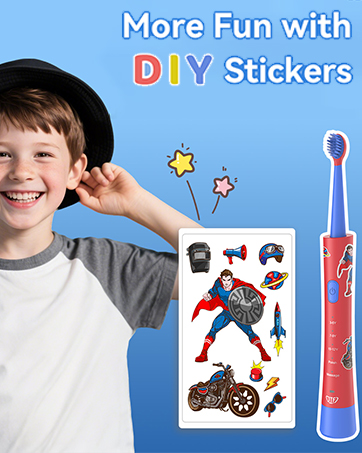
Image: JTF Kids Electric Toothbrush in use.