
1. Introduction
This manual provides detailed instructions for the installation, operation, and maintenance of your AWESAFE Qualcomm 8-Core Android Car Stereo. This advanced car stereo system is specifically designed for Ford F150 models from 2009 to 2012, offering a seamless upgrade to your vehicle's infotainment capabilities.
Equipped with a powerful Qualcomm 8-Core CPU, 4GB RAM, and 64GB ROM, this unit ensures smooth performance and ample storage. The 9-inch HD 2.5D touchscreen provides a clear and responsive interface for all functions, including wireless CarPlay, Android Auto, GPS navigation, WiFi connectivity, Bluetooth, and a Digital Sound Processor (DSP) for enhanced audio quality.
Product Overview

Figure 1.1: AWESAFE Android Car Stereo with CarPlay interface in a Ford F150 dashboard.
This image shows the AWESAFE 9-inch Android Car Stereo seamlessly integrated into the dashboard of a Ford F150. The screen displays the Apple CarPlay interface, featuring large, easy-to-read icons for essential applications such as Phone, Music, Maps, and Messages, indicating its modern connectivity features.
Package Contents
Please verify that all items listed below are included in your package. If any items are missing or damaged, please contact customer support.

Figure 1.2: Included Components and Accessories.
This diagram illustrates all the components and accessories that come with the AWESAFE car stereo. It includes the main head unit, various cables such as the power connector, RCA cable, reversing cable, and USB cable, along with essential tools like a screwdriver and crowbar, and accessories like the audio antenna, microphone, GPS antenna, and CANBUS module.
- AWESAFE Android Car Stereo Unit
- Power Connector Harness
- RCA Cable Set
- Audio Antenna
- Screwdriver
- Crowbar (Plastic Trim Removal Tool)
- Reversing Camera Input Cable
- External Microphone
- GPS Antenna
- CANBUS Decoder
- USB Cable(s)
2. Safety Information
Please read all safety instructions carefully before installation and operation. Failure to follow these guidelines may result in injury, damage to the product, or damage to your vehicle.
- Professional Installation Recommended: Due to the complexity of vehicle electrical systems, professional installation by a qualified technician is highly recommended.
- Disconnect Battery: Always disconnect the vehicle's negative battery terminal before beginning any installation work to prevent electrical shorts and damage.
- Driving Safety: Do not operate the unit or view videos while driving. Distracted driving can lead to serious accidents. Ensure all local traffic laws are observed.
- Wiring: Ensure all wiring connections are secure and properly insulated to prevent short circuits. Do not modify the wiring harness.
- Ventilation: Ensure adequate ventilation around the unit to prevent overheating. Do not block ventilation openings.
- Temperature: Avoid exposing the unit to extreme temperatures or direct sunlight for prolonged periods.
- Cleaning: Use a soft, dry cloth for cleaning. Do not use abrasive cleaners or solvents.
3. Installation Guide
This section provides a general guide for installing the AWESAFE Android Car Stereo. Specific steps may vary slightly depending on your vehicle's exact configuration. It is highly recommended to consult a professional installer or refer to vehicle-specific resources for detailed instructions.
Vehicle Compatibility
This unit is designed for Ford F150 models manufactured between 2009 and 2012. Please ensure your vehicle falls within this range for proper fitment and functionality.
Not Compatible: This unit is not compatible with Ford F-150 Lariat, FX2, Platinum, SVT RAPTOR, or Harley-Davidson models (2007-2010).
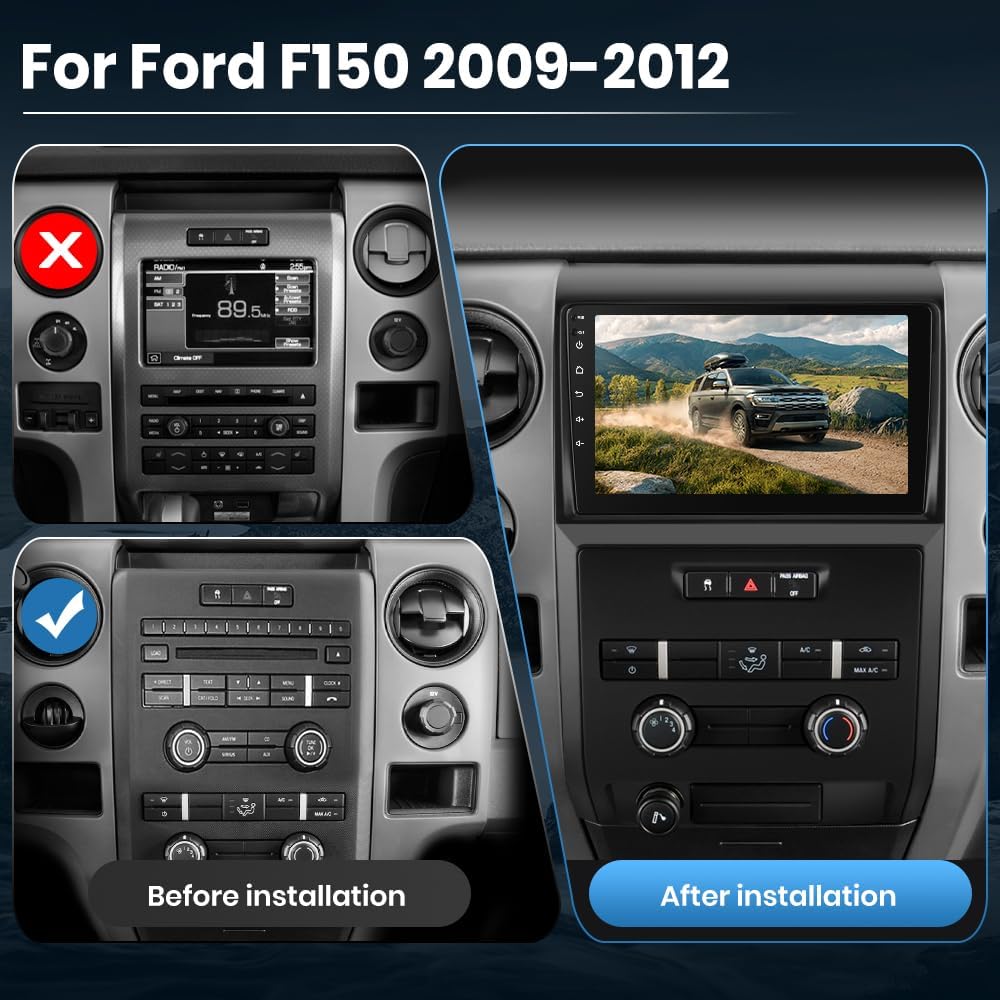
Figure 3.1: Before and After Installation Comparison.
This image provides a visual comparison of the Ford F150 dashboard. The 'Before installation' panel shows the original factory radio, while the 'After installation' panel displays the AWESAFE 9-inch Android Car Stereo perfectly fitted into the dashboard, highlighting the significant aesthetic and functional upgrade.
Installation Steps
- Preparation: Park your vehicle on a flat, stable surface. Turn off the engine and remove the key from the ignition. Disconnect the negative terminal of your vehicle's battery.
- Remove Original Unit: Carefully remove the trim panels surrounding your existing car stereo using the provided crowbar tool. Unscrew and detach the original head unit from the dashboard. Disconnect all wiring harnesses and antenna cables from the old unit.
- Connect Wiring Harnesses: Connect the provided power connector harness, RCA cables, and other necessary cables (GPS antenna, USB cables, microphone, reversing cable, CANBUS) to the corresponding ports on the new AWESAFE stereo unit. Ensure all connections are firm and correct according to the wiring diagram (refer to Section 8: Specifications for wiring diagram).
- Install New Unit: Carefully slide the new AWESAFE stereo unit into the dashboard opening. Secure it with screws or mounting brackets as per your vehicle's design.
- Reconnect Battery: Once the unit is securely mounted and all connections are verified, reconnect the negative terminal of your vehicle's battery.
- Test Functionality: Turn on your vehicle and test all functions of the new stereo, including power, audio, touchscreen responsiveness, radio, Bluetooth, CarPlay/Android Auto, and GPS.
- Reassemble Dashboard: Carefully reattach all trim panels removed in step 2.
4. Initial Setup
After successful installation, follow these steps for initial setup and configuration of your AWESAFE Android Car Stereo.
- First Power On: The unit will boot up automatically after the battery is reconnected. The AWESAFE logo will appear, followed by the Android home screen.
- Language and Time Settings: Navigate to the system settings to select your preferred language, set the correct time zone, and adjust the date and time.
- Wi-Fi Connection: To access online features, download apps, and use online maps, connect the unit to a Wi-Fi network. Go to Settings > Network & Internet > Wi-Fi, select your network, and enter the password. You can also use your mobile phone's hotspot.
- Bluetooth Pairing: Pair your smartphone or other Bluetooth devices with the stereo for hands-free calling and audio streaming. Go to Settings > Connected devices > Pair new device, and follow the on-screen instructions to connect your device.
- GPS Configuration: The built-in GPS module will automatically detect your location. For optimal navigation, ensure the GPS antenna is properly installed and positioned.
- Steering Wheel Control Learning: If your vehicle supports steering wheel controls, you may need to configure them. Go to Settings > Steering Wheel Control and follow the instructions to map the buttons.
5. Operating Instructions
This section details the various functions and features of your AWESAFE Android Car Stereo.
5.1 User Interface and Navigation
The 9-inch HD 2.5D touchscreen provides an intuitive interface. Swipe left or right to navigate between home screens, and tap icons to open applications. The Android operating system allows for customization and installation of various apps.
5.2 Wireless CarPlay & Android Auto
Enjoy seamless integration with your smartphone using Wireless CarPlay (for iPhone) or Android Auto (for Android phones). This feature allows you to access navigation, make calls, send messages, and play music directly from your phone's interface displayed on the stereo screen.

Figure 5.1: Wireless CarPlay and Android Auto Functionality.
This image demonstrates the dual compatibility of the AWESAFE car stereo with both Apple CarPlay and Android Auto. The main screen shows the CarPlay interface, while a smaller inset image illustrates the Android Auto interface, emphasizing the wired/wireless connectivity options for smartphones.
- Connection: After pairing your phone via Bluetooth, the CarPlay or Android Auto application will automatically launch or can be manually selected from the main menu.
- Features: Access maps, music streaming apps (Spotify, Apple Music), messaging, and phone calls directly through the stereo's touchscreen or voice commands.
5.3 GPS Navigation
The unit comes with built-in GPS and supports both online and offline navigation applications. The included GPS antenna ensures accurate positioning.

Figure 5.2: GPS Navigation Display.
This image shows the AWESAFE car stereo's screen displaying a detailed GPS navigation map. A route is clearly highlighted, demonstrating the unit's built-in navigation capabilities and its ability to provide precise directions for travel.
- Online Maps: Connect to Wi-Fi to use real-time traffic data and updated maps.
- Offline Maps: Download map data for offline use, ensuring navigation even without an internet connection.
5.4 Wi-Fi Connectivity
The integrated Wi-Fi module allows you to connect to wireless networks and access a wide range of online content and applications.

Figure 5.3: Wi-Fi Connectivity and App Support.
This image illustrates the AWESAFE car stereo's Wi-Fi connectivity feature, indicated by the Wi-Fi symbol. The screen displays various app icons, suggesting that users can download and utilize a wide range of applications from an app store, enhancing the unit's functionality.
- App Downloads: Download and install your favorite applications from the pre-installed app store (e.g., Google Play Store).
- Hotspot Support: Use your smartphone as a Wi-Fi hotspot to provide internet access to the stereo.
5.5 Steering Wheel Control (SWC)
The unit supports integration with your vehicle's existing steering wheel controls, allowing for safe and convenient operation of media and volume functions without taking your hands off the wheel.
- Customization: Access the SWC settings in the system menu to program or re-program buttons according to your preference.
5.6 Dual Band Bluetooth & DSP
The dual-band Bluetooth feature enables stable and high-quality wireless connections for hands-free calling and audio streaming. The built-in Digital Sound Processor (DSP) allows for precise audio customization.
- Hands-Free Calling: Make and receive calls directly through the stereo using the built-in microphone and your car's speakers.
- Audio Streaming: Stream music from your Bluetooth-enabled devices.
- DSP Adjustment: Access the DSP settings to fine-tune audio parameters such as equalizer, balance, fader, and sound field to match your listening preferences.
5.7 FM/AM Radio
The high-quality FM/AM radio receiver allows you to listen to local broadcasts, news, and traffic updates.
- Scanning: Use the auto-scan function to find and save available radio stations.
- Manual Tuning: Manually tune to specific frequencies.
6. Maintenance
Proper care and maintenance will ensure the longevity and optimal performance of your AWESAFE Android Car Stereo.
- Screen Cleaning: Use a soft, lint-free cloth to gently wipe the touchscreen. For stubborn smudges, slightly dampen the cloth with water or a screen-specific cleaner. Avoid using harsh chemicals, abrasive materials, or excessive liquid.
- General Cleaning: Keep the unit free from dust and debris. Use a soft brush or compressed air to clean around buttons and ports.
- Software Updates: Periodically check for software updates provided by AWESAFE. Updates can improve performance, add new features, and fix bugs. Connect the unit to Wi-Fi and navigate to system settings to check for updates.
- Avoid Extreme Conditions: Do not expose the unit to extreme temperatures, high humidity, or direct sunlight for extended periods, as this can damage internal components.
7. Troubleshooting
This section addresses common issues you might encounter and provides basic troubleshooting steps. If the problem persists, please contact customer support.
| Problem | Possible Cause | Solution |
|---|---|---|
| Unit does not power on | Loose power connection; Blown fuse; Vehicle battery issue | Check all power cable connections. Inspect vehicle fuses. Ensure vehicle battery is charged. |
| No sound output | Speaker wires disconnected; Volume too low; Mute activated; Incorrect audio source | Check speaker wire connections. Increase volume. Deactivate mute. Select correct audio source (e.g., Radio, Bluetooth, CarPlay). |
| Bluetooth not connecting | Bluetooth off on unit/phone; Incorrect pairing process; Interference | Ensure Bluetooth is enabled on both devices. Re-attempt pairing process. Move closer to the unit. Restart both devices. |
| GPS signal weak or inaccurate | GPS antenna improperly placed/connected; Obstruction; Outdated map data | Ensure GPS antenna has a clear view of the sky and is securely connected. Update map data if necessary. |
| Touchscreen unresponsive | Software glitch; Unit frozen | Perform a soft reset (refer to manual for specific reset button location, usually a small pinhole). If persistent, disconnect battery for 1 minute. |
| CarPlay/Android Auto not launching | Incorrect phone settings; USB cable issue (for wired); Bluetooth not paired (for wireless) | Ensure phone settings allow CarPlay/Android Auto. Try a different USB cable. Verify Bluetooth pairing for wireless connection. |
8. Specifications
Technical specifications for the AWESAFE Qualcomm 8-Core Android Car Stereo.

Figure 8.1: Qualcomm 8-Core Processor Details.
This image highlights the core specifications of the AWESAFE car stereo's Qualcomm 8-core 6125 chip. It details the 8-core CPU, 4GB RAM for higher speed, 64GB ROM for more storage, and the Android 13.0 newest system, emphasizing its powerful processing capabilities.
| Feature | Detail |
|---|---|
| Model Number | B0F65RPRRP |
| Operating System | Android 13.0 (Newest System) |
| Processor | Qualcomm 8-Core CPU (6125 chips) |
| RAM | 4GB |
| Internal Storage (ROM) | 64GB |
| Display Size | 9 Inches |
| Display Type | HD 2.5D Touchscreen |
| Connectivity | Wi-Fi, Dual Band Bluetooth |
| Navigation | Built-in GPS (supports online/offline maps), Map Type: North America |
| Smartphone Integration | Wireless CarPlay, Android Auto (wired/wireless) |
| Audio Features | Built-in DSP (Digital Sound Processor), FM/AM Radio |
| Control Features | Steering Wheel Control compatible, Touchscreen Voice Command |
| Mounting Type | Dashboard Mount |
| Item Weight | 4.4 pounds |
| Package Dimensions | 17.4 x 14 x 8 inches |
| Included Components | Car radio unit, wiring harnesses, accessories (as listed in Package Contents) |
Wiring Diagram
Refer to the following diagram for proper wiring connections. Ensure all cables are connected securely to their respective ports.

Figure 8.2: Wiring Diagram and RCA Cable Details.
This comprehensive diagram provides a detailed overview of the wiring connections for the AWESAFE car stereo. It illustrates the various modules and cables, including the GPS module, USB ports, 4G module, power harness, RCA cables, reversing line, and radio antenna cable. The diagram also shows the back panel of the head unit with clearly labeled ports for power, HDMI, antenna, 4G, and GPS, along with a detailed breakdown of the RCA cable connections.
9. Warranty & Support
Warranty Information
The AWESAFE Qualcomm 8-Core Android Car Stereo comes with a one-year warranty from the date of purchase. This warranty covers manufacturing defects and malfunctions under normal use. It does not cover damage caused by improper installation, misuse, accidents, unauthorized repairs, or acts of nature.
Please retain your proof of purchase for warranty claims.
Customer Support
For technical assistance, troubleshooting, or warranty inquiries, please contact AWESAFE customer support. Refer to the contact information provided with your product packaging or visit the official AWESAFE website for the most up-to-date support details.
When contacting support, please have your product model number (B0F65RPRRP) and purchase date ready.


